
Every Shopify store runs on a maintenance calendar it did not write and almost certainly has not read. Shopify ships a new API version each quarter and supports each stable version for a minimum of twelve months. That is the clock. Every app, every middleware connector, every private script your accountant’s developer wrote in 2021 runs against it, and each one has an expiry date whether anyone recorded it or not.
This matters more in 2026 because of volume. There are now 18,368 apps in the Shopify App Store. The average store runs close to six, a Plus store ten to fifteen, and the mid-market Australian brands we take over routinely have twenty or more once you count the connectors that never appear in the Apps list: the ERP middleware, the freight rate engine, the accounting sync, the warehouse scanner, the loyalty webhook.
None of those things break loudly. They break at 2am on a Tuesday, silently, and you find out four days later when a wholesale customer asks why their invoice still says pending. The cost is never the fix. The cost is the days of bad data between the break and the discovery.
This article is the audit we run: four steps, a scoring model, the four failure modes we see most, and the quarterly ritual that stops a Shopify stack rotting between builds.
What Actually Broke in 2026
Before the method, the evidence. 2026 has been the densest year of Shopify platform change we have worked through. Here is the shortlist that mattered to real Australian stores, with dates, because vague deprecation warnings do not get budget approved and dates do.
| Change | Date | Who it hit |
|---|---|---|
| Shopify Scripts stopped executing | 30 June 2026 | Plus stores on Script Editor discounts, shipping or payments. Editing was disabled from 15 April |
| Expiring offline access tokens mandatory | 1 April 2026 | New public apps only. Existing public apps and all custom apps are grandfathered |
| Checkout metafields deprecated | 2026-04 | Custom checkout and customer account extensions. Move to cart or order metafields |
| JSON metafield writes capped at 128KB | 2026-04 | Storefront API writes. Apps using them before 1 April keep the 2MB ceiling. Everyone else fails on write |
| Inventory levels changed shape | 2026-04 | Any inventory sync. Inactive levels now appear in queries and keep their quantities |
| DraftOrderLineItem.grams removed | 2026-07 | Quoting and B2B tooling still reading grams instead of the weight object |
| Deprecated metaobject access enums removed | 2026-07 | Anything referencing the old private and public-read enum values |
Notice what those have in common. Not one produces a red banner in your Shopify admin. Four of the seven produce a silent write failure, the worst possible mode, because the system keeps reporting success while the data stops moving. The Scripts shutdown was the only one most merchants felt on the day, and only because it touched pricing at checkout.
There is a wider point underneath the specifics. REST has been a legacy Admin API since 1 October 2024, and since 1 April 2025 every new public app has had to be built exclusively on GraphQL. A connector still calling REST endpoints is not broken today, but it is maintained by someone who decided not to move, and that tells you how much attention it gets.
How Shopify’s Version Clock Works
You cannot audit against a calendar you do not understand. Shopify publishes a new stable API version on the first day of each quarter, named by date: 2026-01, 2026-04, 2026-07, 2026-10. Each is supported for a minimum of twelve months, and consecutive versions overlap by at least nine. On the day a stable version ships, the next quarter’s release candidate becomes available, which is your preview window.
So you always have nine to twelve months to move, and a three-month preview. Generous, by platform standards. Also useless if nobody is watching, which is the normal state of affairs once the original build agency has moved on.
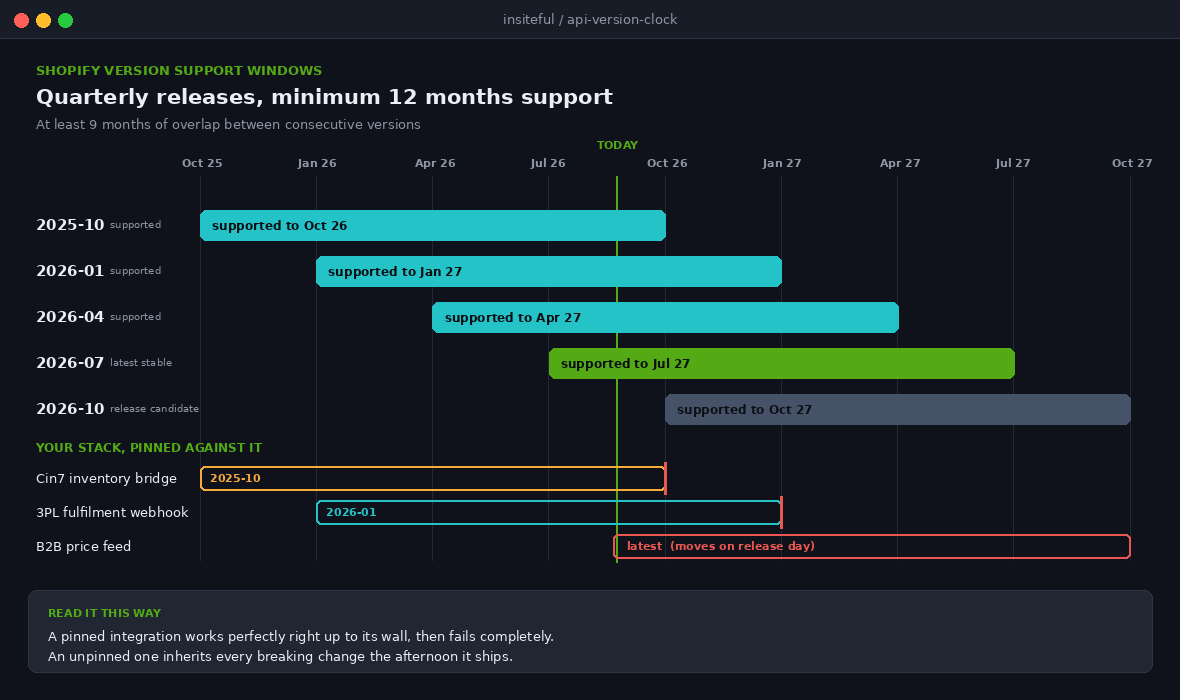
Three behaviours matter when you map your own stack against this:
- Pinned versions are safe until they are not. An integration hardcoding 2025-10 works right up to the day that version leaves support, then fails completely rather than degrading.
- Unpinned versions are dangerous in the other direction. A connector calling the latest alias inherits every breaking change the moment it ships, with no testing window. We have seen more outages from this than from expired pins.
- Field deprecation moves faster than version deprecation. A field can be marked deprecated in one release and removed two releases later while your pinned version is still perfectly supported.
That third point catches experienced teams. Pinning protects you from the schema moving underneath you. It does not protect you from a field being removed in the version you eventually have to move to.
Step One: Build the Integration Inventory
The audit starts with an honest list. Not the Apps list in your Shopify admin, which shows you about half the truth, but every system that holds a Shopify access token or receives a Shopify webhook. Five places to look, and most stores can only produce the first two from memory:
- Apps and sales channels. Public apps installed from the App Store. The easy half.
- Apps and sales channels, then Develop apps. Custom apps built for this store. Where the ERP connector, the freight engine and the abandoned 2022 proof of concept live, each holding a token with scopes nobody has reviewed since install.
- Notifications, then Webhooks. Store-level subscriptions created by hand, often pointing at infrastructure the current team does not own.
- Your middleware platform. On Celigo, Alloy, Zapier, Make or a custom service, every scenario is a separate integration with its own version and failure mode. One connected account can hide forty of them.
- Your theme. Theme app extensions, app embed blocks and script tags left behind by apps that have since been uninstalled.
Write it down in one table. It is the single most valuable deliverable in the whole audit, because six months from now when something breaks, this table tells you in ninety seconds where to look.
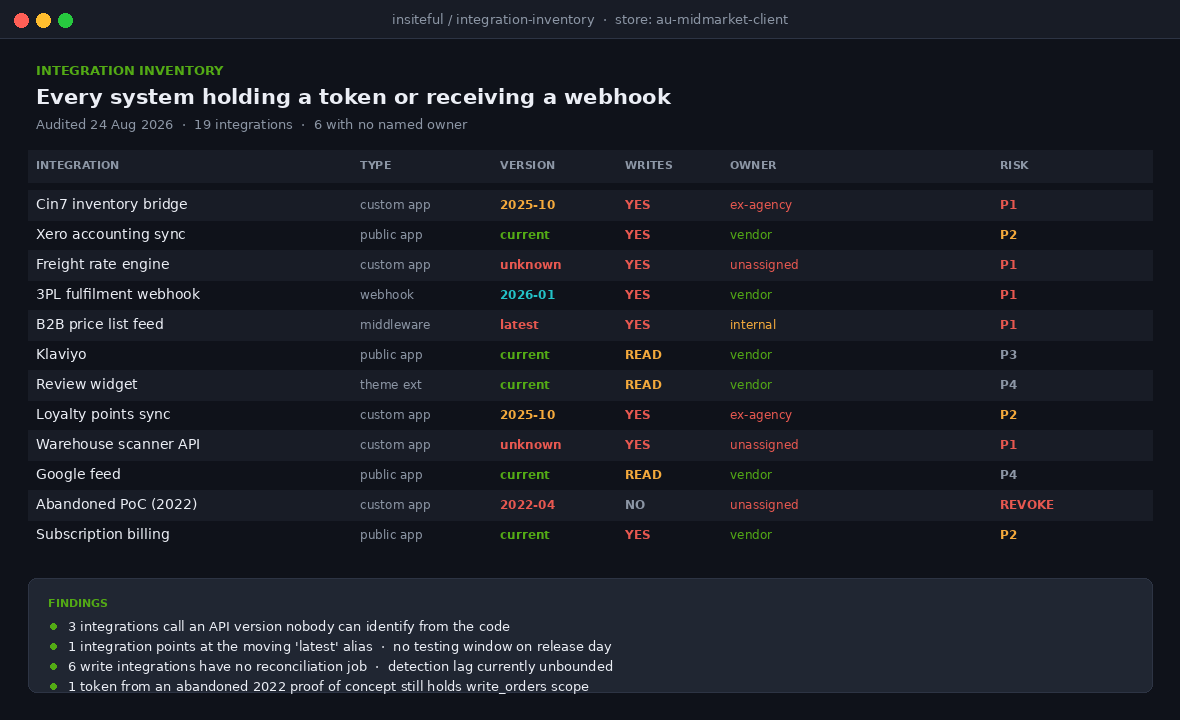
The columns we insist on, and why each one earns its place:
| Column | Why it matters |
|---|---|
| Integration name and type | Public app, custom app, middleware scenario or raw webhook. Type determines who can fix it |
| API version called | Pinned, unpinned or unknown. Unknown is the most common first answer and is itself a finding |
| Direction of data | Reads, writes or both. Write integrations carry the real risk |
| Access scopes granted | A read-only analytics app holding write_orders is a finding on its own |
| Business process it serves | Not the marketing description. What actually stops if this stops |
| Owner and support path | A named person or vendor, with a contract. Blank is a critical finding |
| Last verified working | A date. If nobody can supply one, treat it as unverified |
Step Two: Find the API Version Behind Every Integration
This is the step that separates a real audit from a spreadsheet exercise. For each integration, establish which API version it is actually calling, not which version its documentation claims. For anything you control the answer is in the code: the version sits in the endpoint URL, usually hardcoded in one configuration file. Search the repository.
# find every hardcoded Shopify API version across a codebase
grep -rEn "20[0-9]{2}-(01|04|07|10)" \
  --include="*.js" --include="*.ts" --include="*.rb" \
  --include="*.php" --include="*.py" --include="*.json" .

# and flag anything calling the moving target
grep -rn "/admin/api/latest/" .
grep -rn "unstable" --include="*.env*" .
The second search matters as much as the first. When 2026-10 goes stable on 1 October, an integration pointed at the latest alias is on 2026-10 that afternoon, breaking changes included, with nobody watching.
For public apps you did not build, you infer. Check the app’s changelog and its App Store listing for a recent update date. An app that has not shipped a release since before the 2026-04 wave has not handled the checkout metafield deprecation or the inventory level change. Then verify against the store’s own records, which is the step almost nobody runs.
Step Three: Read the Deprecation Report Your Store Already Has
Shopify keeps a record of every deprecated call your custom apps have made in the previous thirty days, and hands it over on request: the endpoint, what changed, the timestamp of the last offending call, the migration deadline, and the earliest version that fixes it. It is the closest thing the platform offers to a warning light, and in five years of takeover audits we have met perhaps three merchants who knew it existed.
curl -X GET \
  "https://your-store.myshopify.com/admin/api/2026-07/deprecated_api_calls.json" \
  -H "X-Shopify-Access-Token: your_custom_app_token"

# returns, per offending call:
#   api_type          REST | Webhook | GraphQL
#   endpoint          the resource, topic or field being called
#   description       what changed and what to do
#   last_call_at      when your stack last made this call
#   migration_deadline when it stops working
#   version           earliest version that fixes it
Two limitations. The resource covers custom apps only, so it tells you nothing about the public apps in your stack. And the window is thirty days, so a job that makes a deprecated call once a quarter will not appear if you pull the report in the wrong month. Run it against every custom app token, not just one: the report is scoped to the authenticated app, so six custom apps means six calls and six answers.
If the report comes back empty on the first run, do not celebrate. On a store with real integration debt, empty usually means the offending job has not run inside the thirty-day window.
Step Four: Score by Blast Radius, Not by App Rating
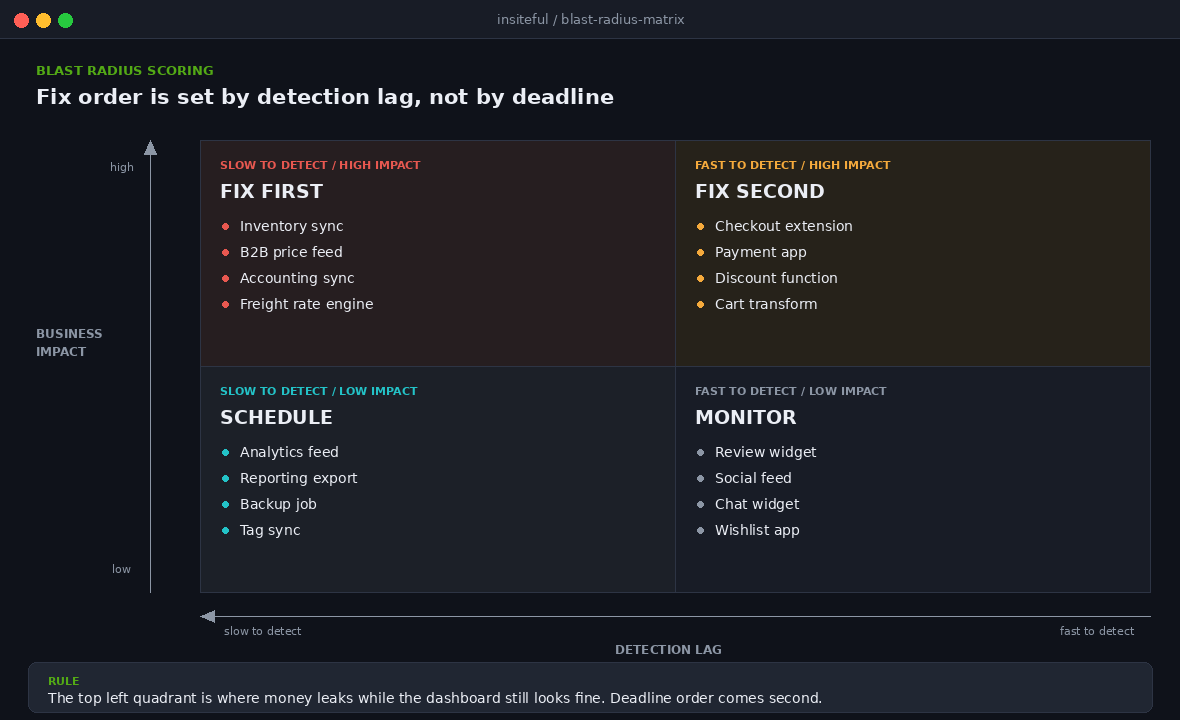
You now have a list of integrations, the version each one calls, and deprecation warnings from the store itself. What you do not have is an order of work. Most teams sort on deadline, which sounds sensible and produces a queue where a cosmetic review-widget change outranks the inventory sync that keeps the warehouse honest.
We score on blast radius instead. Two axes, five minutes per integration.
| Question | Low | High |
|---|---|---|
| How long until someone notices it broke? | Immediately. Storefront or checkout | Days. Background sync, nightly job or report |
| What is the financial consequence per day? | Degraded experience, no revenue loss | Oversells, wrong prices, unfulfilled orders, incorrect tax |
| How many systems depend on its output? | None. It is a leaf node | Two or more. ERP, ledger or freight engine |
| Can it be replaced quickly? | Yes, equivalent apps exist | No. Bespoke, or holds state nothing else has |
The dangerous quadrant is high on both of the first two questions: it fails silently, and it costs money every day it stays broken. That is your inventory sync, accounting connector and B2B pricing feed. Those get fixed first even if their deadline is nine months out. The deadline is not the risk. The detection lag is.
Work an actual number rather than a feeling. For a store turning over $40,000 AUD a week, an inventory sync that silently stops for four days does not cost four days of margin. It costs the oversells, the cancellations, the refund fees, the support hours and the review damage, and on the three occasions we have costed this properly the total landed between three and six times the raw revenue figure for the period.
The Four Failure Modes We Get Called In To Fix
Across every deprecation-related incident we have handled, the failures cluster into four shapes. Knowing the shapes lets you check for them directly rather than waiting for symptoms.
1. The silent write failure
An integration calls a removed field or a mutation whose input shape has changed. The API returns an error, the integration logs it to a file nobody reads, does not retry, and reports success because the job completed. Reads keep working, so the dashboard looks normal. The 128KB JSON metafield cap in 2026-04 is a textbook generator of this: large configuration payloads stop writing while everything else carries on.
How to check for it: reconcile, do not monitor. Take the twenty most recently changed records in the source system and confirm each landed in Shopify. The reconciliation pattern is in our webhook reliability playbook, and the same job design applies to any write integration.
2. The orphaned token
A custom app built by a developer or agency who has since moved on. The token still works, the integration still runs, and nobody knows which server it runs on. When its API version leaves support, there is no one to change it.
How to check for it: the owner column in your inventory. Any blank cell is an orphaned token. Rotate the credential in a maintenance window, with a rollback ready, and see what complains.
3. The rate limit cascade
Not a deprecation, but it surfaces during one. A team migrates to a new API version, the query shape changes, the cost per call goes up, and the integration starts hitting throttle limits under peak load that it never hit in testing. Treat a version migration as a performance change as well as a correctness change.
4. The unversioned middleware layer
Your connectors are healthy, but the low-code platform between Shopify and the ERP has its own Shopify module on its own version, updated on the vendor’s schedule. You did not choose it, you cannot pin it, and you find out it moved when the field mapping stops matching.
How to check for it: read the vendor’s release notes for their Shopify connector specifically, not their product changelog generally, and record the date of their most recent module update in your inventory.
The Second Clock: Rate Limits and Query Cost
Deprecation is the clock everyone eventually hears about. Rate limiting is the one that shapes how your stack performs long before anything breaks, and it changes character completely when an integration moves from REST to GraphQL.
The GraphQL Admin API does not count requests. It calculates a cost per query and draws it from a bucket that refills at a fixed rate: 100 points per second on standard plans, 200 on Advanced, 1000 on Shopify Plus and 2000 for Commerce Components. Scalars and enums cost nothing, an object field costs one point, connections are sized by the first or last argument you pass, and every mutation costs ten before you count its selections. A single query may not exceed 1000 points regardless of plan.
Shopify calculates a requested cost before execution and an actual cost afterwards, refunding the difference, so an over-broad query is penalised at request time even when it returns almost nothing. You can see the per-field breakdown directly:
# ask Shopify to itemise the cost of a query
curl -X POST \
  "https://your-store.myshopify.com/admin/api/2026-07/graphql.json" \
  -H "X-Shopify-Access-Token: your_token" \
  -H "Content-Type: application/json" \
  -H "Shopify-GraphQL-Cost-Debug: 1" \
  -d '{"query":"{ orders(first: 50) { edges { node { id name } } } }"}'

# the extensions block returns requestedQueryCost, actualQueryCost,
# throttleStatus and, with the debug header, a per-field cost breakdown
Three limits belong in the audit alongside the rate ceiling, because each has quietly broken a real integration for us. Input arrays cap at 250 items, so batch jobs need chunking. Pagination caps at 25,000 objects, and count queries return 25,001 to signal there are more, so a reconciliation job that assumes it can page an entire order history stops short. And on non-Plus stores past 500,000 variants, no more than 10,000 new variants can be created per day.
The fix for bulk work is not a smarter retry loop. Bulk operations are exempt from both the maximum cost limit and the standard rate limits, and any integration moving large volumes should use them rather than paginating single queries. The mechanics are in our guide to the Shopify Bulk Operations API.
Making It a Quarterly Ritual
A one-off audit produces a list of fixes and a false sense of security. The clock ticks quarterly, so the review has to be quarterly, and short enough that it actually happens. Ours takes about ninety minutes, in the first week after each stable release.
| When | What we do | Output |
|---|---|---|
| Release day | Read the new stable version’s breaking changes and next quarter’s release candidate. Flag anything touching the inventory | A short list of affected integrations, or a note that nothing applies |
| Week one | Pull the deprecated API calls report against every custom app token | Migration deadlines from the store’s own records |
| Week two | Update the inventory: versions, owners, last-verified dates, new integrations | A current inventory rather than a historical one |
| Week two | Rescore anything that changed, schedule priority-one work | Dated work items with owners, not a backlog |
| Ongoing | Reconciliation on every write integration, alerting on divergence not error rate | Detection lag in hours instead of days |
The last row changes outcomes most. Error-rate monitoring tells you when an integration is failing loudly. Divergence monitoring tells you when it is failing quietly, which is the mode that actually costs money. If you do one thing from this article, put a nightly reconciliation on your inventory sync and alert on the count of records that disagree.
What This Costs, and What It Saves
Being direct about money, because this competes for budget with work that has obvious upside. A first full audit on a mid-market Australian store with fifteen to twenty integrations is two to three days of senior time, and the quarterly review afterwards is a couple of hours. Remediation depends on what turns up, and the honest range runs from an afternoon of configuration to a $12,000 AUD rebuild of an ERP connector unmaintained since 2022.
Set against that, the incidents we get called in to clean up. A four-day inventory divergence over a promotional weekend. A B2B pricing feed that shipped six weeks of orders at last year’s rates. An accounting sync that silently dropped GST on a subset of orders and became a two-quarter reconciliation project. In each case the technical fix took under a day and the cleanup did not. The audit is a known, schedulable cost. The incident arrives the week before Christmas.
How We Do It at Insiteful
Every build we ship leaves with an integration inventory as a delivered artefact, not an internal note. The client owns it, in their own drive, with the seven columns above filled in and a named owner on every line. If we cannot name an owner, we say so in writing before handover.
On takeover projects the deprecation audit is the first technical work we do, ahead of any design or conversion work. We have twice found that the conversion problem a client hired us for was downstream of an integration that had been quietly failing for months. Fixing the theme would have achieved nothing.
We pin API versions deliberately in everything we build, document the pin and its review date in the same file, and build reconciliation into every write integration from the start rather than adding it after the first incident. Our custom apps ship with a scheduled job that pulls the deprecated API calls report and posts anything it finds to the client’s own channel, so the warning reaches a human without anyone having to remember to check.
We also keep the stack deliberately small. Every app is a dependency with its own release schedule, security posture and failure mode, and on a lot of builds native Shopify functionality now covers what a third-party app was doing three years ago. That is the case we make in our argument for a native stack, and it is the cheapest deprecation strategy there is: the integration you removed cannot break. Where something genuinely does need building, the build-or-buy test in our guide to custom Shopify apps in 2026 prices ongoing maintenance rather than pretending a custom app is a one-off cost.
Where to Start
If you do nothing else this month, do these three things in order. They take an afternoon between them and they will tell you whether you have a problem.
- Open Develop apps and count. Every custom app there holds a live access token. For each one, ask who maintains it and when it last changed. Any answer of the form ‘the developer we used to work with’ is a finding.
- Pull the deprecated API calls report against each of those tokens. One command per app, thirty seconds each. It is the store telling you, in its own words, what is about to break.
- Reconcile your highest blast radius write integration once, by hand. Take the twenty most recent changes in the source system and confirm each landed in Shopify. If all twenty landed, you have bought real confidence. If any did not, you have found the thing that was going to cost you a week in November.
If that afternoon turns up more than you want to handle internally, it is worth a conversation. We run this audit as standalone work, independent of any build, because it is exactly the sort of thing that gets deferred forever when it is bundled into a larger project. Book a build assessment and we will walk your integration stack with you, produce the inventory, and hand back a dated list of what needs to move and in what order.