
Every Shopify Plus organisation we audit has an org chart. Almost none have an access chart. The gap between those two documents is where quiet, expensive problems live: the agency that finished a theme project in 2023 and still holds full admin, the coordinator who left in March whose account is deactivated but whose custom app token still pulls orders, the finance contractor granted payout-account access because that was faster than working out which of the forty-odd toggles they needed.
None of that shows up in a revenue report. It shows up when something goes wrong, and by then the question is not “who did this” but “can we even tell who did this”. Most Plus merchants cannot answer that inside an hour.
This is a build guide for the access layer of a Shopify Plus organisation: how the organisation-level permission model actually works, how to map a real team onto it, how to treat apps as staff accounts, how to get audit logging that survives a forensic question, and what the Australian privacy regime expects you to demonstrate.
The Organisation Layer Is a Separate System, and Most Teams Never Configure It
Shopify’s permission model has two tiers, and merchants routinely operate as if only one exists.
The store tier is the one everyone knows: Settings, Users and permissions, tick the boxes for Orders, Products, Discounts. That tier is capped by plan. Basic gives 2 staff accounts, standard Shopify gives 5, Advanced gives 15, and Plus removes the ceiling entirely, per the current plan comparisons.
The organisation tier matters once you run more than one store, and it is only available to Plus merchants or multi-store organisations. Organisation roles cut across every store at once, including stores where the user has no store-level permissions. Shopify’s documentation is explicit that organisation permissions “grant access to different areas of the Shopify admin to manage organization-level tasks, including changes to stores where those users don’t have store permissions”.
A user with no listed access to your New Zealand store can still act on it through an organisation role. If your access register only records store-level permissions, it is not a register of who can do what. It is a partial index.
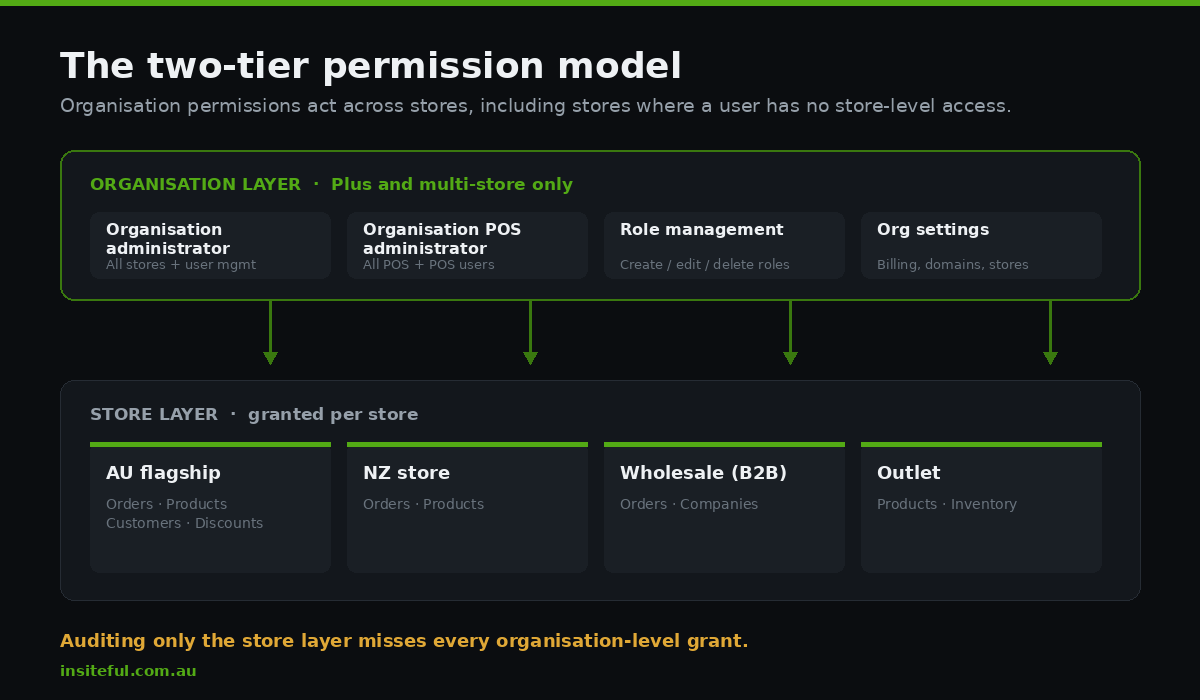
Two organisation roles carry the most weight. Organisation administrator is a high-trust role granting permissions for nearly all features and resources across the organisation and all of its stores, including user management. Organisation POS administrator grants access to all Point of Sale features and resources organisation-wide, including POS user management. Shopify also moved role creation, editing and deletion to an organisation-wide permission rather than a shop-level one, which caught out teams who had someone quietly managing roles for a single store and suddenly found that person needed an organisation role to keep doing their job.
Build this week: export your organisation user list to a spreadsheet with five columns: name, email domain, organisation role, store-level roles per store, and last active date. If you cannot populate the last column, that is the first finding. Most teams surface three to eight accounts they cannot immediately explain, and the ones that hurt are rarely ex-staff. They are agencies, freelancers and app-support logins created for a two-day job in a busy quarter.
Mapping a Real Team Onto the Permission Model
The failure mode here is not carelessness. It is that granting the right permission takes eleven minutes of reading and granting full admin takes four seconds, and the person doing it is usually mid-launch.
Decide the matrix once, off the critical path, then apply it as a default. Below is the starting matrix we use for a mid-size Australian Plus organisation running two to four storefronts. Keep the structure: a named role, a stated purpose, an explicit list of what it must not touch, and a review interval.
| Role | Scope | Explicitly denied | Review |
|---|---|---|---|
| Organisation administrator | All stores, user management, org settings | Held by 2 named people only, never an agency | Monthly |
| Store manager | One store: orders, products, customers, discounts, reports | Payments settings, payout accounts, app install, domains, user management | Quarterly |
| Merchandiser | Products, collections, inventory, media, metaobjects | Orders, customers, discounts, all settings | Quarterly |
| Customer service | Orders, draft orders, customers, returns, limited refund cap | Products, reports, discounts, exports of full customer list | Quarterly |
| Finance | Reports, payouts view, order financials, billing | Editing payout bank details, staff management, theme | Quarterly |
| Developer or agency | Themes, apps, custom app development, dev store access | Customers, orders, payments, reports | Per engagement, expiry date mandatory |
| Marketing | Discounts, marketing, online store pages, analytics | Customer export, orders, payments, theme code | Quarterly |
Three rules make this matrix hold up under real-world pressure rather than collapsing the first time someone is blocked.
Never grant customer export to a role that does not need the whole list. Customer service needs to look up an individual, which is a lookup, not an export. Export is the most consequential toggle in a Shopify admin because it converts a scoped session into a portable file that leaves your control the moment it downloads.
Every external account carries an expiry date recorded at creation. Not “we will remove it when the project ends”. An actual date in a calendar invite assigned to a named internal owner. Agencies do not offboard themselves, and it is unreasonable to expect them to.
Payout bank detail editing sits with the organisation owner and nobody else. This is the target in the overwhelming majority of ecommerce business email compromise attempts, and it is a permission that almost no operational role legitimately needs.
Your Apps Have More Access Than Your Staff Do
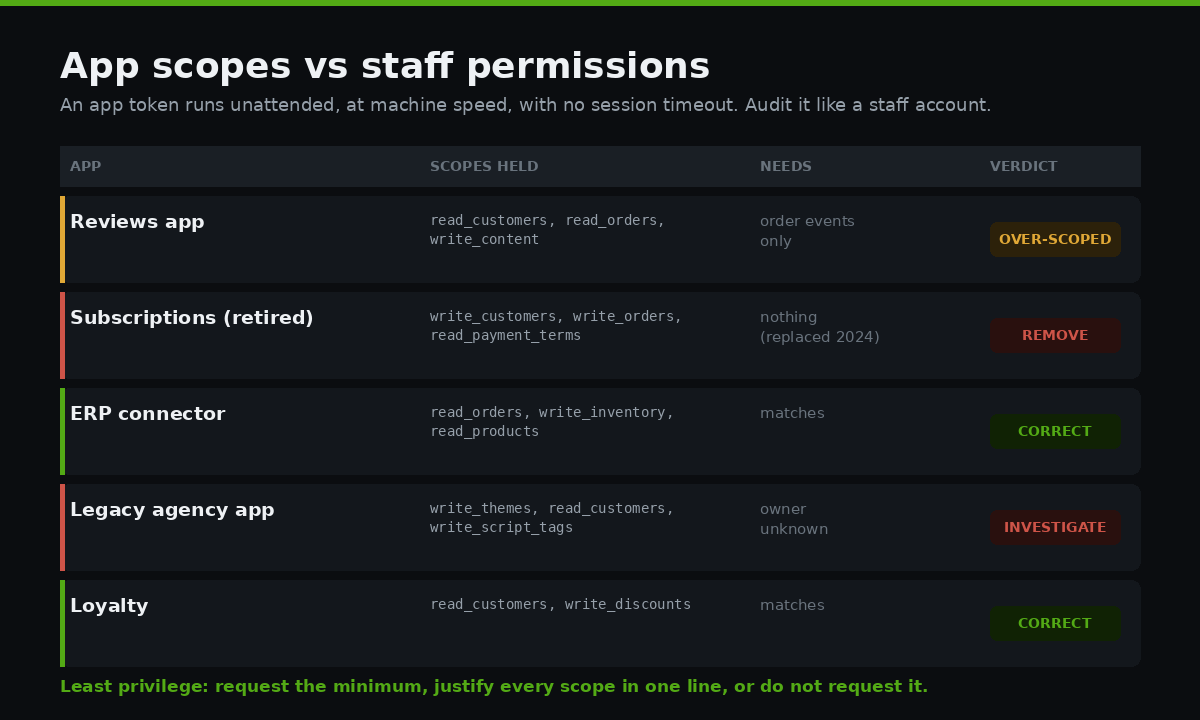
This is the part skipped in almost every access review we inherit. A staff account is a person you can call. An app with a permanent access token is a set of permissions running unattended, at machine speed, with no login prompt and no session timeout, frequently with scopes broader than any human on the team holds.
The principle is least privilege: an app should hold only the minimal permissions its function requires, evaluated scope by scope, expanding only when something genuinely breaks. That is easy to write and rarely audited, because scopes are approved once during install by whoever happened to be installing and then never surface again.
Start by getting the list. This GraphQL query returns installed apps and the access scopes each one holds, which is the document your access review actually needs and which no one on the team has ever seen.
query AppInstallScopes {
  currentAppInstallation {
    accessScopes { handle description }
  }
  appInstallations(first: 100) {
    edges {
      node {
        app { title developerName }
        accessScopes { handle }
        launchUrl
      }
    }
  }
}
Run that, drop the output in a sheet next to your staff matrix, and read the two together. The pattern we find repeatedly on Australian Plus stores: a reviews app holding read_customers and read_orders when it only needs order confirmation events, a defunct subscription app still holding write_customers two years after it was replaced, and a bespoke integration built by a previous agency running on a token nobody can rotate because nobody knows where it is stored.
Custom apps deserve particular attention because their tokens are permanent by design. If you are building or commissioning one, the scope list belongs in the brief, not in the developer’s discretion. We cover the wider decision of what belongs in a custom app in our guide to Shopify custom apps, and the reliability side of the same integrations in webhook reliability.
Build this week: produce an app register with four columns: app name, scopes held, business owner, and the answer to “what breaks if we uninstall this on Friday”. Any app where nobody can answer the fourth column is a candidate for removal, and removal is the only access control with a completion state.
Audit Logging That Answers a Forensic Question
The audit log inside the Shopify admin is useful for a quick sanity check and close to useless for an investigation. It tracks recent actions, it is view-only, it cannot be exported, and it returns up to 250 results. If a question arrives about something that happened five weeks ago across four stores, that log will not answer it.
Plus merchants have a better option that very few have configured. The audit events webhook topic fires on each auditable Admin API request and records Admin API activity across store admin, public, private and custom apps. It was introduced specifically so merchants could audit API activity properly rather than inferring it. The constraints are real and worth knowing before you plan the work: one active subscription per Plus store, delivery via Google Cloud Pub/Sub or Amazon EventBridge only, and access limited to custom apps.
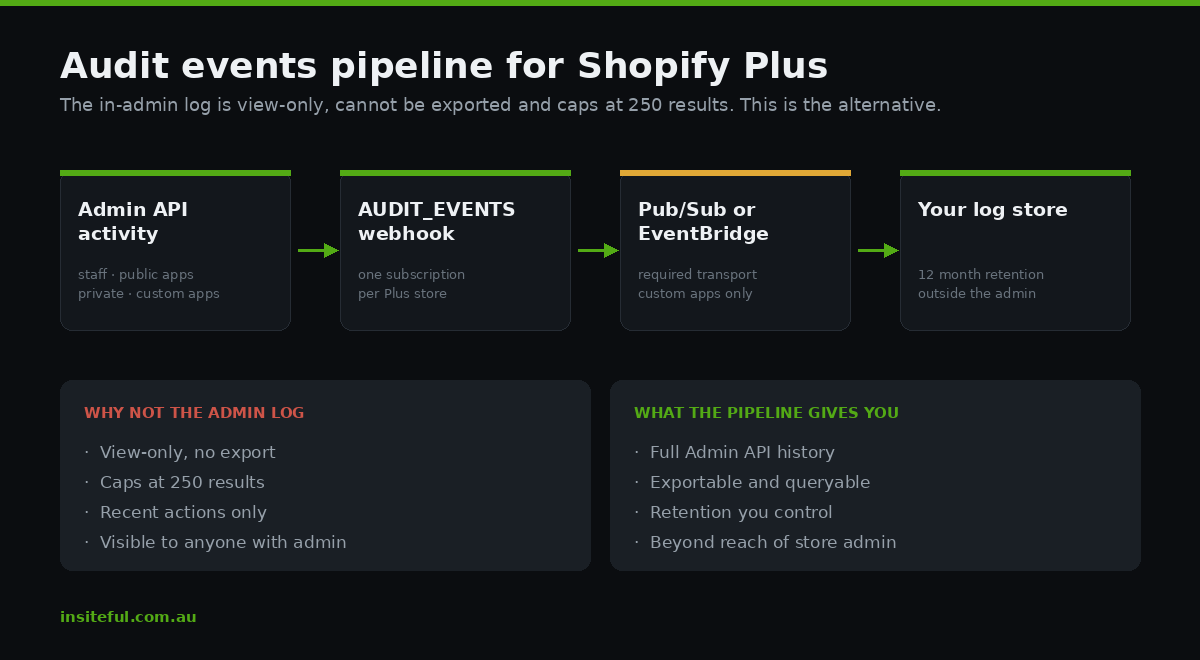
That means this is a small infrastructure project, not a settings toggle. Budget half a day for a single store, plus wherever you are sending the events. The subscription itself is a straightforward mutation:
mutation SubscribeAuditEvents {
  pubSubWebhookSubscriptionCreate(
    topic: AUDIT_EVENTS
    webhookSubscription: {
      pubSubProject: "insiteful-audit-prod"
      pubSubTopic: "shopify-audit-events"
      format: JSON
    }
  ) {
    webhookSubscription { id topic format }
    userErrors { field message }
  }
}
Once events are landing, retention matters more than the plumbing. Twelve months is a sensible floor for an Australian retailer: longer than the window in which you will discover most problems, and long enough to reconstruct a sequence of changes for an insurer or a regulator. Store the events somewhere the Shopify admin cannot reach. That is the entire point, because an attacker with admin access can obscure activity inside the admin and cannot touch a Pub/Sub topic in your cloud project.
If a full pipeline is out of scope this quarter, the free fallback is a Shopify Flow workflow notifying a private Slack channel whenever a staff account is created, a permission changes, or an app is installed. It is not an audit log. It is a smoke alarm, and a smoke alarm you have beats a sprinkler system you have been meaning to install since February.
Offboarding: the Thirty-Minute Runbook
Deactivating a staff account is roughly a fifth of an offboard. The rest is the trail that account left behind, and it is the part skipped when someone leaves on a Friday. Here is the runbook. It is deliberately boring, and it belongs in your operations documentation with a named owner rather than in the memory of whoever usually does it.
- Remove the store-level staff account on every store in the organisation, not just the one they worked in most. Multi-store organisations accumulate incidental access.
- Remove the organisation-level role. This is separate and is the step most commonly missed, because the store list looks clean afterwards while organisation access persists.
- Check POS staff records. POS user management is administered separately, and a retired POS PIN is a physical-world access path that outlives the email account.
- Rotate any shared credentials the person held. If they had the login to your 3PL portal, your ERP, or the domain registrar, those are outside Shopify and outside the deactivation you just performed.
- Review custom apps they created. App tokens survive the death of the account that created them. This is the single most common orphaned-access pattern we find.
- Revoke third-party sessions connected through the account, including any analytics, email or helpdesk platform that authenticated via Shopify.
- Record the offboard with a date and the name of the person who performed it. Without this, you cannot demonstrate a process later, and demonstrating the process is most of what a regulator or insurer wants.
Run it as a checklist with sign-off. Thirty minutes with a checklist beats two hours of memory, and it produces a document that did not exist before.
The Quarterly Access Review, and Why Quarterly Is the Right Interval
Access decay is continuous. Reviews are discrete. The interval decides your worst-case exposure window, and quarterly is where the evidence lands for organisations of this size: annually leaves a stale account live for up to twelve months, monthly generates enough fatigue that it degrades into rubber-stamping by the third cycle. Quarterly reviews of staff roles, contractor access, app scopes and unused permissions are the standard recommendation, on the logic that removing unnecessary access reduces the damaging actions available to a bad actor, a compromised account, or a misconfigured app.
The review is ninety minutes, four questions per line item, one owner:
| Question | Trigger for action |
|---|---|
| Is this person still engaged with us? | No, or unsure, means remove today |
| Have they used this access in 90 days? | No means downgrade to a narrower role |
| Does the role still match what they actually do? | Role drift after promotion or team change means remap |
| Would we grant this access today, from scratch? | No means revoke, regardless of history |
That last question does the heaviest lifting. Access is granted under time pressure and reviewed under none, so the honest counterfactual is the sharpest tool available. It also removes the interpersonal friction, because you are not accusing anyone of anything. You are re-deciding a decision made in a hurry.
Put the review on a fixed date in the same week as your quarterly reporting. Organisations that attach it to an existing rhythm run it. Organisations that schedule it independently run it twice and then stop.
What Australian Privacy Law Expects You To Demonstrate
The regulatory context has moved considerably, and access governance is now the practical mechanism by which you meet a good portion of it.
The Office of the Australian Information Commissioner recorded 1,205 data breach notifications in 2025, the highest since the mandatory scheme began in 2018 and an 8% increase on the 1,112 recorded in 2024. Of those, 716 were attributed to malicious or criminal activity, with roughly 489 stemming from process failures rather than attacks. That second number is the one relevant to this article. Process failures are what an access register, an offboarding runbook and a quarterly review exist to prevent, and they account for around 40% of notified breaches.
The threat data points the same way. The 2026 Verizon Data Breach Investigations Report found credential abuse present in 39% of all breaches measured across the full attack chain, with credentials representing 52% of data compromised in basic web application attacks. An over-permissioned account is not a separate risk from credential theft. It is the multiplier deciding how bad a credential theft becomes.
Australian consumers have noticed. The 2026 Australian Community Attitudes to Privacy Survey found 82% of Australians concerned about data breaches, up from 74% in 2023, making it the top perceived privacy risk in the country. For a DTC brand, that is a commercial fact as much as a compliance one.
Serious or repeated privacy interferences now attract corporate penalties framed around a $50M AUD maximum or a multiple of the benefit obtained. Against that, a genuine access programme costs a few hours per quarter plus a cloud bill of perhaps $40 to $80 AUD per month.
None of this requires you to become a security organisation. It requires you to be able to produce three documents on request: who has access, why, and when you last checked.
The Five Failure Patterns We Find Most Often
Across Plus access audits, the same five findings recur with enough consistency that we now check for them first.
The permanent agency. A development partner from a previous build cycle retains full admin across every store, because nobody wants to revoke access from a firm that might be needed again. Fix it by moving all agency access to expiry-dated engagements, including ours.
Organisation roles used as a shortcut. Somebody needed access to two stores, the store-by-store grant was tedious, and an organisation role solved it in one step while silently granting access to eleven other stores. Fix it by treating organisation roles as a two-person decision.
The orphaned custom app. A token created by a staff member who left in 2024, still authenticating, still holding write scopes, feeding a spreadsheet nobody opens. Fix it with an app register naming a current business owner for every app. Our notes on bulk operations show how much data one well-scoped token can move.
Shared logins. One “warehouse@” account used by six people on rotating shifts, which destroys attribution and makes your audit log a record of a fiction. Fix it with named accounts, which Plus makes free by removing the staff cap.
Permission creep after promotion. People accumulate access as they move through roles and rarely shed the old set, so after three years a senior operator holds the union of every job they have held. Fix it by re-granting from the matrix at each role change rather than adding to what exists.
None of these are exotic. All are the natural result of a growing team moving quickly without an access design, which is the default state of nearly every Plus merchant we meet.
How We Do It at Insiteful
Access design is part of every multi-store build we deliver, not a security add-on sold separately. When a client runs two or more storefronts on Plus, the permission architecture is scoped in the same discovery phase as the data model and the theme architecture, because structural decisions are cheap at the start and expensive later.
The sequence we run:
We map access before we build anything. During discovery we produce the access chart alongside the org chart, listing every human and every app against every store. On a typical four-store Australian organisation this takes about three hours and routinely surfaces between five and twelve accounts the client did not know were live. We have never run it and found nothing.
We scope every custom app to the minimum and document why. Each scope we request is written into the build brief with a one-line justification. If we cannot justify it in a sentence, we do not request it. At handover the client receives the scope list as a document rather than a mystery inside an app they cannot inspect.
Our own access is expiry-dated. Every Insiteful staff account on a client store carries an end date tied to the engagement. When a build wraps and moves to a support arrangement, our access is re-granted at the narrower support level rather than left at build level. We would rather do the extra step than be the permanent agency in someone else’s audit findings in three years.
We build the audit pipeline during the build, not after. On Plus engagements the audit events subscription goes in while the custom app is already open and the cloud project provisioned. Retrofitting means re-opening closed work, which is how it ends up permanently deferred.
We hand over a runbook, not a conversation. The offboarding checklist, access matrix and quarterly review template are delivered as documents the client’s operations lead owns. A good handover survives the departure of the person we handed it to.
This sits inside the same seven-step process we use for every build. Access governance does not demo well, but it is the difference between a Plus organisation that can answer a hard question in an hour and one that spends a fortnight and a legal retainer finding out it cannot. Across builds in the $8,500 to $25,000 AUD range it adds days, not weeks, and it is consistently the piece clients tell us later they would not have thought to ask for.
Start With the Register
If you do one thing from this article, build the access register: every human and every app, against every store, with a named owner and a review date. It is a spreadsheet and it takes an afternoon. It will tell you more about your operational risk than any tool you could buy this quarter, because the finding is almost never a sophisticated attack path. It is four accounts nobody remembered and an app with write access to your customer records that stopped being used in 2024.
From there: agree the role matrix, expiry-date every external account, get the audit events webhook running, and put the quarterly review on the same date as your quarterly reporting so it inherits a rhythm that already works.
If you run a multi-store Plus organisation and are not confident you could produce that register today, that is worth a conversation. We run access audits standalone and as part of larger builds, and either way you finish with the three documents that matter: who has access, why, and when you last checked.
See how our build process works and request an assessment.
For the architectural decisions that sit alongside this one, our guides to multi-store architecture on Plus and customer account SSO cover the two structural choices that most often determine how complicated your permission model has to be.