
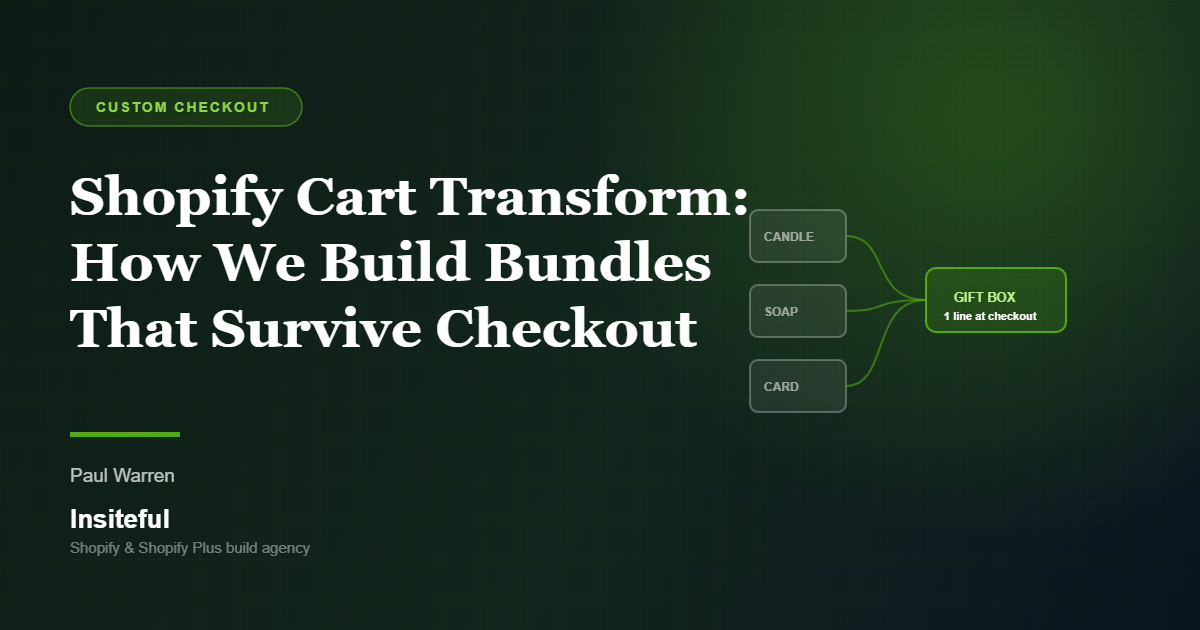
A bundle that looks correct in the cart and falls apart at checkout is one of the more expensive bugs we get called in to fix. The customer sees a “Summer Skincare Kit” for $89 on the product page. They hit checkout and see four separate lines, four separate prices, a shipping quote calculated on four parcels, and a total that does not match the offer. They leave.
Most of the time the cause is the same. The bundle was built in the theme with line item properties and a bit of Liquid, or it was bolted on with an app that rewrites the cart client-side. Neither of those survives the trip into Shopify checkout, because checkout does not read your theme and it does not trust the browser.
Cart Transform is the part of Shopify Functions that solves this properly. It runs server-side inside Shopify, it runs on every cart and every checkout, and the result is a merchandising change that the checkout, the order, the shipping rate engine and the tax engine all agree on. Bundles are worth getting right: current benchmarks put the lift from bundling at 20 to 35 per cent on average order value, and bundle buyers show roughly 2.7 times the lifetime value of single-item buyers. That is a big number to leave sitting behind a broken cart.
This is the architecture we use on Insiteful builds, the constraints that decide the approach, and the failure modes we test for before a bundle goes anywhere near a real order.
The Three Operations, and What Each One Is Actually For
Cart Transform gives you exactly three operations. Every bundle build we do is some combination of them, and picking the wrong one is the single most common reason a bundle project runs over.
- Expand. One parent cart line becomes several child lines. The customer adds “Summer Skincare Kit” and the function expands it into cleanser, serum and SPF as nested components under the parent. Price can be set on the parent or distributed across the children.
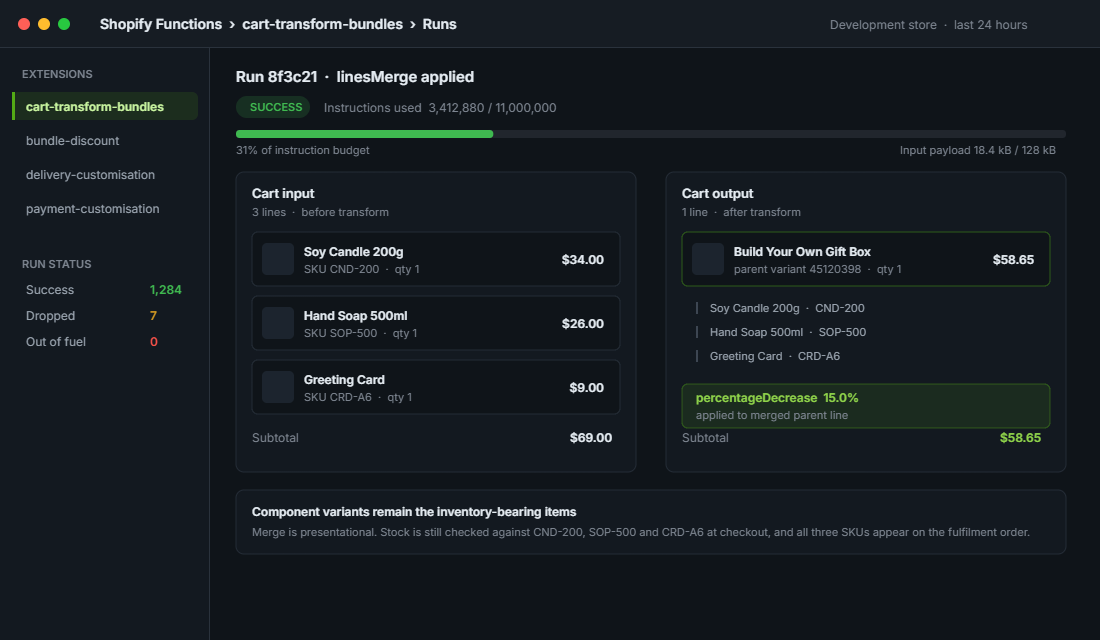
- Merge. Several cart lines collapse into one. The customer adds a frame, a mat and a print separately, and the function merges them into a single “Framed Print” line at a bundle price. This is the operation for stores that sell components individually but want one clean line at checkout.
- Update. No structural change, just presentation and price. Override the title, the image, or the per-unit price of an existing line. This is where most of the old Shopify Scripts line item logic lands after migration.
The decision we make in scoping is which direction the customer is thinking in. If they are buying a named product that happens to contain things, that is Expand. If they are assembling something out of parts, that is Merge. Trying to force one into the other is where builds get slow and fragile.
Worth noting: Expand changes how Shopify treats the parent line internally, and a fixed bundle parent will start behaving as a bundle product across the admin and reporting surfaces. That is fine if you planned for it. It is a nasty surprise if your finance team is reconciling SKU-level revenue in Xero and suddenly a parent SKU appears that was never in the product export.
Fixed Bundles Versus Customised Bundles: The Call We Make in Scoping
There are two architectures, and the difference is whether the components are known at build time or chosen by the customer.
A fixed bundle is a real product variant with components attached through the productVariantComponents relationship in the Admin API. The parent variant holds the price. Inventory is derived from the components, so Shopify will show the bundle as out of stock the moment any single component runs out. For a kit that never changes, this is the cleaner build: the merchandising lives in the product data, not in function code.
A customised bundle is assembled at cart time. The customer picks three candles from a range of twelve, the theme writes the selections into line item properties or a cart attribute, and the function reads those and merges the lines. Nothing is pre-declared in the product data, so you get flexibility and you lose the automatic inventory handling.
The practical rule we apply: if the merchant can list every permutation on a whiteboard, build fixed bundles. If the permutations run into the hundreds, build a customised bundle with a function. One Melbourne homewares client came to us wanting 240 pre-built bundle products for a build-your-own gift box. That would have been 240 SKUs to maintain, 240 sets of images and 240 inventory relationships. The customised bundle function replaced all of it with one parent product and about 180 lines of Rust.
The Inventory Question Nobody Asks Until Launch Week
This is the conversation that should happen in week one and usually happens in week six.
With a fixed bundle, Shopify does the work. Inventory for the bundle is calculated from component inventory, so selling one kit decrements each component by its component quantity. Overselling is handled for you. This is the main reason we push clients towards fixed bundles wherever the catalogue allows it.
With a customised bundle built purely in Cart Transform, there is no such relationship. The function is a presentation and pricing layer. If your merge operation collapses three lines into one and you have not kept the component variants as the real inventory-bearing items, you have just created a bundle that can be sold indefinitely regardless of stock. We have inherited two builds in the last eighteen months where exactly that happened, and both ended in manual refunds and a very awkward email to customers.
The pattern we use: the components stay as the inventory-bearing variants, the merge is presentational, and the parent line carries a price override. Inventory is still checked against the real component variants at checkout, so the oversell path closes. It also means your 3PL still receives a pick list of real SKUs rather than a phantom bundle SKU that does not exist in the warehouse.
If your fulfilment runs through an ERP or a warehouse system, confirm early how it reads bundle lines from the order payload. Cin7, Unleashed and NetSuite all handle nested bundle components differently, and the mapping work is usually a day or two that nobody scoped.
What a Merge Operation Looks Like in Practice
The function returns a list of operations. Shopify applies them and hands the result to checkout. Here is the shape of a merge that collapses three component lines into a single bundle line with a fixed price, which is the most common build we ship.
{
  "operations": [
    {
      "linesMerge": {
        "cartLines": [
          { "cartLineId": "gid://shopify/CartLine/1", "quantity": 1 },
          { "cartLineId": "gid://shopify/CartLine/2", "quantity": 1 },
          { "cartLineId": "gid://shopify/CartLine/3", "quantity": 1 }
        ],
        "parentVariantId": "gid://shopify/ProductVariant/45120398",
        "title": "Build Your Own Gift Box",
        "price": {
          "percentageDecrease": { "value": 15.0 }
        },
        "attributes": [
          { "key": "_bundle_id", "value": "gift-box-3" }
        ]
      }
    }
  ]
}
Three details in that payload matter more than the rest.
- The parent variant must exist. It is a real variant on a real product, usually hidden from all sales channels and priced at zero. If it is missing or archived, the operation is silently dropped and the customer sees three unmerged lines. This is the number one support ticket on bundle builds.
- Prefer a percentage decrease over a fixed price. A fixed price hardcodes the offer into the function and forces a redeploy every time the merchant changes it. A percentage keeps the maths tied to the component prices, so a price rise on one candle flows through automatically.
- Use an underscore-prefixed attribute for the bundle key. Attributes starting with an underscore stay hidden from the customer but persist onto the order, which is what your reporting and your 3PL integration will key off later.
On the read side, the function input is a GraphQL query you author yourself. Keep it small. Every field you request is data that has to be serialised, shipped into the WebAssembly sandbox and parsed, and the input budget is not generous.
query Input {
  cart {
    lines {
      id
      quantity
      merchandise {
        ... on ProductVariant {
          id
          product { id }
        }
      }
      bundleKey: attribute(key: "_bundle_id") { value }
    }
  }
}
Notice what is not in there. No product titles, no images, no metafields we do not need, no full variant objects. On a 40 line cart, requesting the full product object on every line is the difference between a function that runs comfortably and one that fails in production on exactly the large orders you most want to keep.
The Execution Limits That Kill Cart Transform Builds
Functions run as compiled WebAssembly inside Shopify’s own infrastructure, which is why they are fast and why they are tightly bounded. Three ceilings decide whether your build holds up.
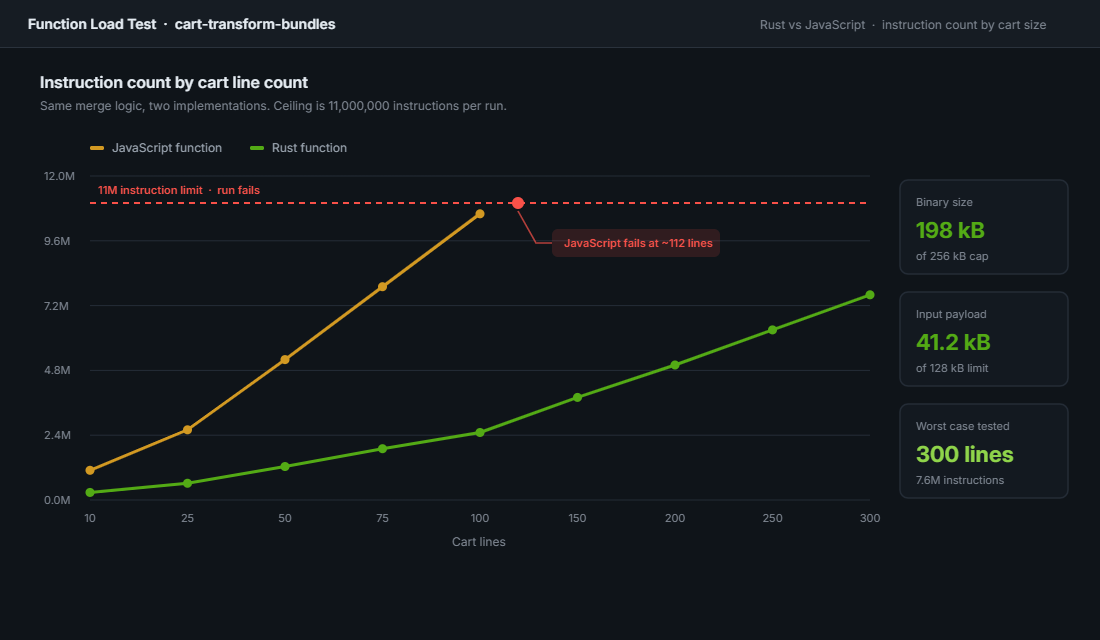
- 11 million instructions per run. Exceed it and the function fails with an out-of-fuel error. Cart Transform is the API where developers hit this most often, because the work scales with the number of cart lines and the number of bundle permutations being tested.
- 128 kB input size. Shopify raised this from the original 64 kB, which helped, but a greedy input query on a large B2B cart will still blow through it.
- 256 kB compiled binary. This is what pushes serious bundle logic out of JavaScript and into Rust. A JavaScript function carries a runtime that eats a large share of both the binary budget and the instruction budget before your own code executes.
We write Cart Transform functions in Rust as a default, not as a preference. On one B2B build with a 300 line reorder cart, the JavaScript version failed at roughly 90 lines. The Rust rewrite of the same logic ran the full 300 line cart inside the budget with room left over. The failure mode matters too: when a function runs out of fuel, the operation is dropped and the customer sees an unbundled, unpriced cart. There is no error message and no obvious symptom in the storefront. You only find it in the function run logs.
Practical mitigations we apply on every build: bail out early if no line carries the bundle attribute, cap the number of permutations evaluated, avoid allocating inside loops, and never pull in a heavyweight dependency for something the standard library already does. An unnecessary import statement is a genuinely common cause of an instruction limit failure.
What Happens Downstream: Discounts, Shipping and Tax
Cart Transform does not run in isolation. Shopify executes checkout functions in a defined order, and Cart Transform runs before discounts. That ordering has consequences your merchant will notice within a week of launch.
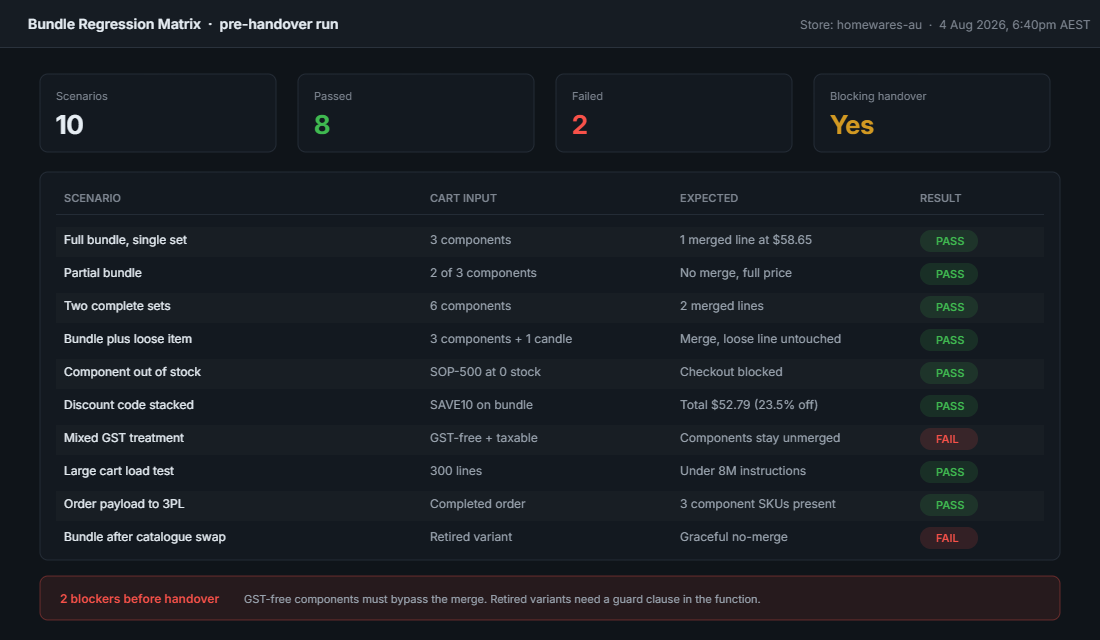
Because the transform lands first, a site-wide 10 per cent discount code will apply to the post-merge bundle price, not the original component prices. If the bundle is already discounted 15 per cent, the customer gets 23.5 per cent off, not 25. Merchants almost always assume the second number. We put this in writing during scoping, because it is a margin conversation, not a technical one. On a store doing $4M AUD a year with bundles at a quarter of orders, a misunderstanding here is a five figure hole.
If stacked discounting on bundles is genuinely not wanted, the cleanest control is a discount function that checks for the bundle attribute and excludes those lines. Fighting it inside Cart Transform does not work, because the transform has already finished by the time the discount runs.
Shipping and tax follow the merged structure. A merged bundle line is one line for rate calculation purposes, which is usually what the merchant wants for a single carton but is wrong the moment the components ship from different locations. Australian GST is applied on the final line price, so a bundle spanning GST-free and taxable items needs the components kept visible rather than merged, otherwise the tax split is lost. We have had to unpick exactly this on a health and supplements build where some items were GST-free and the merged line taxed everything.
Migrating Bundle Logic Off Shopify Scripts
If any of your bundle or line item logic still lives in Shopify Scripts, that runway has already ended. Shopify Scripts was sunset on 30 June 2026 and the Script Editor stayed available only until 30 July 2026. Separately, Additional Scripts, thank-you page script boxes and order status page scripts stop running on 26 August 2026 across every plan.
The important thing to understand about this migration is that it is not a translation job. Scripts ran Ruby against a mutable cart object and you could reassign line item prices directly. Functions return a declarative list of operations and Shopify decides how to apply them. A 60 line Ruby script does not become a 60 line Rust function. It becomes a different design.
The mapping we work through with clients:
- Line item price overrides and bundle pricing. These move to Cart Transform, not to a discount function. If the price change is structural rather than promotional, it belongs here.
- Percentage or dollar promotions, tiered spend thresholds, gift with purchase. These move to product, order or shipping discount functions.
- Hiding, renaming or reordering shipping options. Delivery customisation function.
- Hiding a payment method above a cart value, or for a specific customer segment. Payment customisation function.
We covered the broader move in our piece on migrating Shopify Scripts to Functions, and the checkout surface itself in Checkout UI Extensions. Cart Transform is the piece that sits underneath both: it changes what is in the cart, while UI extensions change how the customer sees and interacts with it.
Testing a Bundle Build Before It Touches Real Orders
Cart Transform failures are quiet. The function does not throw a visible error, it just does not apply, and the customer completes an order at the wrong price. That means the testing has to be deliberate rather than incidental.
The test matrix we run on every bundle build before handover:
- Partial bundle. Customer has two of the three required components in the cart. The function must not merge and must not price as a bundle.
- Multiples. Six components that make exactly two bundles. Confirm two bundle lines, not one line at quantity two priced for one.
- Bundle plus a loose item. The loose item must survive untouched and at full price.
- Component out of stock. Confirm the checkout blocks rather than accepting the order.
- Discount code stacked on a bundle. Confirm the resulting total matches what the merchant signed off, to the cent.
- Large cart. Push to 100 lines and beyond, then read the function run logs for instruction count. Anything above roughly 8 million on a realistic worst case is too close to the ceiling.
- Order payload. Pull the completed order through the Admin API and confirm the component SKUs are present and correctly quantified for fulfilment.
That last one is the check most teams skip. A bundle can look perfect in the storefront and checkout and still hand your warehouse an order line they cannot pick.
How We Do It at Insiteful
Bundles are one of the few merchandising changes that touch product data, cart logic, checkout, tax, shipping and fulfilment at the same time. We treat them as an architecture piece, not an app install.
Our sequence on a Cart Transform build:
- Permutation count first. We count the real number of bundle combinations before writing anything. Under about thirty, we build fixed bundles with component relationships in the product data and skip the function entirely. Over that, we build the function.
- Inventory model signed off in writing. Which variants bear stock, what happens when a component runs out, and how the order reaches the 3PL. This is agreed before development starts, not discovered in UAT.
- Rust by default. Every Cart Transform function we ship is Rust, with the input query pared back to the fields the logic genuinely reads.
- An instruction budget in the brief. We set a target worst-case cart size at the start, usually double the client’s current 95th percentile, and treat exceeding it as a build failure rather than an edge case.
- The merchandising stays editable. Bundle definitions live in metaobjects, not hardcoded in the function, so the merchant’s team can change what is in a kit without a developer and a redeploy. We use the same approach described in our write-up on structuring content with metaobjects.
- Full matrix regression before every seasonal campaign. Bundles that worked in March break in November when the catalogue changes. We rerun the matrix ahead of each major campaign.
The measurable outcome we look for is not just the bundle rendering correctly. It is bundle attach rate against total orders, and average order value on bundle orders versus single-item orders. If a bundle programme is not moving those two numbers within a quarter, the problem is usually the offer rather than the code, and that is a merchandising conversation we would rather have early.
The Short Version
Bundles fail at checkout when they are built in the wrong layer. The theme cannot enforce them, apps that rewrite the cart client-side cannot be trusted by checkout, and Scripts no longer exist. Cart Transform is where this logic belongs, and it works well when the architecture decisions are made deliberately: Expand or Merge, fixed or customised, and a clear answer on which variants carry inventory.
Get those three right and the function itself is straightforward. Get them wrong and you spend the build fighting an execution ceiling and the launch fighting refunds.
If you are planning a bundle programme on Shopify, or you have one that behaves differently in the cart than it does at checkout, that is exactly the kind of build we scope every week. See how we work with Shopify brands.