
The second store is where Shopify retailers get hurt. Not the first. Your first location gets set up carefully, usually with one stock room, one team and one till, and everything in the admin quietly assumes that shape. Then you sign a lease in a second suburb, copy the setup across, and within a month you are overselling stock that is sitting in the wrong store, refunding online orders you could have fulfilled from a shelf 8 km away, and watching two teams share one login because nobody configured roles.
None of that is a Shopify limitation. Shopify handles multi-location retail well, up to 10 active locations on standard plans and up to 200 on Shopify Plus. What breaks is the architecture: inventory allocation, order routing, staff permissions and hardware were never designed as a system, because at one store you never needed to design them. We have built and rebuilt this setup for Australian retailers moving from one store to two, three and beyond, and the pattern of what goes wrong is remarkably consistent.
This is our build guide for multi-location Shopify POS: how we structure locations, inventory, routing, staff and hardware so the second store makes the whole business stronger instead of splitting it in half. If you are still setting up your first till, start with our single-store Shopify POS setup guide and come back when the second lease is real.
What Actually Changes at Two or More Locations
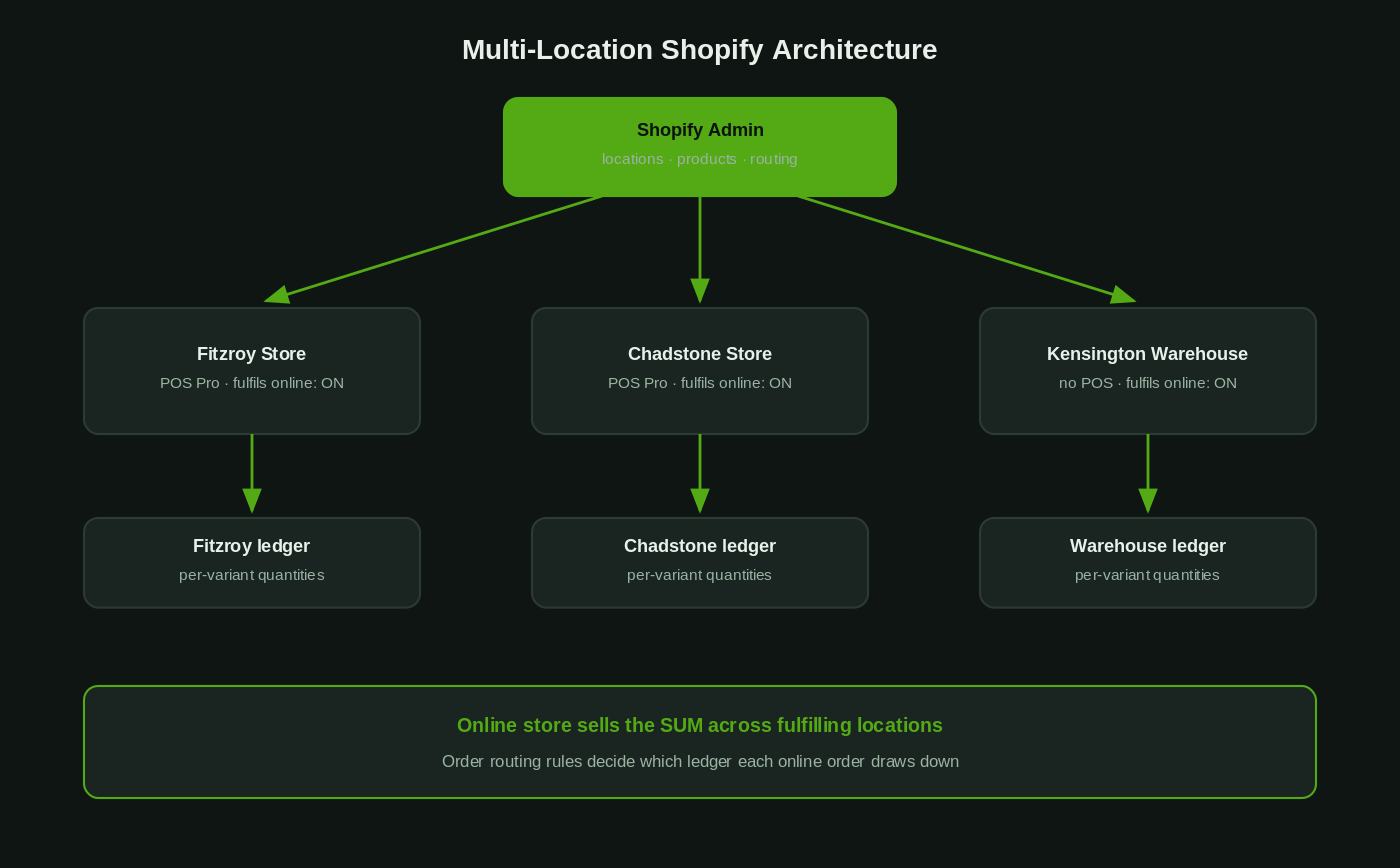
A Shopify location is not just an address. It is an inventory ledger, a fulfilment origin, a tax point and a staffing boundary rolled into one object. At a single location those four roles collapse into each other and you can ignore the distinction. At two locations they pull apart, and every one of them needs a deliberate decision.
Inventory stops being one number per SKU. Every product now carries a quantity at each location, and the online store sells from the sum. Fulfilment stops being obvious. When an online order lands, Shopify has to decide which location ships it, and if you have not configured that logic it will decide for you, badly. Staff access stops being trivial. A casual hired for the Fitzroy store should not be processing refunds in the Chadstone till. And reporting splits: you now need to know which store made the sale, which store held the stock, and whether those are the same place.
The retailers who do this well treat the second store as a systems project, not a hardware purchase. The ones who do it badly buy two card readers and find out the rest in production. The difference shows up within the first quarter: omnichannel customers are worth materially more, with research showing they carry roughly a 30% higher lifetime value than single-channel shoppers, but only when the channels actually agree on stock and orders.
Locations: Set Up the Skeleton Before Anything Else
Everything else hangs off the locations list in Settings, then Locations in the admin, so we build this first and we build it completely. Each physical site gets its own location with its real street address, because the address drives tax jurisdiction, local pickup availability and delivery zone calculations. If you run a warehouse or a 3PL as well as shopfronts, those are locations too, even though no POS device will ever be assigned to them.
Three rules we apply on every multi-location build:
- Name locations for humans, not systems. “Fitzroy Store”, “Chadstone Store”, “Kensington Warehouse”. Staff pick locations from dropdowns on the POS every day, and codes like “LOC-002-VIC” cause mispicks.
- Decide which locations fulfil online orders and which do not. Each location has a toggle for fulfilling online orders. A boutique with 40 units of floor stock probably should not be shipping eBay-sized volume; a warehouse should. This single checkbox is the difference between ship-from-store as a strategy and ship-from-store as an accident.
- Never delete a location with history, deactivate it. Deactivating preserves the sales and inventory history against that site. Deleting orphans it. Shopify counts only active locations against your plan limit, so a closed pop-up costs you nothing to keep deactivated.
Plan limits matter here: Basic, Grow and Advanced plans all support up to 10 active locations, and Shopify Plus supports up to 200. For most Australian retailers the constraint you will hit first is not the location count, it is the POS Pro subscription cost per location, which we cover below.
Inventory Architecture: One Ledger Per Location, One Source of Truth
Multi-location inventory in Shopify is per-variant, per-location. When a product is stocked at three locations, it has three independent quantities, and the storefront sells against the total across locations that are allowed to fulfil online orders. That model is sound. The failures we see are almost always process failures layered on top of it.
The first decision is which products live where. New products are assigned to all locations with a starting quantity of zero, which means every new SKU silently appears at every store unless you manage assignment deliberately. For a fashion retailer running different ranges in different suburbs, that default is wrong, and we scope each product to the locations that actually range it during the product build, not after the first stocktake finds phantom SKUs.
The second is transfers. Stock moving between stores must move as a Shopify transfer, not as a box in the back of someone’s Corolla with a sticky note. Transfers keep both ledgers honest and give you an audit trail of what left where and when. On builds where the client has an existing habit of informal stock movement, we set a hard rule: if it is not in a transfer, it did not move.
The third is accuracy, and this is the number that decides whether the fancy omnichannel features are safe to turn on. Industry store-level inventory accuracy averages somewhere between 65% and 70%, which is why the standard guidance is to keep buy-online-pickup-in-store switched off until you are consistently above 95%. Cycle counts, receiving discipline and shrinkage tracking are boring, and they are also the entire foundation. Note that Shopify migrated all fulfilment services onto multi-location inventory management in early 2026, completing around March, so every app in your stack now speaks the per-location model natively. There is no longer an excuse for an app that only understands one stock number.
When we need to audit stock levels programmatically across sites, the Admin GraphQL API exposes the per-location ledger directly:
query InventoryByLocation {
  productVariants(first: 50, query: "sku:TEE-BLK-M") {
    nodes {
      sku
      inventoryItem {
        inventoryLevels(first: 10) {
          nodes {
            location { name }
            quantities(names: ["available", "committed", "incoming"]) {
              name
              quantity
            }
          }
        }
      }
    }
  }
}
That “committed” bucket is the one retailers forget: stock that is physically on the shelf but already promised to an online order. POS staff can see it, and training them to read it is what stops the classic double-sell where the shirt goes out the door in-store 20 minutes before the picker comes looking for it.
Order Routing: Decide Who Ships What, Or Shopify Will
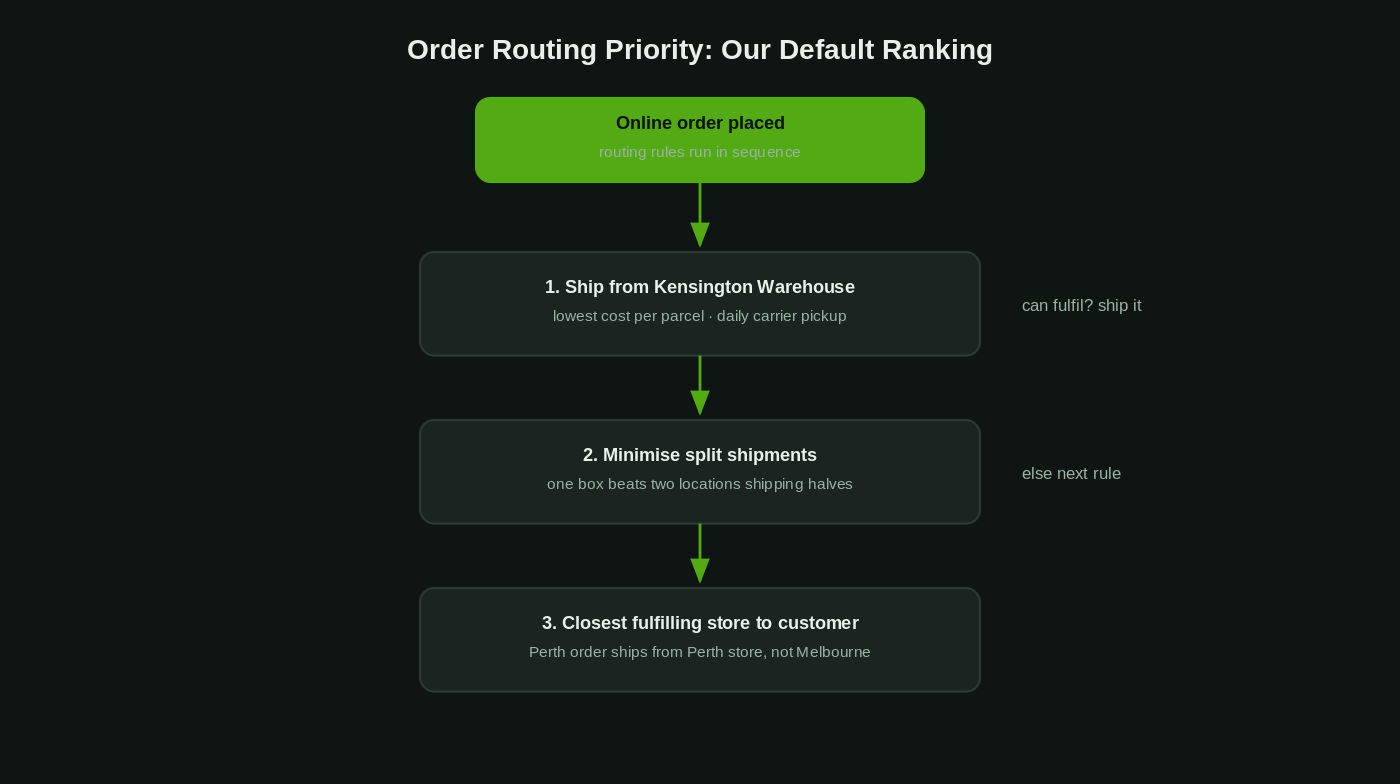
Online orders in a multi-location store are allocated by Shopify’s order routing rules, configured under Settings, then Shipping and delivery, then Order routing. You rank the priorities, Shopify applies them in sequence to every incoming order, and the first location that can satisfy the order wins. The ranking is the strategy.
Our default architecture for an Australian retailer with a warehouse and two or more stores looks like this:
- Warehouse first. It has the packing bench, the satchels and the daily carrier pickup. Cost per parcel out of a warehouse is reliably lower than out of a store.
- Then minimise split shipments. One order in two boxes from two suburbs doubles your freight cost and confuses the customer. We would rather ship complete from the second-priority location than split from two.
- Then closest to the customer. A Perth order shipping from a Perth store instead of a Melbourne warehouse arrives days earlier, and in regional Australia the difference is bigger.
Ship-from-store only enters that ranking for locations where the fulfil-online-orders toggle is on, which is why the skeleton decisions in the locations list matter so much. And if you are running click and collect on top of this, pickup availability is per-location as well; we covered that full build, including prep SLAs and collection flows, in our Shopify click and collect guide.
One number worth knowing before you promise same-day anything: real-time stock visibility is now table stakes, with about 65% of major retail chains showing store-level stock status online. Customers arriving from Google expect “in stock at Fitzroy” to be true. Routing rules and inventory accuracy are what make it true.
Staff Structure: POS Roles Are the Part Everyone Skips
At one store, everyone knows everyone and the owner is usually within earshot of the till. At three stores you have casuals you have never met processing refunds, and the permission model stops being optional. With POS Pro, Shopify gives you named roles, each a bundle of permissions covering actions like applying custom discounts, processing returns, editing the cart after a sale starts, and viewing daily sales totals.
The role set we deploy on most multi-location builds is deliberately small:
- Sales associate. Sell, exchange with receipt, look up stock at any location. No custom discounts, no refunds without approval, no register reports.
- Store lead. Everything an associate can do, plus refunds, custom discounts to a capped percentage, cash tracking and end-of-day.
- Retail manager. Full POS permissions across assigned locations, plus the admin-side reports for their stores.
Staff are assigned to specific locations, so the Fitzroy casual physically cannot open the Chadstone register, and every action is attributed to a named person with their own PIN. When a discount pattern looks wrong in the reports, you can see who, where and when. The rule we enforce on every build: no shared PINs, ever. The first time a stocktake variance conversation involves the phrase “well, everyone uses 1234”, the audit trail is already worthless. Staff can still view inventory and orders across all locations from any POS, which is exactly what you want for “can you check if Chadstone has this in a medium”.
Hardware: Standardise the Kit, Then Multiply It
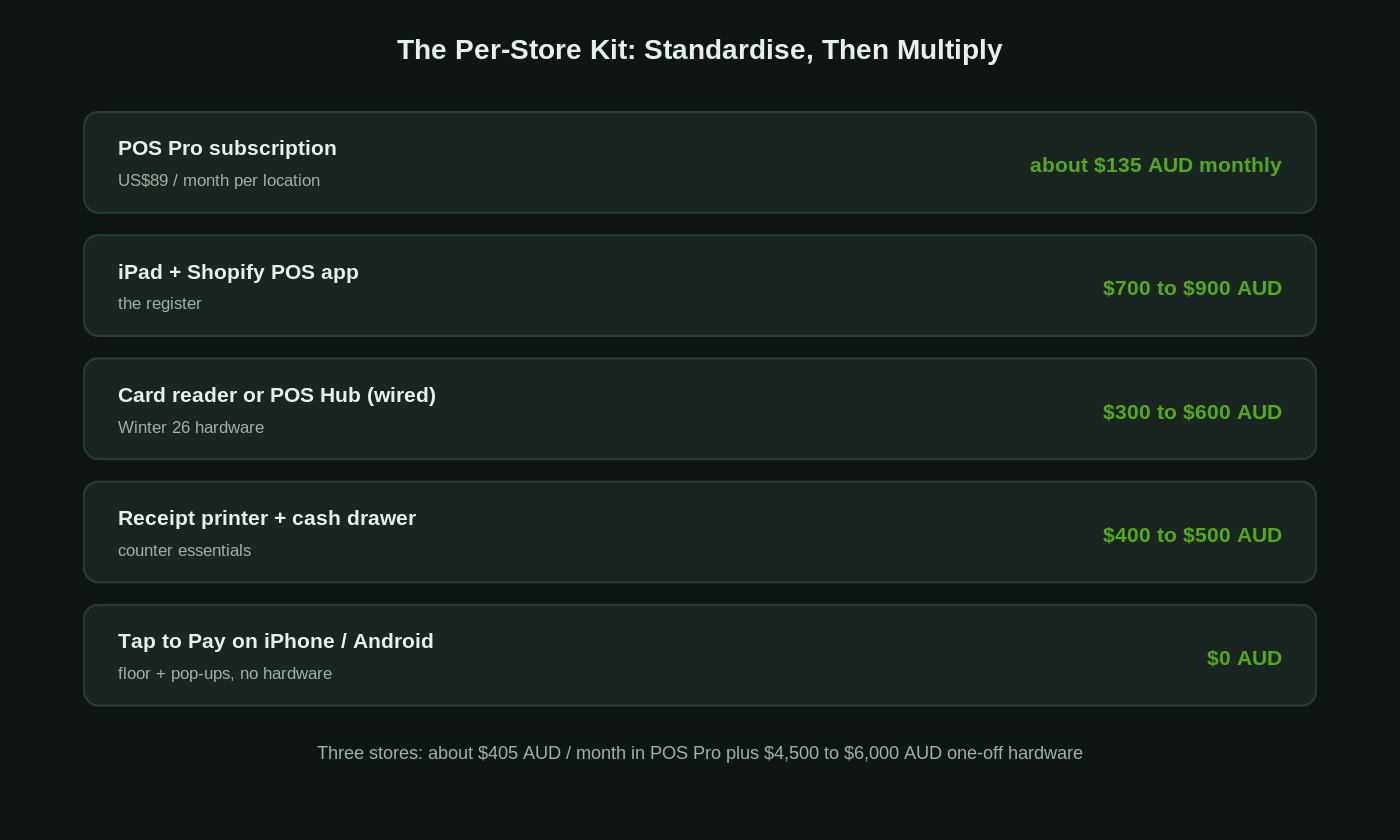
Hardware decisions compound across locations. A quirky setup you can babysit at one store becomes a support burden at four, so we standardise a per-store kit and replicate it exactly. In 2026 the options for Australian retailers are genuinely good:
- Counter setup: iPad with Shopify POS, a card reader, receipt printer and cash drawer. Shopify’s POS Hub, introduced in the Winter 2026 Editions release, gives you wired connections for readers, printers and scanners with dedicated processing, which removes the Bluetooth pairing roulette that plagues busy counters.
- Floor and queue-busting: Tap to Pay is now live in Australia on both iPhone and Android for Shopify POS, so a staff phone becomes a terminal with no extra hardware. For a pop-up or a weekend market stall attached to your retail business, this is the whole kit.
- Multi-entity groups: since June 2026, businesses running multiple legal entities can use Tap to Pay across locations and countries with each entity’s payments kept separate for compliance, which matters for franchise-like structures and family groups running stores under different companies.
Budget honestly. POS Pro is charged per location, at US$89 per month per site on top of your Shopify plan, which lands around $135 AUD each month per store at typical exchange rates. A complete counter kit, iPad included, is usually $1,500 to $2,000 AUD per store. So a three-store retailer is carrying roughly $405 AUD a month in POS Pro subscriptions and a one-off $4,500 to $6,000 AUD in hardware. Against the margin of a store doing even $600,000 AUD a year, it is not the line item to economise on, and the retailers who try to run multi-location on POS Lite always end up paying for Pro anyway once the staff-permissions problem bites.
Reporting: Sales by Store, Stock by Store, Staff by Store
Multi-location reporting has one job: make the stores comparable. In the admin analytics we lean on sales by location, sales by staff member, and inventory by location, and we build the weekly rhythm around three questions. Which store is converting foot traffic, which store is sitting on dead stock, and which store’s shrinkage number is drifting. A retailer we rebuilt recently discovered their second store was “profitable” only because half its costs were being absorbed by the first store’s ledger; per-location reporting made the real picture visible in a week.
The discipline that makes the reports trustworthy is attribution at the till. Every sale rings through the correct location, every staff member uses their own PIN, and online orders fulfilled from a store are visible as that store’s fulfilment workload. Get those right and the numbers stop being arguable at the Monday meeting.
The Failure Modes We Get Called In to Fix
Almost every multi-location rescue job we take on is one of these four:
- The clone-store setup. The second store was created by copying the first, so every product is stocked everywhere, routing was never configured, and the online store happily sells the sum of two inaccurate ledgers. Symptom: oversells spike within weeks of opening.
- BOPIS before accuracy. Click and collect switched on while stock accuracy was still in the industry-average band of 65 to 70%. Symptom: “ready in 2 hours” emails followed by apology phone calls, and staff quietly cancelling pickup orders.
- The informal transfer economy. Stock moves between stores by ute and group chat. Symptom: both stores fail stocktake in opposite directions by similar amounts.
- One login, twelve staff. No roles, shared PINs, refunds untraceable. Symptom: discounts climb, nobody knows why, and the conversation with the team is awkward because the data cannot name anyone.
None of these are exotic. All of them are architecture decisions that were never made, which is the entire argument for treating the second store as a build project with a scope, an owner and a test plan.
How We Do It at Insiteful
We have been building commerce sites for over 25 years and deliver more than 200 client projects a year, and multi-location POS work follows the same discipline as our storefront builds: architecture first, hardware last. A typical engagement starts with a location and inventory audit, mapping every physical site, stock pool and fulfilment path the business actually runs, including the informal ones nobody documented. From there we design the location skeleton, product-to-location assignment, routing priorities and role model on paper before touching the admin, because reversing a bad inventory structure after go-live is painful in a way that reversing a document is not.
The build itself covers locations, per-location product scoping, transfer workflows, order routing rules, POS roles and PINs, hardware standardisation and the reporting views the owner will actually read. We test with real scenarios before launch: an online order that should route to the warehouse, a pickup order at each store, a refund by a sales associate that should require approval, a transfer that has to reconcile on both ledgers. Then we train the store leads on the till they will actually use, not a slide deck. If the rollout involves a new store opening, we sequence the cutover so the existing store never loses a trading hour.
Planning a second store, or untangling the aftermath of one that grew faster than its systems? Book a build assessment and we will map your locations, inventory and POS architecture against where the business is actually heading.