
Every replatforming conversation we have starts in the same place. A founder has decided to move onto Shopify, they are genuinely excited about the build, and then about ten minutes in the real fear surfaces: “I have spent six years and a small fortune ranking on Google. If we get this wrong, do we lose all of it?” It is the right question to be afraid of, because the answer for most migrations is yes, at least for a while.
The data is blunt. A Semrush analysis of 150 documented ecommerce migrations between 2022 and 2024 found that 80% of poorly executed migrations lost between 20% and 60% of their organic traffic in the first 90 days, and 15% took more than a year to recover to where they started. Only around 10% of migrations actually improve SEO, and barely 5% complete the move with no detectable traffic loss at all. For a store doing $4M AUD a year off organic search, a 40% drop is roughly $1.6M AUD in revenue that simply stops arriving while you wait to recover.
Here is the part most agencies will not tell you: that loss is almost entirely self-inflicted. The same study found the two factors that separated the winners from the losers were not the platform, the theme, or the budget. They were redirect-map coverage (complete one-to-one mapping versus partial) and preparation time (at least four weeks of prep versus less than two). Both are entirely within your control. This is how we protect rankings on every Shopify migration we run at Insiteful, and the specific build details that decide whether your traffic dips for three weeks or craters for six months.
Why migrations lose rankings, and why it is avoidable
When you move platforms, almost every URL on your site changes. Shopify forces its own path structure on you: products live under /products/, categories under /collections/, content under /pages/ and /blogs/. So even if a page keeps the exact same name, its address changes. A Magento URL like /mens-jackets/alpine-shell.html becomes /products/alpine-shell. Multiply that by a few thousand SKUs, collections, blog posts and CMS pages, and you have thousands of addresses that Google currently ranks pointing at locations that no longer exist.
If you do nothing, every one of those old URLs returns a 404 the moment you go live. Google revisits them, finds nothing, and over a few weeks drops them from the index along with the rankings and the link equity they carried. That is the crater. The fix is conceptually simple and operationally demanding: every old URL needs a 301 redirect to its new home, so that both Google and any human clicking an old link land on the right page and the ranking signal transfers across. Get the redirect map complete and accurate, and you keep the equity. Leave gaps, and you lose exactly the pages those gaps represent, which are almost always your highest-value ones because they are the ones with the most inbound links.
We have inherited rescue jobs where a previous developer “did the redirects” by pointing the old home page across and calling it done. The store lost 38% of its organic sessions in a fortnight. None of it was bad luck. It was a redirect map with about 200 rows where it needed 1,800.
The URL map is the entire game
If you remember one thing from this article, make it this: the redirect map is not a task in the migration, it is the migration, at least as far as SEO is concerned. We build it before we build the theme, and we treat it as the single most important deliverable of the whole project.
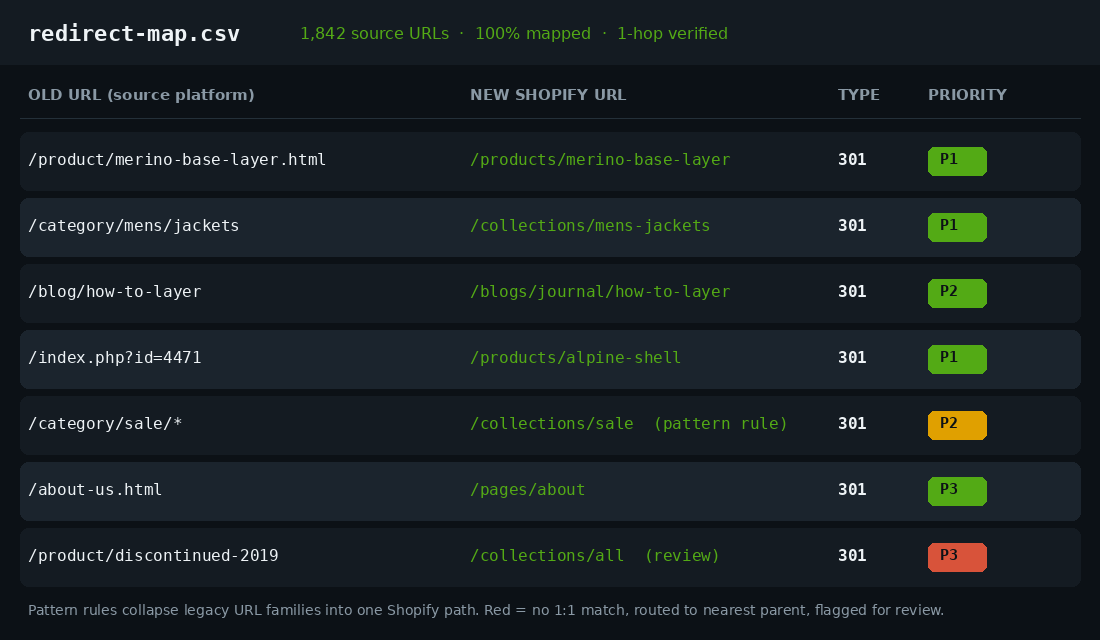
A proper map is a spreadsheet with one row per old URL. Each row carries the old source URL, the exact new Shopify URL it will resolve to, the redirect type (301 permanent, never 302), and a priority tier so we know what to test first. We tier by SEO value: P1 is the top-traffic and top-backlink pages (best sellers, hero collections, your most-linked blog posts), P2 is the long tail that still earns clicks, and P3 is everything else. When something goes wrong on launch day, you fix P1 first.
The non-negotiable rule is that this is a one-to-one map wherever a one-to-one match exists. The lazy shortcut that kills migrations is the many-to-one redirect, where dozens or hundreds of old URLs all funnel into one generic page like /collections/all or the home page. Google treats a redirect as a promise that the destination matches the intent of the original. When it sees a pile of different URLs all collapsing into one, it reads those as soft 404s, declines to pass the equity, and over time can downgrade the entire redirect set. A redirect to the wrong page is barely better than no redirect at all.
How we build and verify the map
The build is methodical. First we run a full crawl of the existing site with Screaming Frog, and we pull the live URL inventory from Google Search Console and the analytics export, because a crawler only finds pages that are linked, while GSC shows you every URL Google actually has indexed, including orphans you forgot existed. Merge those sources and dedupe, and you have the true list of everything that needs a home.
Then we match. Clean one-to-one matches get mapped directly. Predictable families get pattern rules instead of thousands of individual rows. A whole legacy category tree like /category/sale/* can resolve to /collections/sale with a single wildcard rule, which keeps the map maintainable. Anything with no logical match, a discontinued product with no replacement, gets routed to its nearest relevant parent collection and flagged amber for a human decision, never silently dumped to the home page.
On capacity, Shopify is generous: standard plans support up to 100,000 URL redirects and Plus stores up to 20 million, so the platform itself is almost never the constraint. You load them through Online Store, then Navigation, then URL Redirects, either by hand for a handful or by CSV import for the bulk, with a two-column Redirect from and Redirect to format. For large or complex moves we use a dedicated redirect app that supports bulk CSV upload and pattern-based rules, because the native importer does not do wildcards.
Verification is where the discipline shows. Every redirect must resolve in a single hop. A chain, where the old URL points to a second URL that points to a third before landing, bleeds equity at each step and slows the page. After import we re-crawl the entire old URL list and assert two things on every row: status code is 301, and the final destination after following the redirect is the intended target, reached in one hop. We do not eyeball a sample. We check all 1,800 rows programmatically, because the twelve that are wrong will always be twelve of your best pages.
The canonical trap Shopify sets for you
Even with a flawless redirect map, Shopify has a structural quirk that quietly splits ranking signal if you let it. Every product is reachable on two different paths: the clean /products/product-handle URL, and a collection-aware version, /collections/collection-handle/products/product-handle, generated whenever a shopper reaches that product by clicking through a collection.
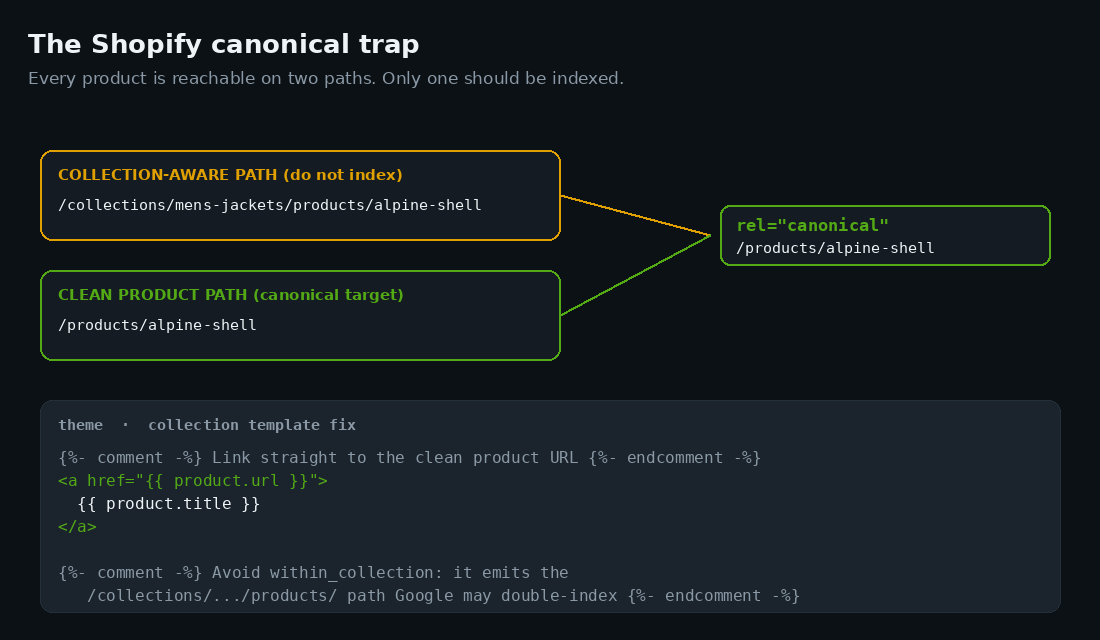
Shopify’s default theme markup does set a canonical tag pointing the collection-aware path back to the clean one, which is correct out of the box. The trouble starts when a theme has been customised, a previous developer has stripped or overridden the canonical, or internal links across the store keep emitting the long collection-aware path. When that happens, Google can index both versions of the same product, split the link equity between them, and treat it as duplicate content. On a freshly migrated store that has not yet rebuilt its authority, you cannot afford to halve the strength of every product page.
Our fix is two-part. We confirm the canonical tag on every product template resolves to the clean /products/ URL, and we make collection grids link straight to that clean URL rather than the collection-aware one, using product.url directly instead of building the path within the collection context. It is a small Liquid change with an outsized effect: one path indexed, one set of signals, full strength on every product. We run a crawl specifically to catch any template still emitting the long path, because a single rogue section can reintroduce the duplication across your whole catalogue.
Do not let the theme rewrite your metadata
The other silent killer is metadata. Your old store has years of hand-tuned page titles and meta descriptions baked into its rankings. Shopify themes love to auto-generate titles from the product or collection name, so the moment you migrate, a page that ranked on a carefully worded title tag can quietly have it replaced with a generic template like {{ product.title }} - {{ shop.name }}. You did not change the content, but you changed the single strongest on-page relevance signal, and rankings move accordingly.
We treat title tags and meta descriptions as migratable data, not something the theme regenerates. During the content export we pull the existing title and description for every URL, and we import them into Shopify as proper SEO fields, page by page, through the product and collection CSVs or via metafields where the theme reads them. Nothing important is left to the theme default. The rule we work to is simple: after launch, a crawl of the new store should show the same title tags ranking pages today as ranked them yesterday, unless we have made a deliberate, recorded decision to improve a specific one.
The same caution applies to handles. Shopify derives a product handle from its title, and a slightly different handle than your old slug means a different URL, which means another redirect and a small risk if it is missed. Where it is safe to do so, we set handles to mirror the most meaningful part of the old slug, so the redirect map stays clean and the new URLs read as deliberate rather than auto-generated. We also preserve image alt text and structured data during the export, because rich result eligibility, product schema, review stars and price, is part of the ranking footprint you are trying to carry across, and a theme that ships its own schema can clash with what your old store emitted.
The pre-launch QA pass
None of this gets tested in production. We build the new store behind Shopify’s password page, point a staging crawl at it, and run a hard checklist before anyone flips DNS. The launch is boring by design, because every failure mode has already been caught on the bench.
| Check | What we assert | Pass condition |
|---|---|---|
| Redirect coverage | Every old URL has a mapped 301 | 100% of crawl + GSC inventory mapped |
| Redirect hops | No chains | Every redirect resolves in 1 hop |
| Canonicals | Product pages self-canonicalise to clean URL | 0 collection-aware paths indexed |
| Metadata | Titles and descriptions preserved | Old title tags present on new URLs |
| Indexing | No accidental block | 0 noindex on commercial pages, password lifted, robots.txt clean |
| Sitemap | Fresh XML sitemap of new URLs | Submitted to GSC, only 200-status URLs listed |
| Internal links | Nav and content point to new paths | 0 internal links firing through a redirect |
The two that catch the most teams are the accidental noindex and the live password page. Shopify development stores ship with search engine indexing disabled, and more than one migration has gone live technically perfectly while quietly telling Google to ignore the entire site. We verify the storefront is open to crawlers, the staging password is lifted, and the robots.txt is not blocking anything commercial, before we call the launch done.
Launch day and the 90-day recovery window
Even a perfect migration moves the ground under Google’s feet, so a small, short dip is normal as it recrawls and reprocesses thousands of redirected URLs. The difference between a managed and an unmanaged migration is the shape and depth of that dip.
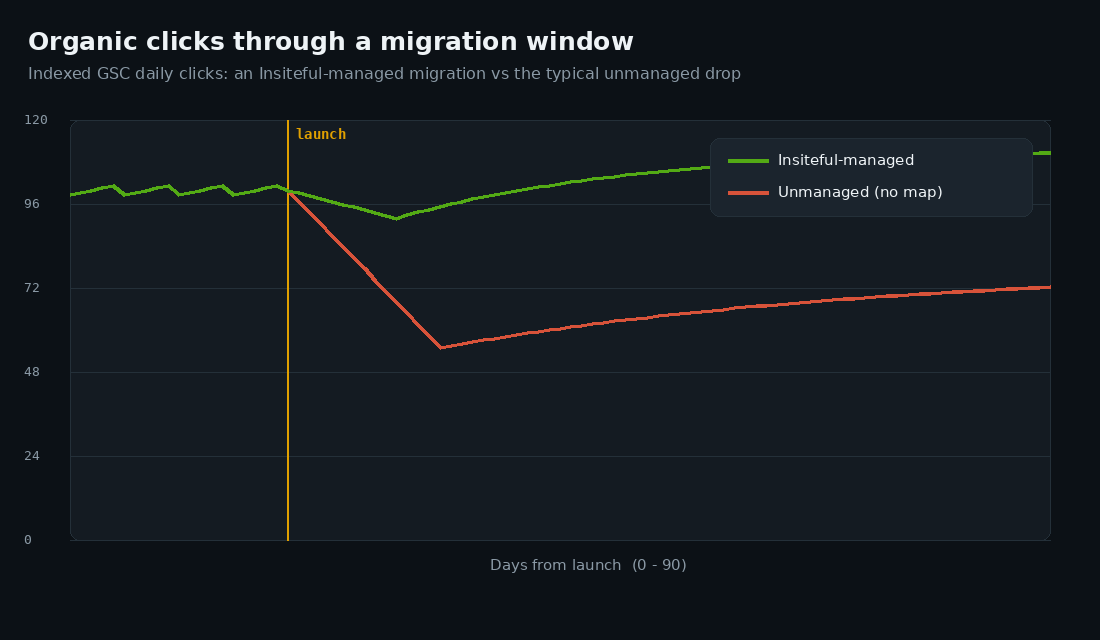
On a well-built migration we expect a shallow dip of under 10% that recovers within a few weeks for a small catalogue, and within two to three months for a large one. On an unmanaged one, the line craters 30% to 50% and claws back slowly over three to six months, if it fully recovers at all. The recovery curve is the single clearest scorecard of whether the redirect and canonical work was done properly.
We do not go quiet after launch. We submit the new XML sitemap to Search Console immediately to accelerate recrawling, then we watch three things daily for the first fortnight and weekly after that: the Pages report for any spike in 404s or “crawled, not indexed” URLs, server logs to confirm Googlebot is fetching the new URLs and following redirects, and the organic clicks line against the pre-launch baseline. A new 404 cluster usually means a redirect family we missed, and we add the rule the same day. Stores often see Core Web Vitals shift after a replatform too, so if your speed scores moved, our Core Web Vitals guide covers what Google measures and how we bring it back.
One number is worth holding onto from the research: across those 150 studied migrations, the single biggest predictor of a clean recovery was redirect-map completeness, and the second was preparation time, a minimum of four weeks between the start of preparation and launch in the successful cases versus under two weeks in the failures. Neither costs money. Both cost discipline. When a client asks why we will not compress the timeline to launch next week, this is the evidence we point to, because the fortnight we would save is the exact fortnight that decides whether the recovery curve is shallow or a cliff.
How we do it at Insiteful
We have run this playbook across more than forty Shopify migrations, and the sequence almost never changes. We build the redirect map in week one, before a single section of the theme is designed, because the map is the asset that protects the revenue and everything else is replaceable. The client signs off on the P1 tier in plain language so there is no debate later about which pages mattered.
We build and test the entire store behind the password page, run the full pre-launch checklist above as a literal gate, and only schedule DNS once every row passes. We have walked away from go-live dates because the metadata export was not finished, because launching a day late is free and launching with a broken map can cost a $4M AUD store six figures in lost orders. That is the trade we make every time.
After launch we own the recovery window, not just the build. We monitor the crawl and the clicks line for ninety days, patch missed redirect families as they surface in the logs, and we do not consider the project closed until organic traffic is back at or above the pre-migration baseline. The deliverable is not “a new Shopify store”. It is “a new Shopify store that kept its rankings”, and those are very different things.
The brands that come through cleanest are the ones that treat the move as a chance to consolidate rather than just lift and shift. If you are weighing up whether to move at all, or which Shopify tier to land on, our replatforming decision tree works through that, and our write-ups on WooCommerce to Shopify and Magento to Shopify cover what actually breaks on each path.
The bottom line
A Shopify migration does not have to cost you your rankings. The brands that lose 40% of their traffic are not unlucky, they are under-prepared: a partial redirect map, a canonical left on the theme default, metadata regenerated by accident, and a launch that doubled as the first test. The brands that come through with a shallow dip and a fast recovery did the unglamorous work first, mapped every URL one-to-one, verified every redirect resolved in a single hop, preserved their metadata, and watched the numbers for ninety days afterward.
It is process, not luck, and it is entirely buildable. If you are planning a move onto Shopify and your organic search is worth protecting, that is exactly the work we do first. Book a build assessment and we will audit your current URL inventory, scope the redirect map, and give you an honest read on what your rankings will do through the move, before you commit to a single line of theme code.