
Handing fulfilment to a 3PL is one of the biggest operational upgrades an Australian Shopify brand can make. You get back the hours spent packing orders in a back room, you stop paying for warehouse space you only fill in November, and your dispatch cut-off stops depending on whether the founder is home. Australians spent $82.6 billion AUD online in 2025, up 14% year on year, and the brands capturing that growth are not the ones taping boxes themselves.
But here is the part nobody tells you at the sales meeting: the 3PL is rarely the thing that fails. The integration is. We have audited Shopify stores where the warehouse was excellent and the customer experience was still falling apart, because orders synced late, stock counts drifted by hundreds of units, and tracking numbers landed in Shopify hours after the parcel left the dock.
Eight in ten shoppers say the delivery experience shapes their satisfaction with an online store, and 81% will stop buying from you if they receive a wrong order more than once. The wiring between Shopify and your 3PL decides both numbers. This is the integration playbook we run when we connect a client’s store to a fulfilment partner, including the settings most setups get wrong.
The Three Ways to Connect Shopify to a 3PL (And the One We Pick Most)
Every Shopify-to-3PL connection we have ever scoped lands in one of three architectures, and choosing the wrong one is the most expensive mistake you can make before a single order ships.
- The 3PL’s own connector app. The warehouse runs a Shopify app that registers as a fulfilment service. Orders route automatically, tracking flows back natively, and inventory updates come from the warehouse management system. Least maintenance, least flexibility.
- A middleware platform. Tools like Celigo, Patchworks or a lightweight integration layer sit between Shopify and the 3PL’s WMS. You get transformation rules, retry queues and logging, at the cost of another monthly licence and another vendor in the incident chain.
- A custom integration. A private Shopify app talking directly to the WMS API. Full control over routing rules, order tagging, batching and exception handling. This is what we build when a brand has logic the off-the-shelf connector cannot express, like routing engraved items to a different facility than stock items.
Our default is the 3PL’s native connector, provided it passes one test: it must be built on Shopify’s Fulfillment Orders API, not the legacy fulfilment endpoints. If the connector fails that test, we move to middleware or custom. A surprising number of Australian 3PLs still run integrations written before Shopify deprecated the old Fulfillment API in 2022, and those connectors cannot see holds, splits or multi-location routing. They work right up until the first edge case, which is usually your first big sale event.
What Your 3PL Must Support in the Fulfillment Orders API
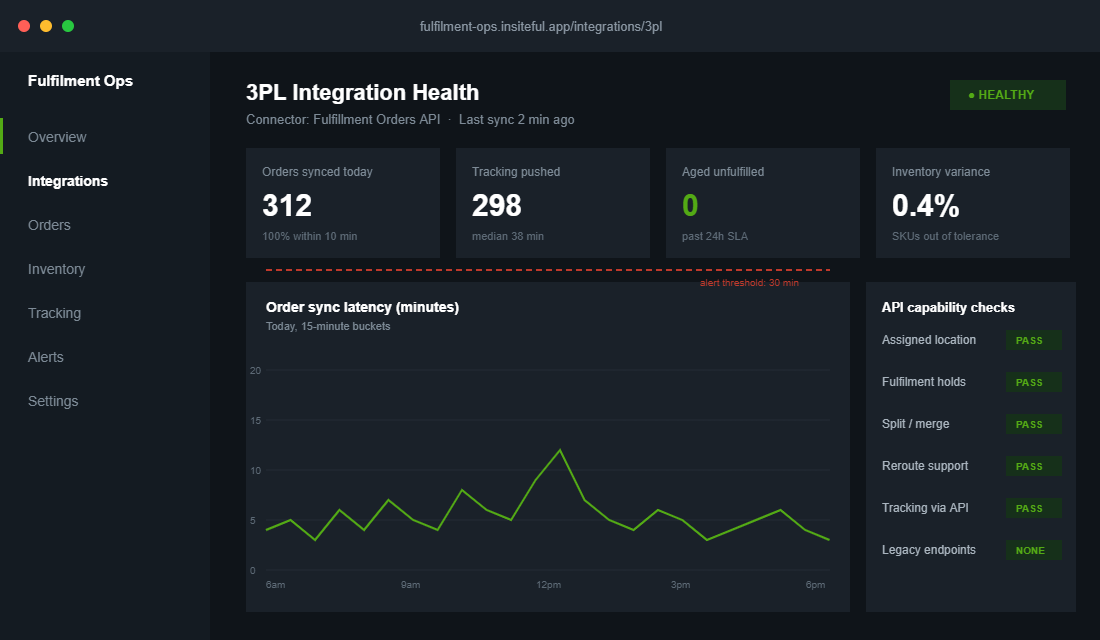
The Fulfillment Orders API models fulfilment the way a warehouse actually works. Every order generates one or more fulfillment orders, each assigned to a specific location, each with its own lifecycle. When we evaluate a 3PL’s integration on behalf of a client, we send their technical team five questions before any contract is signed.
- Do you read the assigned location? The assigned location ID is the single source of truth for who is responsible for fulfilling each item. Connectors that infer responsibility from order tags break the moment you add a second location, a pop-up store or Shopify POS.
- Do you support fulfilment holds? Since Shopify’s 2025-01 API version, multiple apps can place independent holds on one fulfillment order, each with its own handle. A fraud screening app and a pre-order app can both hold the same order without trampling each other. Your 3PL must respect those holds rather than shipping anything that appears in the queue.
- Can you handle splits and merges? The fulfillmentOrderSplit and fulfillmentOrderMerge mutations let an order be divided across shipments or recombined. If a customer orders five units and the warehouse has three, the connector should ship three and keep two on backorder, not freeze the whole order.
- Can you reroute? Fulfillment orders can be moved between locations via the API. When stock runs out in Melbourne, the order should reroute to the Sydney facility automatically.
- Do you push tracking through the fulfilment creation, not order notes? Tracking attached properly triggers Shopify’s native shipping notification, feeds the customer’s order status page, and flows to apps like Klaviyo for branded delivery emails.
The hold check matters more than most brands realise. Here is the shape of the call a well-built connector handles cleanly:
mutation {
  fulfillmentOrderHold(
    id: "gid://shopify/FulfillmentOrder/1046000789"
    fulfillmentHold: {
      reason: OTHER
      reasonNotes: "Pre-order item, release 28 June"
      handle: "preorder-hold-june-drop"
    }
  ) {
    fulfillmentOrder { status }
    userErrors { field message }
  }
}
If the 3PL’s developers cannot tell you how their system behaves when that hold exists, the integration will ship pre-orders early. We have seen it happen with a June drop that left the warehouse in May, and the re-ship and apology discounts cost the brand more than $4,000 AUD in a week.
Inventory Sync: Where the Drift Starts (And the Job That Stops It)
Order flow gets all the attention, but inventory sync is where 3PL integrations quietly rot. The warehouse counts stock in its WMS. Shopify holds its own counts per location. The connector reconciles the two on a schedule, and every gap between those syncs is a window where you can sell stock you do not have.
Industry picking error rates sit between 1% and 3%, and human error affects counts in roughly 43% of warehouses worldwide. Best-in-class operations hold 99.5% to 99.9% accuracy, which is exactly why you pay a professional 3PL. But even a great warehouse drifts: damaged units, supplier cartons that arrive short, returns processed into the wrong bin. Without a reconciliation routine, those small errors compound into oversells.
Three rules we configure on every build:
- One system owns the truth. The WMS is the source of record for on-hand stock. Shopify never overwrites it. Sync flows one way for quantities, with Shopify decrementing in real time as orders land.
- A safety buffer on fast movers. We hold back 2 to 5 units per high-velocity SKU so a picking error or a sync delay does not become an oversell. On a store doing 1,000 orders a month, the margin cost of the buffer is a fraction of one chargeback.
- A nightly reconciliation report. An automated job pulls Shopify’s inventory levels and the WMS export, diffs them by SKU, and flags any variance above a threshold. Drift above 2% on any SKU pages a human before the morning pick run.
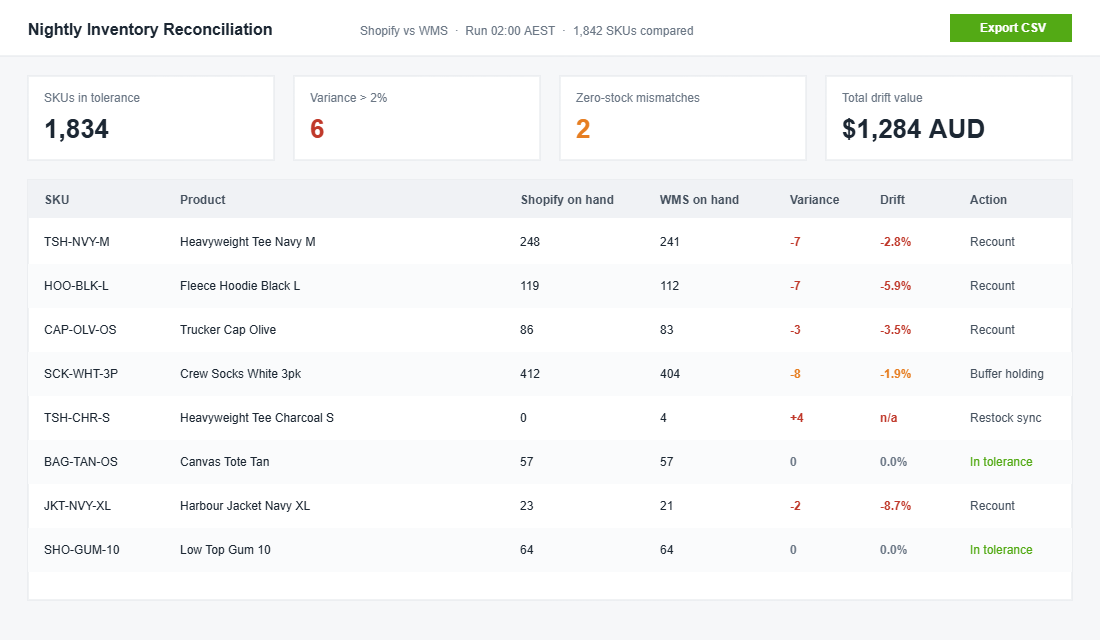
The reconciliation job is forty lines of code and a cron schedule. It is the cheapest insurance in ecommerce, and almost nobody runs it until after their first oversold weekend.
The Australian Carrier Layer: eParcel, Shippit and Starshipit
In the Australian market the 3PL integration almost never stands alone. There is a carrier management layer in the stack, and how it connects determines what your customer sees at checkout and after purchase.
Most of the builds we touch use Shippit or Starshipit between the warehouse and the carriers. Both connect Shopify to Australia Post eParcel and MyPost Business, StarTrack, CouriersPlease, Aramex and the internationals, and both can apply allocation rules so each parcel ships on the cheapest service that meets the delivery promise. Starshipit holds a 4.8 out of 5 rating on the Shopify App Store, and Australia Post itself recommends connecting eParcel through a platform like Shippit, Starshipit or ShipStation rather than integrating raw.
The configuration detail that matters: decide whether the carrier platform is driven by the 3PL’s WMS or by Shopify, and never both. When both systems can book carriers you get duplicate labels, double freight charges and tracking numbers that point at empty consignments. Our standard wiring is Shopify to WMS via the connector, WMS to carrier platform for label generation at pack time, and tracking flowing back up the same chain into Shopify’s fulfilment record.
Allocation rules earn their keep fast. A typical set we deploy:
{
  "rules": [
    { "if": "weight <= 0.5kg AND metro", "then": "AusPost eParcel Standard" },
    { "if": "weight <= 0.5kg AND regional", "then": "AusPost eParcel Standard" },
    { "if": "express_selected", "then": "StarTrack Express" },
    { "if": "weight > 5kg AND metro_same_city", "then": "CouriersPlease" },
    { "if": "international", "then": "AusPost International / DHL by zone" }
  ]
}
With 26% of Australian shoppers expecting same or next-day delivery when a purchase is urgent, and 69% wanting a range of delivery options at checkout, the allocation layer is not plumbing. It is the thing that lets a Brisbane store offer next-day metro delivery without paying express rates on every consignment.
Split Shipments, Partials and Holds: The Settings That Protect the Customer
Defaults are where good integrations go bad. Shopify can split a single line item’s quantity across multiple locations at checkout, and the Fulfillment Orders API supports partial fulfilment natively. But the behaviour your customers experience depends on configuration choices someone has to make deliberately.
The decisions we document for every client before go-live:
- Partial shipping policy. If one item of four is backordered, do we ship three now or hold the order? Shipping partials costs a second consignment fee, roughly $9 to $12 AUD metro. Holding costs customer patience. We default to shipping partials on orders over $150 AUD and holding below it, then tune by category.
- Hold release ownership. Who releases a held order: the app that placed it, the brand’s ops person, or the warehouse? We make this explicit in the runbook, because an unreleased hold is an order nobody is watching.
- Address validation timing. Validate before the order reaches the WMS, not after a failed delivery. A returned parcel plus re-ship runs $15 to $25 AUD by the time it is back out the door.
- Cancellation windows. Once the WMS has the order in a pick wave, cancellation needs a human at the warehouse. We set the sync delay to 10 minutes for exactly this reason: most “wrong size, please cancel” emails arrive within minutes of purchase.
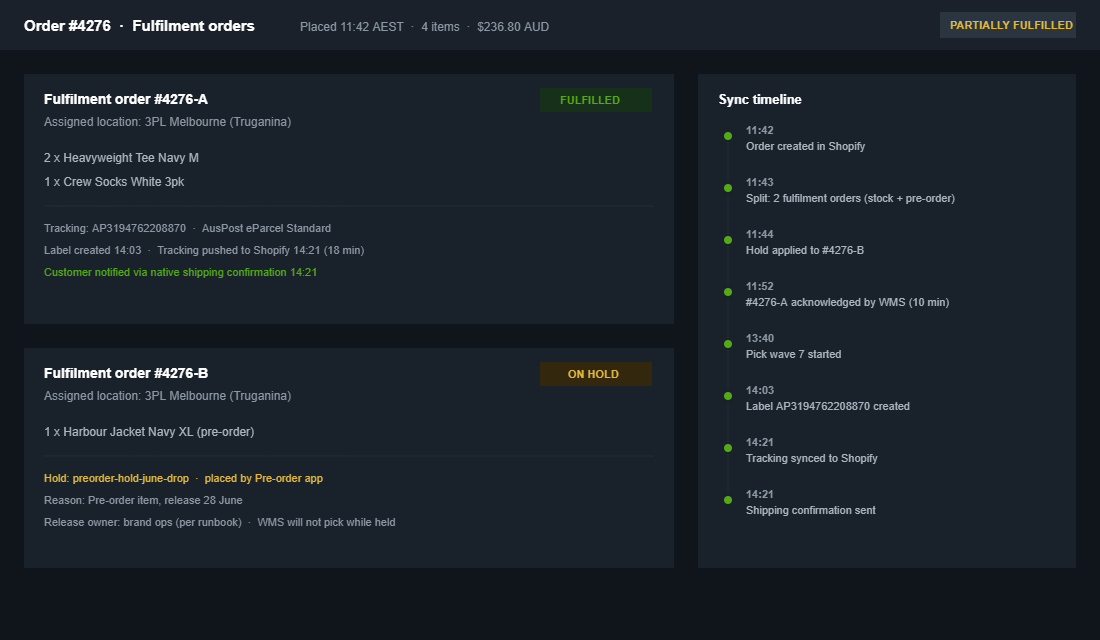
None of these decisions are technical. They are commercial policies expressed in integration settings, which is why an integration built without ops input always needs rework.
The Cutover Plan: Moving a Live Store Without Losing an Order
Connecting a new store to a 3PL is straightforward. Migrating a live store that is taking orders every hour is not, and this is where we see the most damage from rushed setups. Our cutover sequence:
- Week 1: parallel run on inventory. The WMS receives stock and syncs counts to a duplicate Shopify location that is not yet fulfilling. We watch drift for a full week before any order routes there.
- Week 2: trickle routing. A routing rule sends 10% of orders to the 3PL location. We verify every one: pick accuracy, packaging, label service level, tracking latency back into Shopify.
- Week 3: full cutover with the old channel warm. All new orders route to the 3PL. Any order created before cutover still fulfils from the old location, so nothing strands mid-flight.
- Week 4: decommission. The old location’s remaining stock transfers, the location deactivates, and the reconciliation job switches to the new facility as source of truth.
The single most common cutover failure is orders placed before the switch that reference the old location’s inventory. The Fulfillment Orders API reroute exists for exactly this case, and a connector that cannot reroute will leave a tail of stuck orders that someone has to fix by hand at 9pm.
What 3PL Integration Costs in Australia
Brands usually budget for the warehouse and forget the wiring. Current Australian market numbers, so you can sanity-check quotes:
- Pick and pack: $2 to $5 AUD per pick from most Australian 3PLs, with volume pricing kicking in past a few thousand orders a month.
- All-in fulfilment: a store processing around 1,000 orders a month typically lands between $7,000 and $8,500 AUD monthly before postage.
- Receiving: $15 to $30 AUD per carton at most facilities.
- Storage: roughly $16 to $20 AUD per pallet per month, and trending up. Australian storage rates jumped 13% in a single quarter in early 2025 on post-holiday inventory buildup.
- Integration: native connector apps are often free to $200 AUD a month. Middleware platforms run $300 to $1,000 AUD a month. A custom integration is a one-off build cost that makes sense when your routing logic, channel mix or ERP requires it.
The integration line is the smallest number on that list and the one that determines whether every other dollar performs. A $7,500 AUD monthly fulfilment bill with a connector that drops 2% of tracking updates produces more support tickets than the warehouse saves.
Monitoring the Integration After Go-Live
An integration that worked in week one and an integration that works in November are different things. Connectors fail quietly: a webhook subscription lapses, an API version gets sunset, a WMS update changes a field name, and suddenly 3% of orders are sitting unsynced while everyone assumes the system is fine. The brands that catch this in minutes rather than days are the ones watching four numbers.
- Order sync latency. Time from Shopify order creation to WMS acknowledgment. Healthy is under 10 minutes. We alert at 30.
- Tracking latency. Time from label creation at the warehouse to tracking on the Shopify fulfilment. Healthy is under an hour. Anything past 4 hours means customers are getting “where is my order” anxiety before the email arrives.
- Unfulfilled aged orders. Count of paid orders older than the dispatch SLA with no fulfilment and no hold. This should be zero at the close of every business day. It is the single best canary for a stuck queue.
- Inventory variance. The nightly reconciliation diff, expressed as a percentage of SKUs outside tolerance. A slow upward creep here predicts oversells weeks before they happen.
All four can be pulled from the Shopify Admin API and the WMS reporting endpoint on a schedule, pushed into a simple dashboard, and wired to alerts. The build takes a day. We have watched it pay for itself inside a month: one client’s connector silently stopped pushing tracking on a Friday afternoon, the latency alert fired at 5pm, and the fix shipped before a single customer emailed. Without the alert, the brand would have opened Monday to roughly 400 untracked orders and a support queue to match.
Peak season raises the stakes. Picking errors triple during peak periods across the industry, and dispatch SLAs stretch from 24 to 72 hours when warehouse systems fall behind volume. Your monitoring thresholds should tighten in October, not loosen. We re-baseline every client’s alerts before BFCM for exactly this reason.
How We Do It at Insiteful
When a client brings us a 3PL move, the integration work starts before the 3PL is chosen. We sit in on the technical evaluation and put the five Fulfillment Orders API questions to the shortlisted providers, because the answers regularly knock a candidate out before pricing is discussed.
Once the partner is locked, we map every order path the store actually produces: standard orders, pre-orders, subscriptions, B2B orders with NET terms, POS orders, exchanges. Each path gets traced through the connector to confirm where it lands and what can interrupt it. Then we configure the split, hold and routing policies with the client’s ops lead in the room, write the runbook, and stand up the nightly reconciliation job with alert thresholds wired to Slack.
Cutover runs on the four-week trickle plan above, and we stay on watch through the first sale event, because integration faults surface under load, not in week one. It is the same discipline we bring to ERP integrations and marketing stack wiring: the app is never the deliverable, the behaviour under pressure is.
If you are planning a move to a 3PL, or you are already on one and the tracking complaints tell you the wiring is off, that is exactly the kind of build we scope every week. You can see the kind of stores this discipline produces in our recent projects. See how we run a build at Insiteful.