
Here is a pattern we see on almost every brand-led build that lands on our desk. The founder has spent $15,000 AUD or more on a brand identity. There is a beautiful typeface in the guidelines, chosen carefully, with a full weight range and a licensing schedule. Then you open the Shopify store and none of it is there. The theme is running its default font stack, or worse, a half-installed version of the brand typeface that loads late, jumps the layout around, and only covers two of the six weights the designer specified.
It happens because typography sits in an awkward gap. Brand designers hand over font files and assume the developer will wire them in. Developers treat fonts as an asset upload and assume someone else checked the licence. Nobody owns the loading strategy, so the store ships with whatever happened by default. The result is a storefront that looks almost like the brand, which is a quiet way of saying it does not look like the brand at all.
This matters commercially, not just aesthetically. Research aggregated by Marq found that consistent brand presentation across platforms is associated with revenue increases of up to 33%, and 68% of companies report that brand consistency contributed at least 10% of their revenue growth. Your typeface is on your packaging, your ads, your email, and your socials. If the storefront, the place where the actual transaction happens, is the one touchpoint where it goes missing, you are paying for brand recognition and then dropping it at the moment of purchase.
This is the typography system we build into Shopify stores: the licensing checks, the loading architecture, the layout-shift fixes, and the token setup that keeps it all consistent for years. It is the same process we run on every brand-led build, and most of it can be retrofitted to an existing store in under a week.
Typography Is the Brand Asset Your Storefront Uses Most
A customer might see your hero image once per visit. They read your type the entire time they are on the site. Every product title, every price, every size label, every shipping line in the cart is typography. On a typical product page we audit, type accounts for well over 80% of the rendered content by area once you scroll past the gallery. It is the single most repeated brand signal on the storefront, and it is the one most stores treat as an afterthought.
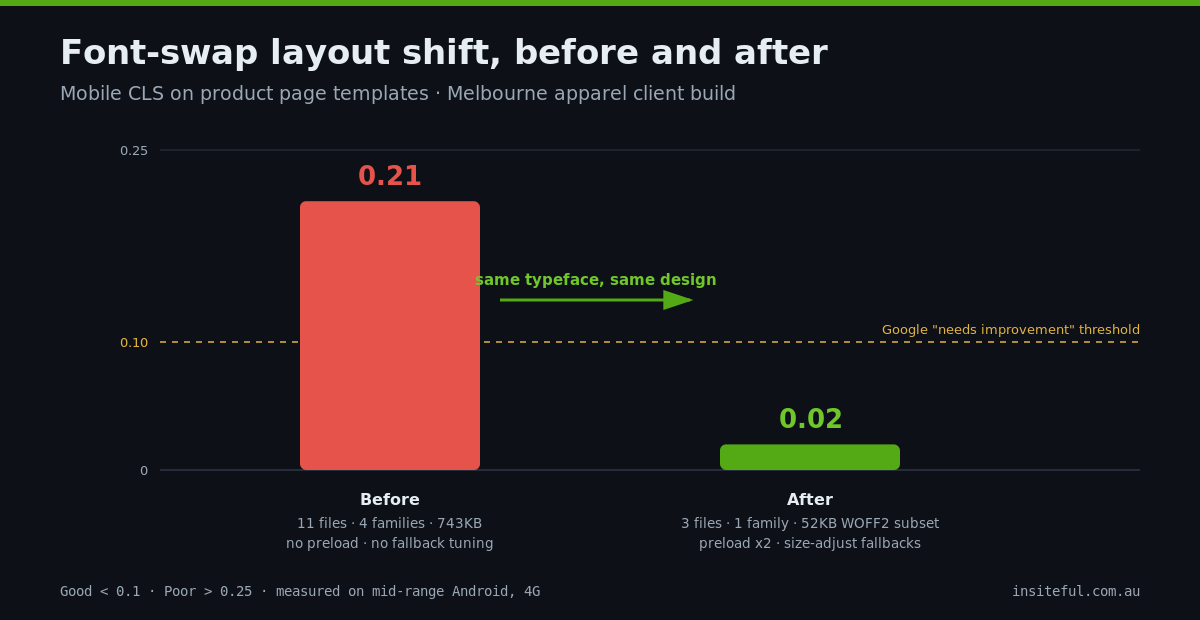
When we run a brand audit on an incoming project, the first thing we do is open DevTools and count what the store is actually loading. A recent example: a Melbourne apparel brand came to us with a store that was loading 11 separate font files across four different families, 743KB of type in total. The brand guidelines specified one family. The extra three had accumulated from apps, an old theme, and a review widget, each injecting its own typography. No single page used more than five of those files.
That audit takes ten minutes and tells you almost everything about the state of a storefront’s type. Open the Network tab, filter by Font, hard refresh, and record three things: how many files load, how many families they belong to, and the total transfer size. A healthy brand-led store loads two to four files from one or two families, totalling under 120KB. Anything beyond that is either waste or brand drift, and usually both.
The Licensing Check Almost Nobody Does
Before a single file goes near the theme, we check the licence, because the font file your brand designer handed over is almost certainly licensed for desktop use, not web use. They are different products. A desktop licence lets the designer set type in Figma or Illustrator. Serving that same file from your Shopify store to every visitor requires a web licence, and using it in a transactional email or a packaging print run can require different licences again.
For Australian brands the foundries we deal with most are Klim Type Foundry across the Tasman, Letters from Sweden, Colophon, and the big aggregators. Web licences are typically priced by monthly pageview tier and run anywhere from $300 to $2,500 AUD per year for the traffic ranges most growing DTC brands sit in, with perpetual options at some foundries. That is not a large number against what the identity cost, but it is a real legal exposure if it is missing, and foundries do enforce.
This is the checklist we run on every typeface before it goes into a build:
- Web licence exists and covers the storefront domain plus the checkout domain, which matters on Shopify because checkout can render on a Shopify-controlled domain
- Self-hosting is permitted. Some licences only allow serving via the foundry’s CDN, which rules out the architecture we prefer
- Subsetting is permitted. A few foundries prohibit modifying the font files, which blocks the biggest file-size win available
- The pageview tier matches reality. We check the licence tier against the last 12 months of sessions plus expected growth, so a good sales year does not put you in breach
- Weight coverage matches the design system. If the guidelines use six weights and the licence covers two, someone needs to make a call before we build, not after
About one project in three fails at least one of these checks on the first pass. It is always cheaper to find that out in week one than after launch.
The Three Ways to Load a Font on Shopify
Shopify gives you three viable architectures for getting a typeface onto the storefront, and they are not equal.
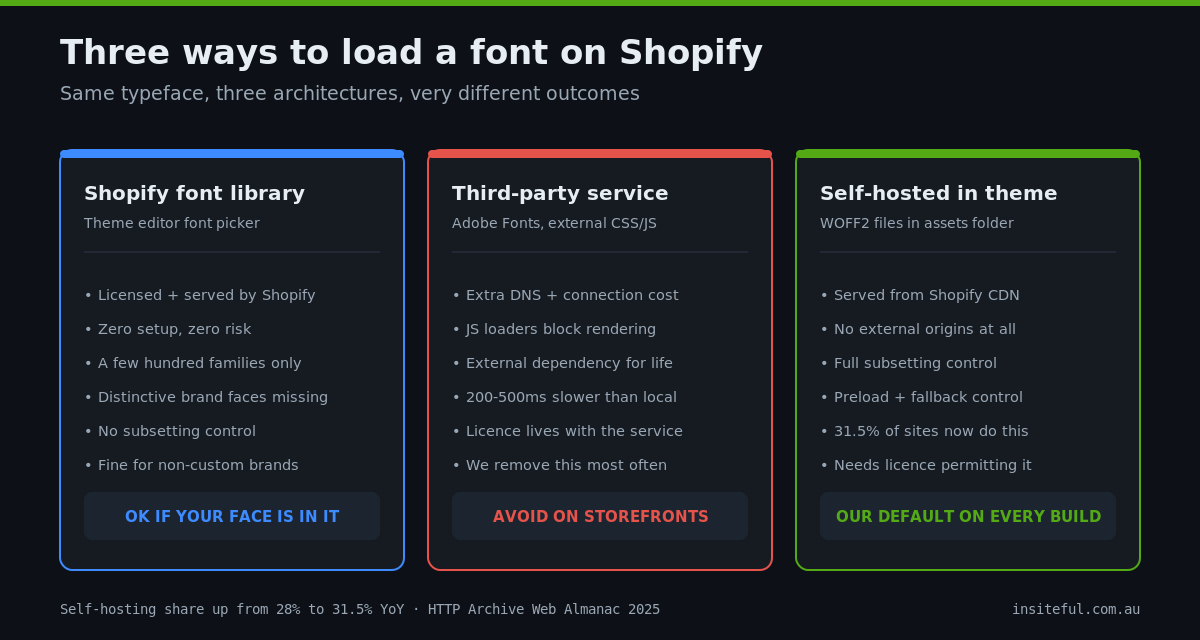
Option one is the Shopify font library. These are the fonts available through the theme editor’s font picker. Shopify licenses them, serves them from its own CDN, and handles the format negotiation. If your brand typeface happens to be in the library, this is genuinely fine, and it is the right answer for stores that have not commissioned a custom identity. The limitation is coverage: the library is a few hundred families, and the distinctive typefaces that anchor strong brand identities are mostly not in it. If your typeface is there, so is your competitor’s.
Option two is a third-party font service such as Adobe Fonts, loaded by script tag or external stylesheet. This is the option we remove most often. The font arrives via an extra DNS lookup and connection to a third-party origin, the JavaScript-based loaders hold rendering hostage to an external service, and you have added a dependency that can slow every page for the life of the store. The 2025 HTTP Archive Web Almanac data backs the move away from this pattern: 31.5% of sites now self-host their fonts exclusively, up from 28% the year before, and self-hosting typically saves 200 to 500 milliseconds against third-party serving.
Option three is self-hosting the files in the theme, served from Shopify’s CDN alongside your other assets. The font files live in the theme’s assets folder, the @font-face rules live in the theme’s CSS, and there are no external origins involved. This is our default on every brand-led build. It is the fastest option, the most reliable, and the only one that gives you full control over subsetting, loading behaviour, and fallbacks. The rest of this article assumes this architecture.
Self-Hosting Done Properly: WOFF2, Subsetting, Preload
Self-hosting badly is worse than not self-hosting at all, and there are exactly three things that separate a clean implementation from a slow one.
Ship WOFF2 only. WOFF2 now accounts for roughly 65% of all font requests on the web and has been supported by every browser that matters for years. There is no reason to upload TTF, OTF, EOT, or plain WOFF fallback formats to a Shopify theme in 2026. They roughly double your asset weight for browsers that no longer exist in your analytics.
Subset the files. Most commercial font files ship with glyph coverage for dozens of languages, currency symbols you will never print, and alternate character sets. For an Australian store selling in English, subsetting to Latin plus the punctuation and symbols you actually use cuts file size by 50 to 80%. We run every licensed file through a subsetting pipeline before it goes into the theme. A 48KB weight typically comes out at 14 to 18KB.
Preload the critical files only. The two files involved in above-the-fold rendering, usually the heading weight and the body regular, get a preload tag in theme.liquid so the browser fetches them before it discovers them in the CSS. Everything else loads on demand. Preloading all six weights defeats the purpose and delays the two that matter.
Here is the pattern as it goes into a build, with the files uploaded to the theme’s assets folder:
<!-- theme.liquid, inside <head>, before the CSS -->
<link rel="preload" as="font" type="font/woff2" crossorigin
      href="{{ 'brand-display-700.woff2' | asset_url }}">
<link rel="preload" as="font" type="font/woff2" crossorigin
      href="{{ 'brand-text-400.woff2' | asset_url }}">
/* base.css */
@font-face {
font-family: "Brand Display";
src: url("brand-display-700.woff2") format("woff2");
font-weight: 700;
font-style: normal;
font-display: swap;
unicode-range: U+0000-00FF, U+2018-201D, U+2026, U+20AC;
}
@font-face {
font-family: "Brand Text";
src: url("brand-text-400.woff2") format("woff2");
font-weight: 400;
font-style: normal;
font-display: swap;
unicode-range: U+0000-00FF, U+2018-201D, U+2026, U+20AC;
}On font-display, the Web Almanac numbers are revealing: about half of all pages now use font-display: swap, while only 0.5% use optional, which is technically the best-behaved setting for layout stability. Our standard is swap for the body family and the heading family, because brand type that silently fails to appear defeats the point of licensing it. Swap shows text immediately in the fallback font and swaps the brand font in when it arrives. The catch is that the swap itself can shift the layout, which brings us to the fix most stores never apply.
Killing the Layout Shift With Metric-Matched Fallbacks
Cumulative Layout Shift is the Core Web Vital that custom fonts most often damage. The mechanism is simple: the page renders in the fallback font, the brand font arrives with different letter widths and line heights, and every line of text reflows. Headlines wrap differently, buttons move, and on mobile the product title can push the add-to-cart button down by 40 pixels mid-tap.
The fix is a metric-matched fallback: a @font-face rule that takes a system font and adjusts its metrics to occupy the same space as your brand font, so the swap changes the letterforms without moving the layout. CSS gives you size-adjust, ascent-override, and descent-override for exactly this, and the values can be computed from the two fonts’ metrics tables.
/* Fallback tuned to match Brand Text metrics */
@font-face {
  font-family: "Brand Text Fallback";
  src: local("Arial");
  size-adjust: 104.3%;
  ascent-override: 92%;
  descent-override: 24%;
  line-gap-override: 0%;
}
:root {
  --font-body: "Brand Text", "Brand Text Fallback", Arial, sans-serif;
}
The numbers this produces are not subtle. On the Melbourne apparel build mentioned earlier, the mobile CLS on product pages was 0.21 before we touched it, almost entirely font-swap reflow, and well into the range Google flags as poor. After consolidating to one family, subsetting, preloading the two critical weights, and adding metric-matched fallbacks, CLS settled at 0.02. Same typeface, same design, no visible change to the brand. The store just stopped jumping. For the Core Web Vitals context around why that matters for rankings and conversion, our Core Web Vitals for Shopify guide covers what Google measures and the fix order we use.
The Type Scale Belongs in Tokens, Not in a PDF
Loading the font correctly is half the system. The other half is making sure the store keeps using it correctly after launch, when the marketing team is building landing pages and an app is injecting its own widget styles. The mechanism for that is a tokenised type scale: the sizes, weights, and line heights defined once as CSS custom properties, wired to theme settings, and consumed by every section in the theme.
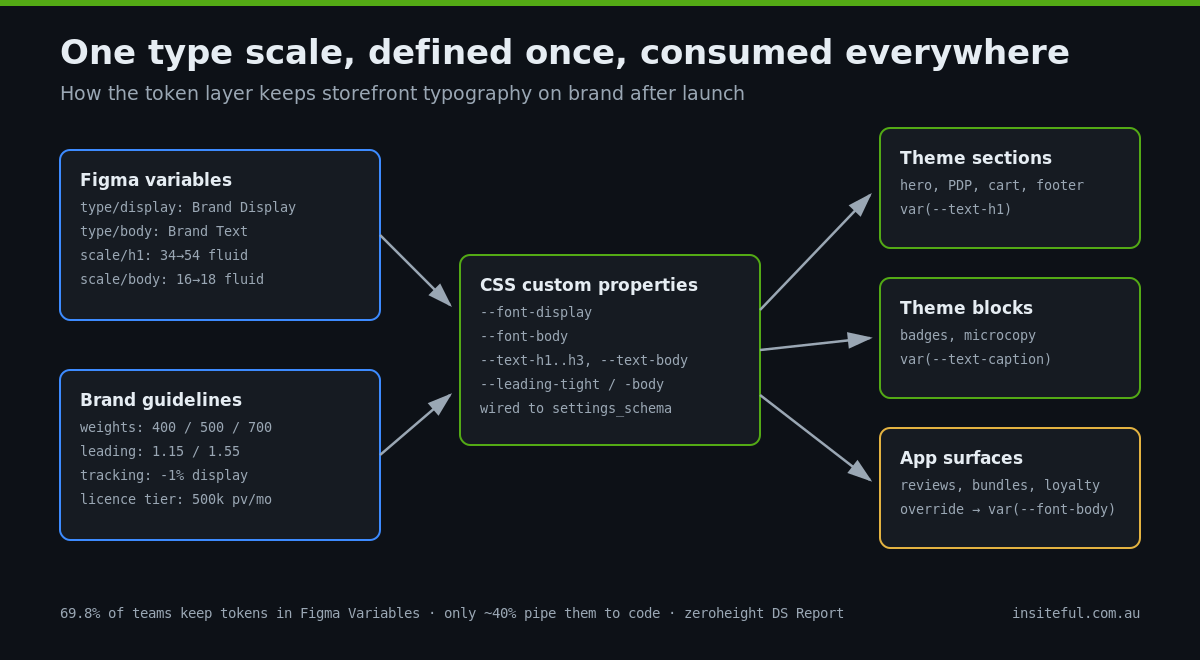
The industry is moving the same way on the design side. The zeroheight Design Systems Report found 69.8% of design teams have migrated their tokens to Figma Variables, but only around 40% have any pipeline syncing those tokens through to code. That gap, between a beautifully tokenised Figma file and a theme full of hard-coded pixel values, is exactly where storefront typography drifts away from brand guidelines. Our job on a build is to close it.
/* tokens generated from the brand's Figma variables */
:root {
  --font-display: "Brand Display", "Brand Display Fallback", Georgia, serif;
  --font-body: "Brand Text", "Brand Text Fallback", Arial, sans-serif;

  /* fluid scale: minimum, preferred, maximum */
  --text-h1: clamp(2.0rem, 1.4rem + 2.6vw, 3.4rem);
  --text-h2: clamp(1.6rem, 1.2rem + 1.7vw, 2.4rem);
  --text-h3: clamp(1.3rem, 1.1rem + 0.9vw, 1.75rem);
  --text-body: clamp(1.0rem, 0.95rem + 0.2vw, 1.125rem);
  --text-caption: 0.875rem;

  --leading-tight: 1.15;
  --leading-body: 1.55;
}
Every heading in every section then references var(--text-h2) rather than its own font-size, which means a brand refresh two years from now is a token edit, not a 40-file find-and-replace. The clamp() values give you a fluid scale that resizes smoothly between mobile and desktop without breakpoint jumps. We wire the core values to settings_schema.json so merchandisers can nudge the scale from the theme editor within limits we set, and the whole structure slots into the section and block architecture we covered in our theme blocks article. The type tokens are one layer of the broader system described in our piece on building a design system for Shopify; typography is simply the layer with the highest visibility and the highest drift risk.
The same token layer is what keeps app-injected content on brand. Review widgets, bundle apps, and loyalty popups all inject their own markup. With a documented token set, those surfaces inherit var(--font-body) through a handful of override rules instead of shipping Helvetica into the middle of your product page. This is component-level reuse applied to type, and the productivity research is consistent on what reuse is worth: studies aggregated by Figr and Sparkbox put development time savings from working against an established component library at 31 to 47% compared with building one-off.
What It Costs, and What Skipping It Costs
A complete typography system, meaning the licence check, subsetting pipeline, loading architecture, metric-matched fallbacks, and the tokenised scale, is folded into every brand-led build we deliver, and our builds run from $8,500 to $25,000 AUD depending on scope. Retrofitting the same system to an existing store is typically one to two weeks of work. Against Australian agency rates of $80 to $200 AUD per hour, that puts a standalone typography retrofit in the $3,000 to $8,000 AUD range for most stores, less if the theme is already well structured.
The cost of skipping it shows up in three places. You pay it in conversion when layout shift moves buttons under thumbs and Google holds the store back on Core Web Vitals. You pay it in brand equity when the storefront is the one channel that does not look like the brand, while the consistency research above says the consistent presentation is worth up to a third more revenue. And you pay it in rework when the eventual rebrand or theme migration discovers that font sizes are hard-coded in 60 places and nobody knows which app injected the fourth typeface. Two hundred dollars a month of accumulated small inefficiencies is invisible; a $12,000 AUD remediation project two years later is not. They are the same money.
How We Do It at Insiteful
Typography gets its own workstream in every Insiteful build, sitting between the design system definition and theme development. The process is the same whether we are building from scratch or rescuing an existing store.
- Audit and licence verification. We inventory every font file the store currently loads, map them to the brand guidelines, and verify web licences against real traffic, including checkout domain coverage.
- Subsetting and format pipeline. Licensed files are subset to the character sets the store actually uses and converted to WOFF2. The pipeline is scripted and kept in the project repo, so future weights get the identical treatment.
- Loading architecture. Self-hosted files in theme assets, preload tags for the two critical weights, font-display set per family, and metric-matched fallbacks generated from the font metrics.
- Token integration. The type scale from the brand’s Figma file becomes CSS custom properties wired to theme settings, consumed by every section and documented for the client’s team. Where the brand has photography and colour systems, the same token structure carries those too.
- Measurement. We baseline LCP and CLS on key templates before the work and re-test after, on real mid-range mobile hardware, not just desktop Lighthouse. The before-and-after goes in the handover document.
That last step matters because it turns typography from a matter of taste into a measured engineering outcome. When the CLS chart drops from red to green in the same week the storefront starts matching the brand guidelines, the investment case writes itself. You can see the standard of finish this produces across our recent projects, and the full build methodology, including where the typography workstream sits, is laid out on our process page.
If your brand guidelines and your storefront have drifted apart, or you are heading into a rebrand and want the new identity implemented properly the first time, book a build assessment. We will audit what your store is loading now, check the licensing position, and show you exactly what a clean typography system would change, with numbers attached.