
In April 2026 the Federal Court ordered Emma Sleep to pay $15 million AUD in penalties over its online sale pricing. Two entities, $7.5 million each. The ACCC’s case materials included a screenshot of the brand’s own website: a strikethrough price, a discount badge, and a countdown timer ticking down beside it. The problem was not that the timer existed. The problem was that promotions were extended, repeated, or swapped for a near-identical offer once the clock hit zero, so the deadline the shopper was reacting to was not a real deadline.
That case is the warm-up. The Competition and Consumer Amendment (Unfair Trading Practices) Bill 2026 passed Parliament in early July 2026 and takes effect on 1 July 2027. Its explanatory memorandum names countdown timers and low-stock notifications that create an artificial sense of urgency as examples of the conduct it is designed to catch. The maximum penalty for a company is the greater of $100 million, three times the benefit obtained, or 30% of adjusted turnover for the breach period.
Every Australian Shopify operator now has a fixed window to audit the urgency elements on their storefront. We have spent the last few months doing exactly that inside client builds, and the pattern is consistent: most urgency UX on Australian Shopify stores is not deliberately deceptive, it is simply unwired. A theme setting was switched on, an app was installed during a BFCM scramble, and nobody connected the message to a data source that could defend it. This article is the technical version of that audit: what each element claims, how to wire it to real data in Liquid, and what evidence keeps the claim standing.
Every Urgency Element Makes One of Three Claims
Before writing a line of code, separate your urgency components by the claim they make. This is the single most useful thing we do in a storefront audit, because each claim has a different data source and a different failure mode.
- A quantity claim. “Only 3 left.” This asserts a fact about inventory. It is checkable against your Shopify inventory records, which makes it the easiest of the three to defend and the most embarrassing to get wrong.
- A time claim. “Sale ends in 04:12:33.” This asserts that a price will change at a specific moment. It is defensible only if the price actually changes then, and only if the same deadline is shown to every visitor.
- A demand claim. “14 people are viewing this right now.” This asserts live behaviour of other shoppers. Almost no Shopify store can substantiate it, because almost no store is measuring concurrent product-page sessions and piping that number into the theme.
Run this classification across your storefront and write down, for each element, the system that would have to be queried to prove the statement true. If you cannot name the system, you have found a compliance problem and a conversion problem at the same time. The Consumer Policy Research Centre found that 83% of Australians have experienced one or more negative consequences from design features intended to influence their behaviour, and that younger consumers were 65% more likely to spend more than they intended. Shoppers are primed to test these elements. When a timer resets on refresh, the shopper has not just discounted that timer, they have discounted everything else the page told them.
The commercial argument for honest urgency is not softer than the compliance argument, it is the same argument. Baymard’s 2025 meta-analysis across 50 studies puts average cart abandonment at 70.22%, with 39% of abandonment traced to unexpected extra costs at checkout. Trust is the scarce resource in that funnel, not attention. Manufactured deadlines spend trust to buy attention, which is a bad trade on a product a customer is considering for the first time.
Wiring Low-Stock Messaging to Real Inventory
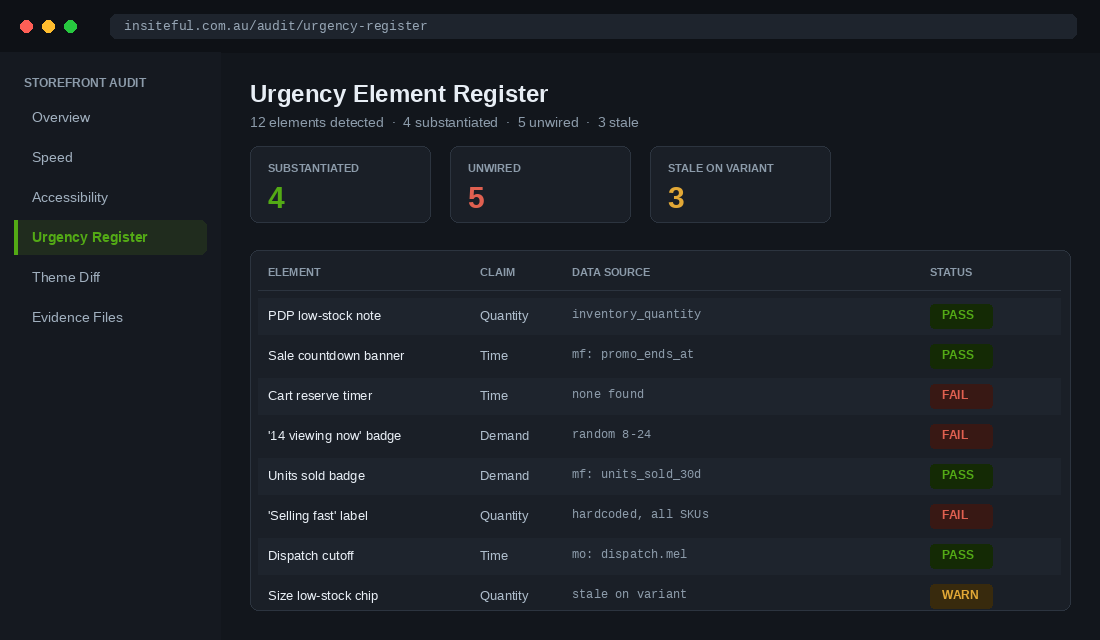
Quantity claims are where we start on every build, because Shopify already holds the truth and most themes simply are not asking for it. Shopify has no built-in concept of a “low” stock threshold on the storefront. It tracks available quantity per variant, and it is up to your theme to decide what counts as low and whether to say anything about it.
The value you want is variant.inventory_quantity. The threshold should not be hardcoded in a snippet. A threshold of 3 is meaningful for a handmade ceramic planter and meaningless for a consumable that moves 400 units a week, so we store it as a product metafield and fall back to a section setting. That way merchandisers can tune it per product without a theme deploy.
Here is the snippet shape we ship. Note the guard on inventory_management: if a variant is not tracked, Shopify returns a value that has nothing to do with stock on hand, and printing it is how stores end up telling customers there are minus seven units left.
{%- liquid
  assign v = product.selected_or_first_available_variant
  assign threshold = product.metafields.custom.low_stock_threshold.value | default: section.settings.default_low_stock
  assign qty = v.inventory_quantity
-%}

{%- if v.inventory_management != blank and v.inventory_policy == 'deny' -%}
  {%- if qty > 0 and qty <= threshold -%}
    <p class="stock-note stock-note--low" data-stock="{{ qty }}">
      Only {{ qty }} left in our Melbourne warehouse.
    </p>
  {%- elsif qty <= 0 -%}
    <p class="stock-note stock-note--out">Currently out of stock.</p>
  {%- endif -%}
{%- endif -%}
Three details in that snippet matter more than they look.
- The
inventory_policycheck. If a variant is set to continue selling when out of stock, a low-stock message is actively false. The customer can buy twenty of them. Only products on a deny policy should ever carry a scarcity message. - The threshold comes from a metafield. Merchandisers own it, developers do not. We define it as an integer metafield under the
customnamespace and expose it in the product admin so the person who knows the replenishment lead time is the person setting the number. - The quantity is printed, not implied. “Only 3 left” is a stronger and safer message than “Low stock”, because it is specific, falsifiable, and it disappears on its own when stock is replenished. Vague scarcity language is what regulators look at hardest.
The Variant Switching Trap
Here is the gotcha that breaks roughly half the low-stock implementations we inherit. Most themes hydrate variant switching from the product JSON blob, the one produced by passing the product object through the json filter. That blob no longer carries inventory_quantity per variant. Shopify removed it some years ago. So a store switches from size 10 to size 12, the price and image update instantly from the JSON, and the stock message keeps showing the count for size 10.
The customer is now reading a scarcity claim about a variant they are not looking at. That is the exact shape of an unsubstantiated claim, and it happened by accident.
The fix is to re-render the block server-side using the Section Rendering API rather than trusting client state. On variant change, fetch the product URL with the variant and section ID appended, then swap the fragment.
async function refreshStockNote(variantId, sectionId) {
const url = `${window.location.pathname}?variant=${variantId}§ion_id=${sectionId}`;
const res = await fetch(url);
if (!res.ok) return;
const html = new DOMParser()
.parseFromString(await res.text(), 'text/html');
const fresh = html.querySelector('.stock-note');
const current = document.querySelector('.stock-note');
if (fresh && current) current.replaceWith(fresh);
if (!fresh && current) current.remove();
}Note the last line. If the newly selected variant has no low-stock message, the old one must be removed, not left in place. A stale scarcity message is worse than no message, and it is the single most common defect we find when auditing an existing product template.
Countdown Timers That Survive a Refresh
A countdown timer is defensible under one condition: the deadline is real, it is the same for every visitor, and something actually changes when it expires. Everything else is decoration on a false statement.
The failing pattern is easy to spot in a theme audit. It looks like this, and if you find it in your codebase, it is the first thing to remove.
// Anti-pattern. Do not ship this.
let ends = localStorage.getItem('promo_ends');
if (!ends) {
  ends = Date.now() + 1000 * 60 * 60 * 4;   // "4 hours" from first visit
  localStorage.setItem('promo_ends', ends);
}
That timer is per-browser fiction. Clear your storage and the sale starts again. Two shoppers looking at the same page see two different deadlines. There is no underlying event, so there is nothing to substantiate if anyone asks.
The pattern we ship instead anchors the deadline to a value stored in Shopify, rendered server-side into the markup. The merchandiser sets one date and time. Every visitor in every timezone counts down to the same instant, and the browser is only responsible for formatting.
{%- assign ends_at = collection.metafields.custom.promo_ends_at.value -%}
{%- if ends_at != blank -%}
  <promo-countdown
    data-ends-at="{{ ends_at | date: '%Y-%m-%dT%H:%M:%S%z' }}"
    data-label="Sale pricing ends">
    <span data-countdown-output></span>
  </promo-countdown>
{%- endif -%}
The web component that drives it has one rule that separates an honest timer from a manipulative one: when the clock reaches zero, the element removes itself. It does not roll over, it does not reset, it does not quietly add another four hours.
class PromoCountdown extends HTMLElement {
  connectedCallback() {
    this.endsAt = new Date(this.dataset.endsAt).getTime();
    this.output = this.querySelector('[data-countdown-output]');
    this.tick();
    this.timer = setInterval(() => this.tick(), 1000);
  }
  tick() {
    const remaining = this.endsAt - Date.now();
    if (remaining <= 0) {
      clearInterval(this.timer);
      this.remove();          // expire honestly, never reset
      return;
    }
    this.output.textContent =
      `${this.dataset.label} in ${this.format(remaining)}`;
  }
  disconnectedCallback() { clearInterval(this.timer); }
}
customElements.define('promo-countdown', PromoCountdown);
The operational discipline behind this is harder than the code. If the timer expires at 11:59pm on Sunday, the price must go back up at 11:59pm on Sunday. That means the discount is driven by a scheduled price change or an automatic discount with a genuine end date, not by a banner that keeps running while the offer quietly continues. The Emma Sleep matter turned substantially on promotions that were extended, repeated, or replaced with a similar offer, which is what made the urgency misleading rather than merely aggressive.
A practical test we run before signing off a campaign: take a screenshot of the product page at the moment the timer hits zero, then take another an hour later. If the price is identical in both, the timer was never telling the truth.
Demand Signals Are the Hardest Claim to Defend
“17 people are viewing this product.” “8 sold in the last hour.” These are the widgets we most often recommend removing outright, and the reason is simple. In almost every store we audit, the number is generated by a random function with a plausible range, seeded per page load. There is no data source at all.
If you want to keep a demand signal, it has to be computed from something you actually store. There are two honest versions.
- Historical sales velocity, stated as history. “142 sold in the last 30 days” is a fact sitting in your order data. Compute it on a schedule with Shopify Flow or a scheduled job, write it to a product metafield, and render it from Liquid. It is a demand signal that never needs a live connection and never needs to be defended beyond an export from your admin.
- Genuine concurrent sessions. If you already run a real-time analytics layer, you can pipe an actual concurrent-viewer count in. Most stores do not have this, and building it for the sake of a badge is a poor use of engineering budget on a $30,000 AUD build.
The Flow-to-metafield version is the one we ship most often. The workflow runs nightly, aggregates the last 30 days of line items per product, and writes an integer to custom.units_sold_30d. The theme then renders it only above a floor, because “3 sold in the last 30 days” is a demand signal pointing the wrong way.
{%- assign sold = product.metafields.custom.units_sold_30d.value | default: 0 -%}
{%- if sold >= 25 -%}
  <p class="demand-note">{{ sold }} sold in the last 30 days.</p>
{%- endif -%}
Notice the tense. “Sold in the last 30 days” is a claim about the past, which you can evidence with a report. “People are viewing this right now” is a claim about the present, which you can only evidence with live instrumentation. Shifting tense is the cheapest compliance win available on a product page, and in our testing it costs almost nothing in conversion because the psychological function is the same: it tells the shopper that other people have made this decision.
Cart and Checkout: What You Can Honestly Say About Reservations
A large number of Australian stores show a cart message along the lines of “Your items are reserved for 10:00”. On standard Shopify, that statement is usually false, and it is worth being precise about why.
Adding an item to a cart does not reserve inventory. Shopify holds stock only once a customer reaches checkout, and the duration of that hold depends on the plan and the checkout state. A cart timer counting down from ten minutes on the cart page is counting down to nothing. Nothing expires, nothing is released, and the customer who calls your support team after being told their items were “released” is going to get a confusing answer.
What you can say honestly on a cart drawer or cart page:
- Stock status at the moment of render. “Only 2 left” is fine on the cart line item if it is pulled fresh from the same variant data as the product page.
- Genuine cutoff times. “Order in the next 3 hours for same-day dispatch from Sydney” is a real operational deadline tied to your courier pickup. It is the strongest urgency message most Australian stores have available and it is almost always underused.
- Real promotion end times. The same server-anchored deadline from the product page, if the offer applies at cart level.
The dispatch cutoff deserves special attention. It is verifiable, it is genuinely useful to the shopper rather than merely pressuring, and it maps to something the business already controls. We usually build it as a metaobject holding the cutoff time and the list of public holidays, so the message goes quiet on a Sunday instead of promising same-day dispatch from a closed warehouse.
{%- assign cutoff = shop.metaobjects.dispatch.melbourne -%}
{%- if cutoff.is_business_day.value and cutoff.minutes_remaining.value > 0 -%}
  <p class="dispatch-note">
    Order within {{ cutoff.minutes_remaining.value | divided_by: 60 }} hours
    for same-day dispatch from our Melbourne warehouse.
  </p>
{%- endif -%}
The Evidence File: What You Keep So the Claim Holds
Under the incoming regime, the useful question is not “is this element allowed” but “if someone asked me to substantiate this on a Tuesday afternoon, what would I send them”. That is a documentation problem, and it is one most Shopify teams have never had to solve.
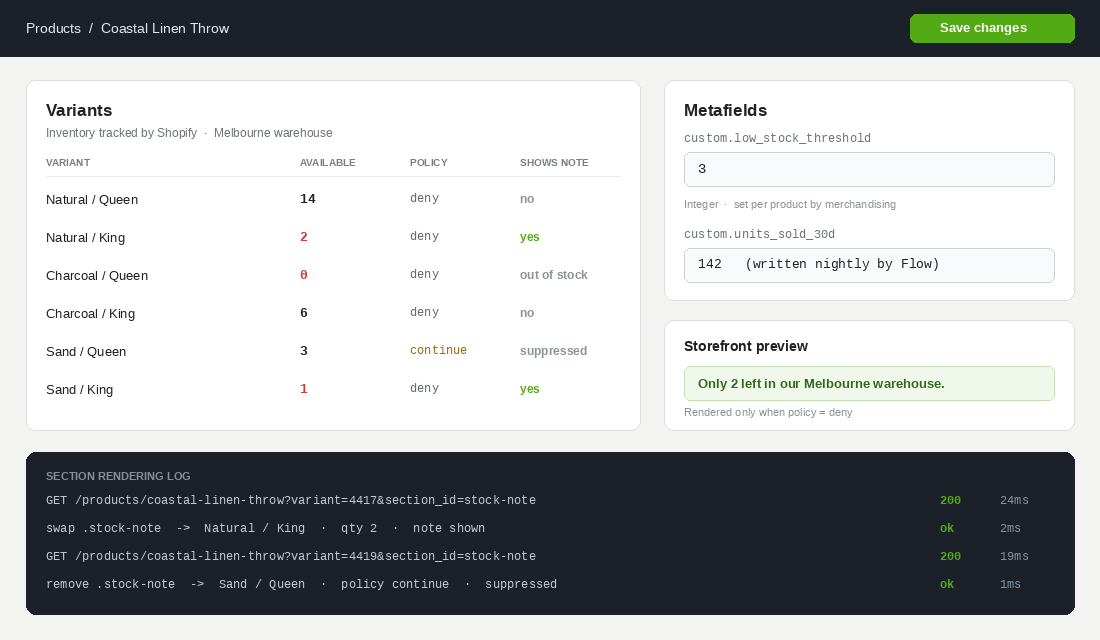
We maintain a simple register alongside the theme, checked into the repository as a markdown file so it moves with the code. One row per urgency element on the storefront.
| Element | Claim type | Data source | Owner | Evidence on request |
|---|---|---|---|---|
| PDP low-stock note | Quantity | variant.inventory_quantity, deny policy only | Ops | Inventory export, timestamped |
| Sale countdown | Time | Collection metafield promo_ends_at | Marketing | Discount config plus before/after price screenshots |
| Units sold badge | Demand | Flow job to custom.units_sold_30d | Ops | 30-day sales report by SKU |
| Dispatch cutoff | Time | Dispatch metaobject, per warehouse | Fulfilment | Courier pickup schedule |
Building this register takes about two hours for a typical storefront and it consistently finds things nobody knew were live. On one recent audit of a homewares brand turning over roughly $4 million AUD a year, the register surfaced a “selling fast” badge that had been installed by an agency three years earlier, was firing on 100% of products regardless of stock, and had survived two theme upgrades because nobody could remember what set it.
The register also gives you a named owner per element. Failures here are rarely a developer decision. They happen when a marketing calendar slips and a promotion is quietly extended while the banner keeps its original copy.
Measuring Whether Urgency Earns Its Place
The assumption underneath most urgency UX is that it lifts conversion. Sometimes it does. But the tests we see run are almost always measured on the wrong window and the wrong metric, which is how a tactic that damages a brand survives for years inside a store.
Three corrections we apply to any urgency test.
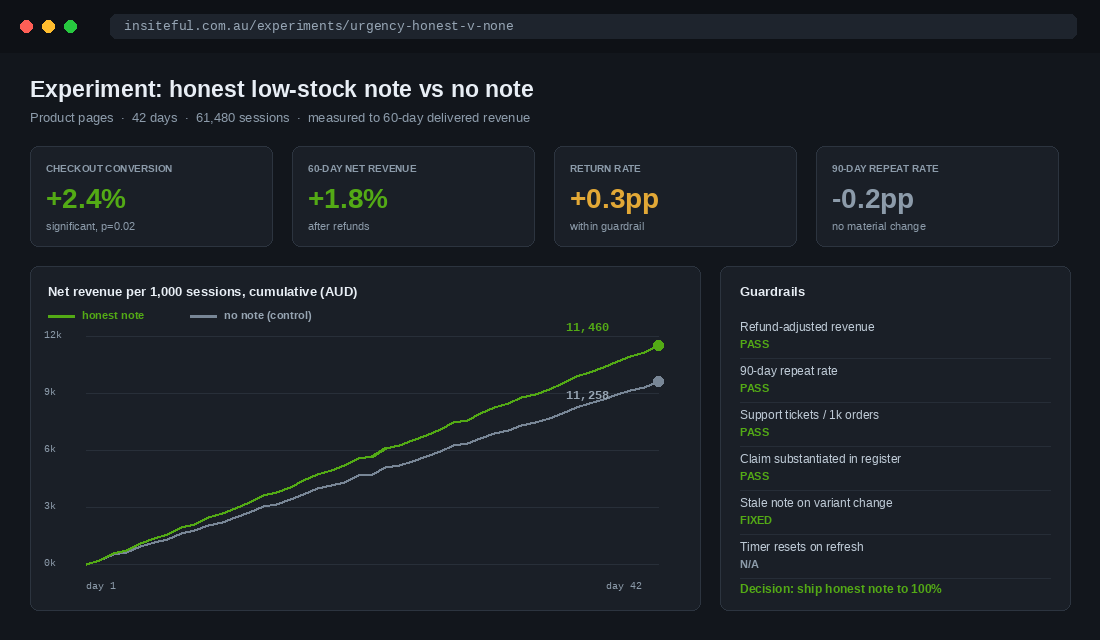
- Measure to delivered revenue, not to checkout completion. Pressure tactics reliably lift immediate conversion and reliably lift returns and cancellations. If your test ends at the thank-you page, you have measured half the effect. Run the window out to 60 days and net off refunds.
- Add a repeat-purchase guardrail. The cost of manufactured urgency lands on the second order, not the first. Segment the test cohorts and compare 90-day repeat rate. A variant that lifts first-order conversion by 2% and drops repeat rate by 5% is losing money on any reasonable customer value assumption.
- Test the honest version against nothing, not against the dishonest version. The useful comparison for an Aussie brand right now is a real low-stock message versus no message at all, because the dishonest variant is not a shippable option after 1 July 2027 regardless of how it performs.
What we see in practice is that specific, true urgency signals hold most of the conversion benefit of the manufactured ones. A genuine “only 2 left” on a product that genuinely has two units carries more weight than a permanent “selling fast” badge, because the first one is rare and the second one is wallpaper. Scarcity works through contrast. A store that shouts scarcity on every product has no contrast left to trade on.
There is a second-order effect worth naming. Research into scarcity cues has found they increase frustration and irritation compared with a control, and that shoppers who miss out due to advertised scarcity are angrier than shoppers who miss out for other reasons. Urgency does not just move a purchase forward. It changes how the customer feels when the purchase does not happen, and most measurement frameworks never look at that group.
A Remediation Sequence for the Next Eleven Months
With 1 July 2027 as the fixed date, the work splits cleanly into three phases. We run it in this order because the first phase costs nothing and removes most of the exposure.
- Phase one, inventory and removal. Build the register. Identify every urgency element and its data source. Anything with no data source comes off the storefront now. This is usually a theme setting toggle or an app uninstall, and it typically takes a single afternoon. Most stores remove between two and five elements at this stage.
- Phase two, rewiring. Connect the elements worth keeping: metafield-driven thresholds, deny-policy guards, Section Rendering on variant change, server-anchored countdowns, Flow jobs for sales velocity. Budget a week of development for a typical Online Store 2.0 theme, longer if the store carries a heavily customised legacy theme.
- Phase three, process. Assign owners, add the register to your campaign launch checklist, and put a recurring item on the promotions owner to confirm scheduled price changes match advertised deadlines. This is the phase teams skip, and the phase that keeps you compliant twelve months later.
One note on apps. A large share of urgency widgets on Australian stores arrive through third-party conversion apps that render their own DOM after page load. If you cannot see the app’s data source in its settings, assume there is not one. Ask the vendor where the number comes from, in writing, and file the answer in the register. If the answer is a randomised range, that app is a liability on your product page, and it is almost certainly costing you Largest Contentful Paint.
How We Do It at Insiteful
Urgency UX sits inside our standard storefront audit, and we treat it as an engineering problem rather than a copy problem. When we take on a build or a rescue, the first thing we do on the product template is trace every dynamic claim back to a source of truth. If a message on the page cannot be traced to a variant field, a metafield, a metaobject, or a scheduled job, it does not ship.
Practically, that means a few fixed decisions across our builds. Low-stock thresholds always live in metafields, never in Liquid, so merchandisers can tune them per product without a deploy. Stock messaging always re-renders through the Section Rendering API on variant change, so it cannot go stale. Countdown deadlines always come from the server and always remove themselves at zero. Demand signals are always historical and always evidenced by a report the client can pull themselves.
We also hand over the register. It is a small artefact, but it is the thing that survives us. It tells the client’s next developer why an element exists, what proves it, and who owns it, which is the difference between a storefront that stays defensible and one that drifts back to “selling fast” badges on every product within eighteen months.
Across the Shopify builds we have shipped for Australian brands, the stores with the strongest conversion are not the ones shouting loudest. They are the ones where every claim on the page happens to be true, which means the shopper’s instinct to test the page finds nothing wrong. That is a slower advantage to build and a much harder one for a competitor to copy.
The Short Version
Classify every urgency element by whether it makes a quantity, time, or demand claim. Wire quantity claims to variant.inventory_quantity with a deny-policy guard and re-render them on variant change. Anchor time claims to a server-side deadline that expires honestly and matches a real scheduled price change. Convert demand claims from present tense to past tense so they are evidenced by a report. Keep a register so any claim can be substantiated on request, and measure the whole thing on delivered revenue and repeat rate rather than checkout completion.
The $15 million AUD Emma Sleep penalty was handed down under the existing law, before the new prohibition even commences. The direction of travel is not ambiguous, and the eleven months between now and 1 July 2027 is more than enough time to do this properly if the work starts as an audit rather than a panic.
If you are weighing up which urgency elements on your own Shopify store can actually be substantiated, that is exactly the kind of audit we run before we scope a build. See how our process works.