
Every Shopify theme we inherit has an icon problem. It is never the problem the client calls us about. Nobody opens a store and says “the icons are wrong.” It surfaces slower than that: a chevron in the FAQ accordion that sits at a slightly different angle to the chevron in the mega menu, a cart glyph with a 1.5px stroke sitting beside a search glyph with a 2px stroke, three different tick marks across the trust badges, the shipping bar and the variant swatches, each one arriving with a different app install and each one a slightly different green.
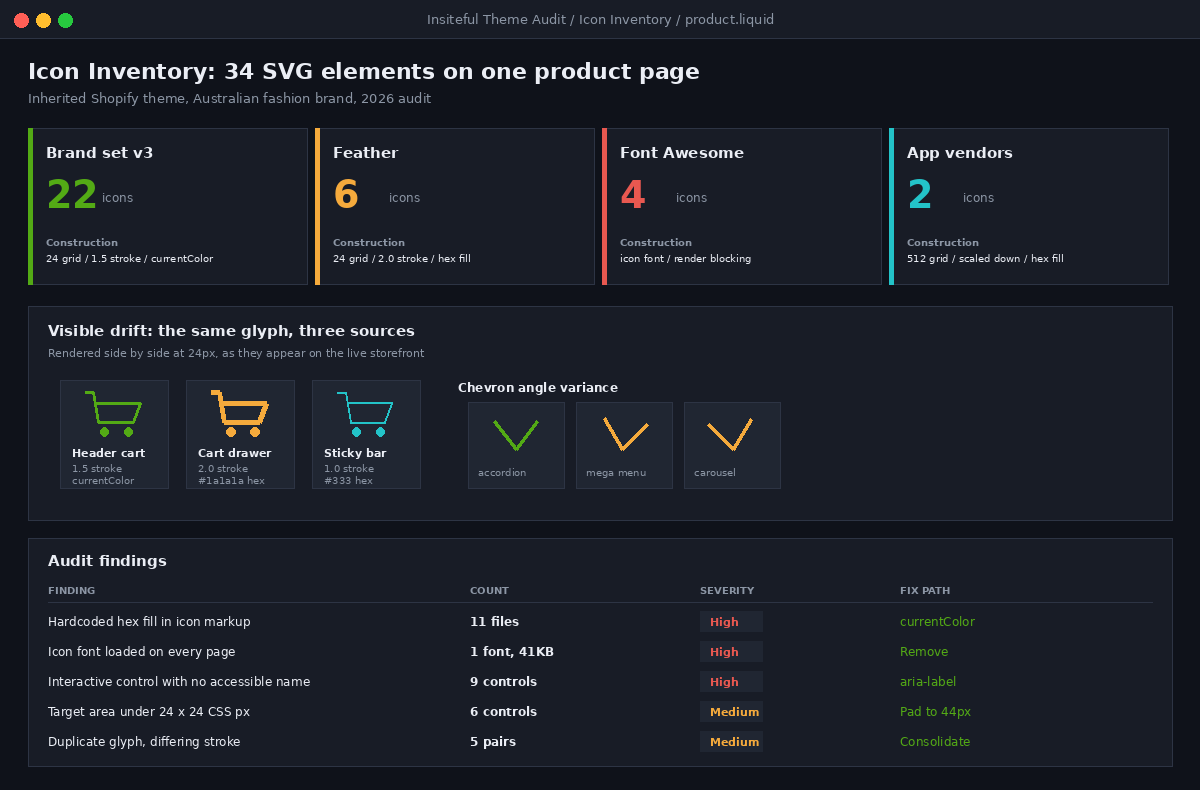
Across the last twelve themes we audited, the median number of distinct SVG elements rendered on a single product page was 34. The highest was 84. Not 84 icons. Eighty-four SVG elements, many of them near duplicates of each other with different viewBox values, different stroke weights, and in four cases hardcoded hex fills that ignored the theme colour scheme entirely. When that store later switched to a dark section background, eleven icons disappeared.
Icons are the smallest unit of a brand system and the least governed. Typography gets a spec. Colour gets a token set. Photography gets an art direction doc. Icons get added by whoever needs one at 4pm on a Thursday. This article is the pattern we use to stop that: how we structure an icon set inside a Shopify theme, the delivery method we standardised on and why, the sizing and accessibility rules we hold, and the six-check audit we run on every store that walks in the door.
Icons Are a Brand Surface, Not a Development Detail
A mid-size Australian fashion brand we worked with had spent roughly $45,000 AUD on a brand refresh. New wordmark, new type stack, a beautiful 40-page identity document. Page 31 specified the icon set: 24px grid, 1.5px stroke, rounded caps, geometric construction. Nine months later we counted the icons actually rendering on their Shopify storefront. Twenty-two of the 38 icons on the site came from the brand set. The other sixteen came from Feather, Font Awesome, two app vendors, and one that had clearly been copy-pasted from a Figma community file.
This is the normal outcome, not the exceptional one. The identity document has no enforcement mechanism inside the theme. Nothing stops a developer pasting an SVG into a section file, and nothing flags it in review, because a pasted SVG looks exactly like a correct SVG in a pull request diff.
The symptoms are consistent enough that we now use them as a diagnostic. If you see these, the theme has no icon system:
| What you see on the storefront | What it means underneath |
|---|---|
| Two chevrons with visibly different angles | Icons sourced from two different sets, no shared grid |
| An icon that vanishes on a dark section | Hardcoded fill instead of currentColor |
| Icons that shift size between mobile and desktop | Fixed width/height attributes instead of CSS sizing |
| A blurry or heavy icon at small sizes | A 48px-drawn icon scaled down, stroke never optically adjusted |
| Icons that appear a beat after the text | Icon font loading over the network as a render-blocking request |
| A screen reader announcing nothing on a button | Icon-only control with no accessible name |
The Three Ways Shopify Themes Ship Icons
There are three delivery methods in common use across Shopify themes in 2026, and the choice has real consequences for performance, accessibility and governance. It is worth being precise about the tradeoffs rather than repeating received wisdom.
1. Icon fonts
An icon font packages every glyph into a webfont file and renders icons as text characters. It was the dominant approach a decade ago and it still ships in a surprising number of themes and apps. The problem is that a webfont is a render-blocking dependency. While it downloads and parses, icons are either invisible or replaced by fallback characters, which is the classic flash of invisible text or flash of unstyled text pattern, and either one can cost you between 100ms and several seconds of visible incompleteness. The whole file ships whether you use ten glyphs or two hundred, because there is no tree shaking of a font.
The accessibility position is worse. A screen reader encountering an icon font glyph sees a Unicode code point, not meaning. A private-use character reads as nothing at all or as a stray symbol, depending on the screen reader, so every icon needs aria-hidden plus separate accessible text, and it is trivially easy to leave that out. We remove icon fonts on every build we take over.
2. An external SVG sprite
A sprite is a single SVG file containing every icon as a symbol element with a unique id, referenced in markup through a use element. One network request delivers the whole set, the file caches well, and the pattern is genuinely good on a static site.
On Shopify it is less comfortable than it looks. The sprite lives in theme assets and is served from the Shopify CDN on a different origin to the storefront document, which historically caused referencing issues, and each page still needs the sprite before any icon paints. More importantly for a brand system, a sprite is a single file that every developer edits, which makes it a merge conflict magnet and makes it hard to see in a pull request diff which icon actually changed. We use sprites in specific cases, mostly where an icon repeats more than fifteen times on a page, such as a star rating grid.
3. Snippet per icon, rendered inline
Each icon lives in its own Liquid snippet in the snippets directory with an icon- prefix, and gets rendered inline into the markup. This is the pattern Dawn uses and the one we standardised on. It paints with the HTML with no extra request, it is styleable with CSS, and critically, every icon is a discrete file that shows up by name in version control.
| Method | First paint | Caching | Diff visibility | A11y default | Our position |
|---|---|---|---|---|---|
| Icon font | Blocked on font load | Excellent, one file | Poor, opaque binary | Poor | Remove |
| External sprite | Blocked on sprite fetch | Excellent, one file | Poor, one shared file | Good | Selective use |
| Inline snippet | Immediate, in document | None, inlined per page | Excellent, one file per icon | Good | Default |
The honest cost of inline snippets is document weight. Every icon is repeated in the HTML on every page that renders it, and it is not cached separately. On a product page with 34 icons at an average 380 bytes of path data, that is roughly 13KB of uncompressed markup. After Brotli compression, because SVG path data is highly repetitive text, we typically measure that at 2 to 3KB over the wire. We accept that cost. It buys immediate paint and a governable file structure, and 3KB is not what is slowing a Shopify store down.
The Snippet Pattern We Ship
The pattern below is what goes into every Insiteful build. It is a single parameterised snippet per icon, with no hardcoded size, no hardcoded colour, and an explicit decision about whether the icon carries meaning.
{%- comment -%}
  snippets/icon-cart.liquid
  Accepts:
    size    - number, CSS px. Default 24.
    class   - string, extra classes.
    label   - string. If present the icon is announced.
              If absent the icon is decorative and hidden.
{%- endcomment -%}
{%- liquid
  assign size = size | default: 24
  assign uid = label | handleize | append: '-' | append: size
-%}
<svg
  class="icon icon--cart {{ class }}"
  width="{{ size }}"
  height="{{ size }}"
  viewBox="0 0 24 24"
  fill="none"
  stroke="currentColor"
  stroke-width="1.5"
  stroke-linecap="round"
  stroke-linejoin="round"
  {% if label %}role="img" aria-labelledby="icon-cart-{{ uid }}"{% else %}aria-hidden="true" focusable="false"{% endif %}
>
  {% if label %}<title id="icon-cart-{{ uid }}">{{ label }}</title>{% endif %}
  <path d="M3 4h2l2.4 10.4a2 2 0 0 0 2 1.6h6.9a2 2 0 0 0 2-1.5L20 8H6" />
  <circle cx="10" cy="20" r="1.2" />
  <circle cx="17" cy="20" r="1.2" />
</svg>
Three details in that snippet do most of the work.
- stroke is currentColor, never a hex value. The icon inherits the text colour of its container, which means it survives a colour scheme change, a dark section, and a hover state without a single extra line of CSS.
- width and height are parameters, not constants. A caller asks for the size it needs. Nothing hardcodes 16 into the file, so the same icon serves a 16px inline use and a 32px feature use.
- Accessibility is a branch, not an afterthought. If a label is passed, the icon gets a role and a title element wired through aria-labelledby. If no label is passed, the icon is explicitly hidden from assistive technology and removed from the tab order with focusable=”false”. There is no third state where the developer forgot.
Calling it stays short, which matters because a pattern only holds if it is easier to follow than to break:
{%- comment -%} Decorative, sits beside visible text {%- endcomment -%}
{% render 'icon-cart', size: 20 %}
<span>Cart</span>

{%- comment -%} Icon-only control, needs a name {%- endcomment -%}
<button type="button" class="header__icon" aria-label="Open cart">
  {% render 'icon-cart', size: 24 %}
</button>
Note the icon-only button carries the accessible name on the button, not the SVG. Where a control has a visible purpose we prefer the name to live on the interactive element, because assistive technology support for title elements inside SVG remains inconsistent across screen reader and browser combinations. The label parameter on the snippet exists for the narrower case of a standalone informative graphic that is not itself a control.
The Manifest: Making the Set Countable
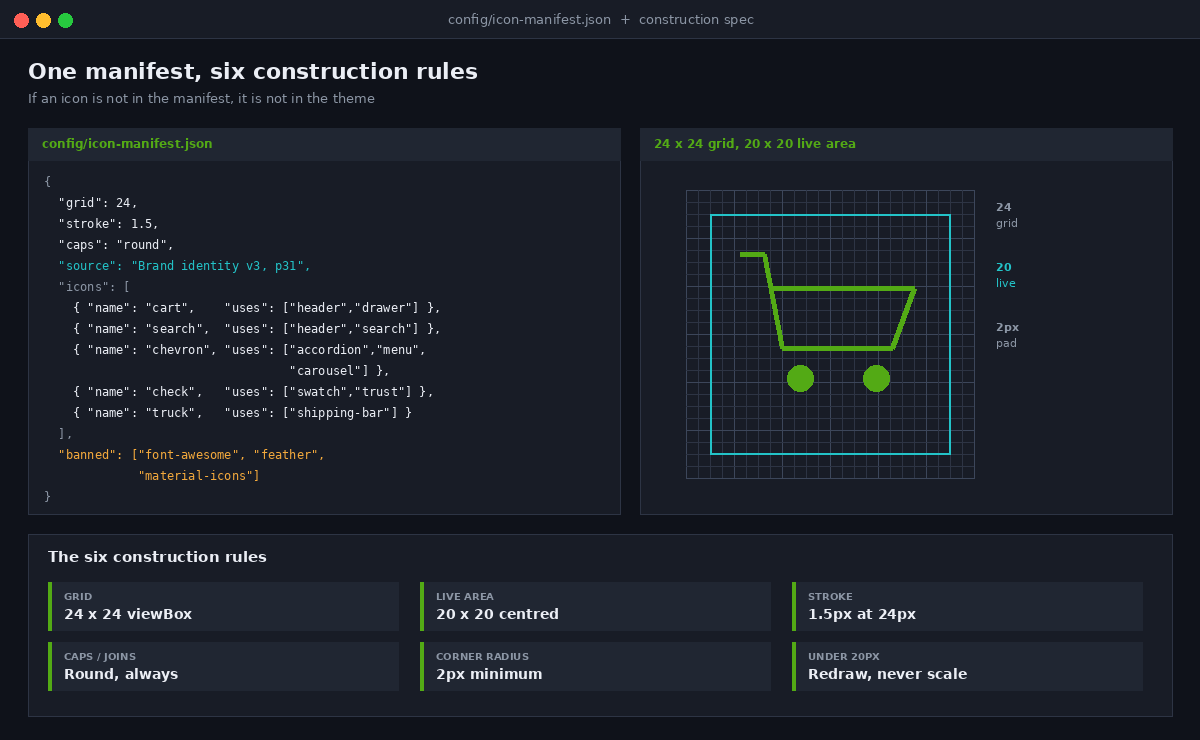
A pattern without an inventory is a suggestion. The second artefact in every build is a manifest, a single JSON file in the theme repository that lists every approved icon, what it is for, and where it came from. If an icon is not in the manifest it is not in the theme.
// config/icon-manifest.json  (repository only, not uploaded to Shopify)
{
  "grid": 24,
  "stroke": 1.5,
  "caps": "round",
  "source": "Brand identity v3, page 31",
  "icons": [
    { "name": "cart",     "snippet": "icon-cart.liquid",     "uses": ["header", "cart-drawer"] },
    { "name": "search",   "snippet": "icon-search.liquid",   "uses": ["header", "predictive-search"] },
    { "name": "chevron",  "snippet": "icon-chevron.liquid",  "uses": ["accordion", "menu", "carousel"] },
    { "name": "check",    "snippet": "icon-check.liquid",    "uses": ["variant-swatch", "trust-bar", "form"] },
    { "name": "truck",    "snippet": "icon-truck.liquid",    "uses": ["shipping-bar", "pdp-benefits"] }
  ],
  "banned": ["font-awesome", "feather", "material-icons", "bootstrap-icons"]
}
The uses array is the part people underestimate. It is what lets you answer the question that always comes up mid-project: if we change the chevron, what breaks? On the theme we cited earlier, the chevron appeared in seven places and three of them were rotated with CSS transforms rather than being separate icons, which is exactly the sort of thing you want written down before someone redraws it pointing the other way.
Grid, Stroke and Optical Sizing
Most icon inconsistency is not a sourcing problem, it is a construction problem. Two icons drawn on different grids will never sit right beside each other no matter how carefully you pick them. Our construction spec is deliberately short so that it actually gets followed.
| Rule | Specification | Why |
|---|---|---|
| Grid | 24 x 24 viewBox for every icon | A shared coordinate space is what makes icons look like a set |
| Live area | 20 x 20 centred, 2px padding all sides | Stops icons touching the edge and colliding with adjacent text |
| Stroke | 1.5px at 24px, scaling proportionally | Matches most modern brand type weights without shouting |
| Caps and joins | Round on both | One decision applied everywhere reads as intentional |
| Corner radius | 2px minimum on drawn corners | Sharp corners alias badly at 16px on non-retina screens |
| Optical sizing | Redraw below 20px, do not scale | A 1.5px stroke at 16px renders at 1px and loses detail |
That last rule is the one teams skip and it is the one that produces the muddy 16px icons you see in cart drawers everywhere. When a 24px icon is scaled to 16px, the stroke scales to exactly 1px, sub-pixel detail collapses, and any interior detail turns to noise. For the handful of icons we use below 20px, we ship a separate small variant with simplified geometry and a stroke bumped back to 1.25px, and we name it explicitly rather than relying on a size parameter to do something clever.
snippets/
  icon-cart.liquid          {%- comment -%} 24px, full detail {%- endcomment -%}
  icon-cart-sm.liquid       {%- comment -%} 16px, simplified, 1.25 stroke {%- endcomment -%}
  icon-search.liquid
  icon-chevron.liquid
  icon-check.liquid
  icon-check-sm.liquid
The standard sizes we use are 16px for inline and dense navigation contexts, 24px for interface controls, 32px for trust and benefit blocks, and 48px for category or feature tiles. Four sizes covers the whole surface. Every additional size is a decision someone has to make again later.
Colour Schemes and the currentColor Rule
Shopify Online Store 2.0 colour schemes let a merchant flip a section between light and dark from the theme editor. Any icon carrying a hardcoded fill will either disappear or sit at an illegible contrast ratio the moment that happens, and because it is a merchant-side change it will happen on a Friday afternoon without a developer present.
The rule is absolute in our builds: no icon file contains a colour value. The only place a colour is set is CSS, and it is set on the parent.
/* assets/base.css */
.icon {
  display: block;
  flex-shrink: 0;
  color: currentColor;      /* inherits from the parent text colour */
}

/* Colour scheme aware, nothing icon-specific required */
.color-scheme-1 .header__icon { color: rgb(var(--color-foreground)); }
.color-scheme-2 .header__icon { color: rgb(var(--color-foreground)); }

/* State changes cost one line because the icon follows the text */
.header__icon:hover { color: rgb(var(--color-link)); }

/* WCAG 2.2 SC 2.5.8 minimum target: 24 x 24 CSS px */
.header__icon {
  min-width: 44px;
  min-height: 44px;
  display: inline-flex;
  align-items: center;
  justify-content: center;
}
The exception worth naming is a multi-colour brand mark, such as a payment logo or a partner badge. Those are not icons in the system sense and we keep them out of the icon directory entirely, in an images or logos folder, so nobody is tempted to apply the currentColor rule to something that legitimately needs three fixed colours.
Accessibility Rules We Do Not Negotiate
Icons are where accessibility quietly fails on ecommerce sites, and in Australia the exposure is real. The Disability Discrimination Act 1992 applies to online services, and the Australian Government references WCAG 2.1 Level AA as the conformance benchmark for digital services. WCAG 2.2 added SC 2.5.8 Target Size (Minimum), which sets 24 by 24 CSS pixels as the minimum activation area for a pointer target. Icon-only buttons in headers and cart drawers are the most common failure of that criterion we find.
Three rules cover almost every case:
- Decorative icons are hidden, not described. If the icon sits next to text that already says “Add to cart”, the icon must carry aria-hidden=”true” and focusable=”false”. Describing it duplicates the announcement and makes the control noisier, not clearer.
- Icon-only controls carry the name on the control. An aria-label on the button, not a title inside the SVG. If the control opens something, say so: “Open cart”, not “Cart”.
- Target area is at least 24px, and we build to 44px. The icon can be 20px. The tappable box around it is padded out to 44px, which satisfies SC 2.5.8 with margin and matches the touch target guidance in both major mobile platforms.
The verification step matters as much as the rule. A quick check in the browser console will surface every interactive element on the page with no accessible name and every target below the threshold, which is faster than clicking through with a screen reader for a first pass:
// Paste in DevTools console on any storefront page
const fails = [...document.querySelectorAll('a, button, [role="button"]')]
  .map(el => {
    const r = el.getBoundingClientRect();
    const name = (el.getAttribute('aria-label')
      || el.textContent.trim()
      || el.querySelector('title')?.textContent
      || '').trim();
    return { el, name, w: Math.round(r.width), h: Math.round(r.height) };
  })
  .filter(x => x.name === '' || x.w < 24 || x.h < 24);

console.table(fails.map(f => ({ name: f.name || 'MISSING', w: f.w, h: f.h })));
console.log('Failing controls:', fails.length);
On the twelve themes we audited, the median number of failing controls returned by that snippet on a product page was nine. Every one of them was an icon.
Governance: Who Is Allowed to Add an Icon
A system survives on the rule that governs additions, not on the quality of the initial set. Ours is one sentence: adding an icon to the theme requires a manifest entry in the same pull request. That single constraint does a lot of quiet work, because it forces the person adding the icon to state what it is for and to notice if something equivalent already exists.
The review checklist sits in the pull request template so it is impossible to skip:
- Is there an existing icon that covers this? Check the manifest before drawing anything.
- Is it on the 24 grid with a 1.5 stroke and round caps?
- Does the file contain any hex or rgb colour value? It must not.
- Does it use currentColor for stroke or fill?
- Is aria-hidden or an accessible name explicitly set? No default state is acceptable.
- Has the manifest been updated with name, snippet and uses?
- If it renders below 20px anywhere, has a small variant been drawn?
We also run one automated gate in continuous integration, because the colour rule is the one that gets broken by accident more than any other and it is trivially machine-checkable:
#!/usr/bin/env bash
# .github/workflows/icon-guard.sh
# Fails the build if any icon snippet contains a literal colour value.

BAD=$(grep -rlEi '#[0-9a-f]{3,8}|rgb\(|hsl\(' snippets/icon-*.liquid || true)

if [ -n "$BAD" ]; then
  echo "Icon files contain hardcoded colours:"
  echo "$BAD"
  echo "Use currentColor. See config/icon-manifest.json"
  exit 1
fi

# Fail if a snippet exists that is not registered in the manifest
for f in snippets/icon-*.liquid; do
  name=$(basename "$f" .liquid | sed 's/^icon-//; s/-sm$//')
  grep -q "\"$name\"" config/icon-manifest.json || {
    echo "Unregistered icon: $f"
    exit 1
  }
done

echo "Icon guard passed."
That script has caught a hardcoded fill on four of the last six client builds, always from an app-generated block or a well-meaning quick fix. It takes about two seconds to run and it is the highest return per line of any check in our pipeline.
The Six-Check Audit We Run on Inherited Themes
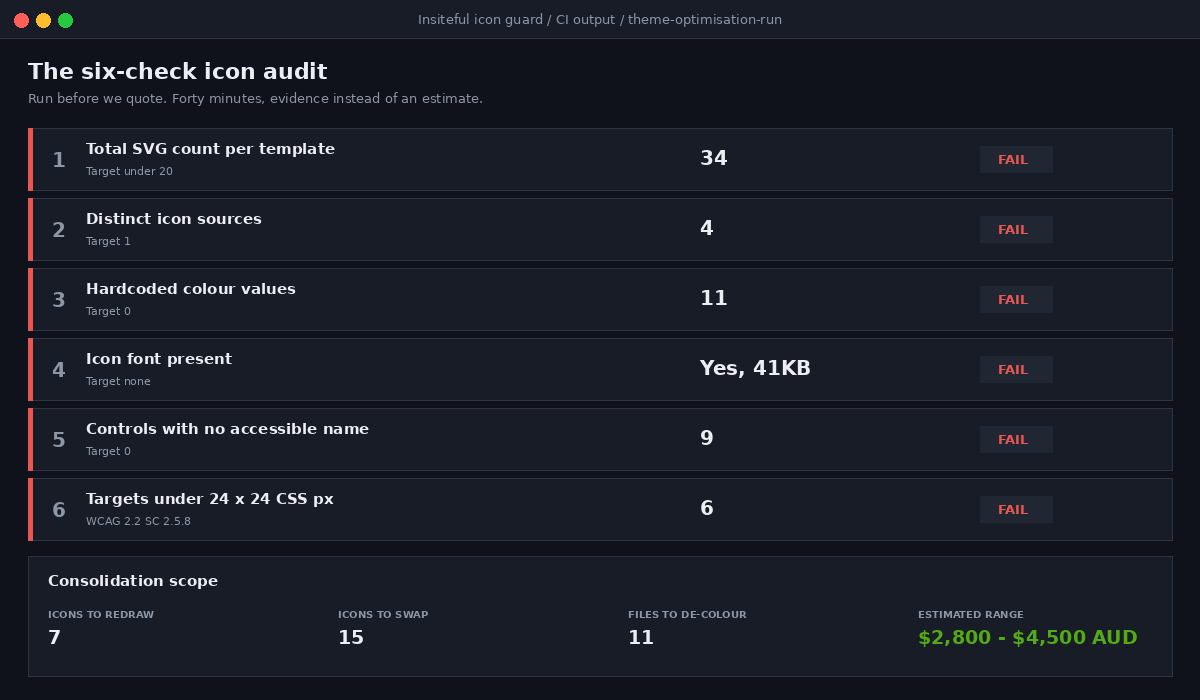
When a brand brings us an existing store, we run the same six checks before writing a proposal. It takes about forty minutes and it is what turns “the site feels a bit inconsistent” into a scope with a number attached.
| # | Check | Method | Typical finding |
|---|---|---|---|
| 1 | Total SVG count per template | Count svg elements in the rendered DOM | 30 to 84 on a product page |
| 2 | Distinct sources | Group by viewBox and stroke signature | 3 to 6 different icon sets |
| 3 | Hardcoded colours | Grep snippets and sections for hex and rgb | 4 to 18 files |
| 4 | Icon font present | Check network for a font file serving glyphs | Present on about half of themes |
| 5 | Accessible name failures | Console audit of interactive controls | Median 9 per product page |
| 6 | Target size failures | Same audit, dimensions under 24px | Usually the header and cart drawer |
Consolidating an inherited theme onto a governed set is a small piece of work relative to what people expect. On a typical store with three or four icon sources, the consolidation runs between $2,800 and $4,500 AUD depending on how many icons have to be redrawn rather than swapped, and it is almost always bundled into a broader theme optimisation rather than sold on its own. The return is not a conversion lift you can chart. It is that every future design decision gets cheaper, because there is one set to change instead of six places to hunt.
How We Do It at Insiteful
We have been building Shopify stores for over 25 years and across more than 200 client projects, and the icon system is now a fixed item in our build sequence rather than something that emerges. It sits in the design system phase, before any section templates are written, because retrofitting an icon system into a half-built theme costs roughly three times what building it first does.
The sequence we follow on every build:
- Extract the set from the brand. If the client has an identity document with an icon spec, we build to it exactly. If they do not, we define the grid, stroke and cap rules with them in the design phase and write it down. Either way the spec exists before the first snippet.
- Draw the core set, not the full set. We start with the twelve to eighteen icons a Shopify storefront genuinely needs: cart, search, account, close, chevron, check, minus, plus, truck, return, lock, star. Everything else gets added on demand through the manifest rule.
- Build the snippets with the parameterised pattern. Size and label as parameters, currentColor for stroke, explicit accessibility branch. One file per icon.
- Register the manifest and wire the CI guard. Both land in the same commit as the first icon, so the rule exists before there is anything to break.
- Audit before handover. The console check runs on every template, and no build goes live with an interactive control that has no accessible name.
- Hand the manifest to the client. It goes into the documentation pack with the theme, so the next developer, whether that is us or someone else, inherits the rule and not just the files.
We do not build headless Shopify stores, and this is one of the quieter reasons why. On a native Shopify theme the icon system is six files and a JSON manifest that any competent Liquid developer can maintain. The moment the storefront moves to a separate front end, icons become a component library with a build step, a versioning story and a dependency chain, and the client is now paying an agency retainer to change a chevron. Native keeps the ownership where it belongs, with the merchant.
Where to Start on Your Own Theme
If you want a fast read on your own store, open a product page, run the console snippet from the accessibility section, and count how many interactive controls come back with a missing name. Then grep your snippets directory for hex values. Those two numbers will tell you within five minutes whether you have an icon system or an icon collection.
If the answer is a collection and you would rather it were a system, that is the sort of work we fold into a build or a theme optimisation. You can see how we scope and run that process, including the design system phase where the icon set gets defined, on our process page.