
On 1 October 2026 the Reserve Bank’s surcharge ban takes effect. From that date an Australian store can no longer add a fee to a Visa, Mastercard or eftpos payment at checkout, and the RBA’s Conclusions Paper of 31 March 2026 makes clear that buy now pay later, mobile wallets and American Express are excluded from the ban for now, pending a separate consultation. For twenty years the surcharge was the one tool a merchant had to steer a customer toward a cheaper way to pay. In 23 days it is gone, and the only lever left is the one most Shopify stores have never touched: which payment methods appear, in what order, under what name, and for which carts.
That lever is the Payment Customization Function. It has existed since Shopify Functions replaced Scripts, it runs on every plan from Basic up (with limits we cover below), and since 30 June 2026 it is the only mechanism that can change the payment step at all, because Scripts stopped executing that day. This article is the payment rules we now build for clients before 1 October: what the function can and cannot touch, what an Australian store gets that a US store does not, the input query, three rules we ship on nearly every build, the silent failure modes, and the checkout test matrix. Worked numbers are in AUD.
What a payment customization can touch, and what it cannot
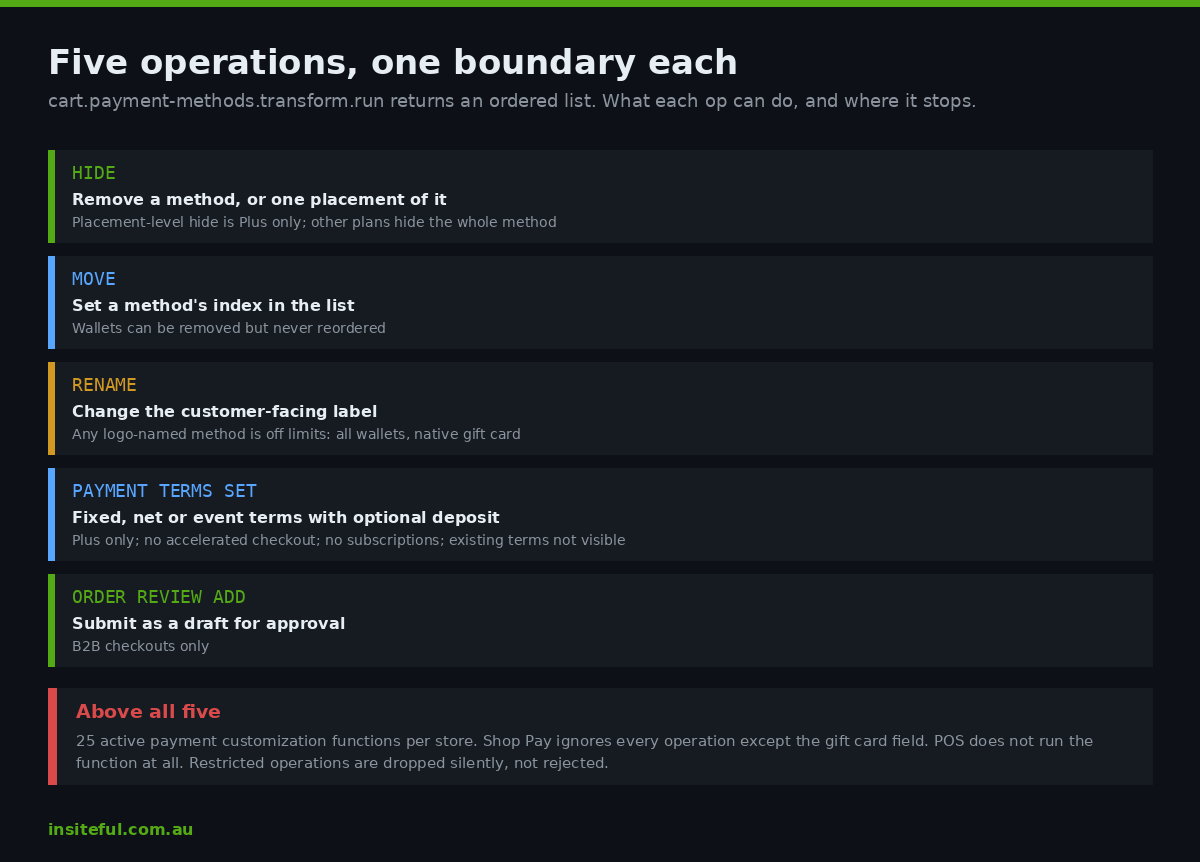
The function target is cart.payment-methods.transform.run. Shopify hands it the cart, the buyer, and the list of payment methods that would otherwise render, and the function returns an ordered list of operations. Five operations exist in the 2026-07 API and each has a hard boundary that is documented but rarely read.
| Operation | What it does | Boundary |
|---|---|---|
| Hide | Removes a payment method from checkout, optionally from a specific placement only | Placement-level hiding (Express bar versus payment section) is Plus only. On any other plan the placements field is ignored and the whole method disappears |
| Move | Moves a method to a new index in the display order | Wallets (Shop Pay, Apple Pay, Google Pay, PayPal Express) can be removed but never reordered |
| Rename | Changes the customer-facing label | Any method whose name is a logo cannot be renamed: every wallet plus the native gift card field |
| Payment terms set | Sets fixed, net or event-based terms on this order, with an optional deposit | Plus only, not on accelerated checkouts, incompatible with subscription selling plans, and existing terms are not in the input so the function cannot read them |
| Review requirement | Submits the order as a draft for approval instead of capturing | B2B checkouts only |
Three platform-wide constraints sit above all five. A store can activate at most 25 payment customization functions. In Shop Pay the function is ignored for everything except the native gift card field, so a customer who lands in the Shop Pay flow sees Shop Pay’s own method order, not yours. And in POS the function does not run at all, which matters for any brand whose store staff assume the web rules apply at the counter.
What an Australian store gets that a US store does not
The help centre’s plan matrix has a geographic clause that most agencies quote from the US version. Stores on Basic or higher, but not Plus, can hide, rename, reorder and sort payment methods, with one exception: in the United States and Canada those customisations do not apply to credit card fields. Australia is not in that exception. An AU store on Shopify Grow or Advanced can customise the card field, the BNPL options and the manual methods alike, and the card-field restriction that limits a Chicago store to non-card methods does not apply in Melbourne.
| Capability | AU store on Basic to Advanced | AU store on Plus |
|---|---|---|
| Hide, move, rename via a public app (Checkout Blocks, App Store apps) | Yes, including the card field | Yes |
| Custom app with your own Function | No. Custom-app Functions are Plus only on the help centre matrix | Yes |
| Hide a method from one placement only | No, hides everywhere | Yes |
| Payment terms and deposits | No | Yes |
| Review requirement on B2B orders | No | Yes |
| Hide accelerated checkout buttons by condition | No | Yes, via custom app |
The practical split is this. A $2M AUD brand on Advanced gets the three presentation operations through a public app and can run the BNPL and ordering rules below without writing code. Everything involving a bespoke input query, a placement, a deposit or a B2B review needs Plus and a custom app, which is where the rest of this article lives.
The input query decides what your rule can know
A Function only receives the fields its input query asks for, and Shopify’s own guidance is to request the minimum. The query below is the shape we start from on an Australian Plus build. It reads the cart total in presentment currency, the buyer’s country and B2B company if any, whether any line is a gift card or a pre-order, the payment method list, and the configuration metafield on the customization itself.
query CartPaymentMethodsTransformRunInput {
  cart {
    cost { totalAmount { amount currencyCode } }
    buyerIdentity {
      isAuthenticated
      customer { id hasAnyTag(tags: ["wholesale", "trade"]) }
      purchasingCompany { company { id } }
    }
    deliveryGroups { deliveryAddress { countryCode } }
    lines {
      quantity
      merchandise {
        ... on ProductVariant {
          product { isGiftCard hasAnyTag(tags: ["preorder"]) }
        }
      }
    }
  }
  paymentMethods { id name }
  paymentCustomization {
    metafield(namespace: "$app:payments", key: "rules") { jsonValue }
  }
}
Two details in that query save a support ticket later. The amount comes back in the cart’s presentment currency, so a store selling into NZ through Markets will see NZD on a Kiwi cart; Shopify’s localisation guidance is explicit that a threshold written in AUD must be converted or the rule will fire at the wrong value. And the $app: reserved prefix on the metafield namespace stops any other installed app from writing to your rules, which the tutorial’s open namespace does not.
Rule one: buy now pay later thresholds
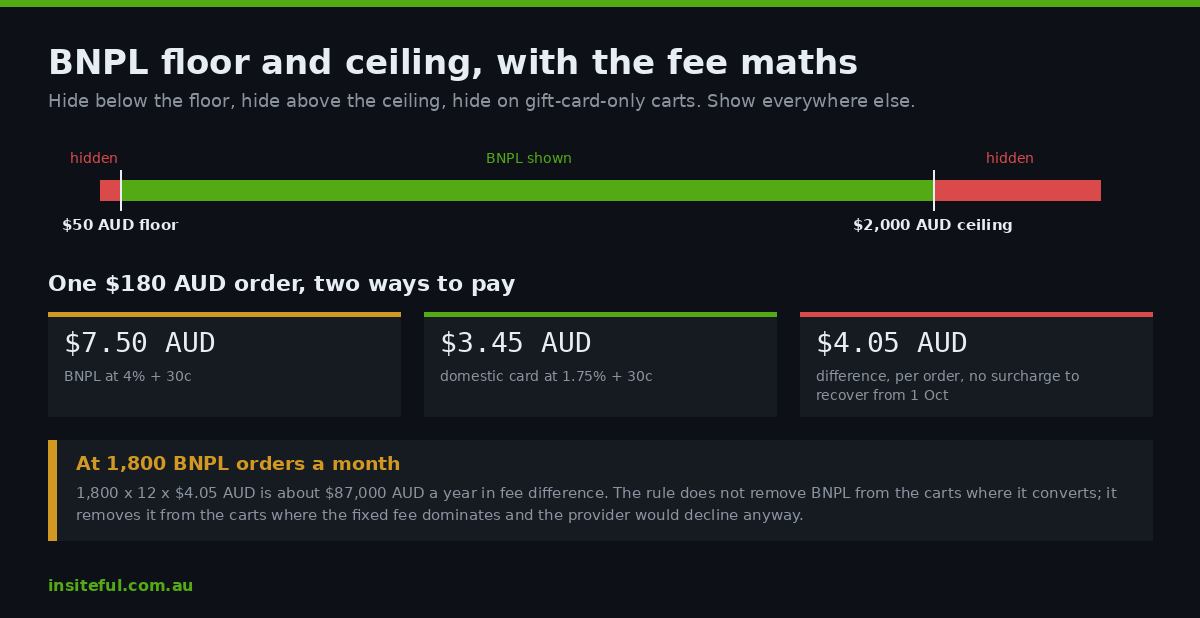
BNPL is the method the surcharge ban does not touch, and it is the most expensive method on the page. Merchant fees on Afterpay and Zip are commonly quoted at several times a Shopify Payments card rate. On a $180 AUD order, a BNPL fee of 4 per cent plus 30 cents costs $7.50 AUD; the same order on a domestic card at 1.75 per cent plus 30 cents costs $3.45 AUD. That $4.05 AUD difference across 1,800 BNPL orders a month is roughly $87,000 AUD a year, and after 1 October there is no surcharge to recover any of it.
The rule we build does not remove BNPL, because for apparel and homewares it lifts conversion on the carts where it matters. It hides BNPL below a floor where the fixed fee dominates and above a ceiling where the provider’s own limits would decline the customer anyway, and on gift-card-only carts where BNPL is normally prohibited by the provider’s terms.
export function cartPaymentMethodsTransformRun(input) {
  const rules = input.paymentCustomization?.metafield?.jsonValue ?? {};
  const total = parseFloat(input.cart.cost.totalAmount.amount ?? "0");
  const ccy = input.cart.cost.totalAmount.currencyCode;
  const floor = rules.bnplFloor?.[ccy] ?? 50;
  const ceiling = rules.bnplCeiling?.[ccy] ?? 2000;
  const giftOnly = input.cart.lines.every(l => l.merchandise.product?.isGiftCard);

  const isBnpl = m => /afterpay|zip|klarna|humm|paypal pay in 4/i.test(m.name);
  const ops = [];
  if (total < floor || total > ceiling || giftOnly) {
    for (const m of input.paymentMethods.filter(isBnpl)) {
      ops.push({ paymentMethodHide: { paymentMethodId: m.id } });
    }
  }
  return { operations: ops };
}
The thresholds live in the metafield keyed by currency, so the same function serves an AUD cart with a $50 AUD floor and an NZD cart with its own. The name match is a regular expression rather than an equality check because provider labels change: a gateway rename from “Afterpay” to “Afterpay by Block” silently broke an equality-matched rule on a client store in 2025, and nothing in the admin flagged it. Matching on a stem survives that.
Rule two: ordering by cost after the surcharge ban
Once surcharging goes, presentation order is the only cost signal a store can send. The RBA’s May 2026 bulletin puts debit cards at 49 per cent of all consumer payments and credit at 23 per cent, with PayID used by around half of respondents in the past year, up from 32 per cent in 2022, and lower fees cited by one in five PayID users as a reason. A customer who prefers a cheap method will find it if it is first. The Move operation places a method at an index; the rest shuffle down.
const order = rules.order ?? ["Bank transfer", "Card", "PayPal", "Afterpay", "Zip"];
order.forEach((stem, index) => {
  const m = input.paymentMethods.find(pm => pm.name.toLowerCase().includes(stem.toLowerCase()));
  if (m) ops.push({ paymentMethodMove: { paymentMethodId: m.id, index } });
});
Placement is the second half of ordering on Plus. The Express bar at the top of checkout and the payment section below it are separate placements, and a Hide operation can name one without the other. The RBA’s 2025 survey has payments made through mobile apps at 46 per cent of online payments, and on a phone the Express bar is the only thing above the fold, so a BNPL button there is the first payment option most customers see. On carts under the floor we hide BNPL from the Express placement and leave the card and wallet buttons alone; on carts inside the range we leave the bar as installed, because removing a wallet from Express to promote a cheaper method is the one move Shopify’s own help centre warns will cost conversion.
Two limits shape how far this goes. Wallets cannot be moved, so Shop Pay, Apple Pay and Google Pay keep their positions in the Express bar regardless of your order array; you can hide them on Plus but not demote them. And Rename, which is the obvious partner to Move for a label like “Card (no surcharge)”, is blocked on any logo-named method, so the relabel only works on the generic card field and manual methods. We use it for exactly one thing on AU builds: renaming the manual bank transfer method to include the PayID identifier and the expected clearing time, which cut “where do I send the money” tickets by a measurable amount on a Brisbane furniture client.
Rule three: terms, deposits and review on B2B orders
For wholesale on Plus the same function sets payment terms per order. The PaymentTermsSetOperation shipped in API 2025-07 on 18 June 2025 and supports fixed, net and event-based terms with an optional deposit. A trade customer placing a $2,400 AUD order can be given net 30 with a 30 per cent deposit of $720 AUD captured at checkout and $1,680 AUD due on invoice, decided by cart value and company tag rather than a blanket account setting.
const b2b = Boolean(input.cart.buyerIdentity.purchasingCompany);
if (b2b && total >= (rules.depositAbove ?? 2000)) {
  const dueAt = new Date(Date.now() + 30 * 86400000).toISOString();
  ops.push({ paymentTermsSet: {
    paymentTerms: { fixed: { deposit: { percentage: 30 }, dueAt } }
  }});
}
if (b2b && total >= (rules.reviewAbove ?? 10000)) {
  ops.push({ orderReviewAdd: { reason: "Trade order over the review threshold" } });
}
The fixed-term form above takes an absolute due date; the net form takes a day count and the event form takes one of FULFILLMENT_CREATED, ORDER_FULFILLED or INVOICE_SENT. The documentation carries four caveats that decide whether this is safe to ship. Terms set here apply only to the order in front of the customer and never change the company’s default terms. The function cannot see existing terms, so it cannot say “keep whatever this company already has”; it either sets or stays silent. On a B2B checkout automatic capture on the fulfilment event is not supported, so a net-on-fulfilment term means someone in finance captures manually. And a D2C checkout that receives payment terms loses its pay-now options entirely, which is why we gate the operation on purchasingCompany being present and not on a customer tag alone.
Where it fails silently
None of the failures below produce an error in the admin, a userError in GraphQL or a message at checkout. The customer sees a payment page; it is just not the one you designed.
Restricted operations are dropped, not rejected. When plan or geography restricts an operation, the input still lists every payment method, the function still runs, and the operations that target a restricted method are simply not applied. A rule written and tested on a Plus development store that hides the card field will pass every unit test and do nothing on an Advanced-plan US store. Testing on the production plan is the only check that catches this.
Placements on non-Plus hide everything. A rule that intends to remove PayPal from the Express bar while leaving it in the payment list is a Plus-only distinction; on Grow or Advanced the same operation removes PayPal from both. The field is present in the input on every plan, so the code compiles and the review passes.
Shop Pay routes around you. A returning Shop Pay customer completes payment inside Shop Pay’s flow, where the function’s operations are ignored except for the gift card field. For a store where Shop Pay is 30 to 40 per cent of orders, a BNPL floor rule reaches only the remainder, and the reporting has to be read with that in mind.
Subscriptions cancel payment terms. Any cart containing a subscription selling plan cannot receive payment terms from the function. A B2B store that adds a replenishment subscription to its trade catalogue will find deposits stop applying on exactly the orders that include it.
Order edits do not re-run the function. An order edited in the admin after checkout keeps the payment method and terms decided at checkout; the function is not consulted again, and the compatibility table lists both admin and checkout order edit as unsupported.
Debugging is done from the execution log, not from the checkout. Every run of the function on a development store is written to the terminal with the full input and output, and shopify app function replay re-executes a captured run locally against the current code, so a rule can be fixed and re-checked without rebuilding the cart. We keep one captured input per matrix row in the repository, which turns the checkout matrix below into a unit test suite that runs in seconds after every change, and the production checkouts into a confirmation step rather than the first place a bug is seen.
The test matrix we run in checkout
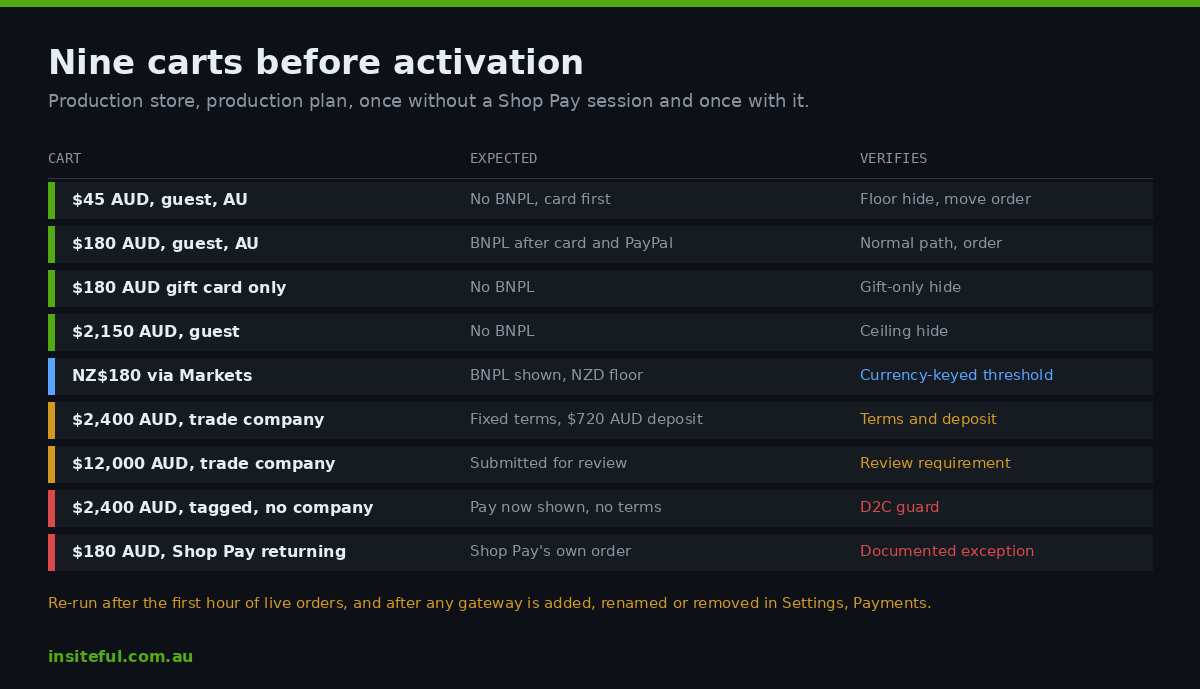
Every rule gets one real checkout per cell before activation, on the production store, on the production plan, from a browser without a Shop Pay session and then from one with it. The matrix for the three rules above is nine carts and takes an afternoon.
| Cart | Expected | Verifies |
|---|---|---|
| $45 AUD, guest, AU address | No BNPL shown, card first | Floor hide, move order |
| $180 AUD, guest, AU address | BNPL shown after card and PayPal | Normal path, order |
| $180 AUD gift card only | No BNPL | Gift-only hide |
| $2,150 AUD, guest | No BNPL | Ceiling hide |
| NZ$180 via Markets | BNPL shown, NZD floor applied | Currency-keyed threshold |
| $2,400 AUD, trade company | Net 30, $720 AUD deposit | Terms and deposit |
| $12,000 AUD, trade company | Submitted for review | Review requirement |
| $2,400 AUD, tagged customer, no company | Pay now shown, no terms | D2C guard |
| $180 AUD, Shop Pay returning | Shop Pay’s own order | Documented exception |
Each row is recorded with the checkout permalink and a screenshot, and the set is re-run after the first hour of live orders and again whenever a gateway is added, renamed or removed in Settings, Payments, because a provider rename is the most common way a name-matched rule dies.
How we do it at Insiteful
Payment rules are part of every Plus build we scope and, since the RBA’s March decision, part of every pre-October engagement with existing clients. We begin with the payment settings export and a fee schedule from the client’s gateways, then model the current month’s orders against each method’s cost so the floor, ceiling and order are numbers the finance team signed rather than defaults. The function is written against API 2026-07 with a reserved-namespace metafield, a currency-keyed threshold map, stem-based name matching, and a purchasingCompany guard on every terms operation.
Activation is by paymentCustomizationCreate with a function handle, never a function ID, so the same configuration deploys from staging to production without an ID lookup. The nine-cart matrix is run on production before the customization is enabled and the results are kept with the build. The client receives the rules metafield as a documented JSON schema so they can move a threshold without a developer, plus the one instruction that matters most: any change to a gateway in Settings, Payments triggers the matrix again.
For a Melbourne homewares brand on Plus that work took BNPL from 31 per cent of orders under $50 AUD to under 2 per cent, with no measurable change in conversion on those carts, and the wholesale deposit rule replaced a manual draft-order process that had been taking a staff member most of a Monday. If you want to see where payment architecture sits in a build, our seven-step process lays it out.
Before 1 October
If your store surcharges cards today, that income stops in three weeks and your payment page becomes the only place cost can be managed. If your store has never written down which methods appear for which carts, Shopify has been deciding for you, in the order the gateways were installed. We build the rules, the function and the checkout test run for Australian Shopify brands, on Plus and on the plans below it. Book a build assessment and we will start with your payment settings export and your gateway fee schedule before we recommend anything.