
Most Shopify Plus stores we inherit have exactly one environment: the live one. There is a duplicated theme in the library called “Copy of Dawn (DO NOT PUBLISH)”, an agency somewhere with the staff login, and an unwritten rule that nobody touches anything after 3pm on a Friday. That arrangement works right up until the afternoon it does not, and then it fails in the most expensive way possible: in front of customers, during a sale, with no way back.
The numbers make the risk concrete. Australian shoppers spent a record $82.6 billion AUD online across 2025, up 14 per cent year on year and now 24 per cent of total retail spend, with 9.8 million households buying online and 41 per cent shopping at least fortnightly. For a Plus merchant doing $20 million AUD a year, an hour of broken cart on a Thursday night is not an inconvenience. It is roughly $2,300 AUD of orders that never happened, plus a support queue and a trust problem that outlasts the outage.
Staging on Shopify is not the same thing as staging on a self-hosted platform. You cannot clone the database, spin up a second instance and point a subdomain at it. What you can and cannot duplicate is decided by the platform, not by your budget. This article covers what a real staging setup looks like on Shopify Plus in 2026: the environment tiers that are actually available, the theme pipeline that connects them, the things staging structurally cannot test, and the release runbook we use at Insiteful.
What “staging” actually means on Shopify
The first thing to get straight is that a Shopify environment is not one object. It is four separate layers, and each layer has a different degree of separability. Treating them as a single unit is the root cause of most staging disappointment.
| Layer | Can it be isolated from production? | What that means in practice |
|---|---|---|
| Theme code and settings | Yes, fully | Unpublished themes are genuinely separate. This is where 80 per cent of your change volume lives, and it is the layer staging handles well. |
| Store data (products, customers, orders) | No, not within one store | An unpublished theme reads the same catalogue and the same customer records as the live theme. There is one dataset per store. |
| Apps and app configuration | Partially | Apps install at store level. An unpublished theme sees the same app settings. Theme app extensions can be scoped per theme, but app admin config cannot. |
| Checkout, Functions, Flow, Launchpad | No, store-level only | These are configured once per store. Publishing a Flow or a discount Function affects the live store immediately, regardless of which theme is published. |
Read that table again, because it explains the failure mode we see most often. A team tests a theme change on an unpublished preview, everything looks fine, they publish, and the site breaks because the change interacted with an app setting or a checkout Function that was never part of the preview. The theme was staged. Nothing else was.
A working Shopify Plus staging strategy is therefore not one environment. It is a set of environments, each covering a different layer, plus a written list of the things none of them cover.
The four environment tiers we build for Plus clients
Here is the structure we set up on a typical Plus build. Not every client needs all four, but every client needs a deliberate decision on each.
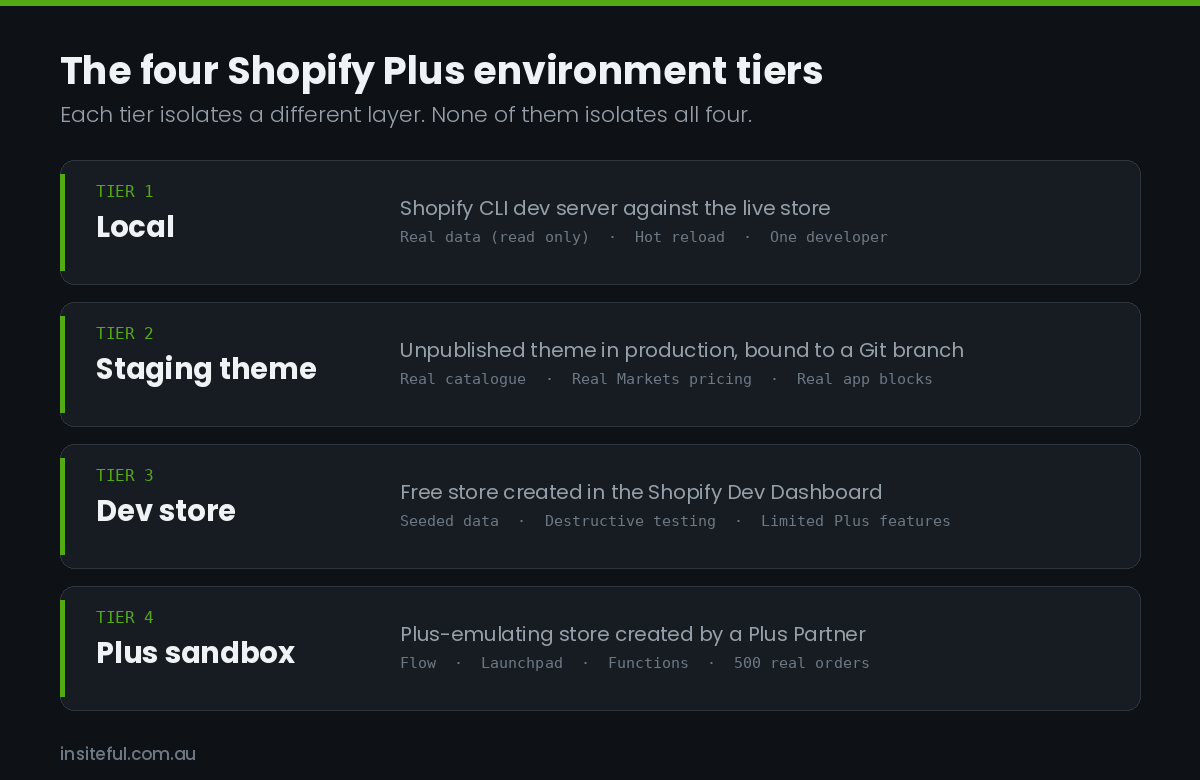
| Tier | What it is | Real data? | Plus features? | Best for |
|---|---|---|---|---|
| 1. Local | Shopify CLI dev server against the production store, rendering a local theme copy | Yes, read-only through your own session | Yes (it is the real store) | Day-to-day Liquid, CSS and JS work with hot reload |
| 2. Staging theme | An unpublished theme in the production store, bound to a Git branch | Yes, live catalogue and pricing | Yes | QA with real products, real Markets pricing, real app blocks |
| 3. Dev store | A free store created in the Shopify Dev Dashboard | No, seeded test data | Limited | Destructive testing, app trials, training, data model experiments |
| 4. Plus sandbox | A Plus-emulating store created by a Plus Partner | No, seeded test data | Yes, most of them | Testing Flow, Launchpad, Functions and checkout changes before they touch the real store |
Tier 2 is the workhorse and the one most teams under-use. Because an unpublished theme reads the live catalogue, it is the only environment where you can QA against your actual 14,000 SKUs, your actual Markets price lists and your actual app blocks. A dev store with 12 demo products will never surface the product page that breaks because one variant has a 90 character option name.
Tier 4 is the one most teams do not know exists. Shopify Plus Partners can create Plus sandbox stores that include most Plus plan features. Per Shopify’s own developer changelog, a sandbox store lets you make unlimited test purchases through the Bogus Gateway, process unlimited test orders and up to 500 real orders (against 50 on a standard dev store), create unlimited products, use Plus API call rates, and access Plus apps including Flow and Launchpad. Custom checkout access is available on request through your partner manager. That is the closest thing Shopify offers to a genuine pre-production environment for the store-level layer.
One caveat that trips agencies up: with the move to the Dev Dashboard, stores you build to hand over to a client are now “client transfer stores”, and while they sit in your organisation they carry real restrictions. You can install only free and partner-friendly apps (no custom or draft apps), real transactions are not supported, shipping labels are test-only, you cannot deactivate password protection on the online store, and file storage limits match the Basic plan. Plan the handover date around those limits rather than discovering them the week before launch.
Wiring the theme pipeline: branches, themes and the Shopify bot
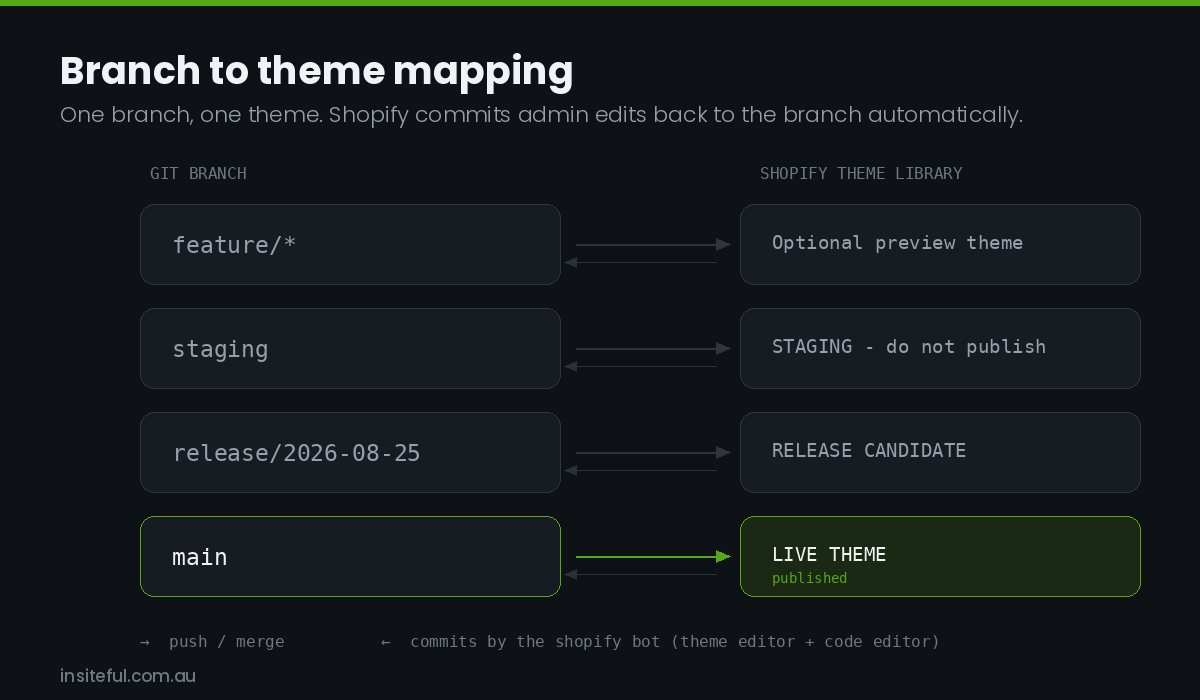
Once the tiers exist, the theme layer needs a pipeline. Shopify’s GitHub integration connects a repository branch to a theme in the theme library, and keeps them in sync in both directions. That bidirectional part is the bit people misjudge.
When anyone edits a connected theme through the Shopify admin (the theme editor, the code editor, or a theme app changing settings), Shopify commits that change back to the branch automatically, authored by the shopify bot. You cannot turn this off. It is a feature, not a bug: it means merchandiser changes in the theme editor are captured in Git rather than being silently overwritten by your next deploy. But it also means your branch history will contain commits you did not write, and your release process has to expect them.
The branch map we use on Plus builds:
| Branch | Connected theme | Published? | Who can merge |
|---|---|---|---|
main |
Live theme | Yes | Lead dev only, via reviewed PR |
staging |
“STAGING – do not publish” | No | Any dev, via reviewed PR |
feature/* |
Optional short-lived theme | No | Author |
release/YYYY-MM-DD |
“RELEASE CANDIDATE” | No | Lead dev, cut from staging |
Three rules make this hold together in practice.
Rule one: never disconnect a branch you intend to reuse. Shopify’s documentation is explicit that you cannot reconnect a branch to the same theme after disconnecting. Reconnecting creates a new theme, which means a new theme ID, which breaks every CI job, bookmark and QA link that referenced the old one. If a connection needs changing, plan it as a scheduled task, not an idle Tuesday tidy-up.
Since the published theme keeps its branch connection when you publish it, the cleanest release model is not “publish the staging theme”. It is “merge staging into main and let the live theme update itself”. The live theme stays connected to main forever, and publishing becomes a rare event rather than a weekly one.
Rule two: settle conflicts before they reach Shopify. There are no conflict alerts in the Shopify code editor, and the code editor version of a file overwrites the GitHub version. If a merchandiser saves a section in the theme editor at the same moment CI pushes a commit, Shopify’s outbound commit can be rejected by GitHub as outdated. The recovery path is the theme card: Actions then Reset to last commit. Put that in your runbook now, because you will need it at some point and you do not want to be searching for it mid-incident.
Rule three: treat settings_data.json as data, not code. That file holds every theme editor customisation, it can grow to 1.5 MB, and it is the single most common source of ugly merge conflicts on Shopify projects. Merchandisers change it in production. Developers change it in staging. Our standing policy: developers never hand-edit settings_data.json in a feature branch. Section schema changes go in the section file, and the setting values get applied in the admin after deploy.
The CI job that runs before anything reaches staging
Manual pushes are where discipline dies. Once a pipeline exists, no human should be running shopify theme push against a shared theme. Shopify CLI 3.20 and above supports non-interactive use in CI, authenticated with a Theme Access password generated by the Theme Access app rather than a staff login. Three environment variables do the work: SHOPIFY_CLI_THEME_TOKEN for the password, SHOPIFY_FLAG_STORE for the target store, and SHOPIFY_FLAG_FORCE set to 1 to suppress interactive prompts.
Here is a trimmed version of the workflow we ship on Plus projects. It gates on Theme Check before it will touch a theme, which is the entire point.
name: Deploy to staging
on:
  push:
    branches: [staging]

jobs:
  verify-and-deploy:
    runs-on: ubuntu-latest
    steps:
      - uses: actions/checkout@v4
      - uses: actions/setup-node@v4
        with:
          node-version: 20

      - name: Install Shopify CLI
        run: npm install -g @shopify/cli

      - name: Theme Check (fails the build on errors)
        run: shopify theme check --fail-level error

      - name: Push to staging theme
        env:
          SHOPIFY_CLI_THEME_TOKEN: ${{ secrets.THEME_ACCESS_PASSWORD }}
          SHOPIFY_FLAG_STORE: ${{ secrets.SHOP_DOMAIN }}
          SHOPIFY_FLAG_FORCE: 1
        run: |
          shopify theme push \
            --theme "$STAGING_THEME_ID" \
            --json \
            --ignore config/settings_data.json \
            --ignore templates/*.json
The two --ignore flags matter more than anything else in that file. They stop CI from overwriting merchandiser work: JSON templates and settings_data.json are content, owned by the client’s team in the admin, not by the repository. Without those flags your first automated deploy silently reverts a fortnight of homepage merchandising and you spend an afternoon explaining why.
We add a second job for release candidates that runs Lighthouse CI against the staging theme preview URL and fails if Largest Contentful Paint regresses beyond the budget agreed at the start of the build. Performance regressions are the easiest thing in the world to ship accidentally, because nothing looks broken. A budget in CI is the only reliable catch. If you have not set budgets yet, our guide to Shopify performance budgets covers how to pick numbers that are defensible rather than aspirational.
What staging structurally cannot test
This is the section most agencies skip, and it is the one that saves clients money. There are things a staging theme in the production store simply cannot cover, and the honest move is to name them and mitigate them rather than pretend the preview link is a full rehearsal.
| Cannot be tested on a staging theme | Why | How we cover it |
|---|---|---|
| Checkout changes (branding, UI extensions, validation) | Checkout is store-level and applies to the published configuration | Plus sandbox store, plus a Bogus Gateway pass in a checkout profile that is not the primary one |
| Shopify Functions (discounts, delivery, payment customisation) | Functions activate at store level once deployed | Sandbox first, then production activation behind a discount code nobody has |
| Flow workflows | A live Flow triggers on real orders regardless of theme | Sandbox with seeded orders, then a limited-scope trigger condition on go-live |
| Launchpad events | Scheduled at store level, changes real publishing state | Sandbox rehearsal, plus a documented manual rollback for each scheduled action |
| Third-party app behaviour | Apps read store-level config, not theme-level | App-by-app risk register, staged app updates, vendor sandbox where offered |
| Inbound webhooks and ERP sync | Point at the production store by design | Separate ERP sandbox endpoint plus replayable webhook logs |
| Real payment gateway behaviour | Test mode differs from live in 3DS, fraud and settlement | A small set of real low-value orders on go-live day, refunded immediately |
The ERP and webhook row deserves emphasis for Australian merchants specifically, because so many mid-market Plus stores here run Cin7, Unleashed or NetSuite behind the storefront. A theme deploy cannot break your inventory sync, but an app update or a Function that changes line item properties absolutely can. Our notes on Shopify ERP integration go through where those seams usually tear.
Data parity without leaking customer records
Dev stores and sandboxes are only useful if the data in them resembles reality. Twelve demo snowboards will not surface the bug in your bundle logic. But copying production data into a sandbox is where teams create a privacy problem for themselves.
Under the Privacy Act 1988 and the Australian Privacy Principles, personal information copied into a test environment is still personal information, and APP 11 obliges you to protect it with reasonable security steps. A sandbox store with a shared password and five contractors on it is not that. The practical answer is simple and it is the rule we apply on every build: seed sandboxes with synthetic customers and real products. The catalogue is the part that makes tests realistic. The customer records are the part that creates risk, and they add almost nothing to test quality.
Our seeding pattern for a Plus sandbox:
- Products and collections: export the live catalogue and re-import to the sandbox. Use the Bulk Operations API for anything past a few thousand SKUs rather than a CSV round trip. We covered the mechanics in working with the Shopify Bulk Operations API.
- Customers: generate synthetic records with the Australian address shapes that break things: unit numbers, PO boxes, NT and TAS postcodes, and a suburb name containing an apostrophe.
- Orders: place Bogus Gateway test orders across every fulfilment path the store supports, including click and collect and split shipments.
- Metafields and metaobjects: replicate the definitions before the data, or the import will silently drop values.
- Markets: mirror the market and price list structure, since currency rounding is a common source of preview-versus-production drift.
Keep the seed as a script in the repository, not a one-off manual effort. A sandbox you can rebuild in twenty minutes gets used. A sandbox that took two days to populate gets protected, stops matching production within a month, and quietly becomes useless.
The release runbook we run on every Plus deploy
Environments are only half the answer. The other half is a written sequence that the same person can follow at 6am on a Tuesday and at 11pm before a sale, without improvising. Ours fits on one page.
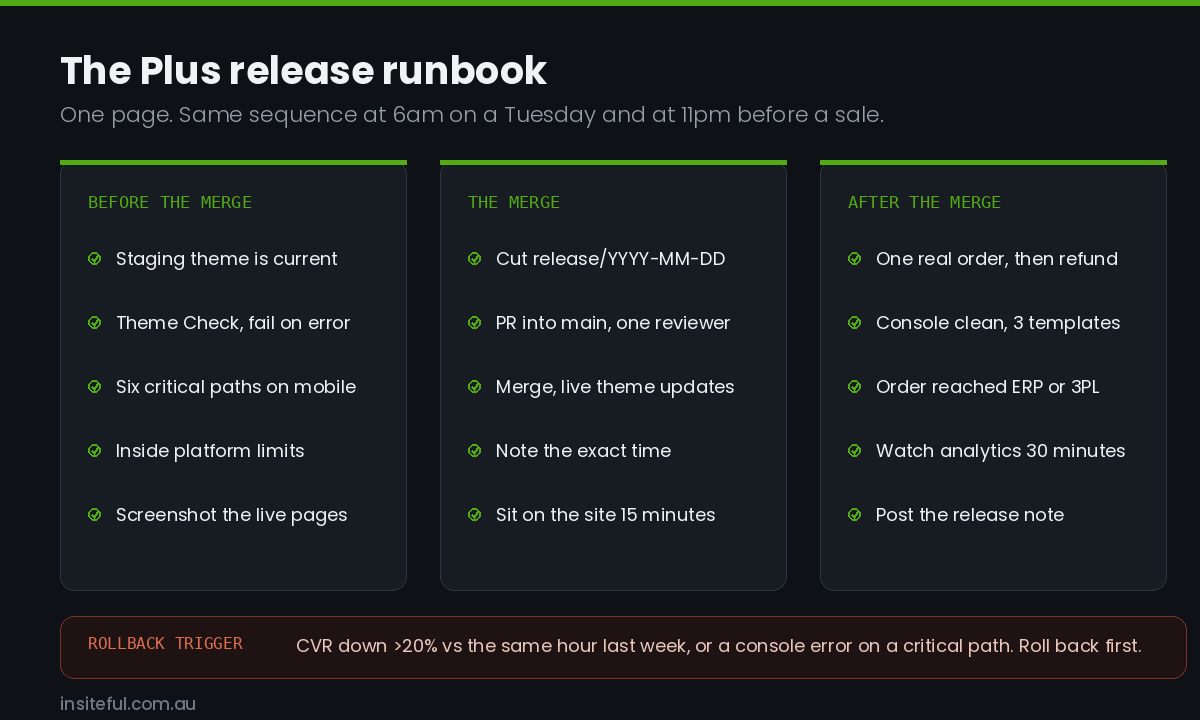
Before the merge
- Confirm the staging theme is genuinely current: check the theme card’s Last saved timestamp and the last commit hash on
staging. If they disagree, resolve before going further. - Run Theme Check locally with
--fail-level error. CI does this too, but catching it locally is cheaper. - Walk six critical paths on the staging preview on a real mobile device, not an emulator: home, collection, product with variants, cart, customer login, and search with zero results.
- Confirm the theme is within platform limits. The ceilings that bite are 25 sections per JSON template, 20 section groups per theme, 50 blocks per section, and 1,250 blocks per JSON template. Exceeding one errors at save or push time, which is a bad thing to discover mid-release.
- Screenshot the live theme’s key pages. Ninety seconds, and it is your visual rollback reference.
The merge
- Cut
release/YYYY-MM-DDfromstagingand open the PR intomain. One reviewer minimum, and the reviewer is not the author. - Merge. The live theme, connected to
main, updates itself. Note the exact time. - Do not close the laptop. Sit on the site for fifteen minutes.
After the merge
- Place one real order through the live checkout on a mobile device and refund it. Test mode does not prove the money moves.
- Check the browser console on three templates for new errors, and confirm the order landed in the ERP or 3PL, not just in Shopify.
- Watch real-time analytics for thirty minutes. A sudden drop in add-to-cart rate is the earliest signal something is wrong.
- Post the release note in the shared channel: what shipped, what to watch, who is on call.
Rollback
Rollback has to be a decision anyone can make, not a debate. Ours is: if conversion rate drops more than 20 per cent against the same hour last week, or if any critical path throws a console error, roll back first and diagnose afterwards. The mechanism is git revert on main, which propagates to the live theme within seconds, with publishing the previous theme as the manual fallback if the GitHub connection is misbehaving. Both paths get tested during onboarding, before anyone needs them. A rollback plan you have never executed is a hypothesis, not a plan. The same principle drives our Shopify migration cutover runbook.
Release windows and freeze rules for the Australian calendar
Environment discipline matters most at exactly the moments it is hardest to maintain. The Australian retail calendar has four windows where the cost of a bad deploy multiplies: Click Frenzy in May and November, Black Friday and Cyber Monday, the Boxing Day to mid-January run, and end of financial year in June for anyone selling B2B. Our standing rules for those windows:
| Period | Theme deploys | App installs or updates | Checkout, Functions, Flow changes |
|---|---|---|---|
| Normal weeks | Any weekday morning | Staged, one at a time | Sandbox first, then production |
| Two weeks before a peak | Content only, no structural change | Frozen | Frozen |
| Peak window | Frozen except rollbacks and defect fixes | Frozen | Frozen |
| Week after peak | Resume with a full runbook pass | Resume | Resume |
Freezes only work if the campaign content is already in the theme before the freeze starts. That is what Launchpad is for on Plus: schedule the theme publish, the price changes and the collection availability in advance so the peak-day action is a scheduled event, not a person editing a live store at 11:58pm. Rehearse it in a sandbox, because a Launchpad event that fires the wrong theme is not something you can quietly undo.
Measuring whether the environment strategy is working
If you cannot measure it, the discipline erodes. Four numbers tell you whether the setup is earning its keep, borrowed from software delivery research and adapted to a Shopify context.
| Metric | What we measure on Plus builds | Target |
|---|---|---|
| Change failure rate | Deploys requiring a rollback or same-day hotfix, as a share of all deploys | Under 5 per cent, trending toward the 0 to 2 per cent band that the 2025 DORA research identifies as top tier and that only 16.7 per cent of teams achieve |
| Deploy frequency | Merges to main per week |
Two or more. Fewer means changes are batching up, and batches fail harder |
| Lead time | Merge into staging to merge into main |
Under five business days |
| Time to restore | Detection to rollback complete | Under fifteen minutes |
The counter-intuitive one is deploy frequency. Teams that have been burned tend to deploy less and batch more, then wonder why every release is tense. Larger releases contain more changes, more possible interactions, and a harder diagnosis when something goes wrong. Smaller and more frequent is safer, but only once the pipeline and the runbook exist to support it.
Four ways this quietly breaks
Four patterns account for most of the broken setups we are called in to fix. The orphaned staging theme: created six months ago, never resynced from main, now hundreds of commits behind, so QA passes and production breaks. Rebase staging onto main automatically as the last step of every deploy. Twenty themes in the library: every past agency left a copy, nobody knows which is live, and eventually somebody publishes the wrong one. Use a dated naming convention, retain five themes maximum, archive and delete quarterly. Shared staff logins: a password in a shared document and no audit trail when something changes. Use individual staff accounts with scoped permissions, collaborator accounts for the agency, and Theme Access passwords for CI, as covered in our piece on Shopify Plus user permissions. No environment for the store-level layer: theme changes go through a pipeline, but Flow, Functions and checkout settings get edited straight in production because there is nowhere else to test them. That is exactly what the Plus sandbox tier solves, and it is free to Plus Partners.
How We Do It at Insiteful
Every Shopify Plus build we deliver includes the environment setup as part of the build, not as an optional extra quoted later. Concretely, that means four things.
We wire the pipeline in week one, before any feature work. The repository, the branch protection rules, the GitHub connection to a staging theme, the Theme Access password in CI secrets, and the Theme Check gate all exist before the first section gets written. Retrofitting a pipeline onto a half-built theme is roughly twice the work, because you also have to untangle whatever got hand-edited in the admin along the way.
We build the sandbox alongside the store. Every Plus client gets a Plus sandbox seeded with their real catalogue and synthetic customers, plus the seed script committed to their repository so it can be rebuilt on demand. Flow workflows, Functions and checkout extensions are proven there before they are activated on the live store.
We write the runbook with the client’s team, not for them. The release and rollback runbook is a document their staff can execute after we hand over. We walk through a full deploy and a full rollback together during handover, on their store, so the first rollback anyone performs is a rehearsal rather than an emergency. Twenty-five years and roughly two hundred sites a year have taught us that the runbook nobody has rehearsed is the runbook nobody follows.
We keep the environment story native. We build native Shopify, so the pipeline described here is the whole pipeline: Liquid, the theme architecture, Shopify CLI and the GitHub integration. No separate front-end deployment to coordinate, no second hosting bill, no dependency on a framework release cycle. That is a deliberate architectural choice, and it is a large part of why our clients’ release process stays something a two-person in-house team can operate. Our full build process shows where this sits in a project.
Typical Insiteful builds run from $8,500 to $25,000 AUD depending on scope, and the environment and pipeline work is inside that number rather than beside it. The reasoning is simple. A client who cannot safely deploy a change six months after launch has not received a working store. They have received a very expensive snapshot.
Where to start if you have none of this
You do not need all four tiers on day one. In order of return on effort:
- This week: get the live theme into Git via the GitHub integration. Even with no CI at all, you now have history, diffs and a rollback path. This is a thirty minute job.
- This month: add a staging theme on a
stagingbranch, and write the release runbook. One page. Test the rollback once. - This quarter: add the CI job with a Theme Check gate and the two
--ignoreflags, and stand up a Plus sandbox for store-level changes. - Ongoing: track the four delivery metrics, review them monthly, and clean the theme library quarterly.
If your Plus store is still shipping straight to production and you would like an outside read on what that is costing you, our build assessment starts with a review of exactly this: how changes reach your live store today, where the single points of failure sit, and what it would take to fix them.