
Every replatforming quote we review has a line item for theme build, a line item for app rebuild, and a line item that just says “data migration”. That last one is where projects go wrong, because it hides three completely different problems behind one word.
Products migrate. Products are the easy part. Customers and orders are where merchants discover, usually about four days after launch, that half their audience cannot log in, their loyalty balances have vanished, and their accountant is asking why the new store shows twelve years of revenue as a single day of trade.
This is the article we wish every merchant read before signing a migration contract. It covers what genuinely transfers to Shopify, what transfers with conditions attached, what never transfers no matter which app you buy, and how to sequence the whole thing so your customers do not feel the seam.
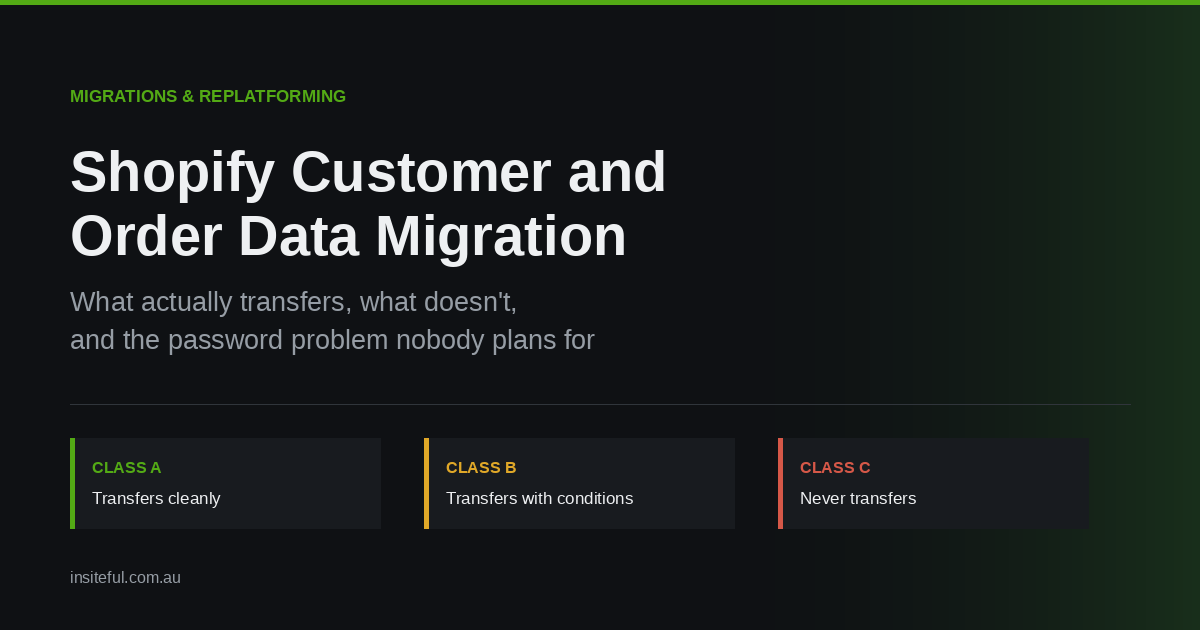
The three classes of migration data
Before you scope anything, sort your data into three buckets. This single exercise removes most of the surprise from a migration, and it takes about an hour.
Class A, transfers cleanly. Customer name, email, phone, default and additional addresses, tags, notes, tax exemption flags, and company records for B2B. These land in Shopify with high fidelity through a CSV or the Admin API. Budget for mapping effort, not for loss.
Class B, transfers with conditions. Order history, marketing consent, store credit, and metafield-held custom attributes. All of these arrive, but they arrive changed in ways that matter. An imported order is not the same object as a native order. A consent flag imported carelessly is a compliance exposure rather than a marketing asset.
Class C, never transfers. Passwords. Session tokens. Saved payment methods and stored card vaults. Platform-internal IDs that your integrations depend on. Loyalty point balances held inside a third-party app on the old stack. Anything living in an app database rather than the platform database.
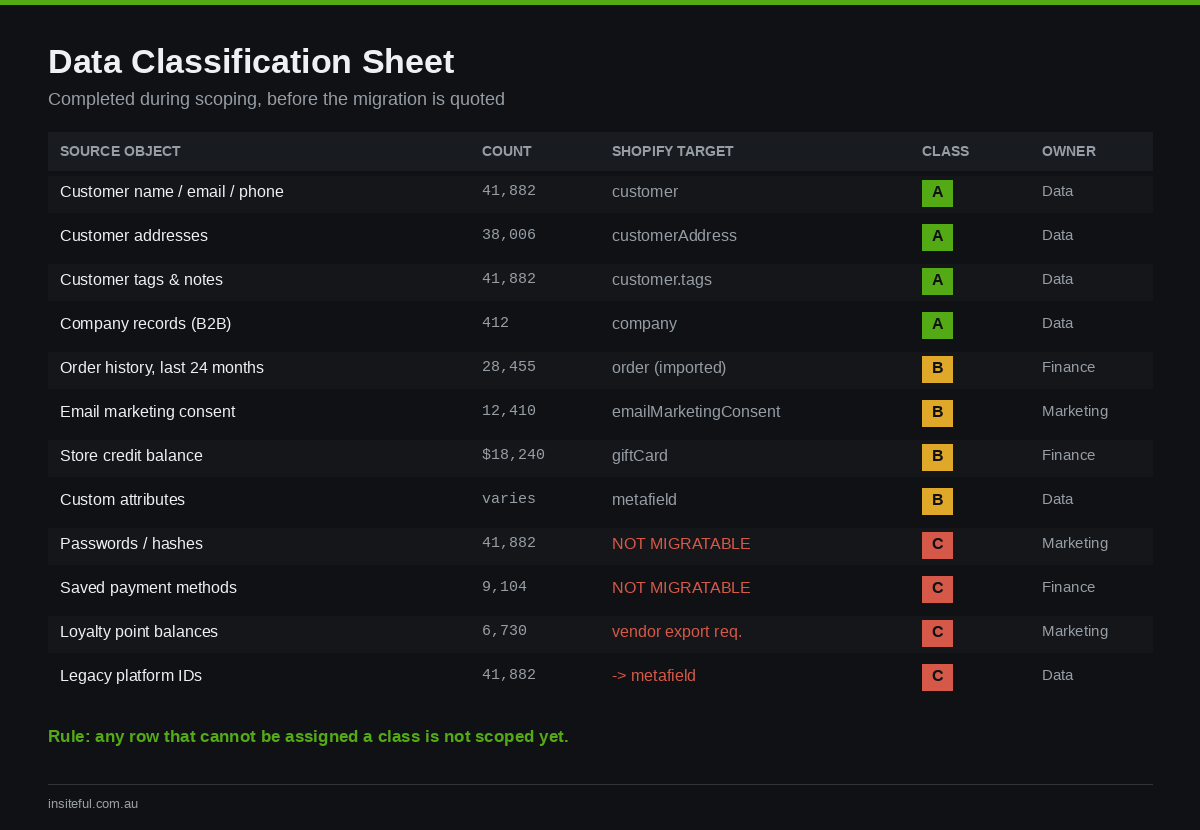
The build artefact here is a one-page data classification sheet, filled in before quoting. We run it as a spreadsheet with five columns: source object, record count, target Shopify object, class, and owner. If a row cannot be assigned a class, it is not scoped yet, and it will become a launch-week emergency.
The password problem, and why it is really a marketing problem
Shopify does not accept imported customer passwords. This is not a limitation of your migration app, and no vendor can work around it. Passwords on your old platform are stored as one-way hashes, frequently using a different algorithm and salt to the one Shopify uses, and they are irreversible by design. There is nothing to move.
The practical consequence is that every migrated customer account arrives in Shopify in a disabled state. The customer record exists, the order history attaches to it, but the account has no credential behind it. To make it usable, the customer must receive an account activation email and set a new password.
Merchants consistently underestimate what this means. You are not performing a technical step. You are asking your entire customer base to complete a friction-heavy action, at the exact moment your brand looks unfamiliar to them because the site just changed. Treat it as a campaign, not a checkbox.
Three things determine whether that campaign works.
Timing. Do not send activation emails at cutover. Launch day already carries redirect checks, DNS propagation, payment gateway verification, and whatever the theme decides to do under real traffic. Adding a support queue full of “I cannot log in” tickets on the same day is self-inflicted. We send activation 24 to 48 hours after cutover, once the store is confirmed stable.
Segmentation. Sending one blast to a 90,000-record list produces a support spike and a deliverability risk. Segment by recency. Customers who ordered in the last 12 months get activation first, in tranches. Dormant accounts from four years ago can wait, or can be left to activate organically when they next attempt to log in.
Framing. The default Shopify activation email is functional and forgettable. It reads like a system notification, which is exactly what a customer deletes. Rewrite it. Explain that the store has been rebuilt, that their order history and addresses are already waiting inside, and that setting a password takes one click. The activation rate difference between the default template and a properly written one is not marginal.
There is also a quiet fallback that most merchants miss. A customer who never activates is not locked out of buying. They can still check out as a guest, and Shopify will match the order to the existing customer record by email. Account activation improves the experience, but it is not a gate on revenue. Knowing this changes how hard you push the campaign.
Marketing consent: the field pair that gets merchants fined
This is the section that should make you slow down.
Shopify does not store email marketing consent as a single true or false value. It stores a pair. The state field holds one of not_subscribed, unsubscribed, or subscribed. The opt-in level field separately holds single_opt_in, confirmed_opt_in, or unknown. Through the Admin API, only SUBSCRIBED, UNSUBSCRIBED, and PENDING can be written; the remaining states are read-only or set internally.
Migration tools handle this badly by default. The common failure is a mapping that treats any non-empty value in the source system as subscribed, which silently resubscribes people who opted out years ago on your old platform. The second failure is defaulting opt_in_level to unknown, which destroys the evidence trail proving how consent was obtained.
In Australia this is not a tidiness issue. Under the Spam Act 2003, you need express or inferred consent before sending commercial electronic messages, and you are expected to hold records of when and how that consent was given. ACMA penalties are calculated per day rather than per message, with a ceiling in the region of $3.13 million AUD per day for corporations. ACMA has issued more than $20 million AUD in penalties since 2020, with a $7.5 million AUD penalty against Commonwealth Bank the largest to date. A migration script that resubscribes 40,000 unsubscribed records is a compliance event, not a bug.
The rule we apply is simple and non-negotiable: consent migrates conservatively. If the source data does not clearly prove consent, the record imports as not_subscribed. You can win a lapsed subscriber back with a re-permission campaign. You cannot un-send an unlawful one.
The build artefact for this section is an explicit mapping table, written before any import runs, and reviewed by whoever owns marketing rather than whoever owns the migration.
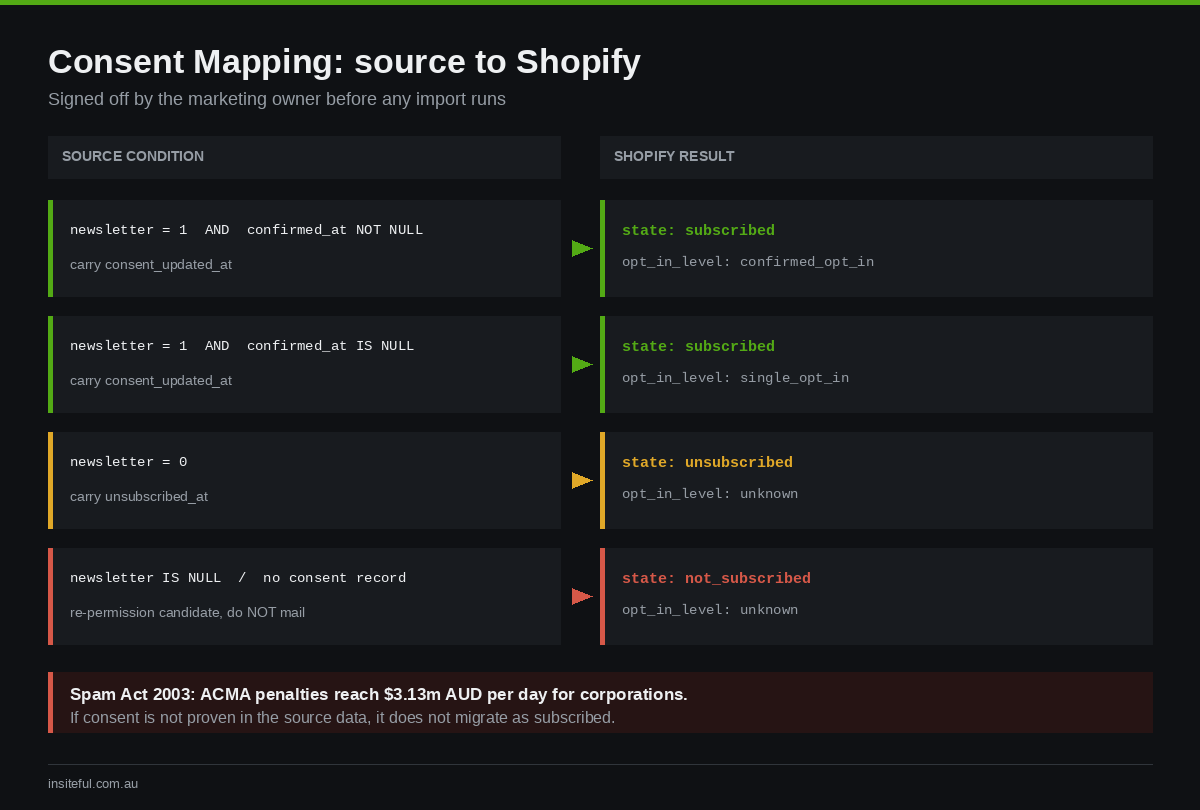
CONSENT MAP  (source -> Shopify)

source.newsletter = 1  AND  source.confirmed_at IS NOT NULL
  -> state: subscribed        opt_in_level: confirmed_opt_in
     consent_updated_at: source.confirmed_at

source.newsletter = 1  AND  source.confirmed_at IS NULL
  -> state: subscribed        opt_in_level: single_opt_in
     consent_updated_at: source.created_at

source.newsletter = 0
  -> state: unsubscribed      opt_in_level: unknown

source.newsletter IS NULL  OR  no consent record found
  -> state: not_subscribed    opt_in_level: unknown
     (re-permission campaign candidate, do NOT mail)
Carry consent_updated_at across wherever your source system holds it. That timestamp is your evidence. Losing it during migration means that if you are ever asked to prove consent, your answer is a shrug.
What an imported order actually is
Order history is the second place merchants get surprised, and the surprise is structural rather than cosmetic.
Shopify does not support importing historical orders by CSV through the native admin. Order import runs through the Admin API or through a migration app that wraps it. Beyond that, historical order access is scoped: by default the Order API exposes roughly the last 60 days, and reading further back requires the read_all_orders scope granted on top of standard order permissions.
More importantly, an imported order behaves differently to a native one. It exists for reporting, for customer service lookup, and for populating a customer’s account page. It does not sit inside the normal operational flow. You generally cannot refund it or re-fulfil it through the standard admin path, because the payment never happened on Shopify and there is no transaction to reverse. Orders are also effectively immutable once closed, which means tax, discount, and transaction values have to be correct at the moment of import. There is no clean edit afterwards, and there is no undo for a bad API import run.
Two consequences follow, and both belong in your project plan rather than in a post-launch discovery.
First, returns policy needs a bridging rule. If you offer 60-day returns and you migrate on 1 March, then until 30 April your team will receive return requests against orders that physically cannot be refunded in Shopify. Decide now whether those get processed manually through the payment gateway, issued as store credit, or handled as a gift card. Write it down and give it to your support team before launch, not during.
Second, your financial reporting will have a visible seam. Imported orders carry their original order dates, so historical revenue lands in the right periods, but the transactions underneath do not reconcile to Shopify Payments payouts. Your bookkeeper needs to know that Shopify analytics before the cutover date is a historical record, and the payout ledger is the source of truth from cutover forward. Agreeing this with the accountant in advance takes fifteen minutes. Discovering it at end of financial year takes considerably longer.
How much history should you actually bring?
The instinct is to migrate everything. It is usually the wrong call.
For most merchants, 12 to 24 months of order history covers every real use case: customer service lookups, returns within policy, repeat purchase analysis, and the customer-facing order list. Data older than that is better held in a warehouse or BI tool alongside Shopify, where it is queryable without inflating the migration.
The cost of over-migrating is real. Import runtime scales with record count and API rate limits, so a full-history import can add days to your cutover window and consume the calm period you needed for testing. Customer CSV files are capped at 15 MB, which forces batching on larger lists. And every additional year of imported orders is another year of data you must be able to honour deletion requests against, since redaction requests are generally expected to be actioned within 30 days.
Our default recommendation is 24 months of orders migrated into Shopify, the full customer record set migrated regardless of age, and everything older exported to cold storage as CSV plus a documented schema. The customer records are cheap and useful. The ancient orders are expensive and rarely opened.
Identity matching, the failure nobody tests for
Every migration silently assumes that email address is a unique customer key. It very often is not.
Legacy platforms accumulate duplicates: the same person with jane@company.com.au and Jane@Company.com.au, guest checkouts that never created an account, staff-created records from phone orders, and wholesale contacts entered twice under different company spellings. Import that unresolved and you get split order histories, customers who see half their purchases, and loyalty tiers calculated against the wrong lifetime value.
The build artefact is a pre-migration dedupe pass, run on an export before anything touches Shopify. Normalise, group, and inspect the collisions manually before merging. Never merge automatically on a fuzzy name match; merge on normalised email, then review the remainder by hand.
PRE-IMPORT DEDUPE  (run on source export, not in Shopify)

1. normalise_email  = lower(trim(email))
2. group by normalise_email  -> flag groups with count > 1
3. within each group, keep:
     - earliest created_at        (preserves customer tenure)
     - most recent default address
     - union of all tags
     - union of all order references
4. guest orders with no account:
     match to normalise_email; if no match, create record
     with tag "migrated-guest"
5. output: collisions.csv for MANUAL review before merge
     -> never auto-merge on name similarity
Guest orders deserve their own decision. If you create customer records for every historical guest purchaser, your customer count inflates and your marketing list gains people who never asked for an account. Tag them, keep them separate from your mailable segments, and let consent rules decide the rest.
The apps that quietly hold your data hostage
The most expensive migration losses are rarely in the platform. They are in the apps sitting on top of it.
Loyalty balances usually live in the loyalty app’s own database, keyed to a platform customer ID that will not exist after migration. Product reviews live with the reviews vendor and are keyed to old product IDs. Subscription contracts are the hardest of all, because they carry payment tokens that cannot be transferred between platforms without the gateway’s cooperation. Helpdesk history is keyed to old order numbers, so support agents lose context on every historical ticket.
Work through this in a fixed order, well before cutover:
- Inventory every app holding customer-linked data. Loyalty, reviews, subscriptions, helpdesk, returns portal, SMS, quiz and personalisation tools, wishlist.
- For each, ask the vendor one question in writing: can you migrate our data to a new Shopify store, and what is the identity key you will match on? Get the answer in email. Vendor support pages are frequently out of date on this.
- Export a raw backup regardless of the answer. Even if the vendor says migration is supported, hold your own CSV. Vendors change plans and merchants change vendors.
- Preserve the join key. Write the legacy customer ID and legacy order number into Shopify metafields on every migrated record. This is the single highest-value, lowest-cost step in the entire migration, and most projects skip it.
That last point earns its own emphasis. A metafield such as custom.legacy_customer_id costs nothing to populate during import and makes every future reconciliation possible. Without it, matching a loyalty export back to Shopify records six weeks after launch becomes a manual exercise across thousands of rows. We have been called in to clean up exactly that situation more than once, and the remediation costs more than the original migration line item.
The reconciliation ledger
A migration is not finished when the import completes. It is finished when the numbers agree.
Before cutover, capture counts from the source platform. After import, capture the same counts from Shopify. Any variance must be explained in writing, not waved through. Unexplained variance is where silent data loss hides.
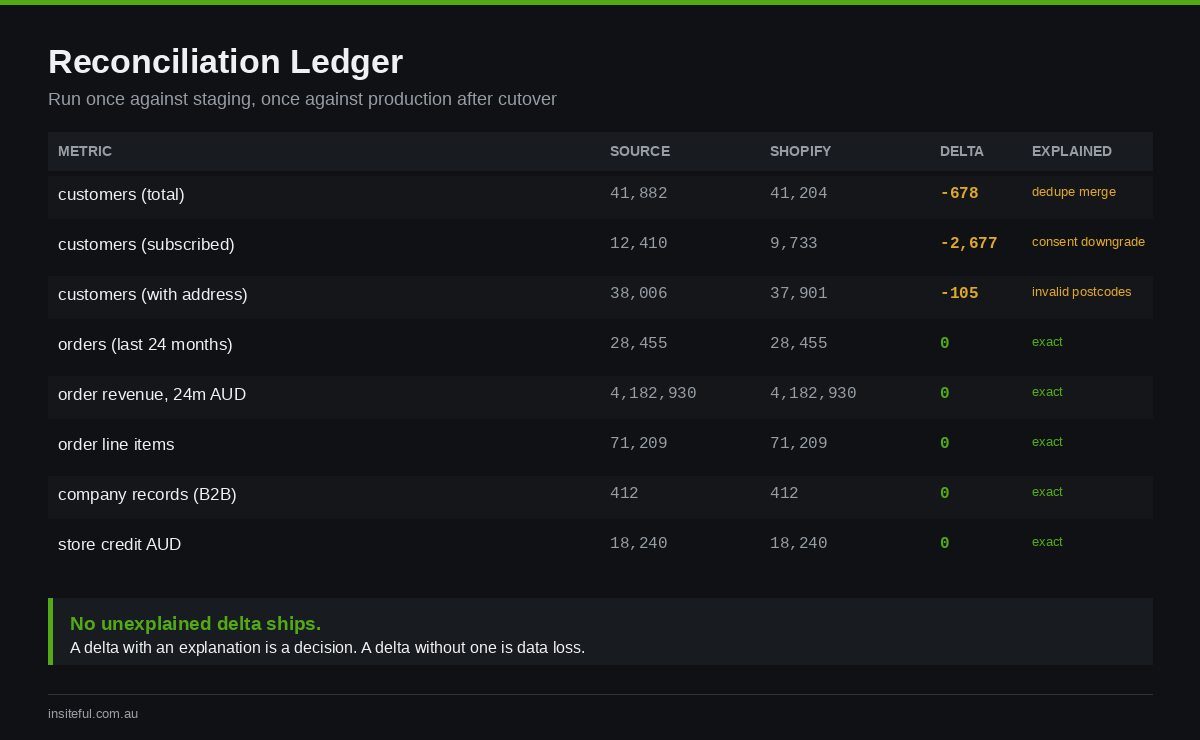
RECONCILIATION LEDGER            source    shopify    delta   explained?

customers (total)                 41,882    41,204     -678    Y  dedupe merge
customers (subscribed)            12,410     9,733   -2,677    Y  consent downgrade
customers (with default address)  38,006    37,901     -105    Y  invalid postcodes
orders (last 24 months)           28,455    28,455        0    Y  exact
order revenue, last 24m AUD    4,182,930 4,182,930        0    Y  exact
order line items                 71,209    71,209         0    Y  exact
company records (B2B)               412       412         0    Y  exact
store credit balance AUD         18,240    18,240         0    Y  gift cards

RULE: no unexplained delta ships. A delta with an explanation
is a decision. A delta without one is data loss.
Run this twice: once against a staging import, and once against production after cutover. The staging run is where you find the mapping errors while they are still cheap to fix.
A realistic sequence
Compressed into the order we actually run it:
- Classify data into Class A, B, and C. Agree what is deliberately not migrating.
- Export source data and run the dedupe pass. Review collisions by hand.
- Build and sign off the consent mapping table with the marketing owner.
- Import customers into a staging store. Reconcile. Fix mappings. Repeat until deltas are explained.
- Import orders into staging. Reconcile revenue by month against source reporting.
- Confirm app data paths with each vendor in writing. Populate legacy ID metafields.
- Cutover. Redirects, DNS, payments. No activation emails today.
- 24 to 48 hours later, send activation to the most recent cohort. Monitor support volume and activation rate.
- Roll activation through remaining cohorts over one to two weeks.
- Run the re-permission campaign against
not_subscribedrecords that were downgraded.
How we do it at Insiteful
We have run this process across migrations from WooCommerce, Magento, BigCommerce, Squarespace, and Neto, and the pattern that separates a clean migration from a painful one is consistent: the data work is scoped and reconciled before the theme build starts, not alongside it.
Practically, that means three commitments on every build we take on. First, the data classification sheet is completed during scoping, so the quote reflects real record counts rather than an estimate. Second, every migrated record carries its legacy identifiers in metafields, without exception, because that decision costs an hour during import and saves weeks later. Third, consent migrates conservatively by default, and we will push back if asked to do otherwise, because the downside sits with the merchant and it is measured in seven figures.
We also treat the activation campaign as part of the build rather than as something handed to the client afterwards. The email is written, segmented, and scheduled before cutover, and we watch activation rate for the first fortnight as a launch metric alongside conversion rate and Core Web Vitals.
Our Shopify builds run from $8,500 to $25,000 AUD depending on complexity, and data migration is quoted as a discrete line with its own reconciliation deliverable. If you want the detail on how the cutover itself is sequenced, our migration cutover runbook covers the 72 hours around launch, and our guide to migration SEO covers protecting rankings through the same window. If you are still deciding whether to move at all, start with the replatforming decision tree, and the lessons from our 40-plus WooCommerce migrations are worth reading before you brief anyone.
The short version
Passwords never move, so plan an activation campaign rather than a technical step. Consent moves conservatively or it becomes a legal exposure. Imported orders are records, not operational objects, so write your returns bridging rule in advance. Deduplicate before you import, not after. Write legacy IDs into metafields on everything. And reconcile the numbers twice, because a delta without an explanation is data loss wearing a spreadsheet.
Migrations do not fail on theme quality. They fail on the data nobody scoped.
If you are planning a move to Shopify and want the data side scoped properly before anyone touches a theme, book a build assessment and we will walk through your record counts, your app dependencies, and what a realistic migration window looks like for your store.