
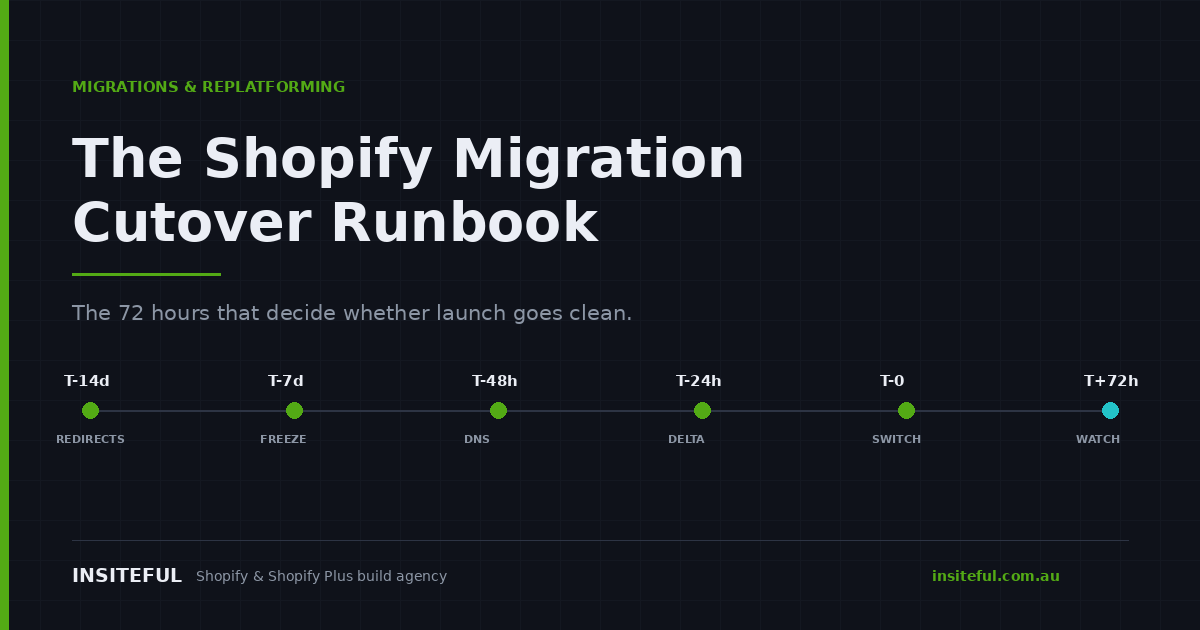
Migrations do not fail during the build. They fail in the 72 hours around the switch, and they fail quietly.
Industry data backs this up. Most ecommerce replatforming projects experience a 5 to 20 percent conversion drop in the first 60 days post-launch, almost entirely from regressions that standard QA testing missed. A poorly executed migration can cost 2 to 5 times the original budget in post-launch fixes alone, before you count lost revenue, ranking damage, or the hit to the team’s confidence. The pattern that analysts keep documenting in 2026 is the uncomfortable one: the launch itself runs clean, and the revenue loss starts afterward.
We have run this sequence on Magento, WooCommerce, BigCommerce, Squarespace and Neto builds. The design work is the visible part. The cutover is the part that decides whether the client wakes up to a store that is taking money or a store that is taking support tickets.
This is the runbook we actually use. Times are T-minus hours from the DNS change.
A cutover is a sequence, not a switch
The most expensive assumption in replatforming is that go-live is a single action performed by one person at one moment. It is not. It is roughly eleven dependent actions performed by four people over three days, and every one of them has a failure mode that only becomes visible downstream.
Here is the shape of it:
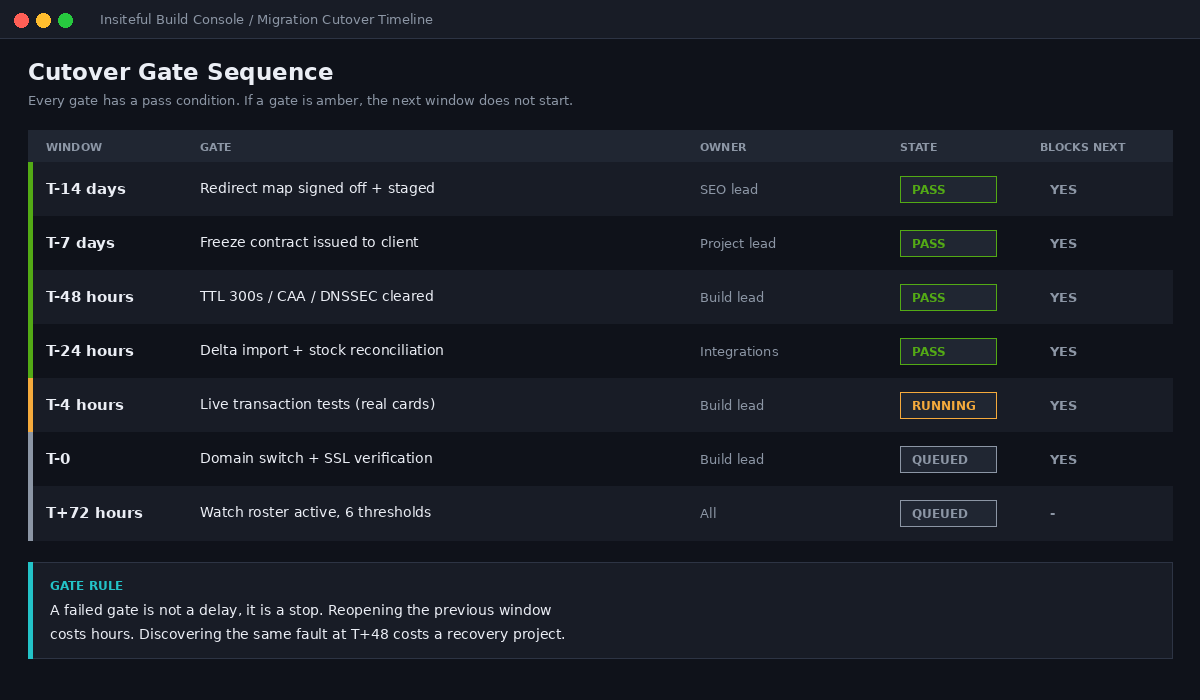
| Window | What happens | Failure mode if skipped |
|---|---|---|
| T-14 days | Redirect map signed off, staged in Shopify | Organic traffic collapse in week two |
| T-7 days | Freeze contract issued to client team | Data drift, orphaned orders |
| T-48 hours | DNS TTL lowered, CAA and DNSSEC cleared | Split traffic, SSL provisioning stall |
| T-24 hours | Delta import, inventory reconciliation | Overselling on high-velocity SKUs |
| T-4 hours | Live transaction tests with real money | Tax or gateway misconfiguration |
| T-0 | Domain switch, SSL verification | Downtime, mixed-content warnings |
| T+72 hours | Watch roster active, thresholds monitored | Silent revenue leak for weeks |
Every row above is a gate. If the gate does not pass, the next one does not start. That single rule prevents more revenue loss than any amount of pre-launch testing.
T-minus 14 days: the redirect map ships before the theme does
On our builds the redirect map is a deliverable with a sign-off, not a task someone remembers on launch night. It is the single highest-leverage artefact in the whole project and it needs to exist while there is still time to argue about it.
The platform constraints matter here, because they shape how you build the file:
- Standard Shopify plans support 100,000 URL redirects. Shopify Plus supports up to 20,000,000. These limits are fixed and cannot be raised, so on a large catalogue you plan against them from day one.
- Each redirect string has a 1,024 character maximum, including the leading forward slash. Legacy platforms with long faceted-search URLs will blow through this.
- Shopify rejects redirects that would create a chain. This is helpful, but it means a badly ordered import will silently drop rows.
- Import in batches of roughly 1,000 rows so validation errors are traceable to a specific block rather than a 40,000-row file.
The prioritisation is where agencies earn their fee. On a recent Neto build we extracted 11,400 legacy URLs. Only 340 of them carried 82 percent of organic sessions. Those 340 get hand-mapped one to one, reviewed by a human, and tested individually. The remaining 11,060 get pattern rules and a spot-check sample.
We ship the map as a two-column CSV and a verification script that runs the morning after the switch:
# verify-redirects.sh - run at T+1 hour and again at T+24
# expects redirects.csv with columns: old_path,new_path

DOMAIN="https://www.clientdomain.com.au"
FAIL=0

while IFS=, read -r old new; do
  CODE=$(curl -s -o /dev/null -w "%{http_code}" "$DOMAIN$old")
  DEST=$(curl -s -o /dev/null -w "%{redirect_url}" "$DOMAIN$old")
  if [ "$CODE" != "301" ]; then
    echo "FAIL $old → status $CODE"
    FAIL=$((FAIL+1))
  fi
done < redirects.csv

echo "Failed redirects: $FAIL"
A properly configured 301 passes the majority of the original page’s accumulated ranking signals to the new URL, which is exactly why this is mandatory rather than optional. We go deeper on the ranking side in our guide to moving stores without losing rankings.
T-minus 7 days: the freeze contract
The freeze is a commercial agreement, not a technical setting. Someone in the client’s team will update a price, edit an order, or upload 40 new products at 9pm on launch eve unless you have told them in writing that they cannot, and told them exactly when the window opens again.
Best practice is to freeze content changes on the legacy store 12 to 24 hours before the DNS change, then run a final delta import of anything created during that window. We issue a one-page freeze register with named owners:
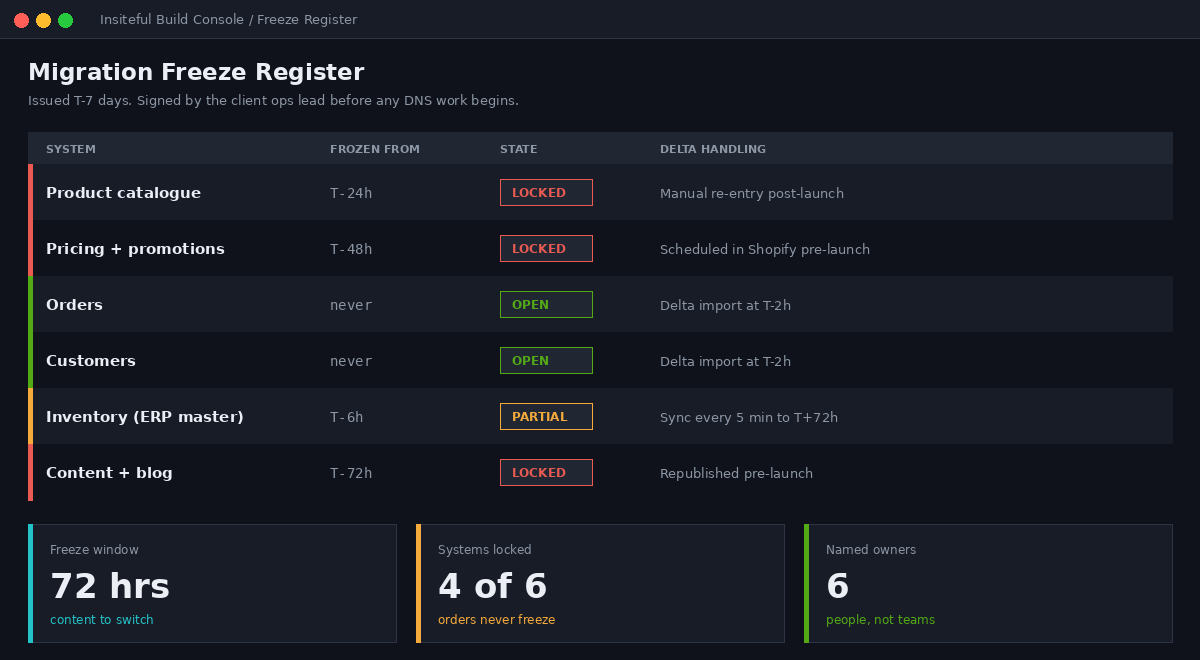
| System | Frozen from | Still permitted | Delta handling |
|---|---|---|---|
| Product catalogue | T-24h | Nothing | Manual re-entry post-launch |
| Pricing and promotions | T-48h | Nothing | Scheduled in Shopify pre-launch |
| Orders | Never frozen | Normal trading | Delta import at T-2h |
| Customers | Never frozen | Normal signups | Delta import at T-2h |
| Inventory (ERP master) | T-6h | Receipting only | Sync every 5 min through T+72h |
| Content and blog | T-72h | Nothing | Republished in Shopify pre-launch |
Note the asymmetry. Orders and customers are never frozen, because you cannot ask a business to stop trading. Everything else is frozen, because everything else is a choice.
T-minus 48 hours: DNS is a two-day job
The single most common cause of a messy launch is treating DNS as a five-minute admin task. It is a 48-hour process with three independent things that can block it.
First, lower the TTL. Drop the time-to-live on the A and CNAME records to 300 seconds at least 24 to 48 hours before the switch. TTL controls how long DNS records stay cached by resolvers worldwide. Leave it at the default 3,600 or 86,400 and you get a long window where some customers hit the new store and some hit the old one, with orders landing in both systems.
Second, check the CAA record. Shopify provisions a free SSL certificate for every connected domain, usually within 24 hours but occasionally up to 48. If the domain has a CAA record that does not permit Let’s Encrypt, Google, or SSL.com to issue certificates, provisioning silently stalls and the store serves security warnings. This is the failure that gets discovered by a customer rather than by the team.
Third, check DNSSEC. Active DNSSEC on the legacy provider is a known blocker for certificate provisioning and needs to be disabled before the switch, not during it.
The records themselves are simple: an A record pointing to 23.227.38.65 and a CNAME for the www subdomain pointing to shops.myshopify.com. Worth knowing that after connection your A record may display a different host ID. That is still valid and does not indicate a fault, which saves a panicked support ticket at 2am.
We verify from three resolvers before anyone touches the primary domain setting:
# DNS pre-flight - run at T-48h, T-24h and T-0

for RESOLVER in 1.1.1.1 8.8.8.8 9.9.9.9; do
  echo "--- $RESOLVER ---"
  dig +short A clientdomain.com.au @$RESOLVER
  dig +short CNAME www.clientdomain.com.au @$RESOLVER
  dig +short CAA clientdomain.com.au @$RESOLVER
  dig +short DS clientdomain.com.au @$RESOLVER
done

# TTL check - must read 300 or lower before proceeding
dig clientdomain.com.au A | grep -A1 "ANSWER SECTION"
T-minus 24 hours: the delta import and the overselling trap
Data migration is consistently the highest-risk phase of the whole project, and the reason is that most teams treat it as one job. It is two.
Bucket one is masters: SKUs, product records, locations, vendors, customers. These are loaded early, profiled for nulls, duplicates and referential integrity, then cleansed and de-duplicated before load. Right-sizing history here matters. Not every legacy record deserves to survive.
Bucket two is open activity: open sales orders, open purchase orders, and stock on hand. These are volatile, they change until the moment you freeze, and they are what the delta import is for.
The trap sits between them. Importing historical orders without decoupling inventory adjustment causes overselling and backorders, because every imported order tries to decrement stock that was already decremented on the legacy platform. We import historical orders with inventory behaviour explicitly set to bypass, then run a single authoritative stock-on-hand load from the ERP as the last write before the switch.
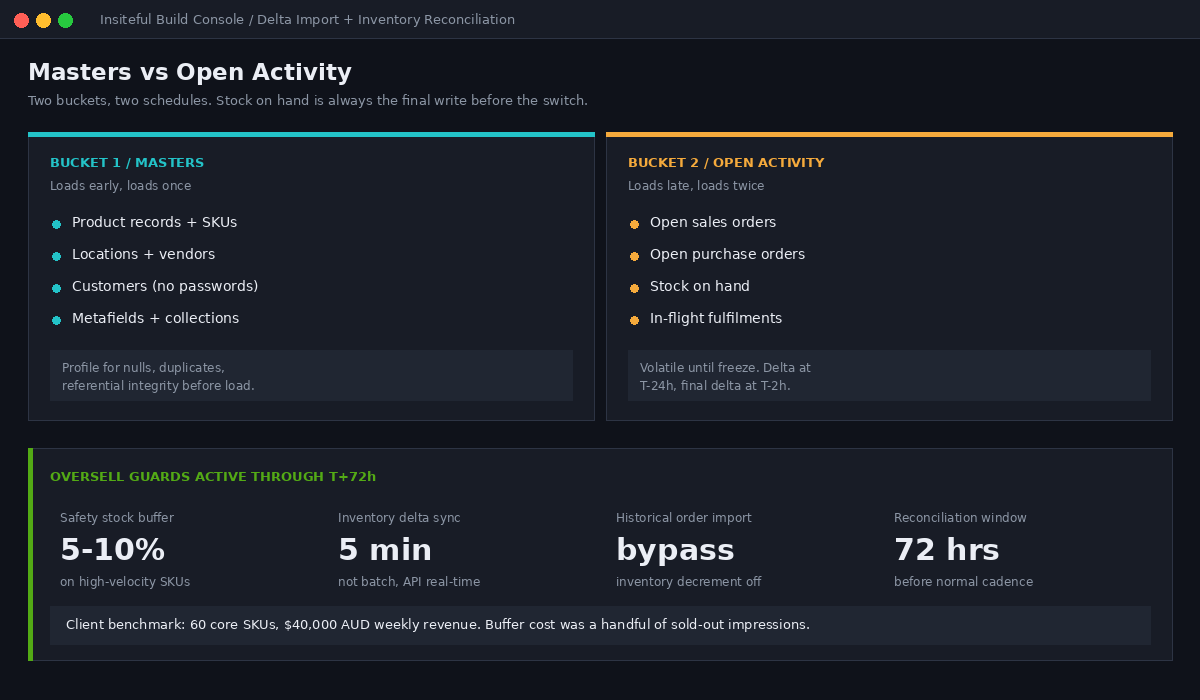
Two safeguards we apply on every build with a live ERP or 3PL connection:
- Safety stock buffer of 5 to 10 percent on high-velocity SKUs through the DNS propagation window. On a client doing $40,000 AUD a week through 60 core SKUs, this costs a handful of “sold out” impressions and prevents dozens of oversell refunds.
- Incremental inventory delta syncs every 5 minutes through the full 72-hour cutover phase, stepping back to normal cadence only once the watch window closes. High-volume stores need real-time API syncs here, not low-frequency batch updates.
One thing that never migrates: customer passwords. They are hashed on the legacy platform and cannot be moved. Every migration ships with an account activation strategy, and the wrong one turns a launch into a support queue. We stagger activation invites in cohorts by last-order date rather than blasting the full list on day one. Our 3PL integration guide covers the fulfilment side of this reconciliation in more detail.
T-minus 4 hours: real money, real cards, real refunds
Test orders in a sandbox prove almost nothing. Four hours out, we place real transactions with real cards against the live gateway and then refund them. For Australian merchants there is a specific checklist, because the tax configuration is the part that quietly costs money.
- GST collection is on and the ABN is entered. In Settings, Taxes, Australia, select Collect GST and enter the business ABN. A domestic order of $180 AUD displayed GST-inclusive should show a $16.36 GST component. If that number is wrong, every invoice from launch onward is wrong.
- The ABN is also on the billing profile. Australian stores pay 10 percent GST on the Shopify subscription and shipping labels unless the ABN is registered under Settings, Billing, Tax registration. This exemption only applies to invoices issued after the ABN is added, so adding it late is money left behind permanently.
- Australia Post live rates return correctly for metro, regional and remote postcodes, including any dimensional weight rules and rural surcharges. We test six postcodes: 3000, 2000, 4870, 6430, 0870 and 7470.
- Payouts land in the right account. Confirm the Shopify Payments payout schedule and bank details before the first real customer order, not after.
Our standard pre-launch transaction set is six orders: a domestic GST-inclusive order, an international order into New Zealand, one into the United States, a gift card purchase and redemption, a discount code order, and a B2B order on net terms if the store has a wholesale channel. Each one is refunded and the refund is confirmed as settled.
T-zero: the switch sequence
The switch itself is nine steps in a fixed order. Deviating from the order is how stores end up serving mixed content or losing an hour of orders.
- Confirm all gates from previous windows have passed. If any is amber, the switch does not proceed.
- Run the final delta import for orders and customers created since the freeze.
- Run the authoritative stock-on-hand load from the ERP.
- Confirm redirects are staged and counted in Shopify admin. Staging redirects before pointing the domain is non-negotiable.
- Update the A and CNAME records at the registrar.
- Set the domain as primary in Shopify and remove the password page.
- Watch SSL provisioning. Do not announce launch until the certificate is live and the padlock resolves from three networks including a mobile carrier.
- Place one live order through the production domain and refund it.
- Submit the new sitemap in Google Search Console and request indexing on the top 20 URLs.
Step seven is where patience pays. Certificates usually provision within 24 hours, but announcing launch to an email list before the padlock resolves converts a routine wait into a brand problem.
T-plus 72 hours: the watch roster
Post-launch monitoring discipline has not kept pace with how good migration tooling has become. That gap is now the main thing separating migrations that grow revenue from migrations that bleed a quarter. Uncoordinated handoffs between data, design and integration vendors is the leading documented cause of post-launch revenue loss.
The fix is unglamorous: named owners, agreed thresholds, and a defined action for each one. Three roles minimum, assigned before go-live, on a roster that covers the full 72 hours.
| Signal | Threshold | Owner | Action |
|---|---|---|---|
| 404 rate | >0.5% of sessions | SEO lead | Patch redirect map within 2h |
| Checkout completion | >10% below baseline | Build lead | Gateway and script audit |
| Order sync lag | >15 min to ERP | Integrations lead | Requeue, check webhook delivery |
| Oversell events | Any | Ops lead | Raise safety buffer, halt affected SKU |
| Support ticket volume | >2x rolling average | Client service | Categorise, escalate top theme hourly |
| Page LCP | >2.5s on collection templates | Performance lead | Asset audit, defer third-party scripts |
The 404 threshold is the one clients push back on. It looks pedantic. It is the earliest reliable signal that the redirect map has a systematic gap, and catching it in hour two rather than week three is the difference between a patch and a recovery project.
The regressions standard QA misses
Functional testing confirms that things work. It rarely confirms that things earn. These are the leaks we specifically hunt in the watch window, because every one of them passes a functional test:
- Analytics and consent. If GA4 or the consent banner is not firing correctly on the new checkout, you will see a conversion drop that is purely measurement. Teams have made real pricing decisions off phantom drops. Verify the purchase event fires with correct value and currency before you trust a single dashboard.
- Email flows re-triggering. Importing 40,000 existing customers can enrol every one of them in a welcome series. We suspend all flows during import and re-enable them with a created-date filter.
- Abandoned cart timing. Migrated carts can fire recovery emails for carts abandoned months ago on the old platform.
- Review app product mapping. Reviews attach to product IDs. New platform, new IDs. Reviews land on the wrong products or vanish, and product-page conversion drops with them.
- Subscription contracts. Recurring revenue is the least forgiving data to migrate. Contract dates, payment methods and cadence all need reconciling against the legacy system line by line, not in aggregate.
- Structured data. Price, availability and review markup often survive the theme but break on migrated product templates, which quietly removes rich results.
What you can roll back, and what you cannot
Every runbook needs a documented reverse. Most of it is not reversible, which is precisely why the gates exist.
| Element | Reversible? | Cost of reversing |
|---|---|---|
| DNS records | Yes, if TTL is 300s | 10 to 30 minutes of split traffic |
| Primary domain in Shopify | Yes | Minutes |
| Orders placed on the new store | No | Manual re-entry into legacy system |
| Customer account activations | No | Reputational, cannot un-send |
| Inventory writes to the ERP | Partially | Full stocktake reconciliation |
| Search engine crawls of new URLs | No | Weeks of ranking volatility |
Our rollback trigger is deliberately narrow: we revert only for a total checkout failure or a gateway outage lasting more than 30 minutes. Anything smaller gets fixed forward, because a second DNS change costs more in confusion than most defects cost in revenue.
How We Do It at Insiteful
Twenty-five years and roughly 200 sites a year has taught us that the cutover is the deliverable clients remember. The theme is what they bought. The launch weekend is what they judge.
Every Insiteful migration ships with the same four artefacts, and they are written into the scope rather than improvised in the final week:
- A gated cutover timeline with pass conditions, issued at project kickoff so the client’s team can plan trading, marketing and staffing around it.
- A signed freeze contract with named owners per system, so nobody is surprised when the catalogue locks.
- A verified redirect map with the top revenue-generating URLs hand-mapped and individually tested, plus the verification script the client keeps.
- A 72-hour watch roster with thresholds, owners and escalation paths, staffed by us and the client together.
We run the switch in a shared war room, not over email. Three people from our side and the client’s ops lead on a single call for the switch window, with the roster taking over afterwards. That coordination layer is exactly what the failure research keeps pointing at, and it is the cheapest insurance in the entire project.
Our Shopify and Shopify Plus builds run $8,500 to $25,000 AUD across a six to eight week timeline, and the cutover runbook is included in that scope on every migration. We build native Shopify, which keeps the launch surface small and the rollback path short.
If you want to see how a specific migration would sequence, we have written up the platform-specific playbooks for Neto, BigCommerce and WooCommerce. If you are still deciding whether to move at all, start with our replatforming decision tree.
Book a build assessment
If you are replatforming this year and the launch plan is currently a calendar invite called “go live”, that is the gap worth closing. We will walk your migration through the same gate structure we use internally and tell you where the risk actually sits.