
The call always comes at the same time of day. It is 6am, the overnight sync between the ERP and Shopify has been running since midnight, and it is still going. Nobody knows how far through it is. The warehouse team is about to start picking against stock levels that were accurate seven hours ago, and the merchandiser who scheduled a price change for 9am is now watching a job that may or may not land before the sale goes live.
We get brought into this situation a lot. The store is usually on Shopify Plus, the catalogue is somewhere between 20,000 and 400,000 variants, and the integration was written by someone who assumed that a bigger plan means a bigger allowance. It does not, at least not in the way most people expect. Shopify Plus gives you a deeper bucket. It does not give you permission to ask bigger questions, and it does not make a paginated loop through a large catalogue a sensible thing to do.
This article is the version of that conversation we have with technical stakeholders before we quote an integration rebuild. It covers how Shopify actually prices an API request, why the ceiling that matters is not the one on your plan page, and the two mechanisms (bulk queries and bulk mutations) that move heavy work outside the rate limit entirely. There is arithmetic, there is code, and there is the operational scaffolding you need around it so that a failed job wakes someone up instead of quietly corrupting your inventory.
The context matters here. Australians spent $82.6 billion AUD online in 2025, up 14 per cent year on year, and online is now 24 per cent of all retail spend according to the Australia Post eCommerce Report. The brands driving that number are not running 300 SKUs any more. They are running deep catalogues across multiple markets with an ERP, a PIM, a 3PL and a marketplace feed all writing into the same store. Every one of those systems shares the same rate limit.
The bucket, in actual numbers
Shopify’s Admin API rate limiting is a leaky bucket. Your app has a bucket with a fixed capacity, every request drains points from it, and the bucket refills at a constant rate. When the bucket is empty, requests are rejected until enough points have restored.
The numbers that matter:
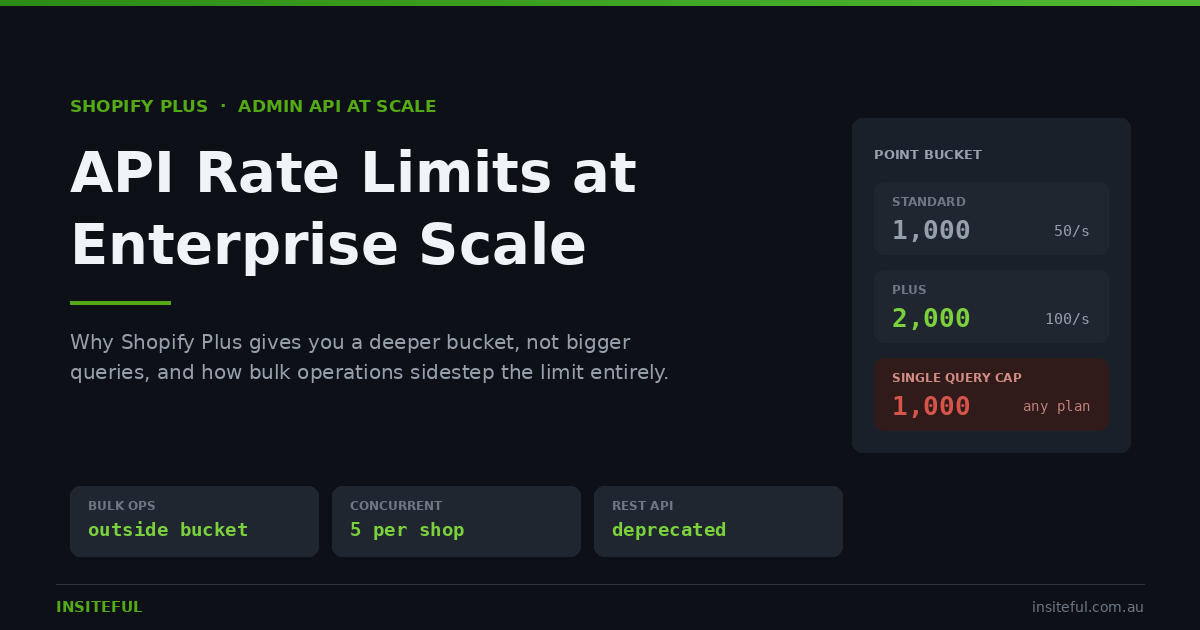
- Standard Shopify plans: a 1,000 point bucket, restoring at 50 points per second.
- Shopify Plus: a 2,000 point bucket, restoring at 100 points per second.
- Every plan, no exceptions: a single query may not exceed 1,000 points.
That third line is the one that catches teams out. Plus doubles your capacity and doubles your restore rate, so you can sustain roughly twice the throughput. It does not raise the per query ceiling. A query that costs 1,400 points is rejected on a Plus store exactly the same way it is rejected on a Basic store, and it is rejected before execution, based on the requested cost. You do not get a partial result. You get an error.
The practical consequence is that scaling an integration on Shopify is not about writing fewer, larger requests. It is about understanding where the ceiling sits, staying under it deliberately, and knowing when to stop making requests altogether and hand the work to a bulk operation instead.
How Shopify prices a query before it runs
Shopify assigns an integer cost to every field in the GraphQL schema and adds them up before the query executes. The rules are deterministic, which means you can calculate the cost of any query on paper before you ship it.
- Scalar fields (id, title, sku, a price string) cost 0 points.
- Object fields cost 1 point each.
- Connection fields cost 2 points, plus 1 point per item requested.
- Standard mutations cost around 10 points.
Scalars being free is the detail people miss. Asking for forty scalar fields on a product costs you nothing extra. The cost lives entirely in the shape of the query, specifically in how many connections you nest and how many items you request from each one.
Here is the query almost every catalogue sync starts life as:
query CatalogueSync($cursor: String) {
  products(first: 250, after: $cursor) {
    pageInfo { hasNextPage endCursor }
    edges {
      node {
        id
        title
        handle
        status
        variants(first: 10) {
          edges {
            node { id sku price inventoryQuantity }
          }
        }
      }
    }
  }
}
It reads as harmless. Work the cost out and it is not. Each product node costs 1 point as an object, plus a nested variants connection at 2 points plus 10 items, so 12 points. That is 13 points per product. The outer products connection is 2 points plus 250 items at 13 points each.
Total: 3,252 points. More than three times the hard ceiling. Shopify rejects it outright, on Plus and on every other plan.
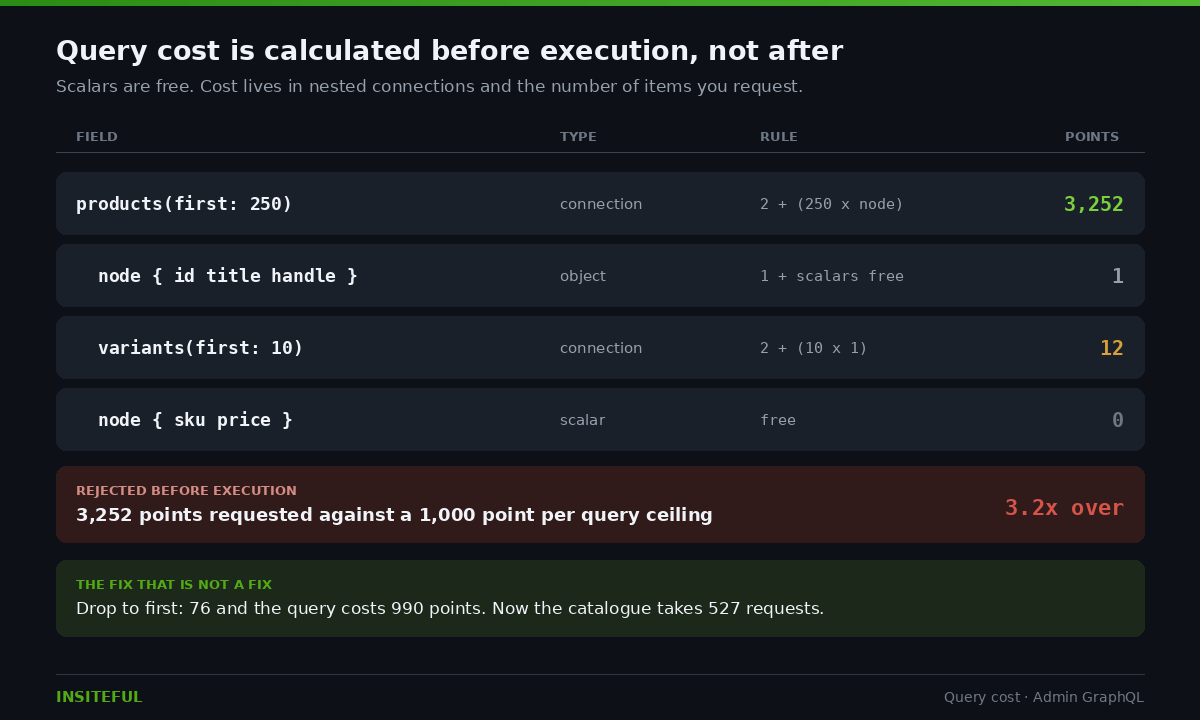
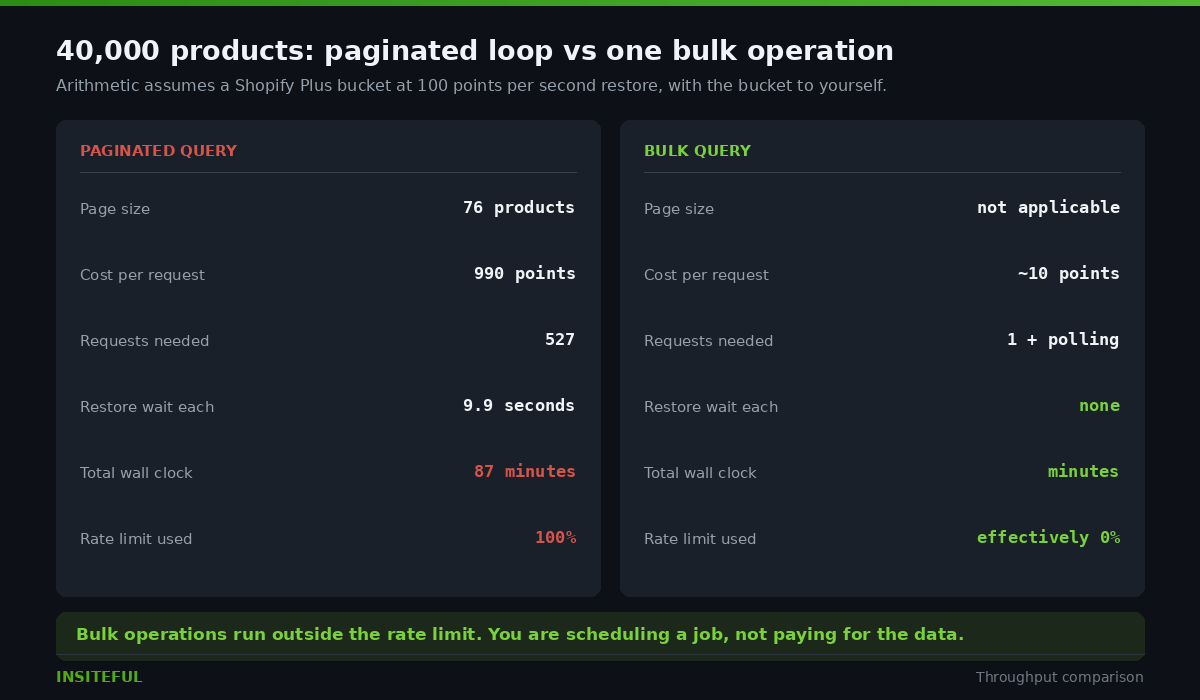
The fix most teams reach for is to drop the page size until the query is accepted. Solve for the ceiling and you land at 76 products per page, which costs 990 points. That works. It also means a 40,000 product catalogue now takes 527 requests, and each one of those requests drains 990 points from a bucket that refills at 100 points per second on Plus. That is 9.9 seconds of restore time per page.
527 pages at 9.9 seconds each is roughly 87 minutes of wall clock time on Shopify Plus, and about 174 minutes on a standard plan, for a single read of the catalogue. Not a write. A read. And that is with the bucket entirely to yourself, which it never is, because the ERP connector, the review app, the subscription app and the marketplace feed are all drawing from a shared limit on the same store.
This is the point at which a lot of integrations start “working” by getting slower every quarter until one day the overnight window is not long enough. That is the 6am phone call.
The field almost nobody requests
Before we change any integration, we instrument the one we inherited. Every GraphQL response from Shopify can carry an extensions block that tells you exactly what the request cost and how much capacity you have left. Most client codebases we open have never asked for it.
{
  "extensions": {
    "cost": {
      "requestedQueryCost": 990,
      "actualQueryCost": 812,
      "throttleStatus": {
        "maximumAvailable": 2000.0,
        "currentlyAvailable": 1188,
        "restoreRate": 100.0
      }
    }
  }
}
Two things fall out of this immediately.
First, requestedQueryCost and actualQueryCost almost never match. Shopify reserves the requested cost up front, then refunds the difference once it knows how many items actually came back. If you asked for 250 items and 40 exist, you are refunded the gap. Teams that budget against requested cost consistently under use their allowance, sometimes by 30 to 40 per cent.
Second, currentlyAvailable is the only number worth pacing against. A well behaved client reads it on every response and slows itself down as the bucket drains, rather than sprinting until it gets a 429 and then reacting. Reacting to throttling is always more expensive than avoiding it, because the failed request still cost you a round trip and, on a mutation, may have left you unsure whether the write landed.
The rule we apply on every Plus build: if currentlyAvailable drops below 25 per cent of maximumAvailable, the worker pauses until the bucket has restored to at least 50 per cent. It costs a few seconds of throughput and it removes an entire class of failure.
Why pagination is the wrong tool for a full catalogue
Everything above is a description of pagination working as designed. The 87 minute figure is not a bug. It is what happens when you use a real time, interactive API to do a batch job.
Paginated queries are the right tool when you need a small, current slice of data in response to something a user just did. Show me this customer’s last five orders. Look up this variant by SKU. Check whether this discount code exists. Latency matters, volume does not.
A catalogue export is the opposite. Nobody is waiting on the other end of it, latency is irrelevant, and volume is the entire problem. Running it through the interactive API means you are paying real time prices for batch work, and you are spending your store’s shared rate limit to do it.
Shopify’s answer to this is bulk operations, and the important thing about them is not that they are faster. It is that the work runs outside your bucket. A bulk query that pulls a 500,000 product catalogue costs you roughly the same handful of points as any other mutation, because all you are doing is asking Shopify to schedule a job. The extraction itself does not touch your rate limit at all.
Bulk queries: moving the work outside your bucket
A bulk query is a normal GraphQL query wrapped in the bulkOperationRunQuery mutation. There is no pagination, no page size, and no cursor. You describe the shape of the data once and Shopify walks the entire result set for you.
mutation {
  bulkOperationRunQuery(
    query: """
    {
      products {
        edges {
          node {
            id
            title
            handle
            status
            variants {
              edges {
                node { id sku price inventoryQuantity }
              }
            }
          }
        }
      }
    }
    """
  ) {
    bulkOperation { id status }
    userErrors { field message }
  }
}
Note what is missing. No first: 250. No after: $cursor. Bulk queries do not accept pagination arguments on the top level connection, because pagination is the thing you are handing over.
The mutation returns immediately with a bulk operation ID and a status of CREATED. From there you poll:
query {
  currentBulkOperation(type: QUERY) {
    id
    status
    errorCode
    objectCount
    fileSize
    url
    partialDataUrl
  }
}
When status reaches COMPLETED, the url field holds a signed link to a JSONL file containing every record. One object per line, with nested connection results appearing as separate lines carrying a __parentId field that points back to the parent record.
That parent ID structure is the part that trips people up on their first bulk implementation. The file is not a nested JSON document. It is a flat stream where a product line is followed by its variant lines, each tagged with the product’s ID. You reassemble the hierarchy as you read, which is exactly what you want for a large file because it means you can stream it rather than loading the whole thing into memory. We have processed multi gigabyte JSONL exports on a worker with 512MB of RAM precisely because of this.
Two operational details worth writing down. The signed URL expires, so download it promptly rather than storing the link. And partialDataUrl exists for a reason: if an operation fails partway through, you can still retrieve what completed, which is often enough to resume rather than restart.
Bulk mutations: the staged upload path
Reading at scale is the easy half. Writing at scale is where most integrations are actually losing time, because a price update across 40,000 variants through the interactive API is 40,000 mutations at roughly 10 points each. On Plus, at 100 points per second, that is 400,000 points of work and roughly 67 minutes if nothing else is touching the store. In practice it is longer, and every minute of it is a minute your other integrations are being starved.
Bulk mutations solve this, but the flow is less obvious than bulk queries because you have to get your data into Shopify before you can operate on it. There are three steps.
Step one: reserve an upload target. You cannot POST a file to Shopify directly. You ask for a staged upload location first.
mutation {
  stagedUploadsCreate(input: {
    resource: BULK_MUTATION_VARIABLES,
    filename: "variant-prices.jsonl",
    mimeType: "text/jsonl",
    httpMethod: POST
  }) {
    stagedTargets {
      url
      resourceUrl
      parameters { name value }
    }
    userErrors { field message }
  }
}
The resource value must be BULK_MUTATION_VARIABLES. Using the wrong resource type is the single most common cause of a staged upload that appears to succeed and then produces a bulk operation that fails with no useful error.
Step two: upload the JSONL. The parameters array comes back with a set of form fields that must be included in your multipart POST, in the order supplied, before the file field. Not alongside it, before it. Object storage rejects the upload otherwise.
Each line of the file is the variables object for one execution of your mutation:
{"input": {"id": "gid://shopify/ProductVariant/4411", "price": "129.00"}}
{"input": {"id": "gid://shopify/ProductVariant/4412", "price": "149.00"}}
{"input": {"id": "gid://shopify/ProductVariant/4413", "price": "159.00"}}
Step three: run the mutation against the file. The stagedUploadPath is the key parameter returned in step one, not the full URL.
mutation {
  bulkOperationRunMutation(
    mutation: "mutation call($input: ProductVariantInput!) { productVariantUpdate(input: $input) { productVariant { id price } userErrors { field message } } }",
    stagedUploadPath: "tmp/12345/bulk/abc-def/variant-prices.jsonl"
  ) {
    bulkOperation { id url status }
    userErrors { field message }
  }
}
Shopify then executes that mutation once per line, and when it finishes you get a results JSONL back. That results file is not optional reading. It contains the per line outcome including userErrors, which is where you find the 40 variants that failed validation while 39,960 succeeded. An integration that fires a bulk mutation and does not parse the results file is an integration that silently drops data, and we have inherited several of those.
The relevant constraints in API version 2026-01 and above: each app can run up to five bulk mutation operations per shop simultaneously, and a bulk mutation has to complete within 24 hours or it is cancelled.
Five concurrent operations, and the queue that has to sit behind it
That five operation ceiling is a design constraint, not a footnote. It means an integration that dispatches bulk jobs opportunistically will eventually hit a wall, and what it does at that wall determines whether you find out about it in a dashboard or from the warehouse.
The architecture we build for this is boring on purpose. A single dispatcher, a durable job queue, and a rule that nothing calls the Shopify API directly.
Job created  ->  QUEUED
                  |
             dispatcher checks active bulk ops
                  |
        under 5? ---- no ----> stays QUEUED, retried next tick
                  |
                 yes
                  |
              RUNNING  ->  poll every 20s
                  |
        COMPLETED / FAILED / CANCELED
                  |
        parse results JSONL, record per line errors
                  |
              RECONCILED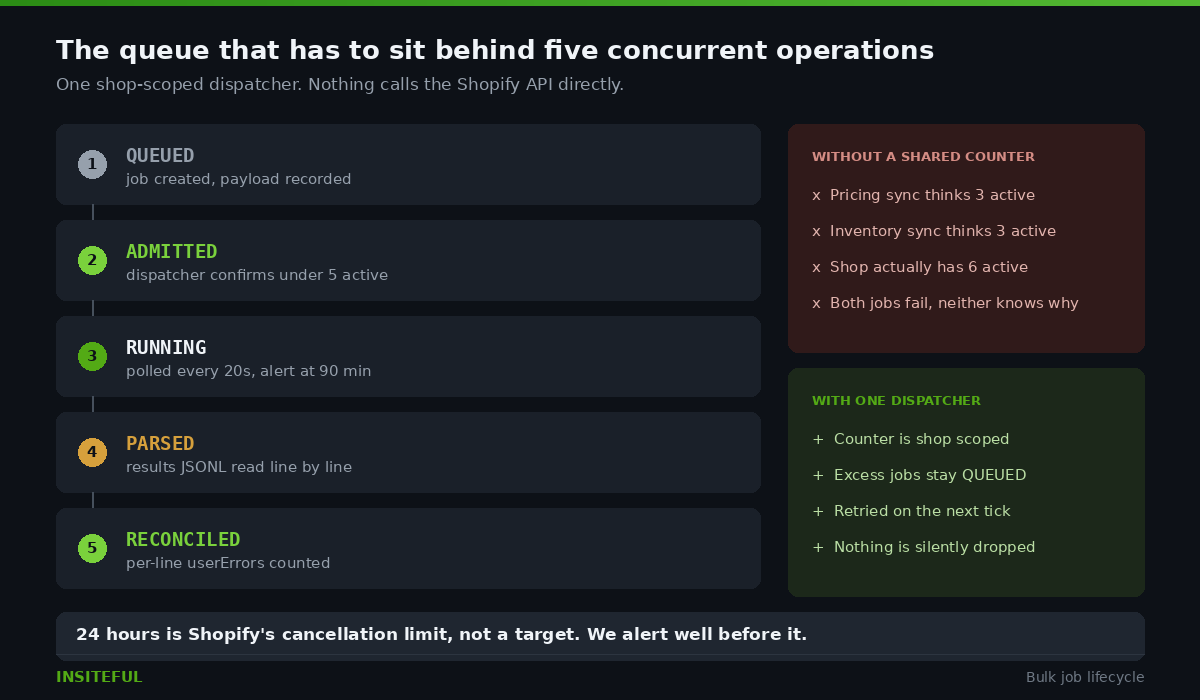
Three rules make this hold up in production.
One dispatcher, not one per job type. If the pricing sync and the inventory sync each maintain their own idea of how many operations are running, they will collectively exceed five and both will start failing. The concurrency budget belongs to the shop, so the counter has to be shop scoped and shared.
Jobs are idempotent and resumable. Every job records the exact JSONL it uploaded. If an operation fails at 80 per cent, we do not regenerate the payload from the source system, because the source has moved on in the intervening hour. We re run the recorded file, and only the lines that failed.
The 24 hour window is a monitoring threshold, not a limit to use. If a bulk mutation is still running after 90 minutes on a catalogue we have sized, something is wrong and we want to know then, not 22 hours later when Shopify cancels it. We alert at a fraction of the ceiling.
This is the same discipline we apply to webhook reliability on Shopify, and for the same reason. The failure mode that hurts is not the loud one. It is the job that reports success while quietly dropping a percentage of records.
Backoff that actually works
Even with bulk operations doing the heavy lifting, an integration still makes ordinary interactive calls, and some of them will be throttled. What the client does in that moment separates a system that degrades gracefully from one that falls over.
When you exceed the limit, Shopify returns a 429 with a Retry-After header containing the number of seconds to wait. Respect it. It is not advisory, and it is more accurate than anything you can calculate locally.
Where there is no header, the fallback is exponential backoff with jitter. The backoff part is well known. The jitter part is the one that gets left out and it is the one that matters at scale.
async function callWithBackoff(fn, maxAttempts = 6) {
  for (let attempt = 0; attempt < maxAttempts; attempt++) {
    try {
      return await fn();
    } catch (err) {
      if (err.status !== 429 && err.code !== "THROTTLED") throw err;
      if (attempt === maxAttempts - 1) throw err;

      const retryAfter = Number(err.headers?.["retry-after"]);
      const base = Number.isFinite(retryAfter)
        ? retryAfter * 1000
        : Math.pow(2, attempt) * 1000;

      const jitter = Math.random() * base * 0.5;
      await new Promise(r => setTimeout(r, base + jitter));
    }
  }
}
Without jitter, every worker that got throttled in the same second wakes up in the same second, sends its retry in the same second, and gets throttled again. Fifty workers doing this produce enormous request volume and zero completed work. It is the thundering herd, and it is entirely self inflicted. Adding a random component spread across the wait window breaks the synchronisation and the queue drains instead of oscillating.
One more detail specific to Shopify: a throttled GraphQL request returns HTTP 200 with a THROTTLED error in the errors array, not always a 429. A retry handler that only inspects status codes will treat a throttle as a successful empty response and move on. Check both.
The REST clock is running
There is a deadline attached to all of this. The entire REST Admin API has been deprecated since 1 October 2024. Shopify began removing endpoints in the 2025-10 release and has signalled annual sunset waves for legacy REST resources from 2026 onward. New apps have been required to use GraphQL since 1 April 2025.
REST rate limiting worked on a request count, 2 requests per second with a 40 request burst on standard plans. It was simple to reason about and it had no equivalent of bulk operations. Teams still running REST integrations are therefore doing two migrations at once when they finally move: a protocol change and a fundamentally different cost model.
Our position with clients is straightforward. If an integration is already under strain on REST, do not optimise it. The optimisation work is throwaway. Rebuild it on GraphQL with bulk operations, because that is the destination regardless and the throughput problem largely dissolves on arrival. We covered the related tooling decisions in our piece on building custom Shopify apps.
What we instrument on every Plus build
An integration you cannot see is an integration you cannot defend. These are the five signals we put on a dashboard before an integration goes anywhere near production traffic.
- Bucket floor per hour. The lowest
currentlyAvailablevalue observed. If this is regularly under 200 on a 2,000 point Plus bucket, you are running hot and a new app install will break something. - Requested versus actual cost ratio. A persistent gap means your queries are over requesting and your pacing logic is leaving throughput on the table.
- Throttle events per 1,000 requests. Our threshold for a healthy integration is under 5. Above 20 and we treat it as a defect, not a tuning problem.
- Bulk operation duration against a baseline. Recorded per job type. A nightly export that has drifted from 6 minutes to 40 is telling you the catalogue grew and the schedule did not.
- Per line failures from the results JSONL. Counted and alerted on. This is the number that catches the silent data loss.
None of this is exotic. All of it is the difference between finding out about a problem from a graph and finding out about it from a client who cannot fulfil orders.
How We Do It at Insiteful
When we scope an integration rebuild on Shopify Plus, we run the same sequence every time.
We measure before we design. The first thing we ship is read only instrumentation against the existing integration, capturing cost extensions on every call for a full week including a weekend and a promotional day. Almost every client is surprised by which system is actually consuming the bucket. It is very rarely the one they suspected, and it is often an app nobody has opened in a year.
We separate interactive from batch. Every call in the codebase gets classified. Interactive calls stay on the paginated API with strict cost budgets and pacing against currentlyAvailable. Batch work moves to bulk operations without exception. That single split usually recovers more headroom than any amount of query tuning.
We calculate query cost on paper first. Every GraphQL document in the repository has its point cost documented in a comment above it, calculated with the same arithmetic used earlier in this article. When someone adds a nested connection in a pull request, the cost comment has to be updated, and reviewers can see immediately if a change pushes a query toward the 1,000 point ceiling.
We build the queue before the first job. The dispatcher, the concurrency counter, the results parser and the retry logic go in first, with a single trivial job running through them. Only then do we build the real jobs. Teams that do this in the other order end up retrofitting reliability around code that assumed it would always succeed.
We hand over the runbook. Every Insiteful integration ships with a document that says what each job does, what its expected duration is, what to check when it is slow, and how to safely re run it. It is written for the person who gets the 6am call, and it assumes that person is not the developer who built it. That is usually the difference between an outage that lasts twenty minutes and one that lasts a day.
The engineering here is well understood and thoroughly documented by Shopify. What we find missing on the stores we inherit is not knowledge of the API. It is the operational layer around it: the pacing, the queue, the results reconciliation and the instrumentation that turns a set of scripts into a system somebody can rely on at 6am.
If your overnight sync is taking longer every month, or you are not confident that your last bulk price update actually applied to every variant, that is a scoping conversation worth having. See how our build process works and what a technical assessment covers.