
Almost every Shopify brief we receive has a line in it about motion. Founders describe it as “premium feel”, “smooth”, “modern”. What they hand us is usually a Figma file with four prototype transitions and a hope that the developers will work it out.
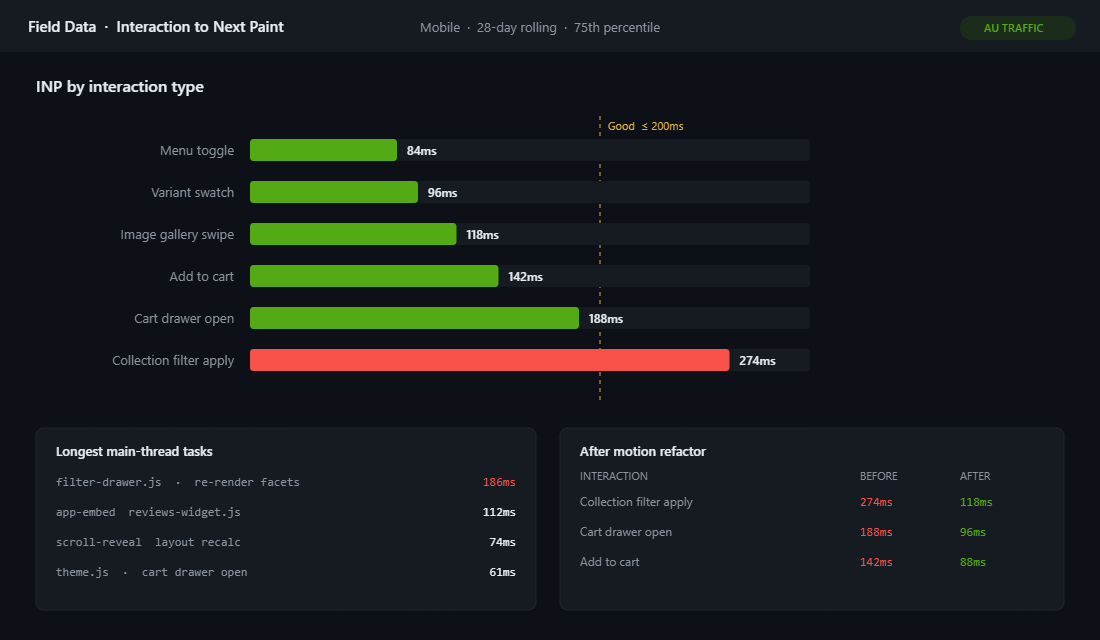
Then the build ships and one of two things happens. Either the animation gets dropped because nobody scoped it, and the storefront feels flat next to the mood board. Or it gets bolted on with an animation library and a scroll plugin, and the collection page starts taking 274ms to respond to a filter tap. Google considers anything over 200ms a failed Interaction to Next Paint score, and INP is now a ranking input on every page of the store.
The brands that get this right treat motion the same way they treat colour and type. It is a system with defined values, documented rules, and a budget agreed before design starts. On a recent replatform for an Australian homewares brand turning over roughly $6M AUD a year, formalising motion this way took their worst-performing interaction from 274ms down to 118ms while making the storefront feel considerably more expensive, not less.
Most Shopify Motion Is Decoration Bolted On At the End
The pattern is consistent across the audits we run. Motion lives in three or four disconnected places and nobody owns it.
- Theme settings. Dawn and most Dawn derivatives ship an Animations panel with “Reveal sections on scroll” and hover effects. It is a checkbox, applied globally, with no brand input.
- Ad-hoc CSS. A developer writes
transition: all 0.3sin a section stylesheet. Another writes 0.25s somewhere else. Nobody notices they disagree. - App embeds. Review widgets, sticky carts and popups each arrive with their own animation timing and their own JavaScript. None of them asked permission.
- A library. Somebody adds AOS or GSAP for one hero effect, and now 40KB of JavaScript runs on every page to animate one element.
The result is a storefront where nothing moves in agreement. A drawer slides in over 300ms, a card lifts over 150ms, a section fades over 800ms, and the cumulative impression is not “premium”. It is noise.
The speed cost is real too. Analysis of Shopify theme field data shows that while most themes handle INP well, the ones that struggle are specifically those carrying heavy JavaScript for complex animations and client-side filtering. Themes that keep their animation CSS-driven, with no animation libraries, stay fast because CSS animations do not block the main thread.
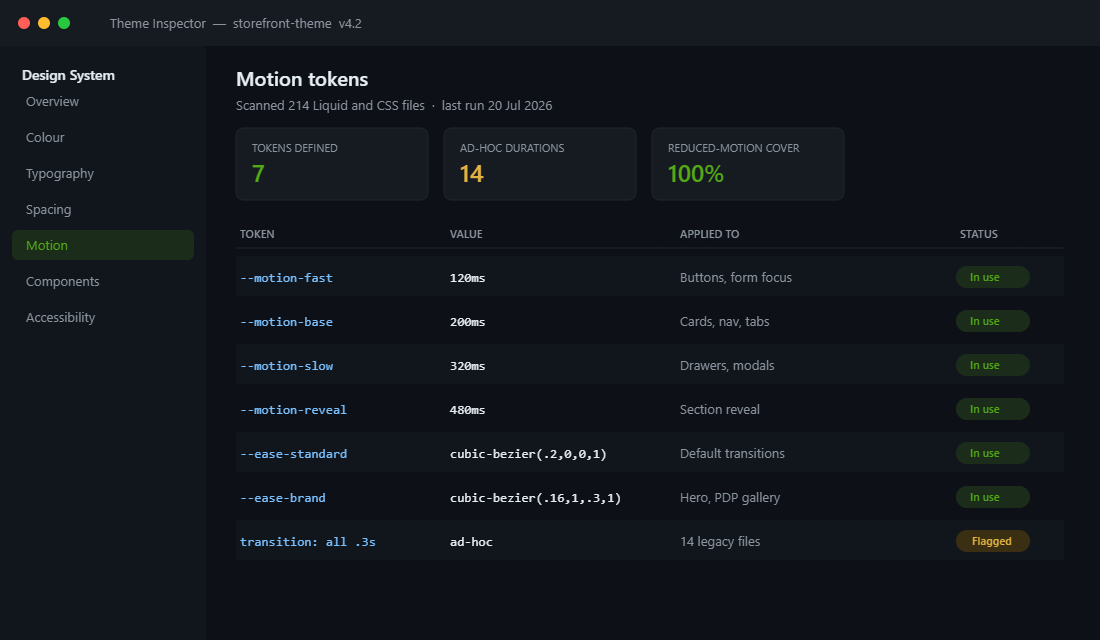
The first thing we do on any brand or theme engagement is inventory what is already moving. It is usually the fastest credibility win available, because the founder has never seen it laid out in one place.
The Four Jobs Motion Actually Does on a Storefront
Before agreeing on a single duration, we agree on what motion is for. Every animation on an Insiteful build has to earn its place under one of four jobs. If it does not, it does not ship.
1. Confirming an action happened
The customer tapped Add to Cart. Something needs to acknowledge that within about 100ms or they will tap again. This is the highest-value motion on the entire storefront and it is usually the least designed. A button state change at 120ms plus a cart count increment does more for perceived quality than any hero animation.
2. Explaining where something came from
A cart drawer that slides from the right edge tells the customer the cart lives on the right. A modal that scales up from the button that opened it keeps the mental thread intact. Motion here is spatial grammar, not decoration.
3. Directing attention in a sequence
On a long-form product page, revealing sections as the customer scrolls sets a reading rhythm. Done at 480ms with a gentle curve, it reads as considered. Done at 1200ms with a bounce, it reads as a template.
4. Carrying brand personality
This is the smallest category and the one clients want to talk about most. A distinctive easing curve on a hero image reveal, a considered image transition in a PDP gallery. One or two moments per page, not fifteen.
Sorting every proposed animation into these four buckets typically removes 30 to 40 percent of what was in the original design file. That is a good outcome. It is also worth remembering that when surveyed, roughly half of online shoppers said they would rather go without animation and video if it meant faster load times.
Motion Tokens: The Layer Almost Every Theme Skips
Design teams have accepted colour tokens and type scales as normal. Motion tokens are still treated as exotic, which is why timing values end up hardcoded in 14 different files.
The fix is not complicated. Four durations and three easing curves cover almost every storefront requirement. We define them once in the theme stylesheet and forbid raw values anywhere else.
:root {
  /* Durations */
  --motion-fast: 120ms;    /* buttons, form focus, swatches */
  --motion-base: 200ms;    /* cards, nav, tabs, hover states */
  --motion-slow: 320ms;    /* drawers, modals, overlays */
  --motion-reveal: 480ms;  /* section reveal on scroll */

  /* Easing */
  --ease-standard: cubic-bezier(0.2, 0, 0, 1);
  --ease-brand: cubic-bezier(0.16, 1, 0.3, 1);
  --ease-exit: cubic-bezier(0.4, 0, 1, 1);
}

.product-card {
  transition: transform var(--motion-base) var(--ease-standard),
              box-shadow var(--motion-base) var(--ease-standard);
}

.cart-drawer {
  transition: transform var(--motion-slow) var(--ease-brand);
}
Two rules make this hold up over time. First, never animate all. Name the properties. transition: all 0.3s quietly animates layout properties the browser then has to recalculate, which is one of the more common sources of jank we find. Second, stick to transform and opacity wherever possible, because those two are the only properties the browser can hand off to the compositor without triggering layout.
This connects directly to the way we handle the rest of the visual system. If you have already read our piece on Shopify design tokens, motion tokens simply sit alongside colour, spacing and type in the same file, versioned the same way.
The commercial argument for this is easy to make. On a mid-size theme, reconciling ad-hoc timings after launch is typically two to three days of developer time, call it $4,000 to $6,000 AUD, plus regression testing across every template. Defining seven tokens on day one costs an hour.
Easing Curves Are Brand Voice, Not Developer Preference
The default browser easing is ease, and almost nothing should use it. It has a soft start and a soft finish, which makes interfaces feel slightly hesitant.
The curve is where brand personality actually lives. A curve that starts fast and settles slowly (a strong decelerate) feels confident and expensive. A curve with a symmetrical shape feels neutral and mechanical. A curve that overshoots feels playful, which suits a kids brand and undermines a jewellery brand.
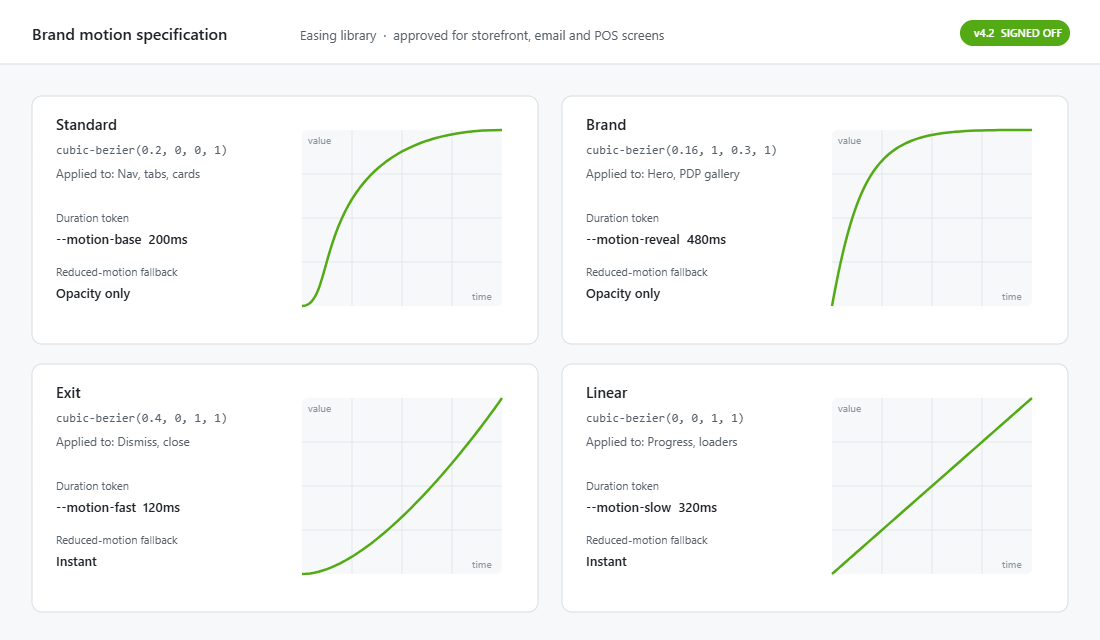
We define three and no more:
- Standard,
cubic-bezier(0.2, 0, 0, 1). The workhorse. Nav, tabs, cards, hover states. Decelerates firmly, arrives without fuss. - Brand,
cubic-bezier(0.16, 1, 0.3, 1). A pronounced decelerate for the two or three moments per page that carry personality. Hero reveals, PDP gallery transitions. - Exit,
cubic-bezier(0.4, 0, 1, 1). Accelerates away. Anything leaving the screen should leave quickly, because the customer has already decided they are done with it.
Elements entering the screen should be slower than elements leaving it. Entering is information the customer needs time to read. Leaving is confirmation they already have. Getting this asymmetry right is one of the clearest signals that a storefront was designed rather than assembled.
We document the curves on a spec sheet that goes into the brand system, next to the colour ramps and the type scale, so the next agency or in-house developer inherits the decision rather than re-litigating it.
Scroll Reveal Without the Responsiveness Tax
Scroll-triggered reveals are the single most requested effect and the single most common cause of a poor INP score on an otherwise well-built theme. The problem is almost never the animation. It is the scroll listener.
Dawn does this correctly out of the box. It uses an IntersectionObserver to watch elements carrying a scroll-trigger class and adds scrolled-into-view when they arrive, which is why the built-in “Reveal sections on scroll” setting costs almost nothing. Plenty of custom builds and third-party sections still attach a scroll event handler that fires dozens of times a second and recalculates layout on every one.
Our implementation is deliberately close to the platform default:
// assets/scroll-reveal.js
const reveal = new IntersectionObserver((entries, obs) => {
  entries.forEach((entry) => {
    if (!entry.isIntersecting) return;
    entry.target.classList.add("is-revealed");
    obs.unobserve(entry.target);   // fire once, then stop watching
  });
}, { rootMargin: "0px 0px -10% 0px", threshold: 0.1 });

document
  .querySelectorAll("[data-reveal]")
  .forEach((el) => reveal.observe(el));
[data-reveal] {
opacity: 0;
transform: translateY(16px);
transition: opacity var(--motion-reveal) var(--ease-brand),
transform var(--motion-reveal) var(--ease-brand);
}
[data-reveal].is-revealed {
opacity: 1;
transform: none;
}Three details matter here. obs.unobserve stops the browser watching an element it has already animated. A 16px translate is enough to read as movement without contributing to layout shift, which keeps this from working against the CLS work done elsewhere in the theme. And critically, nothing above the fold gets a reveal, because animating the hero delays the largest contentful paint for no benefit.
That last point is worth being blunt about. Fading in your hero image makes your LCP worse by exactly the duration of the fade. On a store where a one second delay in mobile load time costs around 7 percent of conversions, a 600ms decorative fade on the most important element on the page is an expensive aesthetic choice.
Reduced Motion Is a Build Requirement, Not a Nice-To-Have
Some customers get motion sickness from parallax and large-scale movement. Vestibular disorder reactions include dizziness, nausea and headaches, and the people affected are not a rounding error. WCAG success criterion 2.3.3, Animation from Interactions, exists specifically to give users a way to turn non-essential animation off.
Operating systems already expose this preference. Honouring it takes one media query, and we put it in every build as a baseline before any animation is written.
@media (prefers-reduced-motion: reduce) {
  *,
  *::before,
  *::after {
    animation-duration: 0.01ms !important;
    animation-iteration-count: 1 !important;
    transition-duration: 0.01ms !important;
    scroll-behavior: auto !important;
  }

  /* Reveals must still resolve, not stay invisible */
  [data-reveal] {
    opacity: 1;
    transform: none;
  }
}
The commented line is the part people miss. If your reveal starts at opacity: 0 and you disable the transition without also forcing the end state, customers with reduced motion enabled get a page of invisible content. We have found exactly this on live Australian stores more than once, including one doing over $2M AUD annually that had no idea a segment of its traffic was seeing blank sections.
This sits inside the broader accessibility work we cover in our guide to the WCAG fixes most Shopify stores are failing. Motion is one of the cheapest items on that list to get right and one of the most frequently skipped.
The Motion Budget We Set Before a Single Frame Is Designed
Design teams accept image weight budgets and font budgets without argument. A motion budget is the same idea and it prevents most of the arguments that happen later in a build.
Here is the budget we take into kickoff on a standard Shopify build:
| Constraint | Budget | Why |
|---|---|---|
| Animation JavaScript | 0 KB of libraries | CSS transitions plus one IntersectionObserver covers every approved pattern |
| INP, 75th percentile mobile | Under 200ms | Google’s threshold for a good score, measured on real traffic |
| Animated properties | transform and opacity only | Compositor-only properties, no layout recalculation |
| Above-the-fold reveals | None | Protects largest contentful paint |
| Distinct durations | 4 | More than four and the system stops being legible |
| Distinct easing curves | 3 | Standard, brand, exit |
| Brand-personality moments | Max 2 per template | Scarcity is what makes them read as intentional |
The number that does the most work in client conversations is the zero-kilobyte library line. It reframes the discussion from “can we have this effect” to “can we build this effect within the platform”, and the answer is nearly always yes.
It also holds up commercially. Yottaa analysed more than 500 million visits across 1,300 ecommerce sites and found 63 percent of visitors bounce from pages taking over four seconds. Meanwhile sites loading in under two seconds convert at 3.05 percent against 1.94 percent for those in the three to four second band. Every kilobyte of decorative JavaScript is being paid for out of that gap.
Where Motion Earns Money on a Product Page
If a client only has the appetite for motion in one place, it goes on the product page, and it goes on these four interactions.
- Variant swatch selection. The image should cross-fade at 120ms, not hard-cut and not slowly dissolve. Hard cuts make the page feel broken. Slow dissolves make the customer wait to confirm they picked the right colour.
- Add to Cart. Button state change inside 120ms, cart count increment, then the drawer at 320ms. The acknowledgement must lead the drawer, not wait for it.
- Gallery navigation. A transform-based slide with the brand curve. This is one of the two personality moments most product templates should get.
- Accordion sections. Shipping, returns, sizing. Animate
grid-template-rowsor a max-height with a fixed measurement, at 200ms. Never animateheight: auto, which forces a layout pass on every frame.
Notice how much of that list is about the cart and the swatch rather than anything a mood board would call an animation. That is the point. The motion that changes revenue is the motion that reduces hesitation, and it maps closely to the mobile patterns that convert across the rest of the store.
How the Layers Compound
Taken one at a time, none of these decisions looks like it moves a number. Tokens are a tidiness exercise. Easing curves are taste. Reduced motion is compliance. An IntersectionObserver is a developer preference.
Together they behave differently. Tokens mean every interaction agrees, so the storefront reads as one designed object instead of a collection of sections. Restricting animation to transform and opacity means the compositor handles it and the main thread stays free to respond to taps, which is what the INP measurement actually rewards. Skipping libraries keeps the JavaScript bundle small, which protects the load time that the conversion data above is priced against. Honouring reduced motion means nobody is excluded and nothing renders blank.
On the homewares replatform mentioned at the start, the combination took the worst interaction from 274ms to 118ms, removed 38KB of animation JavaScript, and cut the number of distinct timing values in the codebase from 19 to 4. The founder’s feedback was not about any of those numbers. It was that the site finally felt like the brand. That is usually how this lands.
Motion is the last layer of a brand system to get formalised and the first one customers feel. A storefront where everything moves in agreement reads as expensive before a single word of copy is processed, and it costs less to build than the ad-hoc version it replaces.
How We Do It at Insiteful
Motion is scoped in the design phase of every build we run, not discovered during development. The sequence is consistent.
- Audit first. On any existing store, we inventory every timing value, every animation library, and every app embed that moves something. The output is the table shown at the top of this article. Most brands are carrying between 12 and 20 uncoordinated durations.
- Agree the budget at kickoff. The table above goes into the design brief before Emma opens Figma. Designers work inside known constraints, which means nothing gets designed that cannot ship.
- Define seven tokens. Four durations, three curves, written into the theme stylesheet on day one and enforced in review. Raw timing values fail code review.
- Build reveals on IntersectionObserver. No AOS, no GSAP, no scroll listeners. Nothing above the fold animates.
- Ship the reduced-motion block before the animation. The media query goes in first so no reveal can ever be written without a fallback.
- Measure on field data, not lab scores. A Lighthouse run in a data centre tells you very little about INP for a customer on a mid-range Android in regional Australia. We check real 75th-percentile field data for the interactions that matter, particularly add to cart and collection filtering.
- Hand over the spec sheet. The curve library, the tokens and the fallback rules go into the brand documentation, so the system survives the next developer.
The same discipline runs through the rest of the visual system, from how we load custom fonts to how colour schemes are structured. Motion is simply the layer people forget to write down.
If your storefront looks close to the brand on a static screen but feels generic the moment someone interacts with it, motion is usually the gap. That is a scoped, measurable piece of work, and it is one of the faster ways to make an existing build feel like the brand it was meant to be. See how we approach a build.