
Most Squarespace stores do not fail. They just stop growing. The founder hits a ceiling somewhere around $50,000 to $100,000 AUD a month and starts running into the same walls: no real abandoned checkout recovery, a payment stack that will not bend, apps that do not exist, and a catalogue that is painful to manage past a few hundred SKUs. That is the point where a migration to Shopify stops being a nice idea and becomes the thing standing between the brand and its next stage.
Here is the problem. Most migrations we get called in to rescue were not scoped as migrations at all. Someone exported a product CSV, imported it into a fresh Shopify theme, pointed the domain across, and called it done. Two weeks later organic traffic has fallen off a cliff, half the product images are broken, and the old blog is throwing 404s across Google. The data moved. The business did not.
Shopify now powers roughly 6.9 million live stores and holds about 26.7% of the top one million ecommerce sites globally, against Squarespace’s 0.3% of that same top tier. Squarespace wins on raw site count. Shopify wins overwhelmingly where the actual money is being spent. That gap is exactly why growing brands make this move. This is the migration we run for Shopify and Shopify Plus clients, written out in full, including the parts that quietly break.
What Actually Transfers, and What Squarespace Quietly Leaves Behind
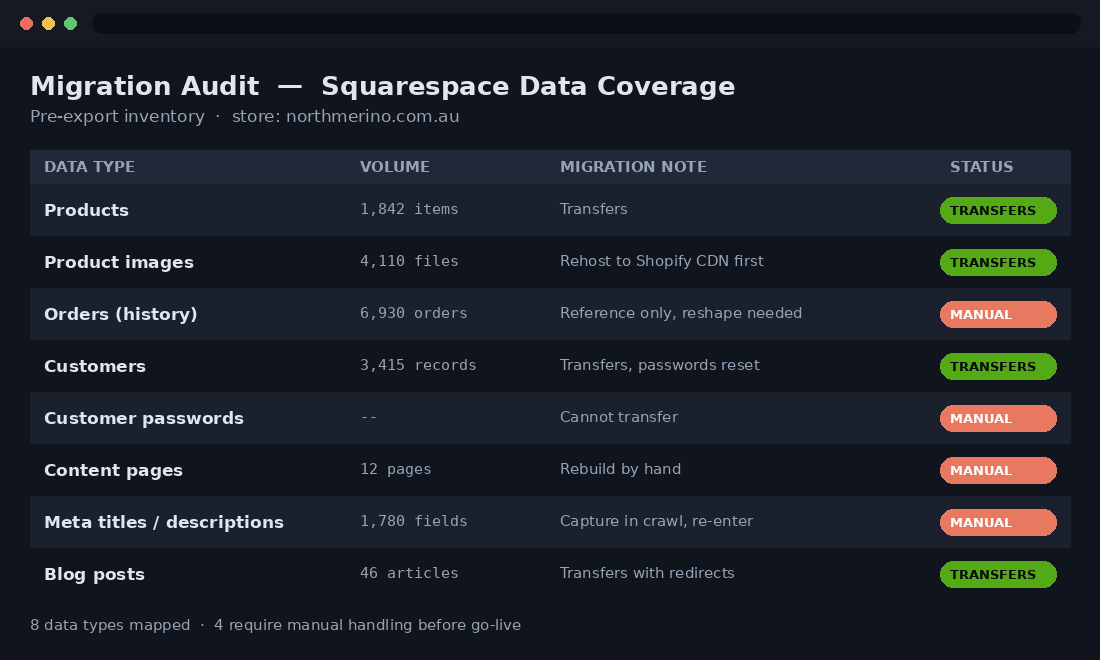
The single biggest cause of a painful migration is assuming the export is complete. It is not. Squarespace’s export is partial by design, and the gaps are not documented in a way a founder would notice until the data is already missing. Before we touch a single CSV, we map every data type against what Squarespace will actually hand over.
- Products transfer, up to a limit. Squarespace caps a product export at 2,000 items. Above that, you are exporting in batches or handling the overflow manually. For most brands this is fine. For a catalogue-heavy store it is the first scoping question we ask.
- Orders come across in the wrong shape. Squarespace exports order history in a format that does not map cleanly to Shopify’s order object. You can bring it in as reference data, but do not expect native Shopify order records with matching statuses and fulfilment history.
- Customer passwords do not move. Ever. Passwords are hashed and non-portable. Every customer will reset on first login to the new store, so the migration plan has to include a re-activation email, not just a silent cutover.
- Content pages are not in the export. Your About page, landing pages, and any custom layout built in Squarespace’s editor are not included. They get rebuilt in Shopify by hand.
- Images live on Squarespace’s CDN. This is the trap. Product and content images are served from Squarespace’s servers. The moment you cancel the subscription, those URLs die and your new store shows broken images everywhere.
One more gap catches SEO-conscious brands off guard: the metadata does not travel with the export. Page titles, meta descriptions, and image alt text that were painstakingly written in Squarespace are not in the product or page CSV. If they are not captured during the audit crawl and re-entered on Shopify, the store launches with generic, auto-generated titles and loses a layer of on-page ranking signal on day one. We pull this into the audit spreadsheet as its own set of columns so nothing that was optimised gets quietly reset to default.
That last point on images sinks more migrations than any other. We have inherited stores where the previous team pointed the domain at Shopify, cancelled Squarespace to stop the billing, and only then discovered that every image reference in the imported data was a dead Squarespace URL. The fix at that stage is slow and manual. The fix beforehand is a single rule: pull every image down and rehost on Shopify’s CDN before the Squarespace account is touched.
The Pre-Migration Audit We Run Before Exporting Anything
A pre-migration audit takes a few hours and saves days of cleanup. We treat it as a hard gate: nothing gets exported until the audit is signed off. The point is to know exactly what you have, so you can prove after go-live that nothing was lost. This is the checklist we work through on every Squarespace build.
- Full URL inventory. Crawl the live Squarespace site and export every indexed URL: products, collections, blog posts, and standalone pages. This becomes the source of truth for the redirect map later.
- Product and variant count. Exact SKU count, variant structure, and any products sitting above the 2,000 export ceiling. This decides whether it is a one-pass import or a batched one.
- Top organic pages. Pull the top 20 to 50 landing pages from Google Search Console by clicks. These are the URLs that must not break. If one of them drops, revenue drops with it.
- Payment and subscription dependencies. Document what is running through Squarespace payments, any recurring subscriptions, and gift card balances. These need a deliberate handover, not a data export.
- Third-party embeds. Reviews widgets, email capture, booking tools, and analytics. Each one needs a Shopify equivalent lined up before launch, not scrambled together after.
The output of this phase is a single spreadsheet: every URL, every product, every dependency, with a column for its destination on Shopify. That document is the migration. Everything after it is execution.
Moving the Catalogue: CSV Mapping That Does Not Corrupt Your Data
Squarespace exports products from the Products panel as a CSV named something like SquarespaceProductDownload.csv. Shopify’s importer expects its own column structure, and the two do not line up. The mistake is importing the raw Squarespace file directly. The columns are close enough to look right and wrong enough to scramble variants, so you end up with duplicate products and orphaned options.
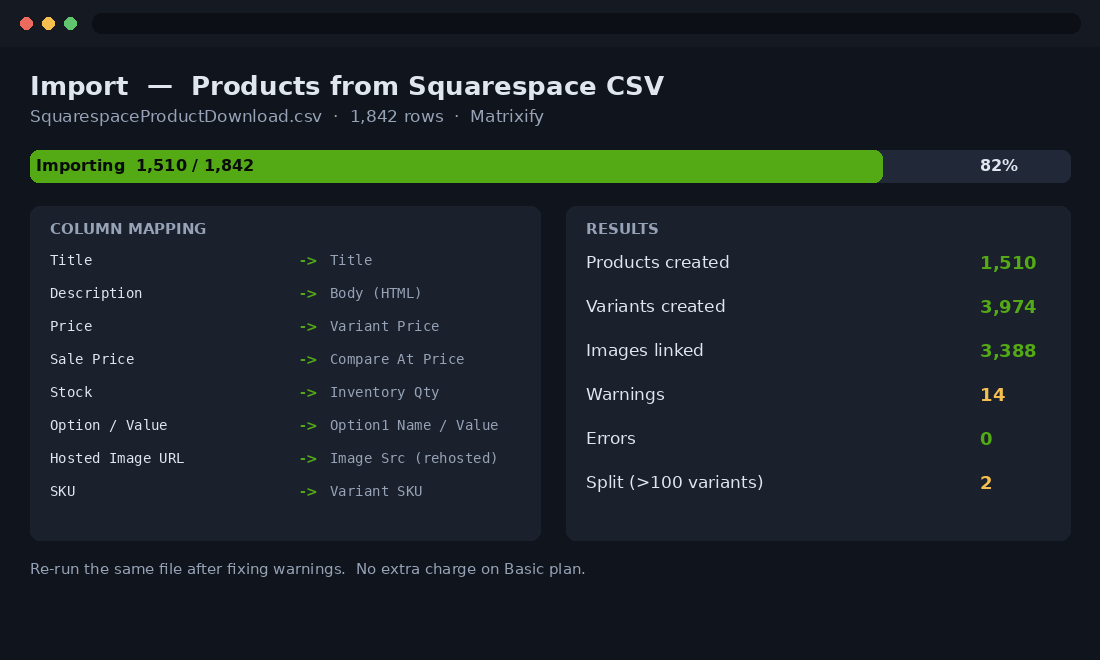
We map the Squarespace export against Shopify’s sample CSV before importing anything. The core column mapping looks like this:
Squarespace column        ->  Shopify column
Product ID / SKU          ->  Variant SKU
Title                     ->  Title
Description               ->  Body (HTML)
Price                     ->  Variant Price
Sale Price                ->  Variant Compare At Price
Stock                     ->  Variant Inventory Qty
Option Name / Value       ->  Option1 Name / Option1 Value
Hosted Image URL          ->  Image Src (rehost first)
Categories                ->  Tags or Collection
For anything past a couple of hundred products, we run the import through Matrixify rather than Shopify’s native importer. Its Basic plan handles up to 5,000 products per import, accepts files up to 20 GB, and lets you re-run the same file as many times as you need to get it clean. That repeatability matters. A first import almost never lands perfectly, and being able to correct the sheet and re-import without penalty is the difference between an afternoon and a week.
One Shopify constraint to plan around: a single product supports a maximum of 100 variants across up to three options. If a Squarespace product exceeds that, it has to be split. Matrixify will split automatically at 100, but automatic splitting rarely matches how you want the store merchandised, so we handle those products by hand.
The Redirect Map: Where Migrations Win or Lose Their SEO
This is the phase that separates a clean migration from a traffic disaster, and it is the one most often skipped. Squarespace and Shopify use completely different URL structures. A Squarespace product lives at a path like /store/p/product-name or /shop/product-name. On Shopify the same product defaults to /products/product-handle. Collections, blog posts, and pages all shift too.
Every one of those old URLs has accumulated ranking equity and inbound links. If it changes without a redirect, Google sees a broken link and the ranking those pages built simply evaporates. A 301 redirect passes that equity forward to the new Shopify URL. No redirect map, no equity transfer. This is not optional and it is not something to bolt on after launch.
We build the redirect map directly from the URL inventory captured in the audit. Old URL in one column, new Shopify URL in the next, one row per page. Shopify accepts this as a bulk URL redirect import, which for a Squarespace store looks like:
Redirect from,Redirect to
/store/p/merino-crew-knit,/products/merino-crew-knit
/store/p/linen-shirt-navy,/products/linen-shirt-navy
/shop,/collections/all
/about-us,/pages/about-us
/blog/why-merino,/blogs/journal/why-merino
Two rules we never break. First, every URL from the audit gets a destination, even if that destination is a parent collection rather than a like-for-like page. A redirect to a relevant collection beats a 404 every time. Second, we test the map against the top organic pages first. Those are the URLs carrying revenue, so they get verified manually before the bulk import runs, not sampled afterwards.
Blog URLs deserve their own line of attention. Squarespace serves posts from a /blog/ path, while Shopify nests them under /blogs/blog-handle/article-handle. That is a deeper structural change than the product URLs, and it is the one teams forget because the blog is not where the checkout lives. But long-form content is often a store’s strongest organic asset, so every post gets an individual redirect, not a blanket rule that dumps them all onto the blog index.
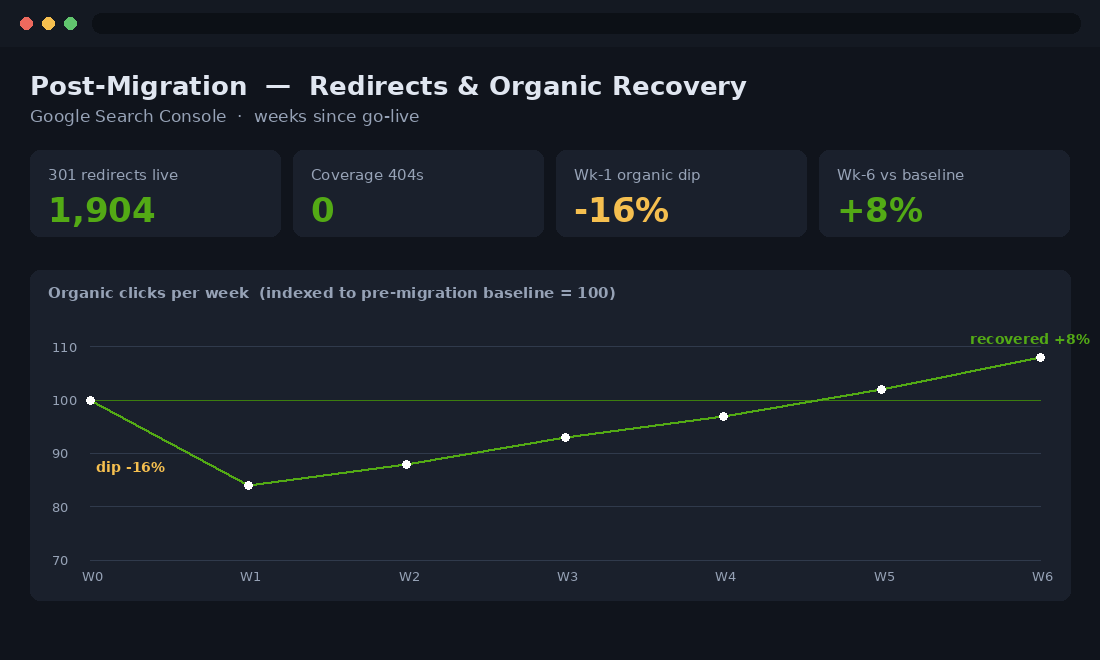
Set expectations honestly with the client here. Even a textbook migration usually sees a temporary organic dip of 10 to 20% while Google recrawls and re-attributes the redirected URLs. With a complete redirect map and a resubmitted sitemap, that recovers within four to six weeks. Without the map, it does not recover, because the equity was never passed on in the first place. We have seen stores that skipped redirects lose six months of ranking progress in a fortnight, and clawing it back costs far more than building the map would have.
Rebuilding Design and Content, Because None of It Comes Across
Your Squarespace design does not transfer. Not the theme, not the page layouts, not the fonts and spacing. This surprises founders every time, and it is worth reframing as an opportunity rather than a loss. You are not rebuilding a Squarespace site inside Shopify. You are building a proper Shopify storefront on Online Store 2.0, with sections and blocks that your marketing team can actually edit without a developer.
The most time-consuming part of a Squarespace migration is almost never the data. It is recreating the content pages and rebuilding the design to a standard that beats the old site rather than merely copying it. We approach it in a fixed order:
- Theme foundation first. A clean, fast base theme with the brand’s typography, colour, and spacing tokens set globally, so every page inherits them instead of being styled one by one.
- Templates before pages. Product template, collection template, and blog template built as reusable structures. Get these right and every individual product page is consistent by default.
- Content pages rebuilt, not copied. The About page, policy pages, and any landing pages are recreated as Shopify pages, with the copy carried across and the layout rebuilt in sections.
- Blog carried over deliberately. Squarespace blog posts are re-created as Shopify articles, keeping the slugs aligned to the redirect map so the content keeps its rankings.
Because images were rehosted to Shopify’s CDN during the catalogue phase, the rebuild uses live, permanent image URLs from the start. Nothing points back at Squarespace, so nothing breaks when that account is finally closed.
The App Stack Decisions You Make Mid-Migration
A migration is the one moment you get to rebuild the store’s tooling from scratch, and it is wasted if you simply try to replicate whatever Squarespace bolt-ons the brand was using. Squarespace hides most of its commerce features behind its own walled garden, so there is rarely a like-for-like app to port. That is a good thing. It forces a deliberate decision about what the Shopify store actually needs rather than inheriting years of accumulated cruft.
We map the store’s functional requirements to a lean Shopify app stack during the build, not after it. Email and automation usually move to Klaviyo, which is the standard for Australian Shopify brands and far more capable than Squarespace’s built-in campaigns. Reviews, subscriptions, and loyalty each get a single chosen app rather than three overlapping ones. The rule we hold to is that every app has to earn its monthly fee in either revenue or hours saved, because a bloated app stack is the single most common cause of a slow Shopify store, and speed is half the reason the brand left Squarespace in the first place.
We document the final stack in the same audit spreadsheet, with the monthly cost in AUD beside each app, so the founder sees the true running cost of the new store before launch and there are no billing surprises in month one.
Testing and the Go-Live Sequence
A Squarespace to Shopify migration typically runs 3 to 10 days of build time, and the go-live itself should be the calmest day of the project because everything has been tested on a password-protected store first. We never flip the domain and then start checking. We check, then flip. The pre-launch test pass covers:
- Checkout end to end. A real transaction through the live payment gateway, including tax, shipping rates, and the confirmation email. Australian GST and domestic shipping rules configured and verified.
- Redirect spot-checks. Every top organic URL from the audit, entered manually, confirmed landing on the right Shopify page with a 301.
- Product data integrity. Variant counts, prices, inventory, and images checked against the original audit spreadsheet. This is where the pre-migration count proves nothing was lost.
- Mobile pass. The store checked on real devices, since most Australian ecommerce traffic is mobile-first and a desktop-only review misses the majority of real sessions.
On launch day the sequence is tight: point the domain at Shopify, confirm SSL, push the redirect import live, submit the new sitemap in Google Search Console, and only then send the customer re-activation email so returning shoppers can reset their passwords. Squarespace stays active, and paid, for at least a couple of weeks past go-live as a safety net. Cancelling it early is how you lose images and any data you did not realise you still needed.
Protecting Rankings in the First Six Weeks
The migration is not finished at go-live. The first six weeks are where you protect the rankings the whole redirect map was built to preserve. We watch four things closely and act on them fast.
- Coverage report in Search Console. Watch for a spike in 404s or redirect errors. A cluster of new 404s means a set of old URLs missed the redirect map, and each one is bleeding equity until it is patched.
- Redirect chains. Confirm old URLs resolve to the new page in a single 301, not a chain of hops. Chains dilute the equity transfer and slow recrawling.
- Sitemap re-indexing. Resubmit the Shopify sitemap and request reindexing of the top pages so Google recrawls the new structure sooner rather than on its own schedule.
- Organic trend line. Expect the 10 to 20% dip, then watch for the recovery curve. If clicks are still falling after week three, something in the redirect map is wrong and needs investigating, not waiting out.
Done properly, most brands are back to their pre-migration organic baseline inside six weeks and climbing past it soon after, because Shopify gives them speed, apps, and conversion tooling Squarespace never could.
How We Do It at Insiteful
When we take on a Squarespace to Shopify migration, the audit spreadsheet is the contract. Before anything is exported, we hand the client a single document listing every URL, every product, every dependency, and its exact destination on the new store. That document is what we verify against at go-live, so the question “did we lose anything” has a factual answer rather than a hopeful one.
We rehost every image to Shopify’s CDN before the Squarespace account is touched, we build the redirect map from the crawl rather than from memory, and we test the top revenue URLs by hand before the bulk import runs. The build itself goes onto a clean Online Store 2.0 theme so the marketing team can run the store without a developer on retainer. Then we hold the client’s hand through the first six weeks of Search Console data, because that is where a migration is actually won or lost. It is the same disciplined sequence whether the store is doing $80,000 AUD a month or building towards Shopify Plus, and it is why our migrations recover their rankings instead of quietly surrendering them.
If you are weighing up a move off Squarespace and you want the migration scoped properly before a single CSV is exported, that is exactly the kind of work we do. See how the Insiteful build process works and where a migration fits into it.