
On 1 June 2026, BigCommerce did something it had spent a decade telling merchants it would never do. It started charging a transaction fee. The new Open Payment Provider Fee applies 2% on the Core plan, 1% on Growth, and 0.6% on Scale to every order processed through a payment gateway that is not on BigCommerce’s approved embedded list. For years, the platform’s entire pitch against Shopify was a single line: no transaction fees. That line is gone.
Our inbox at Insiteful tells the rest of the story. Since the fee was announced, we have fielded more BigCommerce migration enquiries than in the previous two years combined. Some brands are angry. Most are just running the numbers, realising the fee costs them tens of thousands of dollars a year, and asking the obvious question: if we are going to pay a percentage either way, why not be on the platform that converts better and is easier to hire for?
This article is the honest version of that move. We have run BigCommerce to Shopify migrations for brands from $800,000 to $30M AUD in annual revenue. We know exactly what transfers cleanly, what needs rebuilding, and what cannot move at all. We will walk through the data, the URL structure problem that quietly kills organic traffic, the real timeline, and a budget in Australian dollars. No vendor spin, just what happens when you actually do this.
Why BigCommerce Merchants Are Moving in 2026
The fee is the trigger, but it is not the whole picture. Understanding the full case matters, because it shapes what your migration needs to protect.
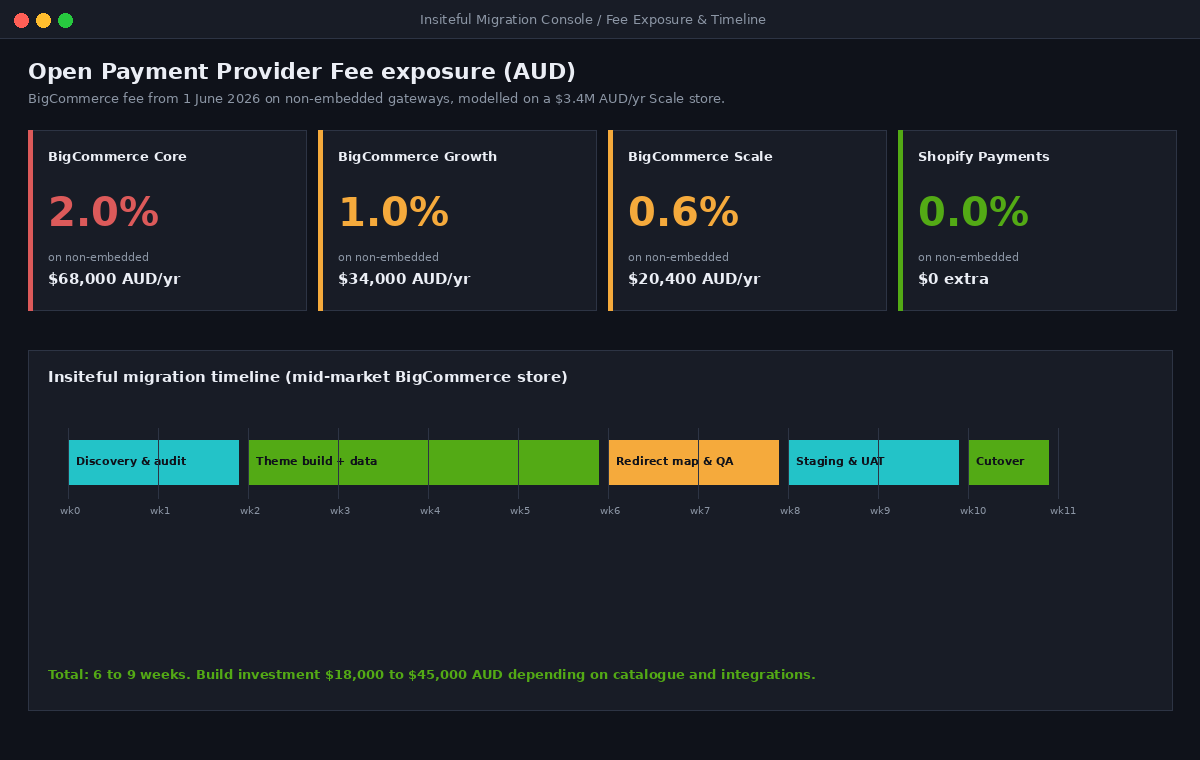
Start with the direct cost. The Open Payment Provider Fee is charged on the prior month’s gross merchandise value for any order that does not run through one of BigCommerce’s embedded providers (Stripe, PayPal or Braintree, Adyen, Checkout.com, and a short approved list). Offline and manual payment methods, including purchase orders, are also caught. For a brand doing $3.4M AUD a year on the Scale plan, the 0.6% rate is roughly $20,400 AUD annually. Drop to the Growth plan and the same volume costs around $34,000 AUD. On Core it is closer to $68,000 AUD. That is money leaving the business for nothing it did not already have.
The market is already moving. In one 90-day migration window ending in 2025, BigCommerce recorded a net loss of 239 stores. Of the merchants who left, 242 moved to Shopify and 215 went to custom carts. That was before the fee landed. The structural backdrop is just as telling: Shopify powers roughly 4.6 million live storefronts and holds around 30% of the US platform market, while BigCommerce sits near 41,000 active stores and a low-single-digit share. When you migrate, you are not moving to a riskier or smaller ecosystem. You are moving to the one with the deepest app market, the largest talent pool, and the clearest roadmap.
For Australian brands the talent point is decisive. It is far easier to hire a Shopify developer, a Shopify-literate marketer, or an agency in Melbourne or Sydney than the BigCommerce equivalent. That hiring reality compounds over years. It is one of the quieter reasons the fee is pushing so many brands to finally make a move they had been considering anyway.
There is also a conversion argument that rarely makes the spreadsheet but should. Shopify’s checkout converts measurably better than the BigCommerce standard checkout, particularly on mobile and particularly for repeat customers using Shop Pay. On a $3.4M AUD store, even a one percentage point lift in checkout conversion is worth more annually than the fee you are trying to escape. We have seen that lift land on real migrations, which means the move can pay for itself on conversion alone, before you count the fee you stop paying. That reframes the decision from defensive cost-cutting to a genuine growth lever.
What Transfers Cleanly, What Needs Rework, and What Cannot Move
Every migration sales pitch implies your store lifts and shifts in one click. It does not. The first thing we do on any BigCommerce project is a data object audit: we map every type of data in the store to its Shopify destination and label it clean, rework, or reset. That single document prevents most migration disasters.
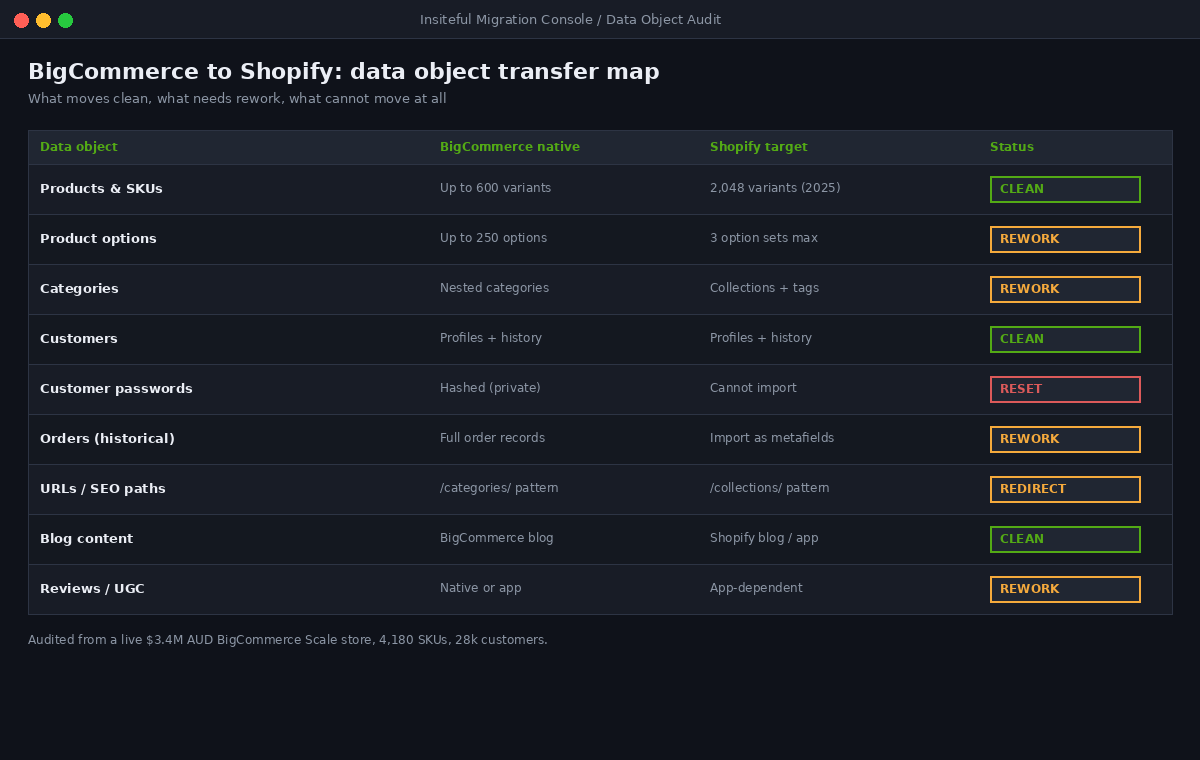
Products, customers, and content transfer cleanly. SKUs, prices, inventory, customer profiles and their order history, and blog content all move with a reliable tool such as Matrixify or a managed import. These are the rows that almost never cause trouble.
Options, categories, and orders need rework. BigCommerce supports far more product options per product than Shopify allows as native option sets, so high-option catalogues have to be restructured or handed to a variant app. BigCommerce uses nested categories; Shopify uses collections plus tags, which means your taxonomy gets remodelled rather than copied. Historical orders are best imported as reference data using metafields, so support staff can still look up a legacy order without pretending Shopify generated it.
{
  "namespace": "migrated",
  "key": "legacy_order_id",
  "type": "single_line_text_field",
  "value": "BC-100482",
  "owner_resource": "order"
}
Passwords cannot move, full stop. BigCommerce stores customer passwords as private hashes it will not export, and Shopify will not accept them. Every customer has to reset their password on first login after cutover. This is not a bug, it is how both platforms protect credentials, and it is the single item that most often gets missed in DIY migrations. We plan a customer communication around it before launch so the reset feels intentional rather than broken.
The Variant Limit That Used to Block These Migrations
For years, the strongest technical argument against moving high-SKU catalogues to Shopify was its hard ceiling of 100 variants per product. BigCommerce comfortably handled 600. For an apparel brand with size, colour, and fit combinations, or a parts retailer with deep configurations, that gap was a genuine blocker. We turned away migrations on exactly this constraint.
That constraint is gone. As of 15 October 2025, every Shopify merchant can create products with up to 2,048 variants, a limit that now sits well above BigCommerce’s native ceiling. Shopify rebuilt this on a new GraphQL product model, released in April 2024, that treats variants and options as separate first-class objects rather than rows hung off a product. More than 6,500 partner apps had to update their integrations before the change could go general, which is why it took 18 months to land.
Two caveats matter for migration planning. The three-option-per-product limit (for example Size, Colour, Material) has not changed, so option structure still needs design even though raw variant count is no longer a problem. And Liquid only ever renders the first 250 variants on a page, so a product with more than that has to read the full set through the Storefront API or a purpose-built variant picker. We check for this on every catalogue before quoting.
{% if product.variants.size > 250 %}
  {% comment %}
    Liquid returns only the first 250 variants.
    Large catalogues must read the full set via the
    Storefront API or a variant picker app.
  {% endcomment %}
{% endif %}
The practical effect is that the variant argument has flipped. The platform that used to lose high-variant brands now comfortably out-scales the one they are leaving. If a developer tells you your 600-variant catalogue cannot move to Shopify, they are working from 2023 information.
Protecting Organic Traffic: The 301 Redirect Map
This is where most migrations silently lose money. BigCommerce and Shopify use completely different URL structures. BigCommerce serves categories at paths like /categories/mens/ and uses .php endpoints for the cart and account; Shopify uses /collections/ and clean app routes. If you launch the new store without mapping every old URL to its new home, Google sees thousands of 404s where ranked pages used to be, and the rankings evaporate.
The numbers are stark. Stores that launch with a comprehensive 301 redirect map retain 95 to 97% of their organic traffic through the transition. Stores that skip redirects, or do them partially, can lose up to half their organic traffic within weeks. There is no recovering that quickly. This is the single most expensive mistake in a botched replatform, and it is entirely avoidable.
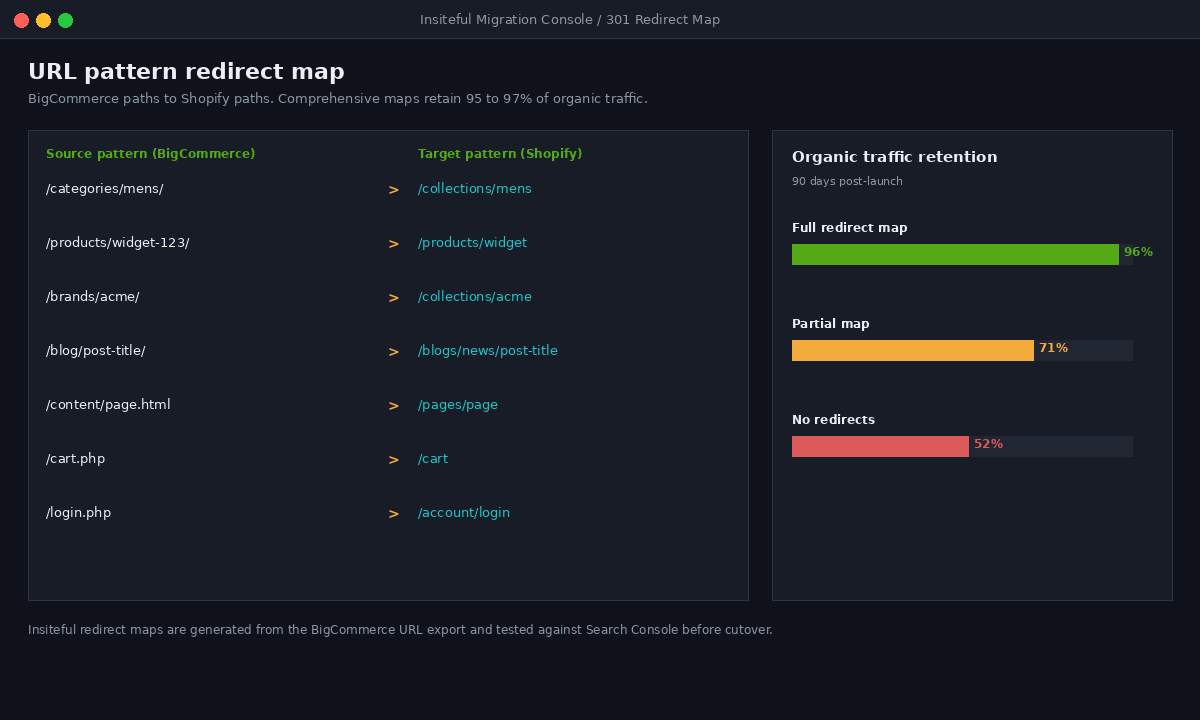
We do not redirect URLs one at a time. We export the full BigCommerce URL set, group it into patterns, and write rules that map each pattern to its Shopify equivalent. Below is a simplified slice of the kind of map we build, ready to import into Shopify’s URL redirects.
Redirect from,Redirect to
/categories/mens/,/collections/mens
/products/widget-123/,/products/widget
/brands/acme/,/collections/acme
/blog/post-title/,/blogs/news/post-title
/content/sizing.html,/pages/sizing
/cart.php,/cart
Every map is tested against Google Search Console before cutover, not after, so we know which high-traffic pages exist and confirm each one resolves to a live destination. If you want the deeper version of this, we wrote a full breakdown in our guide to protecting SEO through a Shopify migration, and the same discipline applies whether you are coming from BigCommerce, Magento, or anywhere else.
Checkout, Payments, and the App Stack You Rebuild
Moving to Shopify Payments is what removes the BigCommerce fee exposure entirely, so for most brands it is the financial centre of the migration. Shopify Payments carries no open-provider surcharge, and the checkout it powers is the highest-converting standard checkout we work with. That said, the checkout is also where BigCommerce stores carry the most custom logic that does not transfer.
If your BigCommerce store had custom checkout scripts, third-party payment routing, or bespoke discount logic, none of that lifts across. On Shopify it gets rebuilt using checkout extensions and, on Shopify Plus, Shopify Functions. This is usually an improvement rather than a loss, because the old custom code was often a workaround for a platform limitation that Shopify handles natively, but it has to be scoped as build work, not migration.
The app stack is the other rebuild. There is rarely a one-to-one mapping between your BigCommerce apps and their Shopify equivalents. Reviews, loyalty, subscriptions, and search all have strong Shopify options, but they are different products with different data shapes. We treat the migration as the right moment to rationalise the stack rather than recreate it. A typical outcome is fewer apps doing more, which is good for both page speed and your monthly tooling bill.
B2B is the area to flag early. If you run wholesale or trade pricing on BigCommerce, Shopify B2B handles a great deal natively now, but the architecture decision matters and shapes the whole build. It deserves its own scoping conversation rather than an assumption that it simply ports over.
One more thing on the apps and data: validation is not optional. After every import we reconcile counts between the two platforms before cutover. Product count, variant count, customer count, and total historical order value all have to match within a known tolerance, and any gap gets investigated rather than waved through. We have seen DIY migrations launch with 10% of products silently missing because a CSV truncated on import and nobody counted. A migration that loses products is worse than no migration at all, so the reconciliation step is treated as a gate, not a nicety.
A Realistic Timeline and Budget in AUD
Here is the part most articles dodge. A BigCommerce to Shopify migration is not a weekend job, and the cheap automated route hides costs that surface later.
- DIY with migration tools: apps like Matrixify or LitExtension run roughly $79 to $200 and move the data. They do not build your theme, write your redirect map, restructure your options, or handle checkout logic. For a real store, the tool is maybe 15% of the actual work.
- Mid-market managed migration: for a typical store with a custom theme rebuild, redirect mapping, and app reconfiguration, expect $18,000 to $45,000 AUD and a six to nine week timeline. This is the band most of our BigCommerce clients land in.
- Enterprise and Shopify Plus: stores with complex integrations, B2B, ERP connections, or large catalogues run 12 to 24 weeks. For brands above $25M AUD GMV, larger budgets and longer windows are normal because the integration surface is wider.
The single biggest budget driver is not the data, it is everything around the data: theme quality, integration count, and the size of your catalogue and URL set. We size every quote against those three variables. If you are still deciding whether Shopify, Shopify Plus, or staying put is the right call, our replatforming decision tree walks through the trade-offs, and our write-up on what we learned across 40-plus migrations covers the patterns that hold regardless of source platform.
How We Do It at Insiteful
We have been building Shopify stores for over 25 years across more than 200 client projects, and our BigCommerce migration process exists to protect the two things that actually matter on a replatform: your revenue and your search rankings. It runs in five stages.
Stage one, discovery and data audit. We pull the full BigCommerce export and produce the data object map you saw above. Every object is labelled clean, rework, or reset, so the scope is locked before a line of build work starts. No surprises in week six.
Stage two, parallel theme build and data mapping. We build the new Shopify theme on a development store while the data import is configured and tested against a staging environment. We do not touch the live BigCommerce store during this phase, so the business keeps trading at full speed.
Stage three, redirect map and quality assurance. We generate the full 301 redirect map from the BigCommerce URL export, test it against Search Console data, and QA every template, payment path, and integration on staging. This is the stage DIY migrations skip and later regret.
Stage four, staging and user acceptance testing. The client team runs through real workflows on the staging store: place orders, process a refund, check B2B pricing, confirm email flows fire. We fix what they find before anyone sees the new store.
Stage five, cutover and monitoring. We schedule the DNS cutover for a low-traffic window, push the redirects live with the new store, and then watch Search Console, analytics, and conversion rate closely for the following weeks. A migration is not done at launch. It is done when the data confirms traffic and revenue held.
The Move Is a Commercial Decision, Not Just a Technical One
The BigCommerce fee made the maths simple for a lot of brands, but the migration itself is still a business decision with real risk attached. Done well, you remove a five-figure annual fee, land on a faster-converting platform, and keep your hard-won organic traffic intact. Done poorly, you save on fees and lose half your search rankings in the same month, which is a far more expensive outcome than the fee ever was.
The difference is entirely in the preparation: the data audit, the redirect map, and a staged cutover that protects the live store until the new one is proven. That is not glamorous work, but it is the work that decides whether your migration is a quiet success or a loud, costly mess.
If you are weighing a move off BigCommerce and want a clear-eyed read on what your specific store would take, that is exactly the conversation we have with founders before any build begins. See how the Insiteful build process works and book a migration assessment.