
Most Shopify catalogues do not fall apart all at once. They drift. A supplier sends a new spec sheet that never makes it into the product description. A bulk edit in the Shopify admin overwrites a translated field. Someone updates a material on the marketing site but not on the product page, and three weeks later a customer returns a jacket because the listing said wool and the label said acrylic. None of these are catastrophic on their own. Stacked across a few thousand SKUs and a handful of sales channels, they quietly cost real money.
For brands past a certain size, this is the point where a Product Information Management system (a PIM) stops being a nice-to-have and becomes the thing holding the catalogue together. We get asked about Shopify PIM integration constantly, usually phrased as some version of “our product data is a mess and we do not know how to fix it.” This is the guide we wish we could hand over before that first call. It covers what a PIM actually does, when it pays for itself, how it maps onto Shopify’s native data layer, and the sync architecture we build to keep the two in step.
The numbers behind the problem are not subtle. Most ecommerce businesses discover their existing product data contains 40 to 60 percent incomplete records and 25 to 35 percent duplicates when they first audit it. On the customer side, 22 percent of shoppers cite a difference between the online image and the actual product as a reason for returning an item, a figure projected to reach 24.5 percent in 2025. With the Australian return rate climbing toward 19.3 percent, product data accuracy is not a back-office concern. It is a margin lever.
What a PIM actually is (and what it is not)
A PIM is a single source of truth for product information. Titles, descriptions, specifications, materials, dimensions, images, care instructions, compliance data, translations, and the relationships between products all live in one place, get enriched and approved there, and then get distributed out to every channel that needs them. Shopify is one of those channels. So is your Amazon listing, your wholesale catalogue, your Google Merchant feed, and the print spec sheet your sales reps hand to buyers.
The confusion we see most often is between a PIM and an ERP. They are not the same tool and they do not own the same data. An ERP owns commercial and operational truth: cost, stock, supplier, purchase orders, financials. A PIM owns descriptive and marketing truth: how the product is presented to a human deciding whether to buy it. Shopify sits downstream of both. The cleanest way to think about it is by which system is allowed to make the final decision about a given field.
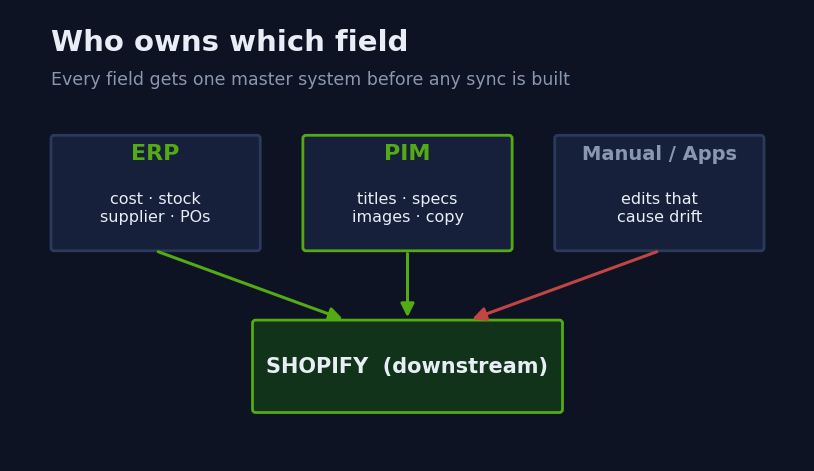
When that ownership map is fuzzy, you get the drift described at the top of this article. Three systems each think they own the product title, edits happen in all three, and the last write wins regardless of whether it was correct. Drawing this map is the first thing we do on any integration project, because it determines the direction every field is allowed to sync.
The signs you have outgrown the Shopify admin
Plenty of stores never need a PIM. If you sell 200 SKUs on one Shopify store in one language, the Shopify admin plus a disciplined spreadsheet is a perfectly good system. A PIM earns its keep when complexity crosses a few thresholds at once, not any single one.
We use a simple diagnostic. If a brand ticks three or more of these, the data is already costing them more than a PIM would.
- Catalogue size: more than roughly 2,500 active SKUs, or heavy variant counts. The research is blunt here: Shopify merchants handling more than 10,000 SKUs reported a 23 percent revenue loss when product information was incomplete.
- Channel count: selling on Shopify plus marketplaces, wholesale, or a separate retail feed. Every extra channel multiplies the cost of inconsistent data.
- Languages and markets: any time you run Shopify Markets with translated product content, the number of fields you maintain doubles or triples.
- Team size: more than two or three people editing product data. Concurrent editing without governance is where duplicates and overwrites breed.
- Supplier-driven catalogues: if your products arrive as supplier feeds in wildly different formats, you need a place to normalise them before they ever touch Shopify.
The reason these compound is enrichment. PIM-optimised content has been shown to lower cart abandonment by 18 to 25 percent, while incomplete specifications drive around 15 percent abandonment on their own. The same research attributes a 15 to 25 percent conversion lift and a 10 to 20 percent reduction in return rates to proper product data management. When you put real money against those percentages for a catalogue doing a few million in revenue, the PIM has usually paid for itself inside the first year.
The Shopify-native data layer a PIM maps into
Before you can sync anything, you have to know where it lands. Shopify’s product model is richer than most people realise, and using it properly is what separates a clean integration from a brittle one. There are three places structured product data can live.
Standard fields are the built-in ones: title, body HTML, vendor, product type, price, SKU, barcode, and the variant options. Metafields are custom fields attached to an existing resource, ideal for things like fabric composition, wash instructions, warranty length, or a part number. Metaobjects are standalone records you define once and reference from many products, which is how you model something like a reusable “size guide” or a “brand” entity that several products share.
By 2026, metaobjects are the recommended way to attach structured custom data, replacing the old habit of cramming structured information into product tags. They reached stable API maturity in 2024 and now underpin Shopify’s own Standard Product Taxonomy. There is a hard constraint worth knowing before you design anything: Shopify supports up to 256 metafields per product. For a richly attributed catalogue, that ceiling forces real decisions about what becomes a metafield, what becomes a referenced metaobject, and what does not belong in Shopify at all.
Every metafield you sync into needs a definition first. We create these as code so they are versioned and repeatable across staging and production, rather than clicking them into existence in the admin.
mutation CreateFabricDefinition {
  metafieldDefinitionCreate(definition: {
    name: "Fabric composition"
    namespace: "pim"
    key: "fabric_composition"
    type: "single_line_text_field"
    ownerType: PRODUCT
    access: { storefront: PUBLIC_READ }
  }) {
    createdDefinition { id name }
    userErrors { field message }
  }
}
Defining fields up front, with a consistent pim namespace, is what lets the sync layer write predictably and lets the theme read predictably. Skip this and you end up with the same logical field stored three different ways.
Attribute mapping is the work that makes or breaks the project
Here is the part nobody wants to hear: the integration software is rarely the hard bit. The hard bit is the mapping. Every field in the PIM has to be matched to a destination in Shopify, with a defined transformation, a sync direction, and a rule for what happens on conflict. Get this wrong and you ship garbage faster than you ever could by hand.
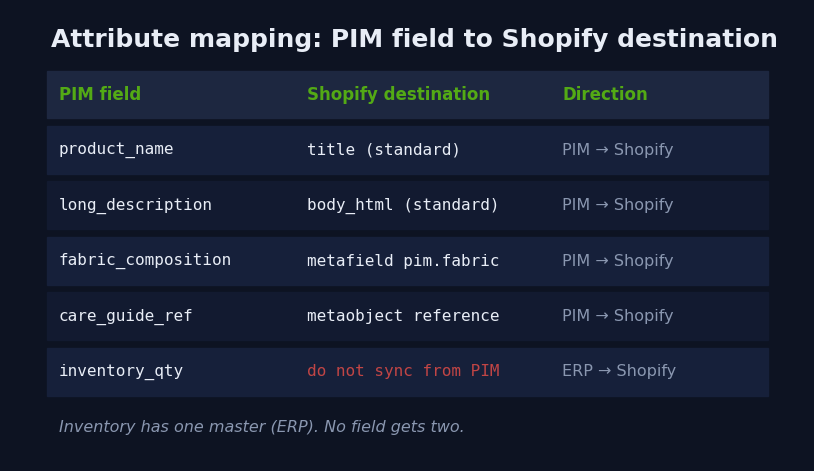
A real mapping document for a mid-sized catalogue runs to hundreds of rows. A small extract looks like this:
| PIM field | Shopify destination | Direction | Transform |
|---|---|---|---|
| product_name | title (standard) | PIM → Shopify | Trim, title case |
| long_description_html | body_html (standard) | PIM → Shopify | Sanitise allowed tags |
| fabric_composition | metafield pim.fabric_composition | PIM → Shopify | Join array, comma-separated |
| care_guide_ref | metaobject reference | PIM → Shopify | Resolve to metaobject GID |
| inventory_qty | (do not sync from PIM) | ERP → Shopify | Owned by ERP, not PIM |
That last row matters more than it looks. The single most common mistake we inherit from failed integrations is two systems both writing the same field. Inventory belongs to the ERP. Pricing usually does too. The PIM owns description, not stock. When the mapping respects ownership, conflicts disappear because no field has two masters. The research backs up where the effort goes: successful implementations spend 35 to 40 percent of project time on data preparation through audits and cleansing. That is not overhead. That is the project.
The sync architecture we build
Once the map is agreed, the sync itself is an engineering problem with well-understood patterns. We build around a few principles: the PIM pushes changes rather than Shopify polling for them, writes are idempotent so re-running a sync never causes damage, and large catalogues move through bulk operations rather than thousands of single calls.
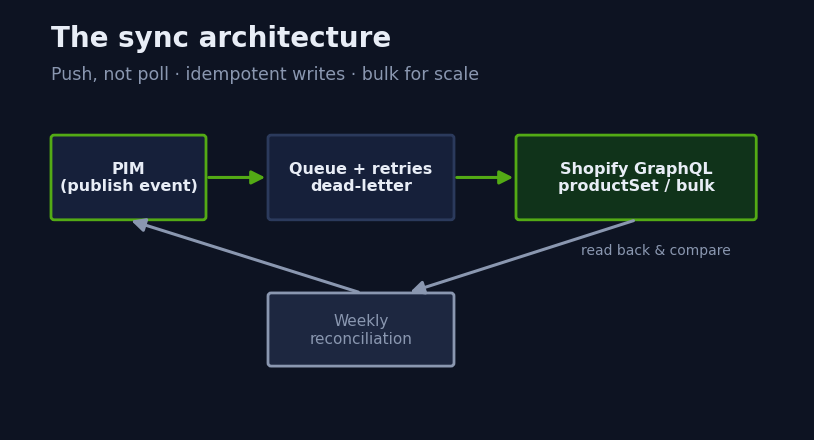
For an individual product update, the modern approach is the productSet mutation, which upserts a product and its metafields in a single, declarative call. Sending the full desired state of the product means re-running it is safe by design, which is exactly the idempotency we want.
mutation SyncProduct($input: ProductSetInput!) {
  productSet(input: $input) {
    product { id handle }
    userErrors { field message }
  }
}

# variables
{
  "input": {
    "handle": "merino-crew-charcoal",
    "title": "Merino Crew Knit - Charcoal",
    "metafields": [
      { "namespace": "pim", "key": "fabric_composition",
        "type": "single_line_text_field", "value": "100% Merino Wool" }
    ]
  }
}
For the nightly full reconciliation of a large catalogue, single mutations do not scale. We push the whole set through Shopify’s asynchronous bulk operations, which run server-side and report back when complete rather than holding a connection open.
mutation RunBulkSync {
  bulkOperationRunMutation(
    mutation: "mutation call($input: ProductSetInput!) { productSet(input: $input) { product { id } userErrors { message } } }",
    stagedUploadPath: "tmp/pim-catalogue-sync.jsonl"
  ) {
    bulkOperation { id status }
    userErrors { field message }
  }
}
The cadence depends on the field. Descriptive content can sync on a schedule, often hourly or nightly, because nobody is harmed if a refreshed description lands twenty minutes late. Anything customer-facing and time-sensitive, like a corrected spec on a product that is actively selling, fires on the PIM’s publish event so it appears within minutes. Real-time everywhere sounds appealing but it is expensive and usually unnecessary. Matching sync frequency to the cost of staleness is a design decision, not a default.
Handling failure and drift
Every integration fails sometimes. An API times out, a malformed value gets rejected, a metaobject reference points at something that was deleted. The difference between a system you trust and one you babysit is how it handles those moments. The research is clear that a PIM should handle your expected update volume with explicit processes for managing sync failures, not assume the happy path.
Our standard pattern is a queue with bounded retries and a dead-letter path. A failed write retries with backoff a fixed number of times, and anything still failing lands in a dead-letter queue that a human reviews rather than disappearing silently.
async function syncWithRetry(product, attempt = 1) {
  try {
    return await pushToShopify(product);   // productSet mutation
  } catch (err) {
    if (attempt <= 3 && isTransient(err)) {
      await sleep(2 ** attempt * 1000);    // 2s, 4s, 8s
      return syncWithRetry(product, attempt + 1);
    }
    await deadLetter.add({ sku: product.sku, error: err.message });
    throw err;
  }
}
On top of retries we run a reconciliation job, typically weekly, that reads the live Shopify state back and compares it field by field against the PIM. Anything that has drifted, whether from a manual admin edit, a half-completed sync, or an app writing where it should not, gets flagged and corrected. This is the safety net that catches the slow drift no single failed call would ever reveal. It is also the report that tells the client, in plain numbers, how clean their catalogue actually is.
Choosing a PIM, and when to skip one entirely
The PIM market is large and growing fast, projected to reach USD 19.95 billion in 2026 at a 13.38 percent CAGR, which means there is no shortage of options. For Shopify brands the practical shortlist is usually a handful of cloud platforms, and the deciding factor is rarely the feature list. It is whether the vendor offers a prebuilt Shopify connector or whether you are funding custom integration from scratch.
The honest answer we give some clients is that they do not need a third-party PIM yet. For a catalogue under a couple of thousand SKUs with a single channel, Shopify’s own metafields and metaobjects can function as a lightweight PIM, governed properly with definitions as code. That keeps the data structured and the door open to a dedicated platform later, without the annual licence. A mid-market PIM subscription typically runs $12,000 to $40,000 AUD per year before integration cost, so skipping it until the complexity genuinely demands it is often the right commercial call.
When a brand does need a dedicated platform, the selection criteria we weight most heavily are: native Shopify connector quality, support for metaobjects rather than tags-only, multi-language handling if Markets is in play, and how the platform models product relationships. AI-assisted enrichment is increasingly standard, with platforms moving beyond basic content generation into data validation and automated quality control across whole catalogues. Useful, but never a reason on its own to buy.
The rollout sequence
Most Shopify PIM implementations take three to six months from planning to launch, though a phased approach that ships core functionality first can reach an initial deployment in 12 to 16 weeks. We always phase it, because trying to migrate every field and every channel at once is how projects stall.
| Phase | Focus | Typical duration |
|---|---|---|
| 1. Audit and map | Clean source data, agree field ownership, write the mapping | 3 to 5 weeks |
| 2. Model and define | Build metafield and metaobject definitions as code | 1 to 2 weeks |
| 3. Core sync | Standard fields plus priority metafields, one-way PIM to Shopify | 2 to 4 weeks |
| 4. Enrich and extend | Metaobjects, translations, remaining attributes | 2 to 4 weeks |
| 5. Reconcile and hand over | Drift detection, dead-letter review, documentation | 1 to 2 weeks |
Phase 1 is where the time goes and where the value is created. A brand that arrives with clean, well-mapped data ships in weeks. A brand that has never audited its catalogue spends most of the project in phase 1, which is exactly as it should be, because syncing dirty data faster only makes a bigger mess.
How we do it at Insiteful
We treat a PIM integration as a data-architecture project that happens to touch Shopify, not a plugin you switch on. Every engagement starts with the ownership map, because until everyone agrees which system is allowed to be right about each field, no amount of clever sync code will save you. We draw it, we get the client’s operations lead to sign off on it, and only then do we write a line of integration code.
We build the Shopify side as code from the start. Metafield and metaobject definitions live in version control, get applied identically to a staging store and production, and never get hand-clicked in the admin where they cannot be reproduced. Our sync layer is idempotent by design, uses productSet and bulk operations rather than naive per-product calls, and ships with the retry, dead-letter, and weekly reconciliation patterns shown above. That reconciliation report is something we hand back to clients every week so they can see their own data quality trending, not just take our word for it.
And we are willing to tell a client they do not need a PIM. More than once we have scoped an engagement, looked at the catalogue, and recommended a governed metaobject layer instead of a five-figure annual subscription. That call comes from the same place every Insiteful build does: we are building a system that has to keep working and keep earning long after we hand it over, and the cleanest architecture usually wins. If you want to see how we scope this kind of work, our build process lays out exactly how we move from audit to launch, and our recent projects show the standard we hold builds to.
Product data integration rarely sits on its own. It usually connects to the same systems we cover in our guides to ERP integration on Shopify and wiring up 3PL fulfilment, and if you run multiple markets, to the translated content setup behind Shopify Markets. A PIM is the layer that keeps all of them telling the same story about your products.
Where to start
If your product data has started to drift, do not begin by shopping for software. Begin with an audit. Count your SKUs, list your channels, and map which system owns which field today, even if the honest answer is “all of them, badly.” That map will tell you whether you need a dedicated PIM or a governed Shopify-native layer, and it will turn a vague sense of mess into a concrete scope.
That is the first thing we do on every integration, and it is the fastest way to find out what your catalogue is really costing you. If you would like us to run that audit and scope the integration properly, start with our build process and we will take it from there.