
Last month a Melbourne skincare brand came to us with a familiar problem. Their marketing lead wanted to launch a Mother’s Day landing page: a hero, a three-product feature, a founder quote, a gift guide grid. Simple brief. Their theme said no. Every layout she wanted meant a developer ticket, and the agency that built the theme quoted four days of turnaround. The campaign window was ten days. By the time the page shipped, half the paid traffic budget had already been spent pushing people to a generic collection page.
That is not a marketing problem. It is a theme architecture problem, and it is the exact problem Shopify’s theme blocks were built to fix.
We covered the first half of this story in our piece on Online Store 2.0 and sections everywhere. Sections gave merchants page-level flexibility. Theme blocks go a layer deeper: they make the inside of every section composable too. When we build themes on this architecture, our clients’ teams ship campaign pages in hours, not developer sprints. Here is how the system works, where it pays off, and how we use it on real Australian stores.
What Theme Blocks Actually Are (And What They Replace)
Shopify themes now support three kinds of blocks, and the distinction matters when you are scoping a build.
- Section blocks live inside a single section’s Liquid file. They are locked to that section, support one level of hierarchy, and cannot be reused anywhere else. This is the old OS 2.0 pattern, and it is why so many themes ended up with six near-identical “image with text” sections.
- Theme blocks are standalone Liquid files in the theme’s
/blocksfolder. Any section that opts in can render them, they can nest inside each other, and a change to one block file updates every page that uses it. - App blocks are supplied by installed apps (reviews, forms, loyalty widgets) and can slot into any section or theme block that accepts them.
The practical shift is in the file structure. On a legacy build, layout logic is buried inside section files where only a developer can touch it. On a theme blocks build, the design system lives in a flat folder of small, named components:
blocks/
  group.liquid          // layout container, rows and columns
  heading.liquid        // typography component, all heading styles
  text.liquid           // body copy with width and alignment settings
  button.liquid         // primary, secondary, text-link variants
  image.liquid          // art-directed image with focal point
  product-card.liquid   // price, badge, swatches, quick add
  testimonial.liquid    // quote, author, rating
  spacer.liquid         // vertical rhythm control
Eight files like these, composed well, can replace twenty rigid sections. That is the whole idea: fewer, smarter components instead of a long menu of one-trick sections.
Nesting: The Feature That Changes How Themes Get Designed
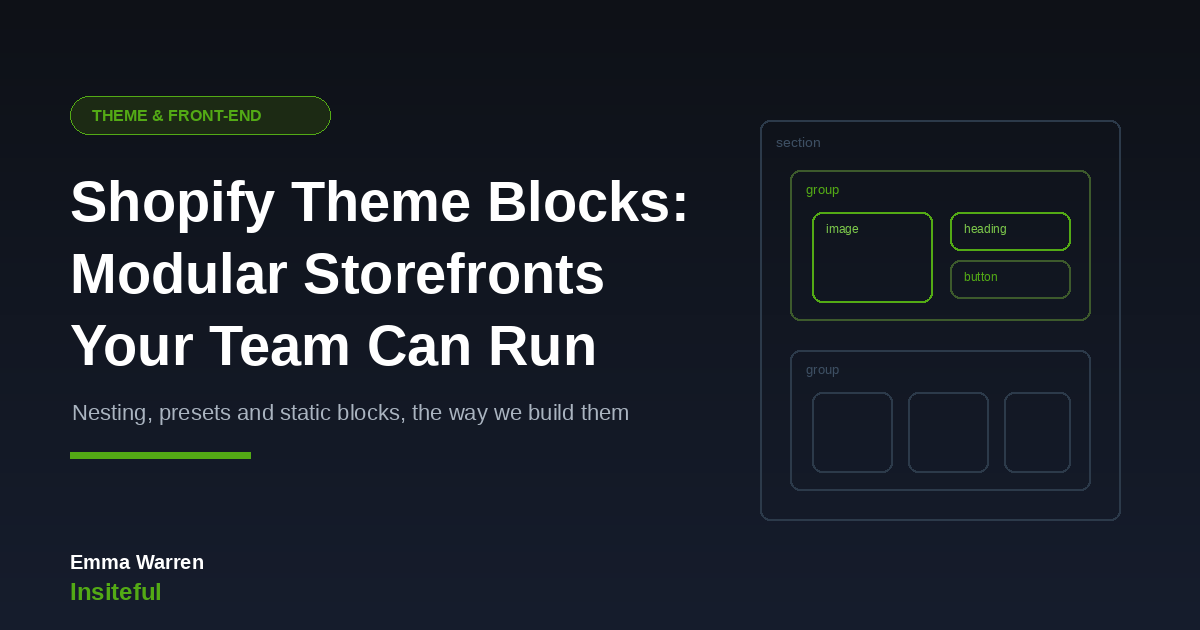
The headline capability is nesting. Theme blocks can sit inside other theme blocks up to eight levels deep, excluding the section level. Legacy section blocks allowed exactly one level: a section, then a flat list of blocks under it. That single constraint is why older themes feel rigid. The designer’s grid had nowhere to live in the data model.
With nesting, a merchandiser can build a two-column row where the left column holds an image and the right column holds a heading, body text, and two buttons stacked vertically. None of that requires code. It requires one well-built “group” block that accepts children. Here is what that assembly looks like from the merchant’s side of the glass:
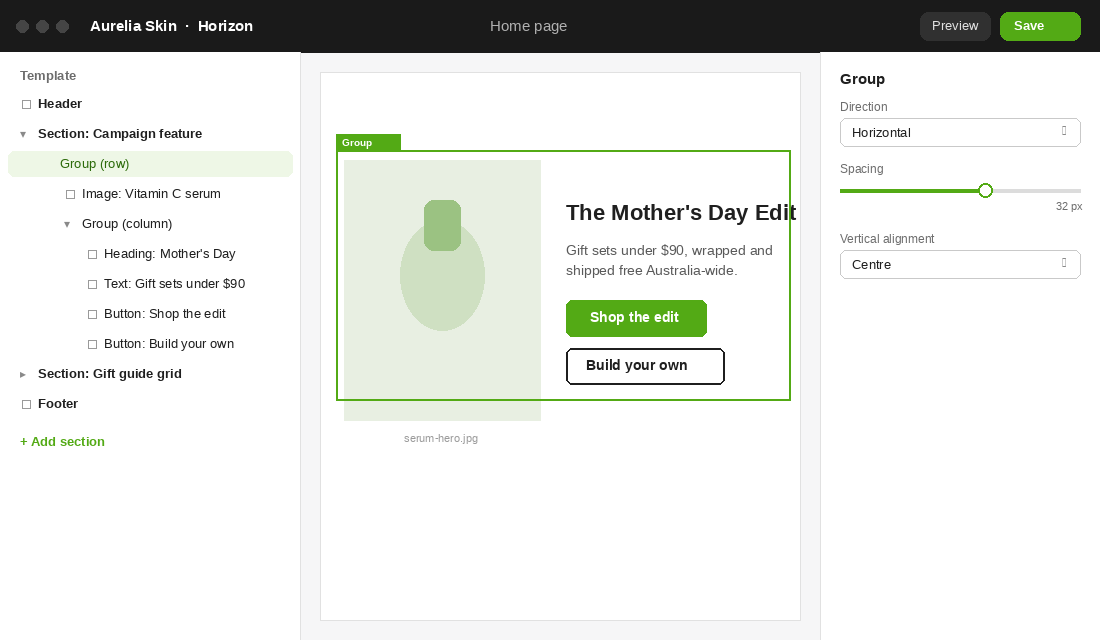
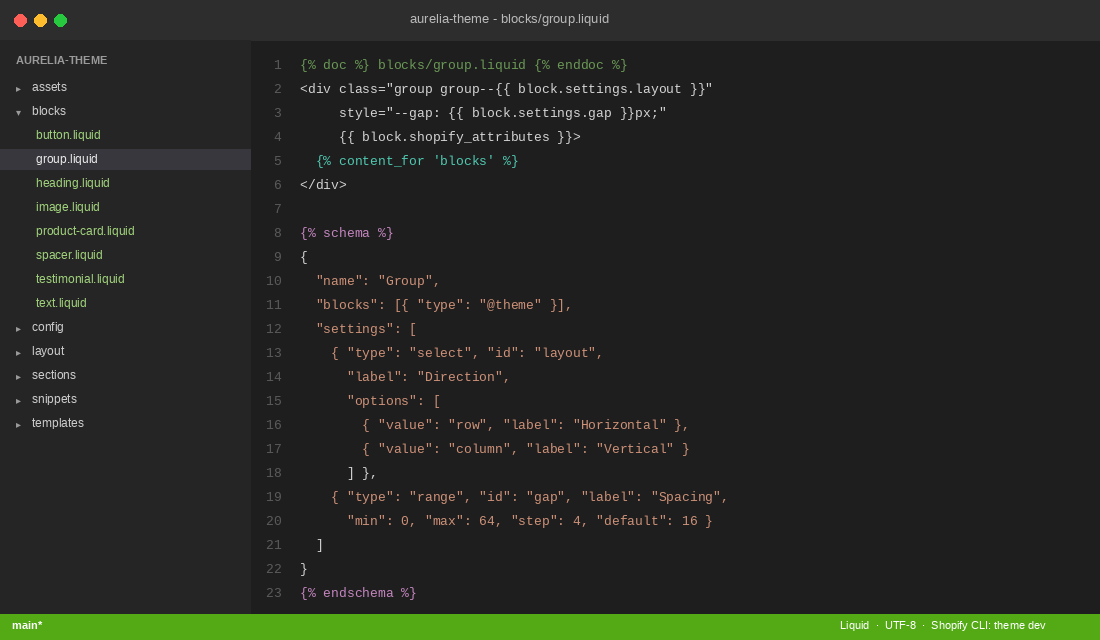
And here is the single Liquid file that makes that editor experience possible:
{% doc %} blocks/group.liquid {% enddoc %}
<div class="group group--{{ block.settings.layout }}"
     style="--gap: {{ block.settings.gap }}px;"
     {{ block.shopify_attributes }}>
  {% content_for 'blocks' %}
</div>

{% schema %}
{
  "name": "Group",
  "blocks": [{ "type": "@theme" }],
  "settings": [
    { "type": "select", "id": "layout", "label": "Direction",
      "options": [
        { "value": "row", "label": "Horizontal" },
        { "value": "column", "label": "Vertical" }
      ] },
    { "type": "range", "id": "gap", "label": "Spacing",
      "min": 0, "max": 64, "step": 4, "default": 16 }
  ]
}
{% endschema %}
Two details in that file do the heavy lifting. The { "type": "@theme" } entry in the schema tells Shopify this block accepts any theme block as a child. The {% content_for 'blocks' %} tag renders whatever children the merchant has added in the editor, in the order they arranged them.
A warning from our own build standards: eight levels of nesting is a ceiling, not a target. Past three or four levels the theme editor sidebar becomes a filing cabinet nobody wants to open. We design our block systems so that 90% of layouts are achievable within three levels.
Static Blocks: Structure Where the Brand Needs Protecting
Full flexibility is not always the goal. A product page has elements that should never be deleted by a well-meaning team member at 11pm before a launch: the price, the variant picker, the add to cart button. For these, Shopify provides static blocks, rendered at a fixed position in the Liquid with an explicit type and ID:
{% comment %} sections/product.liquid {% endcomment %}
{% content_for 'block', type: 'price', id: 'pdp-price' %}
{% content_for 'block', type: 'buy-buttons', id: 'pdp-buy' %}

{% comment %} Everything below is merchant-editable {% endcomment %}
{% content_for 'blocks' %}
Static blocks can still be configured, and merchants can hide them, but they cannot be moved or deleted. This is the architecture answer to a question every agency gets asked: “How do we let the team edit the site without letting them break it?” You draw the line in the template. Structural commerce elements are static. Storytelling and merchandising are dynamic.
On our builds, that split is a deliberate design decision made in the discovery phase, not something we leave to whatever the theme happened to ship with. A wholesale brand with a single brand manager gets a looser setup than a retailer with eight casual staff touching the editor. We write the policy down in the handover doc: which blocks are structural, which are open, and who owns each surface. It takes half a page and saves an argument every quarter.
Presets: Shipping Layout Systems, Not Lego Pieces
Handing a marketing team a folder of atomic blocks and wishing them luck is lazy theme development. The mechanism that makes block systems usable is presets: predefined configurations of a block, including entire trees of nested children, that appear in the editor’s add-block picker as one-click starting points.
"presets": [
  {
    "name": "Feature row",
    "settings": { "layout": "row", "gap": 32 },
    "blocks": [
      { "type": "image",
        "settings": { "ratio": "4:5" } },
      { "type": "group",
        "settings": { "layout": "column", "gap": 16 },
        "blocks": [
          { "type": "heading", "settings": { "size": "h3" } },
          { "type": "text", "settings": {} },
          { "type": "button", "settings": { "style": "primary" } }
        ] }
    ]
  }
]
One preset, five blocks, assembled and styled before the merchant ever sees it. They click “Feature row”, swap the image, rewrite the heading, and publish. If they want to add a second button or remove the image entirely, every part of the preset remains a live, editable block. Presets are starting points, not templates with the doors welded shut.
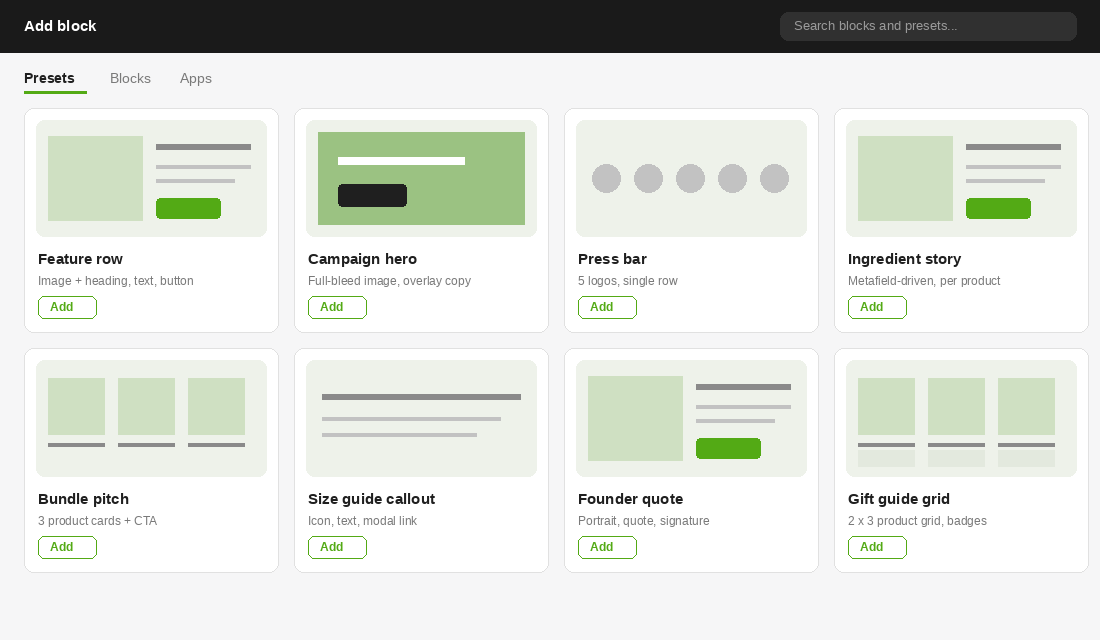
When we deliver a theme, the preset library is a core deliverable. We typically ship 15 to 25 presets mapped to the brand’s actual content patterns: campaign hero, press bar, ingredient story, bundle pitch, size guide callout. The team composes pages from patterns the designer already approved, which is why the result still looks designed six months after handover.
Dynamic Sources: Blocks That Fill Themselves From Your Data
The quiet superpower of theme blocks is how they pair with metafields and metaobjects through dynamic sources. Instead of a merchant pasting content into a block by hand, the block’s settings can be connected to structured data: a product metafield, a metaobject entry, shop-level content.
Here is what that looks like in practice on a product page. We build an “ingredient story” block once. Its heading, body copy, and image settings are wired to product metafields. The brand team fills in the metafields for each of their 120 SKUs in the admin, or imports them via CSV, and every product page renders its own ingredient story through the same block. One component, 120 unique pages, zero copy-paste.
The same pattern carries size guides, care instructions, shipping cutoffs by product type, compliance copy for regulated categories, and the “why we made this” founder notes that do real conversion work on considered purchases. Because the data lives in metafields rather than inside the theme, it survives a redesign. When we rebuild a store that already has structured content, the new theme picks the data up on day one.
For Australian brands selling in regulated categories (supplements, skincare with therapeutic claims, alcohol), this is more than convenience. Compliance copy maintained in one metaobject and rendered by one static block means legal review happens once, not once per page. We have watched brands fail audits because a warning statement was hand-edited on 40 pages and missed on 7 of them.
Horizon Made This the Default, Not an Option
If you want a read on where Shopify is steering theme development, look at Horizon, the first-party theme foundation Shopify shipped at its Summer ’25 Editions. Horizon replaced Dawn as the reference architecture, launched alongside a family of ten free themes built on the same foundation, and is built block-first from the ground up. Every layout in it is composed from nested theme blocks, and Shopify layered AI generation on top so merchants can describe a block and have a draft built for them.
We are measured about the AI piece. Generated blocks still need a designer’s eye for spacing, type hierarchy, and brand fidelity, and we review every generated component before it goes near production. But the architectural signal is unambiguous. Shopify rebuilt its flagship theme around theme blocks. The Theme Store now expects new submissions to follow the same patterns. Agencies still hand-rolling monolithic sections in 2026 are building on borrowed time.
For brands on older themes, this does not mean panic-replatforming your front end. A Dawn-era theme still works. It means that your next rebuild, whenever it comes, should be scoped as a block system. That is a different brief, a different information architecture, and frankly a different kind of agency engagement than “make us a theme that looks like the Figma”.
Why Campaign Velocity Is the Real Return
The business case for theme blocks is not developer elegance. It is the speed at which your team can act on a commercial opportunity.
Australian online spend hit a record $69 billion AUD in 2024, up 12% year on year, across 9.8 million households, according to the Australia Post 2025 eCommerce Report. The same report puts the average online basket at just $95, the lowest in a decade. Read those two numbers together: more demand, thinner baskets. Growth is coming from event-driven peaks (Black Friday, Afterpay Day, Mother’s Day, EOFY) where brands that can spin up dedicated campaign experiences capture an outsized share.
That is exactly the work a block-based theme accelerates. The skincare brand from our opening is a real pattern we see constantly: a $40,000 AUD campaign window half-wasted because the storefront could not keep up with the calendar. After we rebuilt their theme as a block system, their team assembled the next campaign page themselves in under two hours, from presets, with no tickets and no agency invoice for the page build.
There is a second-order saving too. On legacy builds, “small layout change” tickets accumulate into a permanent maintenance retainer. On block systems, those tickets mostly stop existing. Developer time gets spent on things that actually need developers: integrations, custom logic, performance work. We covered the visual-consistency side of this in our piece on building a design system for Shopify; theme blocks are the mechanism that makes the design system enforceable in the editor.
Three Paths From a Legacy Theme to a Block System
If you are on a Dawn-era or heavily customised OS 2.0 theme today, there are three realistic routes forward, and the right one depends on how much custom logic your current theme carries.
- Adopt a Horizon-family theme and customise. The cheapest path for brands whose current theme is mostly stock. You inherit a complete block architecture on day one and invest in brand styling, presets, and content migration. Works best for catalogues under a few hundred SKUs with conventional page needs.
- Rebuild your custom theme block-first. The right call when the existing theme carries years of bespoke sections, custom logic, and brand-specific layouts. We treat it as a design system project: pattern audit, block library, presets, then template assembly. Most of the value of a custom build, with an editor your team can finally drive.
- Hybrid migration, section by section. Keep the theme, introduce theme blocks into new sections as campaigns demand them. This is the lowest-disruption path, but remember the constraint below: old section blocks and new theme blocks cannot share a section, so the editor experience stays inconsistent until the migration finishes. We recommend this only as a bridge with an end date, not a destination.
Whichever path you take, the deciding question is the same: what does your team need to be able to ship without a developer, and how often? Answer that honestly and the architecture decision mostly makes itself.
The Mistakes We See in Theme Block Builds
We audit a lot of Shopify builds, and block-based themes fail in predictable ways. If you are scoping a build or reviewing an agency’s proposal, these are the traps worth asking about.
- Mixing block types in one section. A section cannot use locally-defined section blocks and theme blocks at the same time. Teams retrofit theme blocks into an old theme, hit this wall, and end up with a confusing hybrid where some sections compose and some do not. Migration needs a plan, not a sprinkle.
- Over-atomised systems. If the merchant has to assemble seven blocks to make one banner, the system has failed. Atomic blocks need preset coverage for every common pattern, or the editor becomes a chore and the team reverts to asking developers.
- Unbounded nesting. Eight levels are available. Brand and conversion layouts rarely justify more than three. Deep trees are miserable to navigate in the editor sidebar and miserable to debug.
- No performance budget per block. Each block that loads its own script or stylesheet multiplies across every instance on the page. We set a hard budget for the entire block library, and a heading block ships zero JavaScript. Always.
- Settings sprawl. Forty settings on one block is not flexibility, it is a liability. We cap most blocks at 8 to 12 settings and push brand decisions (colours, type scale, radius) up to theme settings where they belong.
The common thread: theme blocks are an architecture, and architecture is a set of decisions. A folder full of blocks with no opinions is just a different way to ship an unfinished theme. When you brief an agency, ask to see the preset library and the block-level performance budget from a previous build. If they cannot show you either, you are buying components, not a system.
How We Do It at Insiteful
Every custom theme we ship is built block-first on native Shopify. No headless detours, no page-builder apps bolted on top. The build process looks like this.
- Content pattern audit first. Before any Liquid is written, we inventory every layout the brand has shipped across the last 12 months of campaigns, emails, and socials. That list defines the block library and the preset set. The design system serves the content, not the other way around.
- A small library, fully presetted. Most of our builds land between 12 and 20 theme blocks with 15 to 25 presets. Every preset is composed, styled, and approved by our design lead before handover.
- Static-block guardrails on commerce surfaces. Price, buy buttons, variant pickers, and trust elements are statically placed. Storytelling areas are fully dynamic. The split is documented page by page.
- Performance gates in CI. Each block carries a budget. The library as a whole must keep the theme under our Lighthouse thresholds on a mid-tier Android over 4G, because that is the phone your customer in Parramatta is actually holding.
- A one-hour handover session. We record a working session with the team building a real campaign page from presets. If they cannot do it without us on the call, we have not finished the job.
The outcome we aim for is simple to state: after handover, your team should ship campaign pages without writing a ticket, and the site should still look like the brand a year later.
Worth a Conversation?
If your team is fighting the theme every time the marketing calendar turns over, that is an architecture problem with a known fix. We scope theme block rebuilds against your actual content patterns and show you exactly what your team would be able to do themselves. See how we scope a build, or browse our recent projects to judge the work for yourself.