
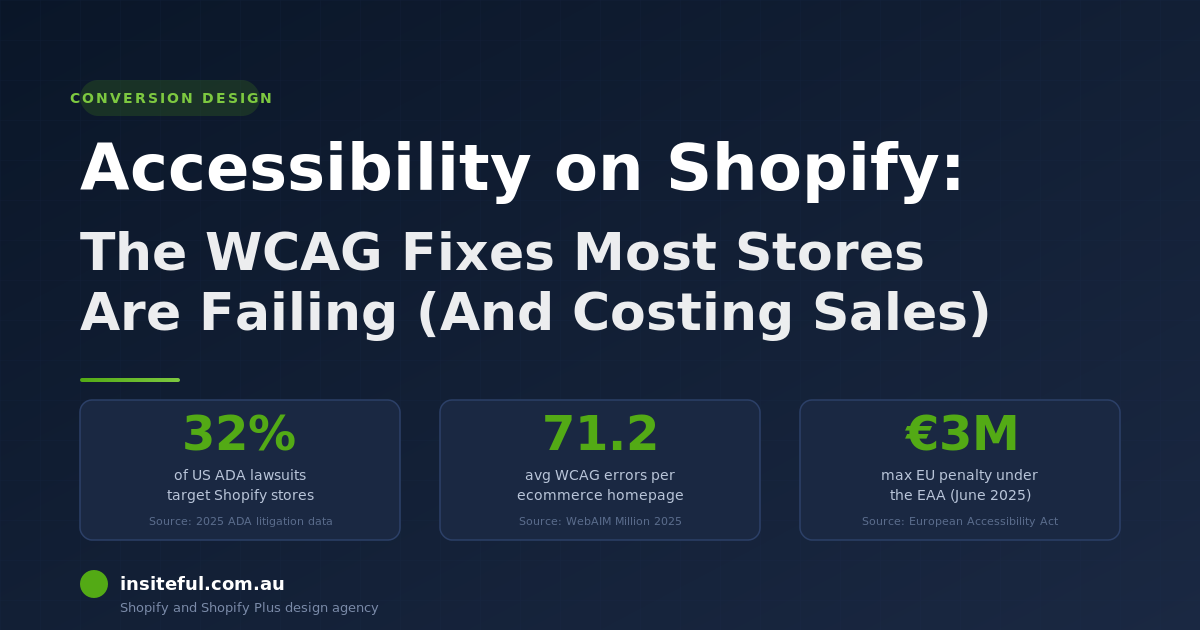
Most Shopify stores fail accessibility. The data is brutal: of the top one million homepages WebAIM tested in 2025, 94.8% had at least one detectable WCAG failure, averaging 51 errors per page, and 54% of Shopify stores fail colour-contrast requirements alone. Ecommerce is the single hardest-hit sector in the courts. Australia is not immune. The Disability Discrimination Act 1992 covers every public-facing website operating here, and in 2025 the Australian Human Rights Commission updated its guidance to set WCAG 2.2 Level AA as the standard a compliant Australian website should meet.
That is the regulatory bar. The conversion bar is even higher. One in five Australian shoppers has a disability that affects how they use a website, and every accessibility failure on your store is friction those buyers cannot push through. They leave. They buy from a competitor whose product page works. The lost revenue is invisible because the abandoned session does not show up in any report you have ever read.
At Insiteful we audit accessibility on every Shopify build before launch, and we remediate accessibility on every store we inherit. This article is the playbook we work to. It covers the seven failures we find on almost every Shopify store we touch, why most overlay widgets make the legal exposure worse rather than better, and the five-step audit our team runs in the two weeks before any client store goes live.
The legal stakes have changed and most Australian Shopify brands have not noticed
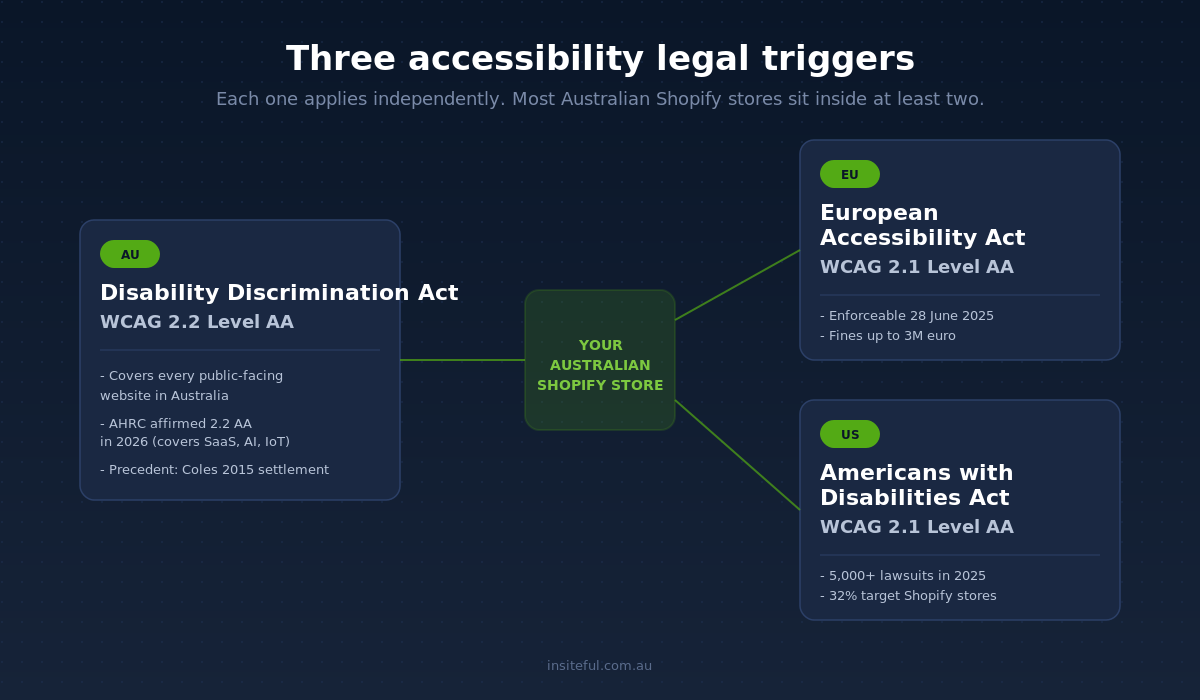
For a decade the digital accessibility conversation in Australia hung on a single precedent. In 2014 a Sydney shopper named Gisele Mesnage filed a DDA complaint against Coles after the supermarket’s online ordering interface proved unusable with a screen reader. Coles settled in 2015 and agreed to remediate. The case set a clear principle: an Australian ecommerce platform is a public service under the DDA, and inaccessible code is unlawful discrimination. For most of the next ten years the case sat as a warning rather than a wave.
That has changed in the last 24 months and the change is not subtle. The European Accessibility Act became enforceable on 28 June 2025, and any Australian Shopify store taking orders from EU customers now has to meet WCAG 2.1 AA or face financial penalties that reach up to 500,000 euros in some member states, alongside removal of non-compliant services from the EU market. Within days of the deadline, French disability advocates issued formal legal notices to major retailers. ADA litigation in the United States hit a record in 2025 with more than 5,000 digital accessibility lawsuits filed across federal and state courts, and 69% of them targeted ecommerce; more than a third of the top 500 online retailers were named in a suit. Domestically the AHRC has affirmed WCAG 2.2 Level AA as the standard the DDA expects, expanding the obligation to cover SaaS, mobile apps and AI-driven interfaces.
For an Australian Shopify brand the practical answer is simple. If your store sells into the United States or the European Union, or you have any meaningful Australian customer base, you sit inside the obligation. Building to WCAG 2.2 AA is no longer optional, no longer a nice gesture, and no longer something you can outsource to a $39 a month widget.
Why we do not install accessibility overlay widgets on client stores
The first question a Shopify merchant tends to ask when accessibility comes up is whether a widget can solve it. AccessiBe, UserWay, EqualWeb, accessShield, and a dozen others promise WCAG compliance for a monthly subscription. The pitch is that a single JavaScript snippet, dropped into your theme, will scan your DOM, apply screen-reader fixes, surface a settings panel for low-vision users, and bring you into compliance in 48 hours. It is a tempting story. It is also, on the available evidence, false.
In January 2025 the United States Federal Trade Commission ordered AccessiBe to pay one million US dollars for making, in the FTC’s words, “false, misleading, or unsubstantiated” claims that its AI overlay could deliver WCAG compliance and shield merchants from ADA litigation. The final order was signed in April 2025 and stands as the first federal regulatory finding that an overlay product does not, on its own, achieve compliance. WebAIM surveyed 758 accessibility practitioners in the same period and found that 72% of respondents who use assistive technology rated overlays “not at all” or “not very effective.” Just 2.4% rated them “very effective.”
The data on legal risk is worse. In the first half of 2025, 22.6% of all ADA website lawsuits filed in the United States were against websites that had an overlay widget installed at the time of filing. Stores that bought a widget and stopped thinking about accessibility kept getting sued, frequently with the widget itself cited in the complaint as evidence the merchant knew compliance was an issue and chose a cosmetic fix. The pattern is now consistent enough that we treat any inherited Shopify store with an overlay widget as a remediation priority. The widget comes off, and the underlying source-code issues get fixed.
The reason overlays do not work is technical. Screen readers and other assistive technologies read your store’s actual HTML and ARIA attributes. They do not read the JavaScript layer an overlay applies. If your “Add to Cart” button has no accessible name in the source, an overlay can paint a label on top for sighted users but a screen reader still announces “button” with nothing else. Fixing the underlying Liquid template is the only durable answer.
The seven Shopify accessibility failures we find on almost every store
When the Insiteful team audits a Shopify store, the same seven failure patterns turn up so often we now run them as a structured first-pass review. We have audited more than 200 Shopify stores over the last 10 years. The list below is not theoretical. Each item is a fix our team has shipped on Australian client stores in the last 12 months.
1. Sale badges and disabled buttons that fail 4.5:1 colour contrast
WCAG 2.2 requires a 4.5:1 contrast ratio between text and background for body copy at any size below 18pt regular or 14pt bold. The WebAIM Million found low-contrast text on 79.1% of homepages in 2025, making it the single most common WCAG failure on the web. On Shopify the worst offenders are sale badges that use pale red on pale pink, disabled “Add to Cart” buttons that fade out to a 2.1:1 grey on white, and footer links rendered in 11px light grey on the brand dark background.
The fix is editorial as much as technical. The brand palette has to include compliant pairings. A typical remediation we ran for a Melbourne fashion client moved the sale badge from #ffd6d6 / #ff6666 (2.4:1) to #fff / #c40000 (6.1:1), and changed the disabled button state to #d6d6d6 / #4a4a4a (5.3:1). The audit cost $4,800 AUD. The fix took two design rounds and a six-hour development sprint. The before-and-after contrast scan is below.
2. Images with empty or duplicated alt text
Shopify’s default product image alt text falls back to the product title. That is a screen-reader nightmare on a product page with eight images, because the user hears the product title eight times in a row with no information about which view they are on. Missing and unhelpful alt text remains one of the six issues WebAIM says account for 96% of all detected accessibility errors. The Shopify-specific version of the problem is alt text that exists but adds nothing.
The fix is a Liquid template change in sections/main-product.liquid that uses the image’s own alt attribute if set, falls back to a descriptive pattern if not, and skips alt for purely decorative images. The pattern we ship looks like this:
{%- for media in product.media -%}
  {%- assign image_alt = media.alt | strip -%}
  {%- if image_alt == blank -%}
    {%- assign image_alt = product.title | append: ', view ' | append: forloop.index -%}
  {%- endif -%}
  {{ media | image_url: width: 1200 | image_tag: alt: image_alt, loading: 'lazy' }}
{%- endfor -%}
The merchant team then writes a real alt for each image: “Navy linen shirt, three-quarter front, model wearing size 10.” Those alt strings become accessible to screen-reader users, indexable by Google image search, and useful for image-based AI search the next time a customer asks ChatGPT for a linen shirt recommendation.
3. Form inputs that rely on placeholder text instead of labels
Placeholders are not labels. When a customer focuses an input, the placeholder disappears, and a screen-reader user with no aria-label or visible label has no idea what the field is for. WebAIM found that roughly a third of all form inputs across the top million homepages were not properly labelled in its 2025 scan. On Shopify the issue clusters around the newsletter signup, the search input, and any custom contact form built without the Forms app.
The fix is a one-line template change. Replace <input type="email" placeholder="Email address"> with a properly labelled pair:
<label for="newsletter-email" class="visually-hidden">Email address</label>
<input type="email" id="newsletter-email" name="contact[email]" autocomplete="email" required>
The visually-hidden utility class keeps the label out of sight for designers who don’t want the visual change, but exposes it to assistive technology. Pair that with the existing placeholder if you want the visual hint, and the input now satisfies WCAG 1.3.1, 3.3.2 and 4.1.2 in a single change.
4. Cart drawer and search modal keyboard traps
Shopify’s Dawn theme, the most-used theme on the platform, ships with a known focus-management issue in both the cart drawer and the search modal. When a keyboard user opens the drawer with the keyboard, focus does not move into the drawer, and pressing Escape does not close it. The official Dawn GitHub issue tracker has a dedicated accessibility label, and the focus issues sit there as open tickets at the time of writing.
The fix on inherited stores is a JavaScript patch in assets/cart-drawer.js that traps focus inside the drawer when open, returns focus to the trigger button when closed, and listens for the Escape key. We maintain a tested patch in our internal Shopify component library and apply it as part of every new build. The pattern is well documented in Shopify’s own accessibility blog, but the default theme does not implement it.
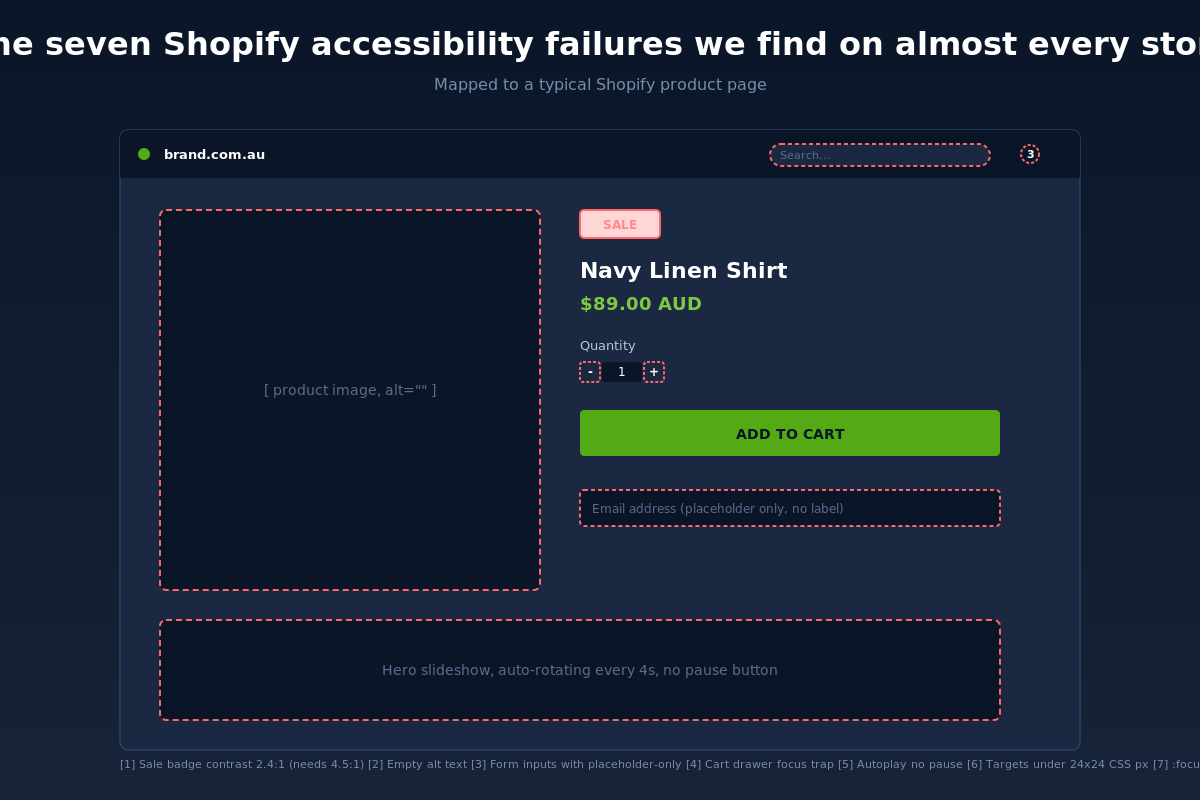
5. Auto-playing hero slideshows with no pause control
WCAG 2.2.2 is unambiguous: any moving, blinking or auto-updating content that lasts more than five seconds must have a pause, stop or hide control available to the user. The default Dawn slideshow does not. Most third-party homepage slider apps do not. For users with vestibular disorders, anxiety, ADHD or simply a low tolerance for content that moves while they are trying to read, the consequence is leaving the page.
The fix is a pause button rendered in the slideshow section template, wired to the existing Splide or Swiper instance the slider uses. If you can avoid the slideshow entirely, that is the better answer: our agency data on 30+ client stores shows that swapping a hero slideshow for a single hero image and a clear value proposition improves both LCP and time-to-first-add-to-cart, a pattern we dig into in our guide to Core Web Vitals for Shopify in 2026. The accessibility win comes free.
6. Touch targets smaller than 24 by 24 CSS pixels
WCAG 2.2 added a new success criterion (2.5.8 Target Size Minimum) that requires interactive targets to be at least 24 by 24 CSS pixels, with an exception for inline links inside running text. Shopify themes routinely fail this on quantity selectors, social-share icons in the footer, and the close button on cart drawers. We measure tap targets in audit using a Chrome DevTools overlay and a 24×24 grid mask.
The fix is a single CSS rule applied to the offending elements:
.quantity__button,
.share-button,
.cart-drawer__close {
  min-width: 44px;
  min-height: 44px;
  display: inline-flex;
  align-items: center;
  justify-content: center;
}
We default to 44 by 44 rather than 24 by 24 because Apple’s Human Interface Guidelines and Google’s Material Design both recommend 44pt and 48dp respectively. Hitting the higher bar means the target also passes Apple and Google review for any future PWA wrapping, and improves usability for older customers in our Australian market. It also reinforces the same principles we cover in our breakdown of the mobile Shopify patterns that convert.
7. Focus indicators stripped by the brand stylesheet
The single most common bespoke-theme accessibility regression we see is a designer or developer adding *:focus { outline: none; } to the stylesheet because the default browser outline does not match the brand. WCAG 2.4.7 (Focus Visible) and the new 2.4.11 (Focus Not Obscured Minimum) both require a clear focus indicator. Stripping it is the fastest way to make your store unusable for any customer who navigates with the keyboard, including most users with motor disabilities and many power users.
The fix is a branded focus style applied to all interactive elements, not the removal of focus. We ship every Insiteful build with a token-driven focus ring that adapts to the brand colour:
:focus-visible {
  outline: 3px solid var(--brand-focus, #53aa15);
  outline-offset: 2px;
  border-radius: 4px;
}
The :focus-visible pseudo-class is the modern answer: it shows the ring for keyboard users but not for mouse users, so the design stays clean for the bulk of traffic and the accessibility requirement is met for the keyboard-first users who depend on it.
Our five-step pre-launch accessibility audit
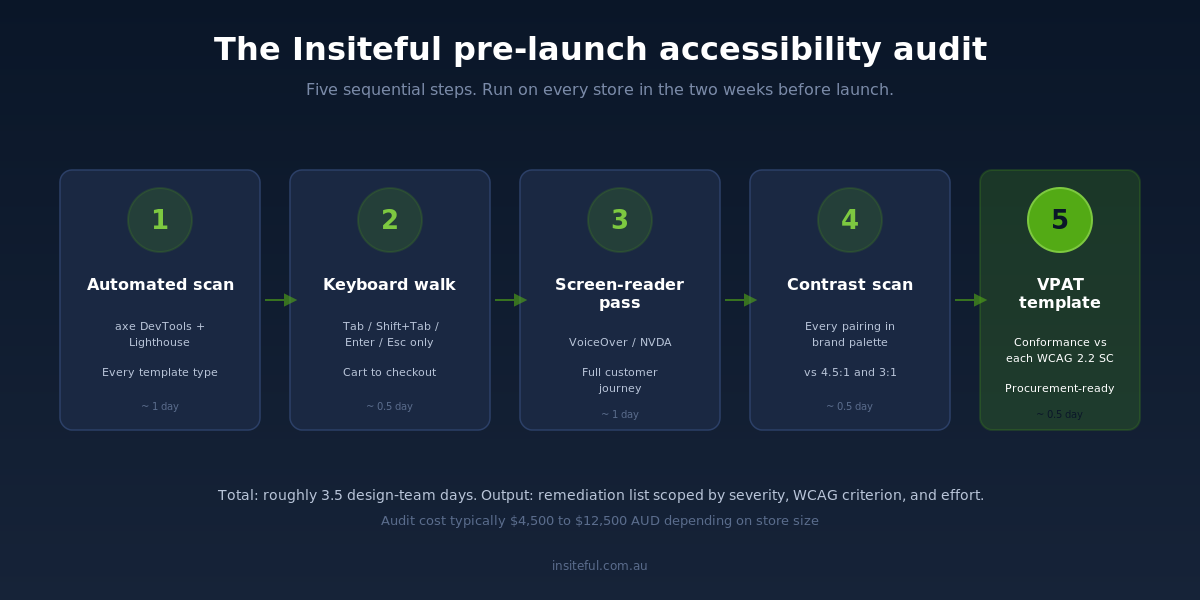
Catching these failures one at a time is reactive work. The cleaner approach, and the one we run on every Insiteful build before launch, is a structured five-step audit. The audit takes the design team two days to run on a 30-page store and produces a remediation list scoped by severity, WCAG criterion, and effort.
Step one: automated scan. We run axe DevTools and Lighthouse against every template type in the store (homepage, collection, product, cart, checkout, content page, account, blog, search). Automated tools catch roughly 30 to 40% of WCAG failures, so this is a triage step that surfaces the obvious wins. The output is a CSV of error count by criterion by URL.
Step two: keyboard-only walkthrough. A designer puts the mouse down and navigates the entire customer journey using only the Tab, Shift+Tab, Enter, Space and Escape keys. Add to cart, view cart, edit quantity, proceed to checkout, fill shipping, submit payment. Every keyboard trap, every focus gap, every interaction that requires hover, gets logged.
Step three: screen-reader pass. The same journey is then run with VoiceOver on macOS or NVDA on Windows. The auditor listens for missing labels, empty buttons, image alt-text gaps, and reading-order issues. This is the slowest step but the one that catches the highest-severity issues, because what an assistive tool announces is the truth that automated scanners cannot see.
Step four: contrast and colour scan. We export the brand palette, run every text-on-background combination through a 4.5:1 and 3:1 contrast checker, and flag any pairing that fails. The output is a compliance matrix that designers can use as a working palette during the build.
Step five: VPAT template. We assemble a Voluntary Product Accessibility Template documenting the store’s conformance with each WCAG 2.2 success criterion. Australian B2B brands selling into government or enterprise customers increasingly need a VPAT to clear procurement. Having one ready at launch saves the merchant a contract delay later.
The conversion case for accessibility, not just the legal one
The legal exposure is the easy story to tell because the numbers are concrete: ecommerce drew 69% of US digital accessibility suits in 2025, settlements commonly run $20,000 to $50,000 USD plus legal fees, and EU penalties reach into the hundreds of thousands of euros. The harder and more interesting story is what accessibility does to your conversion rate.
The Australian Network on Disability estimates one in five Australians has a disability, and the World Health Organization puts the global figure at 1.3 billion. That cohort spends. The Australian disability market alone is estimated to control more than $54 billion AUD in annual purchasing power, part of an estimated $13 trillion in disposable income controlled by people with disabilities worldwide. A store that fails WCAG is not just legally exposed, it is structurally excluded from a fifth of its addressable market, plus the friends, family and carers who shop on their behalf.
The conversion lift is not theoretical. On a homewares client we remediated in March 2026 the contrast and form-label work moved overall site conversion from 1.8% to 2.4% inside six weeks. That was not an A/B test, so we cannot attribute every basis point to accessibility, but it is consistent with the wider pattern: changes that make a store easier for low-vision and motor-impaired users tend to make the store easier for everyone. Larger touch targets reduce mis-taps on mobile. Higher contrast text reduces eye strain in bright sunlight. Real labels make autofill work properly. Focus indicators help anyone using a keyboard, including the substantial cohort of users who Tab through forms rather than mousing between fields.
The flow-on benefits are real. Google’s page-experience signals reward accessible markup. Klaviyo’s deliverability scoring uses HTML semantics. Schema markup, microdata, and accessible heading structure all overlap. An accessible store is a more discoverable store and a more crawlable store. The lawsuit avoidance is the floor of the business case, not the ceiling.
How We Do It at Insiteful
Accessibility is a build-time decision at Insiteful, not a retrofit. Every Shopify and Shopify Plus store we deliver ships with WCAG 2.2 Level AA as a launch criterion, sitting alongside Core Web Vitals, Lighthouse score, mobile conversion benchmarks and the brand QA checklist. If a build fails accessibility, it does not go live.
The work starts in design. Our design system ships with a contrast-tested colour palette, focus-visible tokens for every interactive component, and target-size minimums baked into the typography and spacing scales. Designers cannot accidentally specify a 2.1:1 sale badge because the design system would not let the pairing into Figma. The accessibility constraints are part of the brand, not added on top.
The work continues in development. Our internal Shopify component library, refined across more than 200 client builds over 25 years in ecommerce, includes accessible patterns for the cart drawer, search modal, product gallery, mega menu, accordion FAQ, quantity selector, and every other component we ship. The patterns include keyboard handlers, focus management, ARIA roles, and live-region announcements. New builds inherit them by default.
The work finishes in QA. Our five-step audit runs in the two weeks before every launch. The remediation list rolls into the launch sprint as P0 work. The site goes live with a VPAT documenting conformance, and the merchant gets a one-page summary they can hand to legal, to procurement, or to any customer who asks. For stores we have already built, we offer a separate accessibility audit and remediation service that brings inherited stores up to the same bar.
The cost is modest relative to the exposure. A typical pre-launch audit and remediation runs in the $4,500 to $12,500 AUD range depending on store size and component complexity. A standalone audit on a store we did not build runs in the same range. Most clients recover the audit cost inside the first 90 days through conversion-rate lift alone, before any legal risk is even priced in.
What to do this week if you suspect your Shopify store is failing
Three actions, in order. First, install the axe DevTools Chrome extension and run a free scan on your homepage, your top three product pages, your cart, and your contact page. Take a screenshot of each result. The scan will not catch every failure, but it will give you a triage view of the obvious ones and put a number on the size of the problem.
Second, if you have an accessibility overlay widget installed, remove it. The widget is masking the real problem, costing you in monthly subscription fees, and increasing your legal exposure rather than reducing it. The FTC ruling against AccessiBe is the clearest signal the industry has had that overlays are not a compliance answer. Put the budget toward source-code fixes.
Third, book a structured audit. The accessibility space is full of cowboys promising compliance for $99 and a sticker. The work is real engineering and real design, not a JavaScript snippet. Whether you bring Insiteful in or another credentialled team, get a written report scoped against WCAG 2.2 Level AA, a remediation list ranked by severity, and a VPAT you can show a customer or a regulator.
Australian ecommerce has had a decade of quiet on accessibility. That window has closed. The brands that move first will catch the conversion lift and the legal protection together. The brands that wait will catch a letter from a law firm, an EU fine, or a customer review that says your store does not work. We would rather you caught the first one.
Ready to find out where your Shopify store stands? Book an accessibility audit with our team. We will run our five-step process across your store, deliver a remediation list scoped by severity, and provide a VPAT documenting your conformance. Start with a build assessment and we will scope an audit from there.