
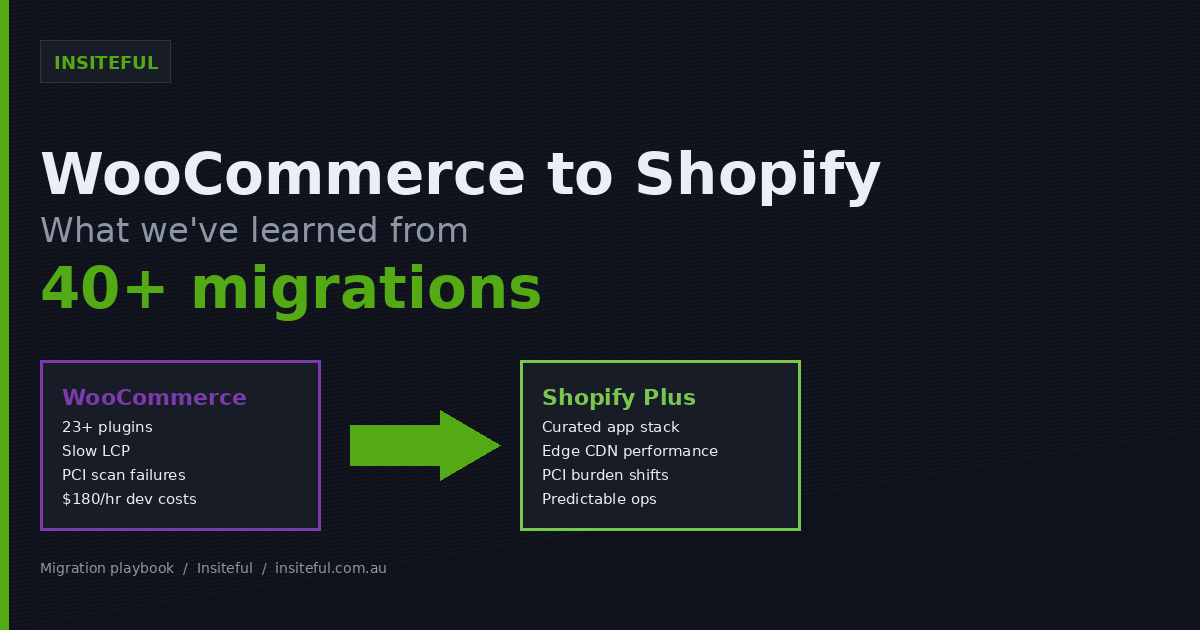
Most WooCommerce founders we speak to in Australia have the same story. The store launched four or five years ago on a $39 theme and a stack of plugins their original developer recommended. It grew. Then it got slow. Then the security patches stopped landing on time. Then one Sunday morning a cart bug ate the BFCM weekend, and the conversation shifted from “we might move to Shopify” to “we need to be on Shopify by Q3.”
We have run more than 40 WooCommerce to Shopify migrations through Insiteful, ranging from $300,000 AUD lifestyle brands to $14M AUD multi-warehouse operators on Shopify Plus. Almost none of them go the way the migration tool vendors describe. The product catalogue is the easy part. The customer data, the SEO surface, the subscription stack, the abandoned cart logic, and the tax engine are where every project either lands cleanly or spends the next six weeks bleeding.
This article is the version of the migration conversation we wish we could send to every founder before they sign anything. What actually moves cleanly, what breaks, what it costs in AUD, and the build decisions that decide whether you keep your organic traffic or watch a quarter of it evaporate.
Why brands move from WooCommerce to Shopify in 2026
The market data is unambiguous. Shopify holds 45.99% of the ecommerce platform market in a February 2026 BuiltWith crawl, roughly 2.6 times the share of WooCommerce, and Shopify’s GMV is on pace to exceed $350 billion for 2025. WooCommerce still powers around 33.4% of live ecommerce stores per Store Leads, but the curve is the wrong direction for brands trying to scale above $2M in revenue. The same forces are pulling brands off Magento and onto Shopify in 2026.
The motivations we hear are remarkably consistent across the 40+ projects we have shipped:
- Hosting bills creep past $400 AUD/month and the store is still slow on mobile because the LCP is being dragged down by 23 plugins.
- The original developer has left and the next person quotes $180/hour just to read the codebase before estimating a fix.
- Checkout conversion has plateaued and the team has run out of A/B tests they can implement without breaking the cart plugin.
- PCI compliance scans are failing because three plugins are two major versions behind and the vendors have gone dark.
- WooCommerce discontinued its native POS in February 2026, which left in-store sellers chasing Lightspeed POS at $249/year per location with another data layer to reconcile.
For founders past the $2M AUD revenue line, the total cost of staying on WooCommerce, hosting, developer time, app fragility, downtime risk, has usually crossed the cost of a Shopify Plus migration before they have even commissioned a quote.
What actually migrates cleanly (and what doesn’t)
The single biggest misalignment we see at scoping is the assumption that “migration” means everything moves. It does not. Some data sets transfer with one CSV import. Others require manual rebuilding from scratch. Knowing which is which up front saves four weeks of project drift.
Here is the migration cleanliness matrix we walk every client through in week 1:
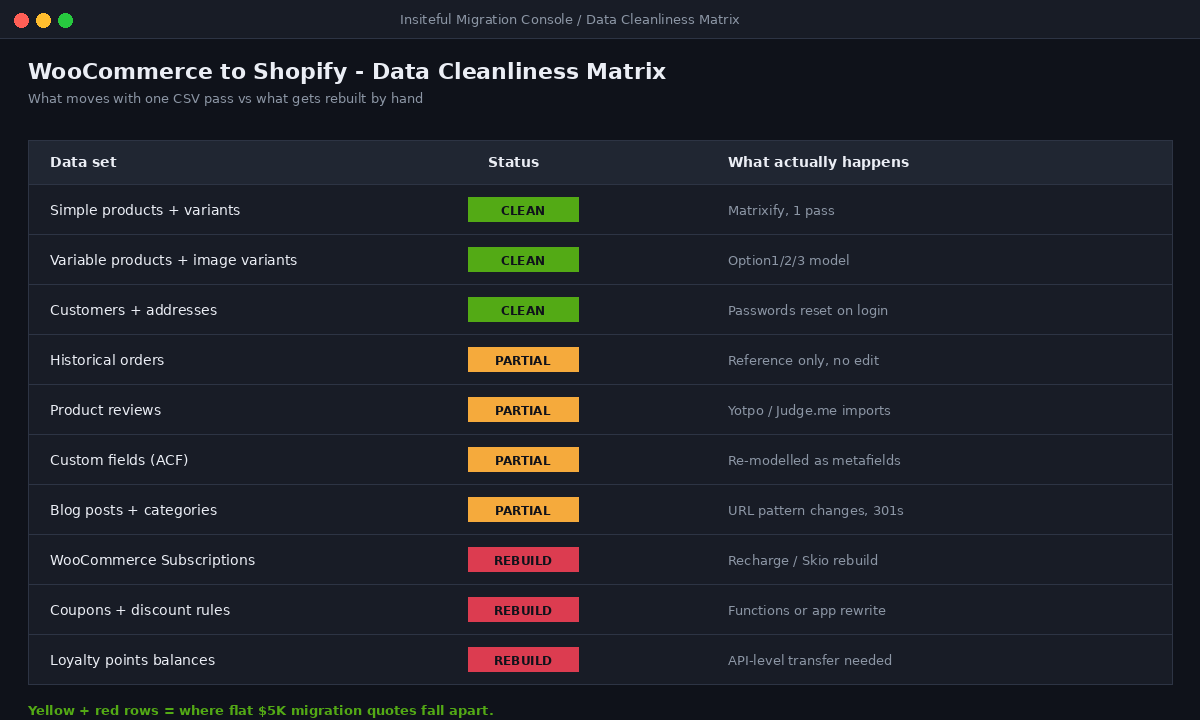
| Data set | Migration difficulty | What actually happens |
|---|---|---|
| Simple products + variants | Clean | CSV via Matrixify, one pass. |
| Variable products with image variants | Clean | Maps to Shopify Option1/Option2/Option3 model. |
| Customers + addresses | Clean | Passwords are not portable. Customers reset on first login. |
| Historical orders | Partial | Imports as reference data. Cannot be refunded or edited inside Shopify. |
| Product reviews | Partial | Depends on origin plugin. Yotpo/Judge.me imports work, native WP reviews are messy. |
| Custom product fields (ACF) | Partial | Re-modelled as Shopify metafields. Variant metafields require third-party importers because Shopify CSV does not handle them natively. |
| Blog posts + categories | Partial | Content moves. URLs change from /blog/slug to /blogs/news/slug. Hard 301 work. |
| WooCommerce Subscriptions | Manual rebuild | Does not map to Shopify. Active subscribers re-onboarded through Recharge or Skio. |
| Coupons + discount rules | Manual rebuild | Shopify Functions or Discount apps. Complex BOGO/tiered logic rewritten. |
| Loyalty points balances | Manual rebuild | Smile.io / LoyaltyLion imports possible but balances need API-level transfer. |
The yellow and red rows are where every migration project lives or dies. Anyone quoting you a flat $5,000 AUD migration price has not asked about your subscription stack yet.
The six things that break on day one if you don’t plan for them
These are the six failure modes we see when a WooCommerce store goes live on Shopify without proper pre-migration planning. We have a checklist for each one, but the categories are:
- Customer logins. WooCommerce hashes passwords differently to Shopify. Even with the customer record imported, every existing customer needs to set a new password on first login. Without a pre-launch email explaining this, your support inbox explodes on day 2.
- Abandoned cart flows. If you were running Klaviyo on WooCommerce, the webhook topology changes. Cart and checkout events need re-mapping or you go three days with no abandonment recovery emails firing.
- Ad pixel data continuity. Meta Pixel and Google Ads tags need new container IDs because the storefront domain technically changes context. Without proper Conversions API setup on day 1, your existing audiences degrade and CPAs spike for the first fortnight.
- Inventory sync to marketplaces. If WooCommerce was pushing to eBay or Amazon via a plugin, those connections do not survive the cut. You need Shopify Marketplace Connect or Codisto configured in parallel before launch, not after.
- Tax engine differences. WooCommerce’s tax rules are flexible to the point of dangerous. Shopify Tax in Australia handles GST cleanly, but if you were running custom rates by postcode for shipping zones, expect to spend a day in the Shopify tax overrides panel.
- Search index lag. Even with redirects in place, Google takes 14 to 30 days to fully re-crawl and re-rank the new URLs. Most stores lose 20 to 40% of organic traffic in the first 30 days if redirects are skipped or done poorly, but with proper 301s and a Search Console resubmit the traffic typically recovers within 60 to 90 days.
Item six is the one that gets founders nervous, and rightly so. The next section is the discipline that protects against it. Once the cutover is done, Core Web Vitals on the new build become the next thing to baseline against the old WooCommerce performance, since most clients see immediate LCP gains they want to lock in.
URL architecture and 301 redirects: where we have saved six-figure SEO surface
The URL structure changes are non-negotiable. WooCommerce uses /product/handle and /product-category/handle. Shopify uses /products/handle and /collections/handle. Blog posts move from /blog/post to /blogs/news/post. Every existing ranking URL that does not have a 301 in place from cutover day will return a 404 the first time Googlebot crawls it.
Our redirect protocol on every WooCommerce migration:
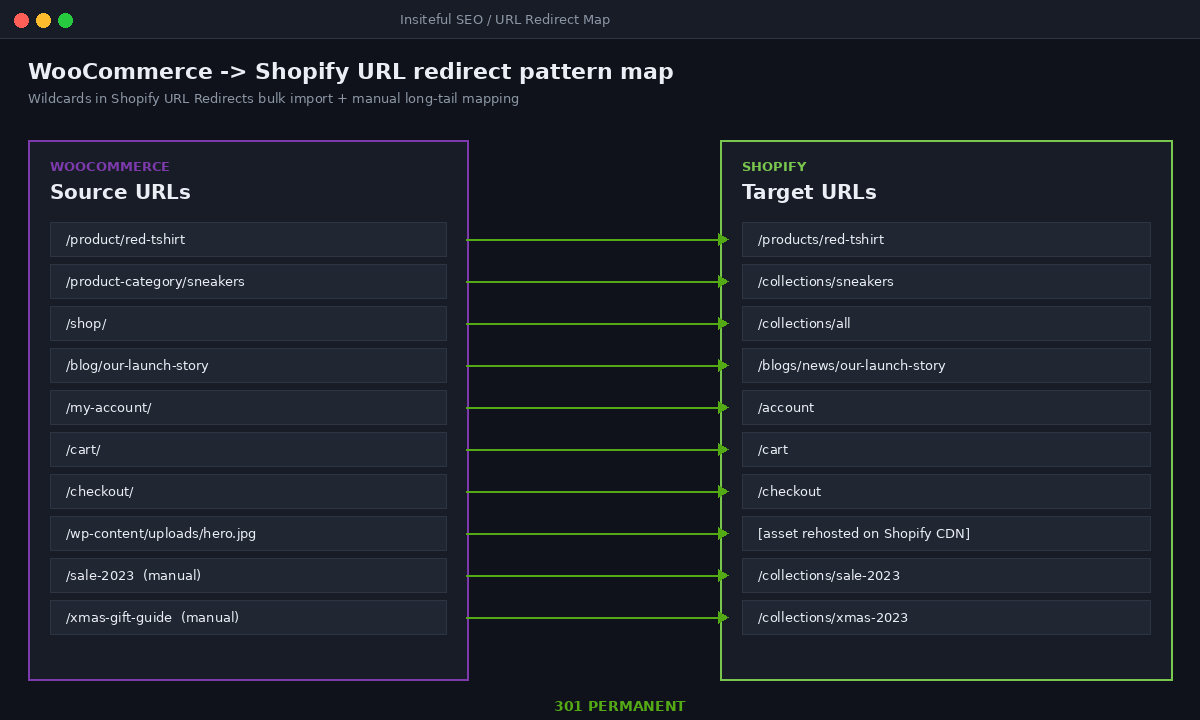
# Pattern map applied via Shopify URL Redirects bulk import
# (Online Store → Navigation → URL Redirects → Import CSV)

Redirect from              Redirect to
/product/(.*)              /products/$1
/product-category/(.*)     /collections/$1
/shop/                     /collections/all
/blog/(.*)                 /blogs/news/$1
/my-account/               /account
/cart/                     /cart
/checkout/                 /checkout
/wp-content/uploads/(.*)   (asset rehosted on Shopify CDN, re-mapped 1:1)
The wildcards are the easy part. The hard work is the long tail of legacy URLs that do not match the pattern. Things like /sale-2023, /xmas-gift-guide, /collections/limited-edition-restock. These have to be mapped one by one from the Screaming Frog crawl of the live WooCommerce site into the Shopify redirect table before DNS cuts over.
On a typical $5M AUD brand we will export 4,000 to 12,000 unique URLs from Screaming Frog, run them against the new Shopify URL list, and end up with around 600 manual redirects on top of the pattern-based ones. Skip this step and the GSC errors will run into the thousands within 72 hours of launch.
The plugin to app translation layer
Every WooCommerce store is a stack of plugins doing very specific things. Migration is the once-in-a-decade opportunity to audit that stack and stop paying for things you no longer need. This is the translation map we hand clients in week 1:
| WooCommerce plugin | Shopify equivalent | Notes |
|---|---|---|
| WooCommerce Subscriptions | Recharge / Skio / Shopify Subscriptions | Shopify Subscriptions is free, fine for simple. Recharge for complex. |
| YITH Wishlist | Wishlist Plus / native theme wishlist | Most modern Shopify themes include this. |
| Yoast SEO | Native Shopify SEO + Sherpas / SearchPie | Shopify handles 80% natively. Apps cover schema bulk-edit. |
| MailChimp for WooCommerce | Klaviyo | Migration is the right time to upgrade off MailChimp. |
| WPML / Polylang | Shopify Markets + Translate & Adapt | Native and cleaner. |
| Advanced Custom Fields | Shopify Metafields + Metaobjects | Models map cleanly. Theme work required to surface them. |
| WooCommerce Bookings | Tipo Appointment / Easy Appointment | No native equivalent. App-led. |
| Stripe for WooCommerce | Shopify Payments (or Stripe via Shop Pay) | Shopify Payments is cheaper if you qualify. |
| Caching plugins (WP Rocket etc.) | N/A | Shopify’s edge CDN replaces these entirely. |
| Security plugins (Wordfence) | N/A | PCI burden moves to Shopify. |
The thing this table does not show is the cost reduction. A typical WooCommerce store running 23 to 40 plugins is paying somewhere between $1,800 and $4,500 AUD per year in plugin licenses. On Shopify, that number usually settles between $2,400 and $7,200 AUD per year in app subscriptions, but with a quarter of the moving parts and an order-of-magnitude better uptime story. WooCommerce has around 6,000 plugins, 1,400 of them paid. Shopify’s App Store sits at over 10,000 apps but is more curated, with abandoned plugins flagged faster.
Migration tooling: what we use, what we avoid
There are three tools that account for ~95% of WooCommerce to Shopify migrations. We have used all of them. Here is the honest take:
Matrixify ($20 to $200 AUD/month) is what we run on every project. It imports data via Excel or CSV at speeds up to 100,000 SKUs in 2 hours, supports files up to 10GB, and gives us a full audit trail of every row that imported, failed, or partially mapped. The trade-off is a steep learning curve. You need someone on the team who is fluent in Excel and Shopify’s data model. Matrixify is what agencies use because the spreadsheet is the source of truth.
Cart2Cart ($150 to $350+ AUD one-off) has been in the migration space since 2009 and handles the click-and-go path for smaller stores. The trade-off is that custom data often gets flattened. If you have custom engraving fields, custom delivery instructions, or anything outside the standard product schema, Cart2Cart will silently drop them. We have used it for sub-100 SKU brands where the data shape is simple. We have never used it for a Plus migration.
LitExtension ($200 to $400+ AUD one-off) is a managed service that covers 120+ source platforms and has Smart Update for ongoing sync during the cutover window. We use them on Magento jobs more than WooCommerce, but they are competent across both.
What we avoid: any free WooCommerce → Shopify “exporter” plugin in the WordPress repo with under 5,000 active installs. The data model assumptions are wrong, and you end up with broken variants, missing metafields, and orphan images that take longer to clean up than a paid tool would have taken to run.
The real timeline (and why “2 weeks” estimates are a lie)
The industry quotes a 30 to 60 day window for WooCommerce to Shopify migrations. That is broadly correct for a single-store, 500 to 5,000 SKU operation. It is misleading for anything else. Here is what actually happens by size band, drawn from our 40+ project sample:
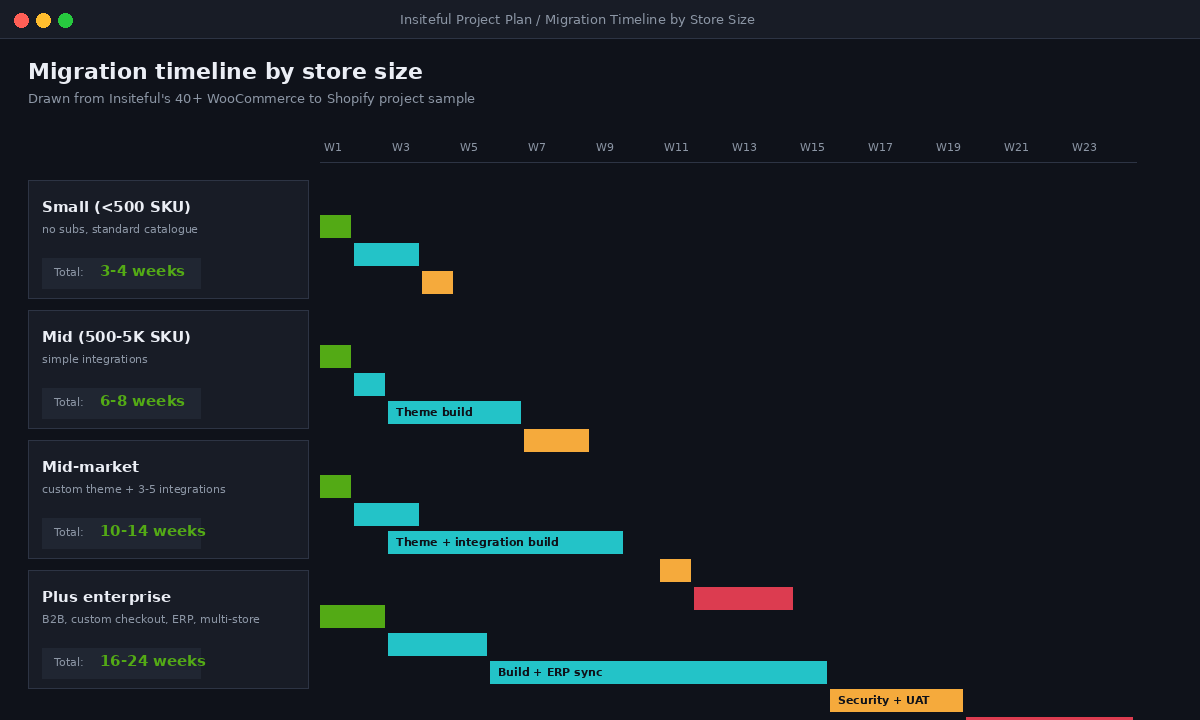
| Store profile | Realistic timeline | Where the time goes |
|---|---|---|
| <500 SKU, standard catalogue, no subs | 3 to 4 weeks | Theme build is the bottleneck, not data. |
| 500 to 5,000 SKU, simple integrations | 6 to 8 weeks | Data cleanup + redirect mapping. |
| Mid-market, custom theme, 3-5 integrations | 10 to 14 weeks | Integration rebuild, custom checkout, content review. |
| Plus enterprise (B2B, custom checkout, ERP) | 16 to 24 weeks | ERP sync logic, B2B catalogue setup, multi-store, security testing. |
The reason agency teams under-quote is that the catalogue moves in 3 days and they think the project is 80% done. It isn’t. The 80% milestone is when you have launched, the 301s are clean, the customer support team has trained on the new admin, and Klaviyo has rebuilt the abandoned cart flows. That last 20% is usually four weeks of work.
The AUD cost picture
Pricing in this space is wildly inconsistent. The cheapest “agency” migration quotes we see in the Australian market sit around $3,500 AUD and the most expensive Plus enterprise builds cross $200,000 AUD. The honest range, for a brand doing $2M to $20M AUD in revenue, is $15,000 to $65,000 AUD all-in for a properly executed migration including theme design, data, redirects, integrations, training, and post-launch monitoring. If a Shopify Plus license is the right call (we break down the threshold in our Plus vs Standard cost-benefit piece), the migration scope and budget both step up.
What the cheap end almost always cuts:
- No SEO redirect work, just product slug mapping.
- A template theme rather than a custom build, which means brand visuals degrade.
- No abandoned cart flow rebuild, no Klaviyo migration.
- No tax engine verification, which means GST starts charging incorrectly on day 1.
- No POS or marketplace channel reconnection.
What the expensive end is usually paying for that is worth it:
- Parallel staging environment for the full 4 to 8 week build, with weekly client reviews.
- Custom-built theme on Online Store 2.0 with sections everywhere, so the marketing team can actually use it.
- Full ERP integration testing if NetSuite, Cin7 or Unleashed is involved.
- Post-launch monitoring against pre-migration benchmarks (LCP, conversion rate, organic traffic) for 30 days.
How we do it at Insiteful
Our WooCommerce to Shopify migration process is built around the assumption that the cutover is a calendar event with consequences, not a code deploy. We run every project as seven phases:
Phase 1 – Discovery and Audit (Week 1). We crawl the live WooCommerce store with Screaming Frog, export the full URL inventory, document every active plugin, and inventory every external integration (ESP, ERP, marketplace, ad platforms). The output is a 20 to 30 page audit document that becomes the scope of work.
Phase 2 – Data Modelling (Week 2). We rebuild the product taxonomy, decide what becomes a Shopify metafield versus a metaobject, scope variant complexity, and lock the URL redirect map. This is also where we make the call on which apps are replacing which plugins, in writing, with the client.
Phase 3 – Theme Build (Weeks 2 to 6, parallel). We design and build a custom Online Store 2.0 theme on the staging Shopify, not a clone of the WooCommerce site. This is where the design system carries the most weight, because a faithful clone usually inherits 4 years of conversion drag that the founder hates anyway.
Phase 4 – Data Migration via Matrixify (Weeks 4 to 6). We run dry-run imports on staging, fix the data shape issues in the spreadsheet, then run the production import with verified row counts on every entity (products, variants, customers, orders, redirects).
Phase 5 – Integration Rebuild (Weeks 5 to 7). Klaviyo flows rebuilt from scratch using the Shopify event schema. Ad pixels re-implemented with Conversions API. ERP or marketplace integrations tested with sandbox transactions before the cutover.
Phase 6 – Cutover (Week 8). DNS swap on a midweek evening in Melbourne time. Bulk redirect import. GSC sitemap resubmit. Live monitoring on LCP, conversion rate, and 404 errors for the first 48 hours.
Phase 7 – Post-launch Monitoring (Weeks 9 to 12). Daily traffic and ranking checks against the pre-migration baseline. Redirect cleanup for any 404 patterns appearing in Search Console. Klaviyo deliverability monitoring. We hold the project open for 30 days after launch specifically for this work, not as billable hours but as part of the build.
The number we care about most is organic traffic at day 60. If we have done the redirect work and the technical SEO carryover properly, the client should be inside 5% of their pre-migration organic traffic by week 8 an