
The hero image is the single highest-impact visual on a Shopify storefront. It is the first thing 100% of your visitors see, it usually carries the Largest Contentful Paint score that Google grades your site on, and it sets the perceived price point of the entire brand before anyone reads a word of copy. Get it wrong and the rest of the build is paddling against the current. Get it right and conversion lift compounds across every channel that drives traffic to the page.
At Insiteful we art-direct hero photography for Shopify and Shopify Plus builds across Australia. We don’t pick stock images. We don’t ask the founder to “send through whatever you have.” We brief, direct, and ship a hero image that is engineered for the storefront it will live on. This article is the working document we hand to clients and photographers before a shoot, plus the technical spec we hand to developers after one.
What “hero image” actually means on a Shopify storefront
In Shopify-agency vocabulary a hero image is the above-the-fold visual on the homepage and, increasingly, on collection landing pages and high-traffic product pages. It is typically full-width, sits inside the first section of the template (Online Store 2.0 makes this a discrete section block), and renders before any other product imagery in the viewport.
Three things separate a hero image from any other image on the store:
- It is almost always the Largest Contentful Paint (LCP) element, which Google measures as a Core Web Vitals score and ranks accordingly.
- It is the one image that cannot be lazy-loaded. It must paint immediately on first byte or the page feels slow regardless of how fast the rest is.
- It carries narrative weight that no other image is asked to carry. Lifestyle, mood, brand promise, and the implicit call to action are all compressed into one frame.
Every decision in this article cascades from those three facts. The art direction has to be strong enough to do the brand work. The file weight has to be light enough to hit a sub-2.5-second LCP. The composition has to leave a safe area for a headline and a CTA overlay that the merchandising team will swap out monthly.
The conversion lift data: why hero photography is non-negotiable
The agency case for treating hero photography as engineering, not decoration, is built on a small stack of numbers we cite in every scoping call:
- 33% conversion lift from high-resolution product photography versus low-resolution placeholders (Grabon, 2026 ecommerce photography statistics).
- 94% higher conversion rate on stores using professional product photography versus stores leaning on amateur imagery (Grabon).
- 9 out of 10 online shoppers rate high-quality product photography as one of the most important factors in a purchase decision.
- 50% of ecommerce buyers are more likely to purchase a product when the image is large and high quality.
- 70%+ of Shopify traffic is mobile in Australia, which means the hero image is being judged on a 6-inch screen more often than on a desktop monitor.
- 135% conversion lift reported by Aje, the Australian fashion brand, in the weeks after a Shopify Plus replatform that overhauled mobile imagery and load times (Shopify case studies).
None of these numbers are marketing puffery. They show up consistently across independent studies because the underlying behavioural truth is consistent: a shopper who arrives on a storefront makes a judgement about price, quality, and brand legitimacy in roughly 50 milliseconds, and that judgement is dominated by the hero image because nothing else is loaded yet. If the hero is sharp, well-lit, and intentional, the shopper stays. If it is washed out, awkwardly cropped, or generic, the shopper leaves before the LCP even finishes painting.
The Insiteful hero brief: seven things we lock before the shoot
Most photography shoots go wrong before anyone picks up a camera. The hero is treated as one frame inside a larger product shoot, the brand brief is verbal, and the developer is brought in two weeks later with a 12-megapixel JPEG that won’t survive being cropped for mobile. We avoid that by locking seven things in writing before a shoot is booked.
- Intent of the hero. Is this hero selling a single hero product, a category, a brand promise, or a campaign? The composition rules differ for each.
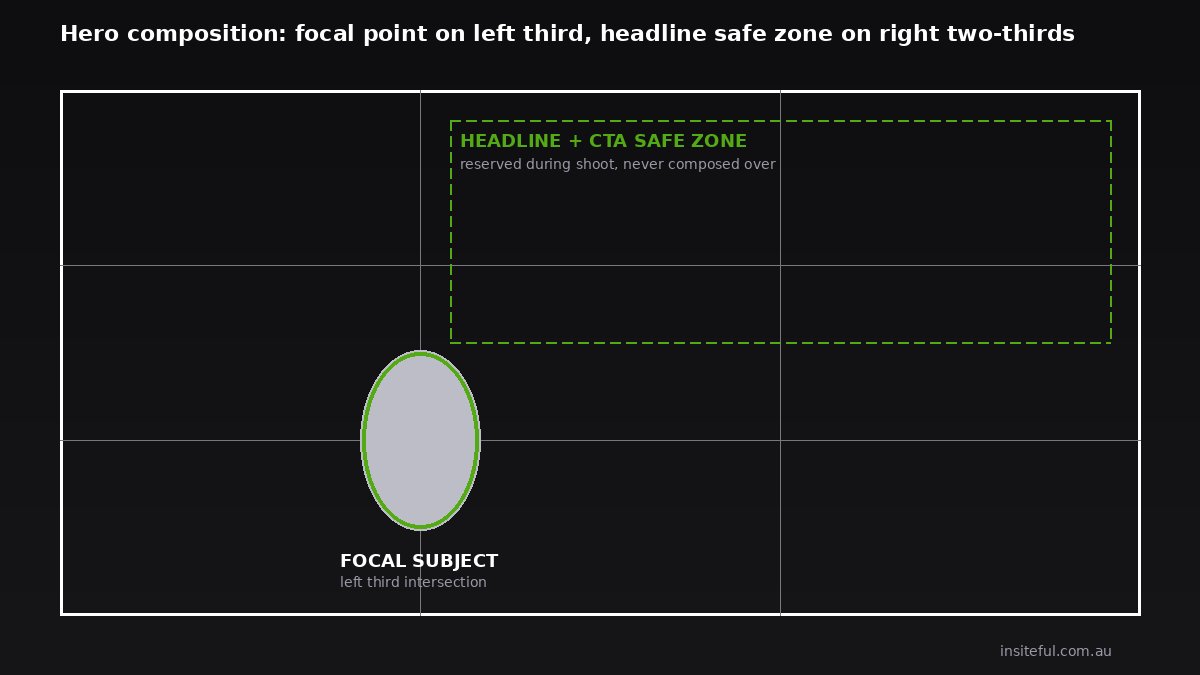
- Headline and CTA overlay zone. Where on the frame will text sit? We mark this as a safe area on the storyboard and brief the photographer to leave it intentionally empty.
- Aspect ratios we need. Minimum two: 16:9 for desktop and 4:5 or 3:4 for mobile. The mobile crop is not an afterthought, it is a separate composition.
- Brand colour reference. A swatch of the storefront’s primary brand colour so wardrobe, set, and post-production all align with the rest of the site.
- Subject and prop list. Specific product variants, props, accessories, and continuity items so we can shoot multiple heroes in one session without retreading.
- Light direction. Hard or soft, warm or cool, daylight or studio. This is the single biggest driver of the “premium” perception.
- File deliverables and naming convention. We hand the photographer a one-page spec at the end of this article so the files come back ready to upload, not ready to argue about.
This brief is signed off by the founder, the brand lead, the photographer, and our development team before the shoot date is confirmed. It takes 90 minutes to write and saves the project a week of reshoots.
Composition rules for hero photography that converts
Ecommerce hero composition is its own discipline. It borrows from editorial fashion photography, but the constraints are different. The hero has to read instantly at 1920 pixels wide on a desktop and at 390 pixels wide on a mobile, and it has to leave room for text without that text feeling like a sticker.
The composition rules we apply on every build:
- Focal point on the left third. Most cultures read left to right. A focal subject on the left lets the right third carry the headline and CTA without competing with the product.
- Negative space is the design, not a gap. A hero with breathing room around the product reads as premium. A hero with the product butting against the frame edge reads as cheap.
- One subject, one story. A hero that asks the viewer to look at three products at once dilutes attention. Heroes that test best in our client work feature a single product, occasionally a single product worn or held by a single person.
- Eye line matters when there’s a model. Direct gaze increases trust and dwell time. Averted gaze toward the product directs the viewer’s attention toward what you want them to click on.
- Colour against colour. The product should sit in tonal contrast to the background. A black bottle on a black surface in low light may be moody, but it is invisible at a thumbnail size in a search result.
Build artefact: we run every hero candidate through a five-second test. We open the image, hold it up at thumbnail size on a phone, and ask a person outside the brand “what is this selling?” If they can answer in five seconds, the composition is doing its job. If they cannot, we are reshooting or reframing in post.
The art direction layer: model, prop, light, location
Once composition is locked, art direction is what separates a hero that looks expensive from a hero that looks like every other Shopify store in the category. This is the layer that founders consistently undervalue and that agency-built sites get right.
Model casting. For brands that put a person in the hero, casting drives more conversion lift than wardrobe or location. The model is the proxy for the customer. We brief casting agents with a specific persona, not a vague age range. “Confident 38-year-old Sydney professional who lifts weights twice a week” produces a better cast than “female, mid-30s.”
Prop styling. Props give the product context. A skincare hero with a single sprig of eucalyptus on the surface reads as Australian, natural, and intentional. The same product on an empty white sweep reads as a marketplace listing. We brief prop stylists with a mood reference deck pulled from outside the category, never from competitors inside it, so the result feels distinctive instead of derivative.
Light. The single largest visual differentiator between a $50 product and a $500 product on the same shelf is light direction. Soft, directional light from the side reads as editorial. Flat, frontal light reads as catalogue. We brief lighting at the storyboard stage so the photographer is not improvising on the day.
Location. Studio versus location is a budget decision and a brand decision. A studio hero is faster, cheaper, and easier to reshoot. A location hero is harder to schedule but lends a sense of place that studio cannot fake. Australian brands have a natural advantage here: a hero shot at Bondi, in the Blue Mountains, on a Melbourne laneway, or in the West Australian wheatbelt instantly signals provenance to both domestic and US-facing audiences.
Technical specs we ship to clients and photographers
Below is the actual spec sheet we attach to every photography brief. Photographers who have worked with us before know it. New photographers get it on first email. It is short on purpose.
INSITEFUL HERO IMAGE FILE SPEC

Master file:
- Format: TIFF or PSD, 16-bit, sRGB
- Dimensions: minimum 4000 px on the longest edge
- Layers preserved (background, subject, prop, retouching)

Delivery to Insiteful:
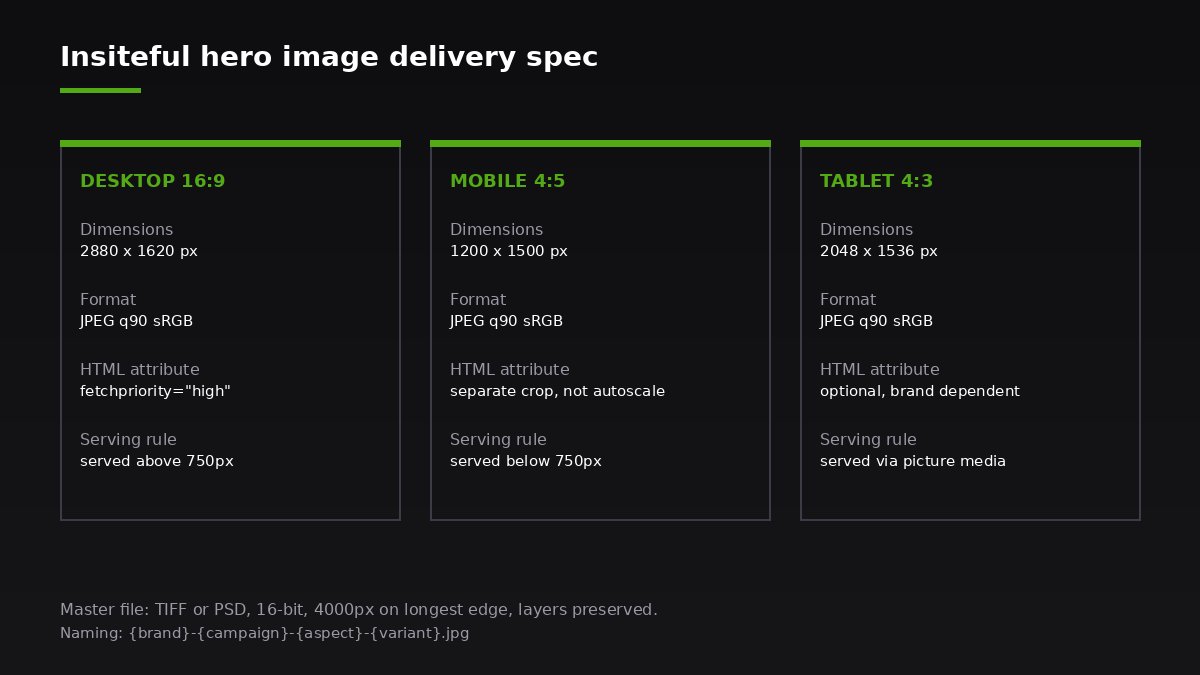
- Desktop crop: 2880 x 1620 px (16:9), JPEG quality 90, sRGB
- Mobile crop: 1200 x 1500 px (4:5), JPEG quality 90, sRGB
- Tablet crop: 2048 x 1536 px (4:3), JPEG quality 90, sRGB
- Each crop delivered as a separate file, not as guides on the master

File naming:
- {brand}-{campaign}-{aspect}-{variant}.jpg
- Example: brand-aw26-16x9-hero-01.jpg

Safe areas:
- Headline safe zone marked as a layer on the master PSD
- Minimum 96 px of clearspace around the focal point at the delivered size

Colour:
- Embedded sRGB profile mandatory
- Adobe RGB or ProPhoto rejected at upload (CDN will not display correctly)
The reason every line of that spec exists is a specific failure we have inherited from another agency. The 16-bit master means we can re-grade for a new campaign without reshooting. The sRGB profile means the image renders the same colour on a Shopify CDN as it did in the photographer’s editing suite. The mobile crop as a separate file means we are not relying on Shopify’s automatic centre-crop to make a wide image work on a phone, which it will not.
The Shopify hero image stack we build
Once the master and crops are in Shopify, the Liquid template is where the hero either flies or stalls. The pattern we use on every Online Store 2.0 build looks like this:
{%- comment -%}
  Hero section: serves desktop and mobile crops separately
  via <picture>, with explicit width/height to prevent CLS,
  fetchpriority=high to win the LCP race, and a preloaded
  source in the <head> via the layout file.
{%- endcomment -%}

<picture class="hero__media">
  <source
    media="(min-width: 750px)"
    srcset="{{ section.settings.hero_desktop | image_url: width: 1440 }} 1440w,
            {{ section.settings.hero_desktop | image_url: width: 2880 }} 2880w"
    sizes="100vw"
    width="2880"
    height="1620">
  <img
    src="{{ section.settings.hero_mobile | image_url: width: 1200 }}"
    srcset="{{ section.settings.hero_mobile | image_url: width: 800 }} 800w,
            {{ section.settings.hero_mobile | image_url: width: 1200 }} 1200w"
    sizes="100vw"
    width="1200"
    height="1500"
    alt="{{ section.settings.hero_alt | escape }}"
    fetchpriority="high"
    loading="eager"
    decoding="async">
</picture>
What that snippet does, in plain language: it serves the desktop crop to anything 750px and wider, the mobile crop to anything narrower, tells the browser the exact aspect ratio so the layout never shifts while the image loads (a CLS killer), and gives the image the highest possible loading priority. The Shopify CDN will automatically deliver WebP or AVIF to browsers that support those formats, which today is roughly 97% of traffic, and the file size drops by 25 to 50% compared to the equivalent JPEG.
Paired with a preload hint in the layout’s <head>, this pattern routinely drops LCP by 800 to 1400 milliseconds on the storefronts we audit. That is the difference between a Core Web Vitals pass and a Core Web Vitals fail.
Mobile hero direction because 70%+ of traffic is mobile
On every Australian Shopify build we have shipped in the last 18 months, mobile traffic ranges from 68% to 84% of sessions. The mobile hero is the hero. The desktop hero is a secondary asset.
That reorders the brief. We compose for mobile first, then crop wider for desktop. We test the mobile hero at actual size on a real phone, not at a downsized preview on a laptop. We treat the bottom third of the mobile hero as a no-go zone because it sits under the sticky cart bar and the thumb of a one-handed user. We give the headline its own breathing room above the product, because on mobile the headline reads first and the product reads second, opposite to desktop.
Build artefact: our mobile hero acceptance test. Before a hero ships, we lock the phone to the smallest viewport in the brand’s analytics (usually an iPhone SE at 375 px wide) and ask three questions. Can you read the headline without zooming? Is the focal point of the product visible above the fold without scrolling? Is the CTA tappable without your thumb covering the product? Three yeses or it goes back to art direction.
Hero video versus hero image: when each one wins
Hero video is having a renaissance on Shopify. The Online Store 2.0 video block, native MP4 hosting, and improvements to mobile autoplay have made hero video easier to ship than it has been at any point in the last five years. It is not always the right call.
Hero video wins when the product needs motion to make sense. Fashion in motion, a knife slicing through bread, a tap pouring water, a candle being lit. Hero video also wins for brand-led drops where the goal is mood over conversion. BanksPower’s published A/B test on a product hero replaced a static image with a five-second product-in-context video and lifted product sales by over 55% in that test.
Hero image wins when the product is best understood as a still life, when the file weight budget for the LCP element is tight, or when the brand’s photography library is the brand’s primary asset and you do not want to dilute it. Image also wins when the production budget will not support both a still and a motion shoot, because a great still beats an average video every time.
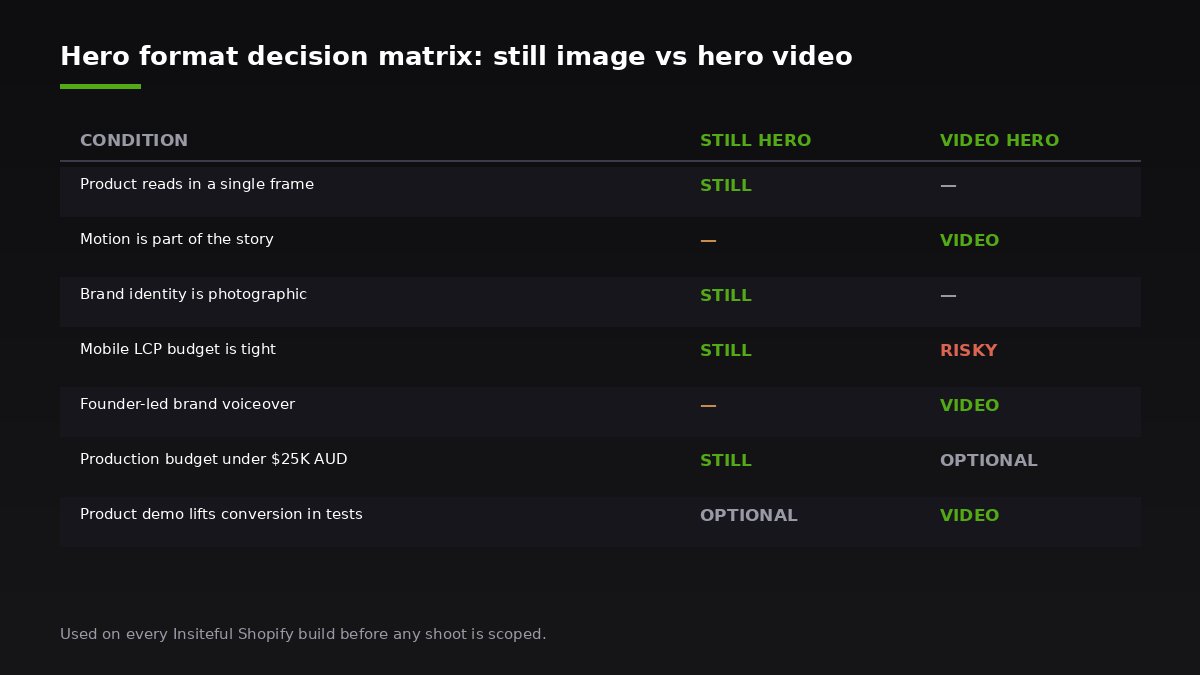
Build artefact: our hero format decision matrix.
                          STILL HERO      VIDEO HERO
Product reads in 1 frame    YES             OPTIONAL
Motion is part of the story OPTIONAL        YES
Brand identity is photographic YES          NO
LCP budget tight (mobile)   YES             RISKY
Founder-led brand voiceover NO              YES
Founder budget under $25K AUD YES           OPTIONAL
The post-shoot retouching brief
A photography shoot delivers raw frames. A retoucher delivers the hero. Most of the gap between “good photographer” and “great storefront” lives in the retouch.
We brief retouchers on five things, in order:
- Colour calibration. The product colour in the hero has to match the product colour on the PDP gallery shots and, ideally, the physical product in hand. Shipping a product that is bluer than the hero is a refund letter waiting to be written.
- Clean plate. Anything that is not the subject or the intended prop gets removed. Lint on fabric, dust on glass, stray hairs, reflections in highly finished surfaces.
- Skin retouching only if there is a model. We keep skin natural, ageing and texture preserved. Over-retouched skin is the fastest way to make a hero look dated.
- Brand colour grade. A consistent grade applied across the entire hero library so the homepage, collection heroes, and campaign banners share a visual language.
- Export ladder. The retoucher exports against the spec sheet above, not against their personal preference.
Build artefact: we keep a versioned retouch log per client. Every hero gets a row in a spreadsheet with the shoot date, retoucher, colour grade reference, and the live URL it ships to. When the brand evolves and a recut is needed two years later, that log is the difference between a half-day update and a full reshoot.
Common hero photography failures we see in Insiteful audits
When a Shopify or Shopify Plus brand books an audit with us, the hero image is almost always in the top three issues we surface. The repeat offenders:
- The hero is a JPEG bigger than 600 KB and the LCP is over four seconds. Fix: regenerate the crops, switch the template to
image_urlwith width parameters, addfetchpriority="high". - One desktop image is being squashed into a mobile viewport. Fix: brief a mobile crop, serve it via
<picture>, recompose if the focal point is now wrong. - The headline sits on top of the busiest part of the image. Fix: move the headline to a brief-defined safe area or add a 40% darkening gradient behind it.
- The hero changes every two weeks but the brand voice does not. Fix: build a hero library with three to six variants on the same grade so merchandising can swap without the storefront feeling inconsistent.
- The hero is generic stock and the rest of the store is brand-led. Fix: schedule a half-day brand shoot, build a hero library, retire the stock.
Fixing the hero is rarely a full rebuild. It is usually a focused intervention: brief, shoot or recrop, retouch, and ship. On a typical Shopify Plus engagement that comes in at four to six weeks and lands between $6,500 and $18,000 AUD depending on shoot scope. The compounding return on a storefront doing $2M AUD or more in annual revenue justifies the spend inside a single quarter.
How We Do It at Insiteful
Photography direction is not a separate line item on our scope of work. It is baked into every Shopify and Shopify Plus build we ship. The reason is straightforward: a build is only as good as the imagery that lives on it, and a build that ships with placeholder imagery is a build that will be judged on placeholder imagery.
The way we run photography on an Insiteful engagement, in sequence:
- Discovery. We audit the existing photography library, the storefront, and the brand guidelines. We flag gaps and rate every existing hero candidate against the composition rules above.
- Brief. We write the seven-point hero brief covered earlier in this article. We sign it off with the founder and the brand lead before any shoot is booked.
- Casting and pre-production. If a shoot is required, we either run it in-house through Emma’s network of Sydney and Melbourne photographers, or we direct the client’s preferred photographer using our brief.
- Shoot day. Emma attends every shoot in person or on a live video brief. The hero is shot first, with multiple lighting variants and crop options, so post has room to move.
- Retouch and grade. We send raw selects to the retoucher with the brief above. First pass back within five business days.
- Ship to storefront. Our development team uploads the masters, builds the responsive
<picture>markup, sets the preload hint, and runs an LCP benchmark before and after. - Hand over the library. The client gets the master files, the retouch log, the spec sheet, and a documented process for refreshing the hero in 12 months.
The brands we work with range from $1M to $40M AUD in annual revenue. The pattern that h