
On 30 June 2026, a large slice of the Shopify Plus ecosystem quietly stopped working. Not with an error page, not with a warning banner in the admin, but silently: the custom discount, shipping, and payment logic that thousands of Plus stores had been running through the Script Editor simply stopped executing. If your checkout relied on Shopify Scripts and nobody migrated it, the logic is not throttled or degraded. It is gone.
We have spent the last few months migrating client stores off Scripts and onto Shopify Functions, and in the fortnight since the cutover we have taken calls from Australian brands who only discovered the problem when their tiered wholesale pricing or their “spend $150 for free shipping” threshold quietly disappeared at checkout. This article is the migration we run for Plus clients: what actually broke, why Functions is the replacement, the technical traps that catch teams out, and how to recover if you are reading this after the deadline has already passed.
What actually stopped working on 30 June
Shopify Scripts was a Plus-only feature that let you run Ruby inside three specific parts of the purchase flow. Each type is now dead, and each one fails in a different, revenue-shaped way. It helps to be precise about which of your customisations lived where, because that is the map for the rebuild.
| Script type | What it did | What breaks now |
|---|---|---|
| Line item scripts | Cart-level discounts, tiered pricing, bundle logic, gift-with-purchase, B2B contract pricing | Discounts silently do not apply; customers pay full price or abandon |
| Shipping scripts | Rename, reorder, hide or discount shipping rates; free-shipping thresholds | All rates show at full price; free-shipping thresholds vanish |
| Payment scripts | Hide, reorder or rename payment methods by cart, customer or region | Every payment method shows to everyone, including ones you deliberately hid |
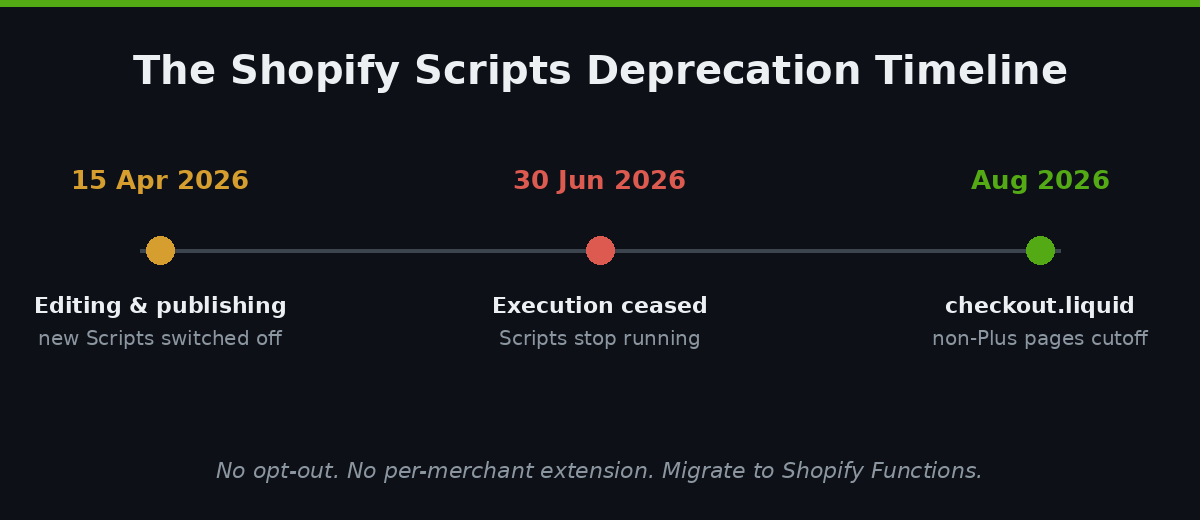
The timeline that led here was well signposted. Editing and publishing new Scripts was switched off on 15 April 2026. Existing Scripts kept running until 30 June 2026, after which execution ceased platform-wide. There is no opt-out, no per-merchant extension, and no way to re-enable a Script. The Script Editor app is a read-only museum now, useful only for reading your old Ruby so you can port it.
Why Shopify Functions is the replacement, not an app
The instinct for a lot of merchants is to reach for an app that replicates the old behaviour, and for simple cases a public app from the App Store is a legitimate path. But if your Scripts encoded anything commercially specific, and most Plus stores’ Scripts do, an off-the-shelf app rarely fits. Shopify’s own replacement is Shopify Functions, and understanding how it works technically is the difference between a clean migration and a checkout that behaves unpredictably under load.
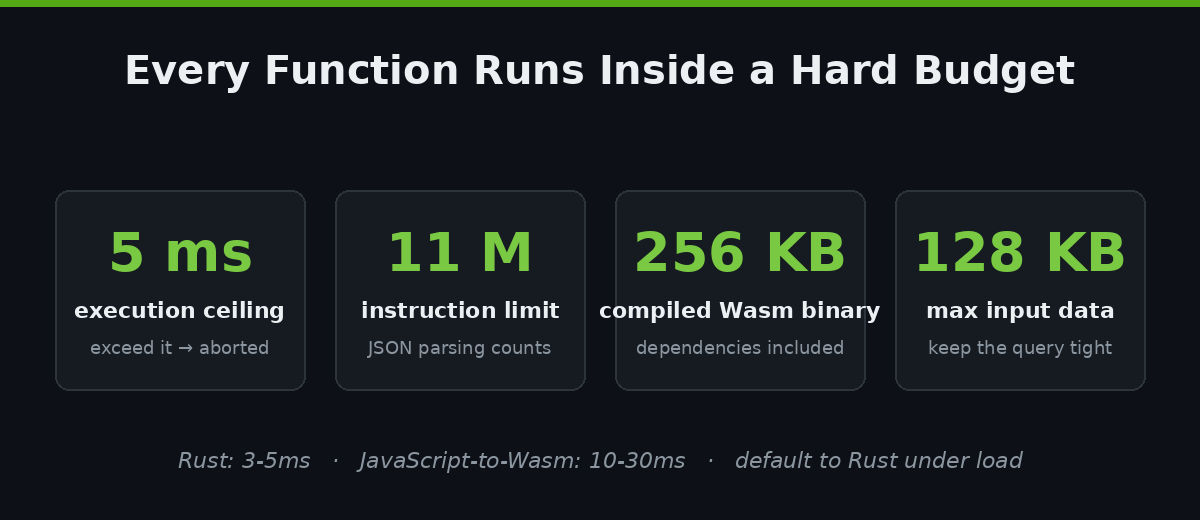
Functions are not Ruby scripts running on a server somewhere. They are compiled WebAssembly modules that Shopify executes inside its own infrastructure, on the hot path of the checkout, for every cart. That architecture is what makes them fast and also what constrains them. The numbers that matter when you are porting real logic:
- 5ms execution ceiling. A Function has a hard 5-millisecond limit. Exceed it and the Function is aborted and its output ignored, which means your discount silently does not apply. Rust typically runs in 3 to 5ms; JavaScript compiled to Wasm runs slower, in the 10 to 30ms range, which is why we default to Rust for anything with real cart complexity.
- 11 million instruction limit. Every Function run has an instruction budget. JSON parsing of the input alone can eat a meaningful chunk of it, especially for wholesale carts with 80+ line items.
- 256KB compiled binary cap. The Wasm module you deploy must be under 256KB, which disciplines how much logic and how many dependencies you can bundle.
- 128KB input limit. The data passed into a Function is capped at 128KB, recently raised from 64KB. You control what is passed via a GraphQL input query, so a tight query is not optional, it is how you stay inside the budget.
- ~30-point query complexity ceiling. The input query itself has a complexity limit, which shapes how much cart, customer and metafield data you can request in one pass.
The mental model is simple once it clicks. Every Function has two halves: a GraphQL input query that declares exactly which slice of cart, customer and product data you need, and a run function that receives that data as a typed object and returns a list of operations for Shopify to apply. You are no longer mutating a live cart object like you did in Ruby. You are returning a declarative set of changes.
Custom app or public app: the Plus decision
Before a single line of Rust gets written, there is a fork in the road that decides your whole architecture: do you rebuild your logic as a custom Function inside your own app, or adopt a public app from the Shopify App Store that ships Functions of its own? The platform draws a hard line here. Any store can use public apps that contain Functions, but only Shopify Plus stores can install custom apps that use the Function APIs directly. That is a genuine advantage of being on Plus, and for most of the brands we work with it is the right call.
The reason is control. A public discount or shipping app is built for the average of ten thousand merchants, which means the moment your logic is even slightly non-standard, whether that is contract pricing per B2B company, region-specific payment rules, or a bundle that discounts the cheapest item, you are fighting the app’s assumptions. A custom Function does exactly what your business does and nothing else, ships in a binary under 256KB, and carries no monthly per-app fee that scales with your order volume. The trade is that you own the maintenance, which is precisely what an agency relationship is for. We reach for a public app only when the requirement is genuinely commodity, such as a simple percentage-off code, and build custom for anything that touches how the brand actually prices and ships.
Mapping old Ruby to new Function APIs
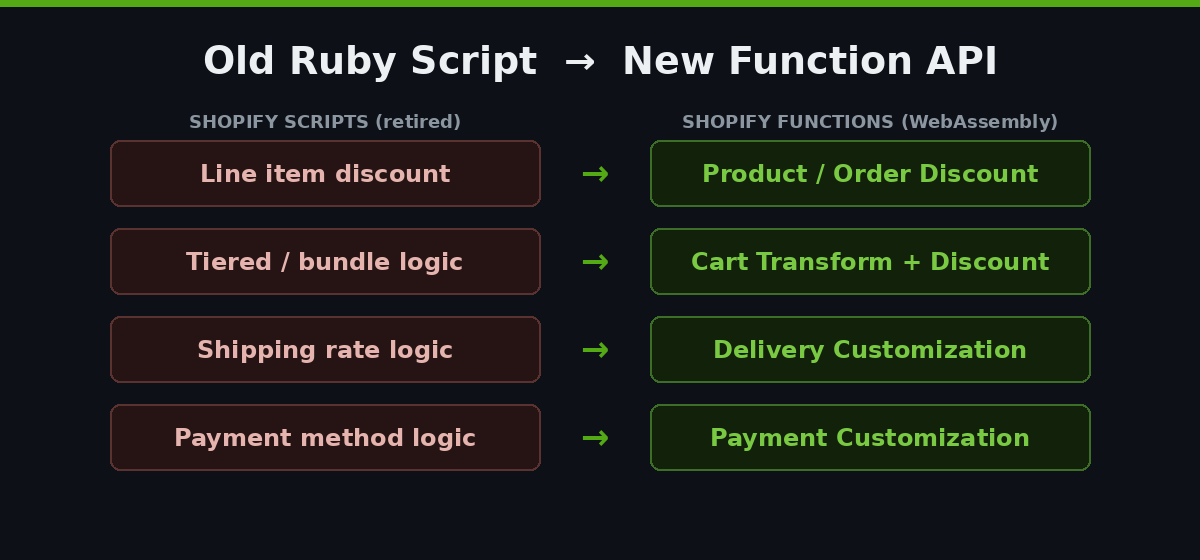
The first artefact we build on every migration is a mapping table. You take every Script in the read-only editor and assign it to a Function API and a target language. This is also where you rationalise: teams almost always find Scripts that duplicate each other, or that encode a promotion that ended in 2024 and was never removed.
| Old Script | Function API | Notes from real migrations |
|---|---|---|
| Line item discount | Product Discount / Order Discount | Split cart-wide vs product-level; they are separate Function targets now |
| Tiered or bundle discount | Cart Transform + Product Discount | Bundling and pricing are often two Functions working together |
| Shipping rate logic | Delivery Customization | Hide, rename and reorder rates; free-shipping thresholds live here |
| Payment method logic | Payment Customization | Hiding a method by cart total or B2B tag is a one-Function job |
Here is a stripped-back Rust discount Function that applies a 15% cart discount once the subtotal clears a threshold. It is deliberately minimal, but it shows the shape every discount migration takes: request the field you need in the input query, branch on it, return an operation.
// src/run.rs — order discount when subtotal >= 150 AUD
use shopify_function::prelude::*;

#[shopify_function_target(query_path = "src/run.graphql", schema_path = "schema.graphql")]
fn run(input: input::ResponseData) -> Result<output::FunctionRunResult> {
    let subtotal: f64 = input.cart.cost.subtotal_amount.amount.parse()?;
    if subtotal < 150.0 {
        return Ok(output::FunctionRunResult { discounts: vec![], discount_application_strategy: output::DiscountApplicationStrategy::FIRST });
    }
    Ok(output::FunctionRunResult {
        discount_application_strategy: output::DiscountApplicationStrategy::FIRST,
        discounts: vec![output::Discount {
            message: Some("15% off orders over $150".to_string()),
            value: output::Value { percentage: Some(output::Percentage { value: "15.0".to_string() }), fixed_amount: None },
            targets: vec![output::Target { order_subtotal: Some(output::OrderSubtotalTarget { excluded_variant_ids: vec![] }) }],
        }],
    })
}
The paired input query is what keeps you inside the 128KB and instruction budgets. Request the subtotal and nothing else:
# src/run.graphql
query Input {
  cart {
    cost { subtotalAmount { amount } }
  }
}
The traps that catch teams mid-migration
A one-line “spend and save” Script is a twenty-minute port. The reason we scope Plus migrations at four to eight weeks is that real stores are never one Script, and the interactions are where the risk lives. These are the failure modes we design around on every build.
The instruction limit under B2B load. A Function that runs perfectly for a two-item retail cart can blow its 11-million-instruction budget on an 80-line wholesale order, because parsing a large input consumes instructions before your logic even runs. When it aborts, the discount silently does not apply, which for a B2B customer means they are quoted the wrong price. We test every discount Function against the largest realistic cart, not the average one, and we keep the input query as narrow as the logic allows.
Discount combination logic. Scripts let you write freeform Ruby to decide whether discounts stacked. Functions handle combination through explicit configuration and discount classes, so behaviour that was implicit in your old code now has to be modelled deliberately. Miss this and you either double-discount and erode margin, or block a legitimate stack and lose the sale.
Configuration living in code. In the Script Editor, changing a free-shipping threshold from $150 to $99 meant editing Ruby. That does not scale, and it is a terrible pattern for a client who wants to run a promotion without a developer. We drive Function behaviour from metafields instead, so the merchant edits a value in the admin and the Function reads it at runtime. The threshold, the percentage, the eligible tags all become data, not code.
# Function reads config from a metafield, so the client can edit it without a deploy
query Input {
  cart {
    cost { subtotalAmount { amount } }
  }
  discountNode {
    metafield(namespace: "insiteful", key: "free_ship_threshold") { value }
  }
}
A worked example: layered wholesale pricing
To make the traps concrete, take a pattern we see constantly on Australian Plus stores that sell both retail and wholesale from one storefront. The old Script did three things at once: it applied a customer-tag-based percentage to wholesale accounts, it enforced a minimum order value before that pricing kicked in, and it suppressed the discount on already-marked-down clearance lines. In Ruby that was one file with a few nested conditionals. It worked, and nobody had touched it in two years.
Rebuilt as Functions, that single Script becomes a small system. The tier percentage moves to a metafield on the customer’s company so the account manager can adjust it without a deploy. The minimum-order gate becomes a subtotal check inside the discount Function, tested against a 90-line reorder rather than a tidy sample cart. The clearance exclusion becomes an explicit variant filter in the discount’s target, because Functions will not let you rely on the loose implicit logic Ruby allowed. What was one opaque file is now three clear, testable pieces, each of which a future developer can read in a minute. That is the hidden dividend of the migration: the logic stops being tribal knowledge locked in Ruby and becomes documented, configurable infrastructure.
The catch, and the reason we test against the largest cart, is that the wholesale reorder is exactly the scenario most likely to breach the instruction budget. A retail cart of three items would never expose it. A 90-line purchase order will, and it will do so silently, on your highest-value customer. Designing for that case from the start is not gold-plating, it is the whole point.
Testing and rolling out safely
You do not migrate checkout logic by deploying to production and watching the orders. The Shopify CLI gives you a local path: scaffold the Function, generate types from your schema, and run it against saved input fixtures before it goes anywhere near a live cart.
shopify app generate extension --template discount
shopify app function run       # runs against test/fixture input JSON
shopify app deploy             # versioned, so rollback is a re-deploy
Our rollout sequence on a Plus store is fixtures first, then a preview on an unlisted development store, then activation on production during a low-traffic window with an analytics watch on discount-application and checkout-completion rates. Because Function deploys are versioned, a rollback is just re-activating the previous version, which is a materially safer position than the old Script Editor ever gave us.
If you missed 30 June: the recovery order
Plenty of stores did not migrate in time, and the fix is the same work under more pressure. Start with Shopify’s Scripts customizations report in the admin, which lists the customisations you were running so you are not reconstructing them from memory. Then triage by revenue impact, not by ease:
- First: anything that discounts. A dead line-item Script means customers are being charged full price where they expected a discount, or your B2B accounts are seeing retail pricing. This is active revenue and trust damage, every hour.
- Second: free-shipping thresholds. A vanished “free shipping over $99” line quietly lifts your effective shipping cost and dents conversion without any visible error.
- Third: payment method rules. If you hid a method for a reason, whether a high-fee option on low-margin carts or a B2B-only term, it is now visible to everyone.
The one thing not to do is rush a half-tested Function onto production to stop the bleeding, because a Function that aborts on large carts fails just as silently as the Scripts you are replacing. Fixtures first, even in a hurry.
The related deadline still ahead: checkout.liquid
Scripts is one of two deprecations Plus merchants are living through, and it is worth not conflating them. The other is the retirement of checkout.liquid and legacy customisations on the Thank You and Order Status pages, replaced by checkout extensibility and the checkout and accounts editor. Plus stores have been auto-upgraded through 2026, and stores on non-Plus plans face an August 2026 cutoff for those pages. If your post-purchase tracking pixels, order-status upsells or thank-you customisations were done the old way, that is a separate migration with its own timeline. We cover the mechanics in our guide to what checkout extensibility makes possible.
How We Do It at Insiteful
When a Plus brand comes to us for a Scripts migration, we do not start by writing Functions. We start with an audit. We export every Script from the read-only editor, map each one to its Function API, and flag the ones that are redundant, expired, or duplicating an app you are already paying for. On a typical mid-market store that audit alone removes 20 to 30 percent of the logic before we build anything, which is cleaner and cheaper to maintain.
From there we rebuild each customisation as a Rust Function, drive its configuration from metafields so your team can adjust promotions without a developer, and test every discount against your largest realistic cart to stay inside the instruction budget. We deploy to a development store first, run the numbers on discount-application and completion rates, then activate on production in a controlled window with rollback ready. For a store running a handful of straightforward Scripts, that is a one to two week engagement; for a Plus brand with layered B2B pricing, bundle logic and regional payment rules, it is the four to eight weeks the platform’s own guidance suggests.
A full Scripts-to-Functions migration for a mid-market Plus store typically lands between $8,500 and $18,000 AUD depending on how much logic is in play and how much of it survives the audit. That is not a line item any brand enjoys, but a checkout that silently misprices carts is a great deal more expensive. This is the same discipline we bring to every Shopify Functions build and to the wider work of keeping a Plus store on clean, upgrade-safe architecture.
The deadline has passed. The work has not.
Shopify Scripts is not coming back, and every day a broken discount or shipping rule stays live is margin and trust leaking out of your checkout. Whether you migrated ahead of 30 June and want the build audited, or you are only now finding out that a rule went dark, the path forward is the same: map what you had, rebuild it as tested Functions, and drive it from configuration your team can control.
If you want a Plus specialist to scope your migration and tell you exactly what is at risk, start with a build assessment. We will export your Scripts, map them to Functions, and give you a clear picture of the work before you commit to anything.