
Most single-store brands we meet think the hard part of going omnichannel is the hardware. They picture the card reader, the receipt printer, the iPad on a stand, and they assume that once the box arrives and the terminal turns on, the rest takes care of itself. Then the first weekend trades, the online store oversells a hero product that was actually sitting in the shop, a regular who has spent thousands online walks in and gets treated like a stranger at the counter, and the brand discovers that point of sale was never a hardware problem. It was a data problem wearing a hardware costume.
For a brand with one physical store and one Shopify storefront, the entire value of Shopify POS comes from a single idea: one source of truth for inventory, customers, and orders, shared across both channels in real time. When that shared layer is configured properly, the store and the site behave like one business. When it is not, you have two systems that happen to share a logo and constantly disagree about what you have in stock and who your customers are.
We have been building and maintaining Shopify and Shopify Plus stores for over 25 years across more than 200 client projects, and a growing share of those are single-store brands adding a counter to a business that started online. This article is our working setup for that exact situation: the location model that everything else depends on, the POS plan decision, how we configure inventory sync so it does not oversell, the customer data layer most brands skip, and how we migrate off a legacy till without losing history. Every section includes the build artefact, configuration, or numbers we would put in front of a client.
Why One Store Still Needs Real Architecture
It is tempting to treat a single shopfront as too small to bother with proper setup. The data argues the opposite. Omnichannel shoppers carry roughly a 30% higher lifetime value than single-channel shoppers, spend about 16% more per order, and shop around 70% more frequently. Retailers engaging customers across channels retain close to 89% of them, against roughly 33% for single-channel engagement. The brand that connects its one store to its website properly is not running a small omnichannel operation. It is running a high-retention one.
In Australia the in-store and online lines have already blurred past the point of being separate strategies. Around 81% of Australians research online before they buy, nearly three-quarters of households purchase across several channels, and roughly 70% of Australian shoppers actively prefer click-and-collect when it is offered. Of those collecting an order, about 78% make an additional purchase at pickup, with 24% doing so as a matter of habit. With ecommerce now sitting near 20% of all Australian retail spending and Australians having spent about $69 billion AUD online in 2024, a single store wired into the website is not a nice extension. It is the shape demand already has.
The build artefact for this section is the mental model we open every POS project with. There are three shared objects that must stay unified across the counter and the site: inventory (one stock number per product, visible to both channels), customers (one profile per person, regardless of where they bought), and orders (one ledger, blended for reporting). Everything that follows is about keeping those three objects single rather than letting Shopify quietly create a second copy of each.
The Location Model Is the Whole Game
Inventory accuracy in Shopify is governed by locations, and this is where most single-store setups go wrong on day one. A location is a place that holds stock. A brand-new Shopify store ships with a default location, usually named after the business or a warehouse. The instinct when the shop opens is to keep selling everything from that one location and just add the POS on top. That is the mistake. The shop floor and the fulfilment area are different places that hold different stock, and Shopify needs to model them as such or it cannot reason about availability correctly.
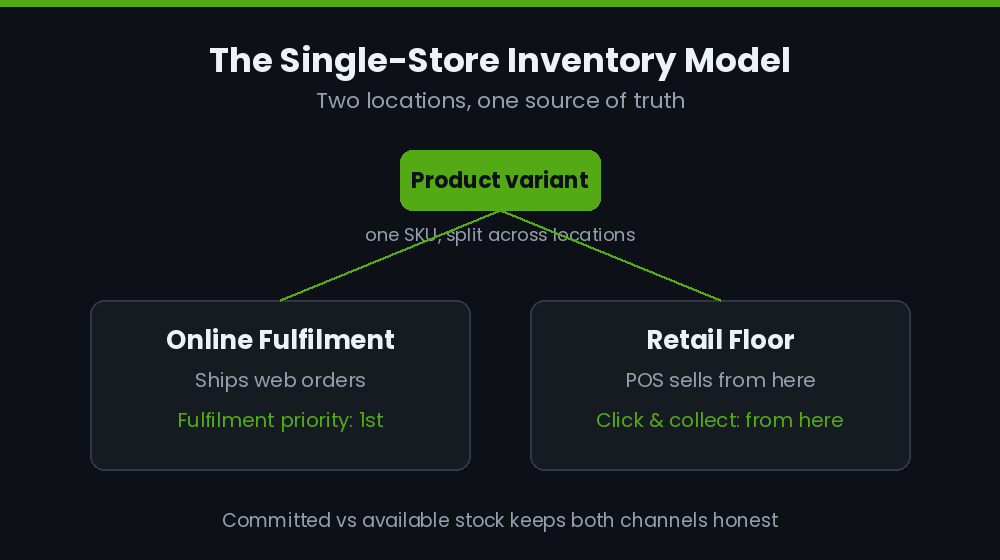
For a single-store brand we almost always run two locations: one for online fulfilment (the stockroom or the area orders ship from) and one for the retail floor. Each product variant then carries an explicit quantity at each location. When a sale happens at the counter, Shopify decrements the retail location. When an online order comes in, it decrements whichever location the fulfilment priority points at. The two channels stop fighting over a single undifferentiated pile of stock.
The build artefact here is the location and fulfilment configuration we set on every single-store project:
| Setting | Our default for one store | Why |
| Locations | Online Fulfilment + Retail Floor | Separate stock pools so a counter sale cannot oversell a web order |
| Fulfilment priority | Online Fulfilment first, Retail Floor second | Web orders pull from the stockroom before touching shelf stock |
| POS sells from | Retail Floor | Counter staff only ever decrement what is physically on the floor |
| Stock visibility | Both locations sellable online | Lets the site sell shelf stock once the stockroom is empty, with a buffer |
| Continue selling when out of stock | Off, except made-to-order lines | Prevents the classic oversell on a hero product |
The distinction that does the heavy lifting is committed versus available stock. When an online order is placed but not yet fulfilled, that stock is committed, not gone. Shopify holds it against the order so it cannot be sold again. Counter staff see available stock, which already nets out commitments. Get the location model and the fulfilment priority right and that arithmetic just works. Skip it and you are manually reconciling two stock numbers every night, which no single-store team has time to do.
POS Lite or POS Pro for One Store
Shopify POS comes in two tiers, and for a single store the choice is genuinely a decision rather than an automatic upgrade. POS Lite is included free with every Shopify plan. POS Pro is an add-on at about $89 AUD per month per location, or closer to $79 AUD per month on annual billing. For one store that is one Pro licence, so the question is simply whether the Pro feature set earns its keep.
For most single-store brands selling more than a handful of transactions a day, it does, and the reason is rarely the headline features. It is the operational ones. Here is the decision matrix we hand clients:
| Capability | POS Lite (free) | POS Pro (~$89 AUD/mo) |
| Real-time inventory sync with online | Yes | Yes |
| Basic customer profiles | Yes | Yes |
| Full in-store purchase history on the profile | No | Yes |
| Buy online, collect in store | No | Yes |
| Staff roles and per-staff sales tracking | Limited | Unlimited, role-based |
| Demand forecasting and low-stock alerts | No | Yes |
| Daily retail sales reports by staff and product | No | Yes |
| Quick count scan-to-adjust (Winter 2026) | No | Yes |
Our rule of thumb: if the store has named staff, runs click-and-collect, or wants the customer profile to reflect in-store spend, Pro pays for itself inside the first month. At roughly $950 AUD a year, the deciding factor is almost never the licence cost. It is whether the brand wants its retail data to be a first-class part of the same system or an afterthought. We have never had a single-store client regret going Pro once collect-in-store and unified profiles were live.
Getting Inventory Sync to Stop Overselling
Real-time bidirectional sync is the feature everyone buys POS for, and it works out of the box: a counter sale drops the online number instantly, and a web sale drops the floor number the staff see. The failure mode is not the sync itself. It is the gap between a physical count and the system count drifting over a busy trading week until the site sells something that walked out the door an hour ago.
We handle this with two controls. The first is a stock buffer on the lines that matter, so the website stops selling a product a few units before the true zero, leaving a safety margin for counting lag. The second is a low-stock automation that warns the team before a hero line runs out across both channels. We build that with Shopify Flow so it runs server-side with no app dependency:
Trigger:  Inventory quantity changed
Condition: Available (Retail Floor) is less than or equal to 3
           AND Product tag contains "hero"
Action:   Send internal email / Slack to store manager
          "{{ product.title }} is at {{ inventory.available }} on the
           Retail Floor. Reconcile count and reorder."
The newest piece of the puzzle is Quick count, which Shopify rolled out for POS Pro in the Winter 2026 release. It lets staff scan items directly into a stock adjustment from the POS device rather than typing counts into a spreadsheet and importing them later. For a single-store brand this is the difference between a cycle count that happens weekly and one that never happens. We set up a recurring Monday-morning count of the top 50 SKUs by velocity, which keeps the system number and the shelf number from ever drifting far enough to cause an oversell. The buffer covers the lag; the cycle count removes it.
The Customer Data Layer Most Brands Skip
This is the section that separates a real omnichannel setup from a till bolted onto a website, and it is the part most single-store brands never configure. When someone buys online, Shopify creates a customer record. When someone buys at the counter, POS can either attach the sale to an existing profile or, if no one captures an identifier, create an anonymous transaction that tells you nothing. The default behaviour of a busy counter is to skip the customer step entirely, and within a few months the brand has thousands of in-store sales attached to nobody.
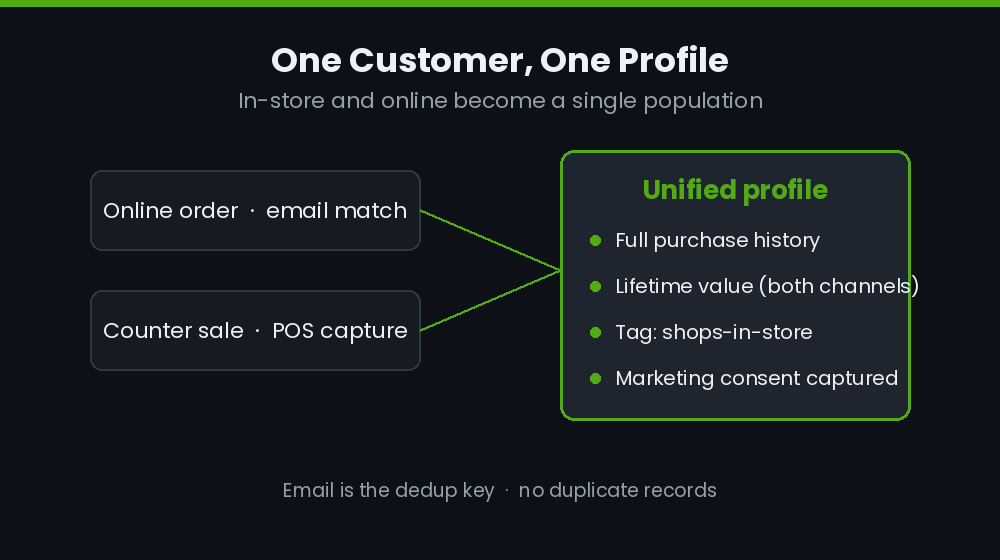
The fix is a deliberate identity-capture workflow at the counter plus the data plumbing behind it. We configure POS to prompt for an email or phone at checkout, we make that prompt fast enough that staff will actually use it, and we make sure the match logic attaches the sale to the existing online profile rather than minting a duplicate. Once that is in place, a single profile carries the full picture: what someone bought online, what they bought in store, and what they are worth in total.
On top of that we build segmentation that treats channel behaviour as a signal. The build artefact is the tagging and segment logic we deploy so the marketing layer can act on in-store behaviour:
// Shopify Flow: tag customers by channel behaviour
Trigger:   Order created
Condition: Order source is "POS"
Action:    Add customer tag "shops-in-store"

// Customer segment (used for email + retargeting)
customer_tags CONTAINS 'shops-in-store'
AND number_of_orders >= 2
AND last_order_date >= -90d
// -> "Active in-store regulars" for VIP and local event flows
That single tag changes what the brand can do. A customer who shops both channels can be invited to in-store events, offered collect-in-store as a default, or excluded from the shipping promotions they do not need. We also wire marketing consent capture into the counter flow so the email collected in store is permissioned for marketing, not just stored. The result is the asset that makes the whole investment worthwhile: a customer list where in-store and online are one population, not two lists you try to deduplicate later. This is the same single-profile discipline we apply when we design a B2B customer portal, where knowing exactly who you are talking to is the entire point.
Click and Collect Without the Mess
Click-and-collect is the highest-leverage omnichannel feature a single store can offer, and the Australian numbers make the case on their own. Around 70% of local shoppers prefer it where available, and roughly three in four make an additional purchase when they come in to collect. BOPIS sales reached about $154.3 billion across the market in 2025, up more than 16% year on year, and around 75% of collect customers buy something else at pickup. For a single store, every collection is a second shot at a sale and a reason for an online buyer to walk through the door.
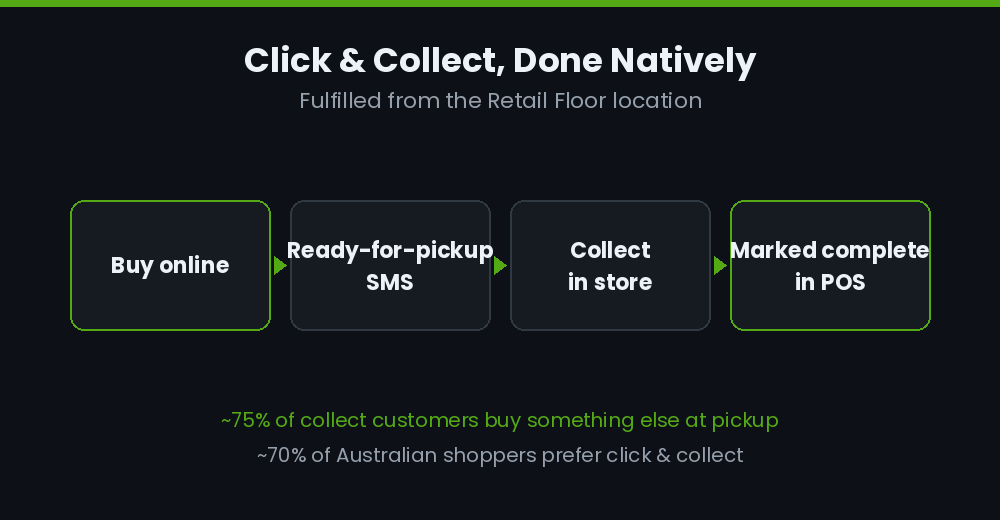
The build is straightforward on POS Pro but only if the location model from earlier is already correct, because pickup is fulfilled from the Retail Floor location. We enable local pickup on the retail location, set a realistic ready-time so customers are not told their order is ready before staff have picked it, and configure the notification sequence so the handover is clean:
Local pickup configuration
- Pickup location:      Retail Floor
- Estimated ready time:  Usually ready in 2 hours
- Order confirmation:    "Order received, we'll text when it's ready"
- Ready-for-pickup SMS:  "{{ name }}, your order is ready at {{ store }}.
                          Bring this message and ID."
- Picked-up status:      Marked complete at counter via POS lookup
The operational detail that makes or breaks it is the counter lookup. When a customer arrives, staff search the order in POS, confirm identity, hand it over, and mark it collected, which closes the order in the same ledger as every other sale. No separate pickup app, no parallel spreadsheet, no orders stuck in a limbo state. The moment a brand tries to run collect-in-store outside the native order flow, the single-source-of-truth advantage is gone.
One Ledger for Reporting and Staff
The payoff of getting all of the above right is that reporting becomes trivial because there is genuinely one set of numbers. Retail and online sales land in the same order ledger, so total revenue, best sellers, and customer value are blended by default rather than stitched together from two exports. For a single-store brand that is often the first time the owner can see, in one view, that a product underperforms online but sells out on the floor, or that their best online customers are also their most frequent in-store visitors.
We set up a small number of saved reports so the team is not rebuilding the same view every week. The build artefact is the blended analytics query we lean on, expressed in ShopifyQL:
FROM sales
SHOW total_sales, net_sales, average_order_value
GROUP BY sales_channel, staff_name
SINCE -30d
ORDER BY total_sales DESC
// One view: web vs counter performance, and which staff
// member is actually driving in-store revenue
Per-staff attribution is a POS Pro capability that quietly changes how a small retail team operates. When every counter sale is attributed to the staff member who rang it, the daily report shows who is converting browsers into buyers, which makes coaching and incentives possible without guesswork. None of this requires a third-party analytics app. It is the native reporting working off a clean, single dataset, which is the entire reason we obsess over the location and customer setup before anyone rings up a sale. If app weight is already a concern on the storefront, this matters even more, and it connects directly to the kind of app audit work we do to keep stores fast.
Migrating Off a Legacy Till Without Losing History
Plenty of single-store brands come to us already running a legacy point of sale: Vend, Lightspeed, Square, or a standalone till that has never spoken to the website. The migration anxiety is always the same, and it is reasonable: years of customer history and purchase data sitting in a system they are about to leave. Handled badly, a POS migration resets every customer to a stranger and throws away the loyalty signal that took years to build.
We treat it as a data project, not a hardware swap. The build artefact is the field-mapping plan we run before a single record moves, so the old system’s customers land as enriched Shopify profiles rather than blank ones:
| Legacy field | Shopify destination | Note |
| Customer name / email / phone | Customer profile | Email is the dedup key against existing online profiles |
| Lifetime spend / order count | Customer metafield | Preserves historical value the native field cannot import |
| Loyalty tier / points | Customer tag + metafield | Keeps VIPs flagged from day one on the new system |
| Product catalogue + SKUs | Products + variants | SKU is the match key so inventory maps cleanly |
| On-hand stock by item | Inventory at Retail Floor | Counted and reconciled at go-live, not blind-imported |
The detail that protects loyalty is the email-based deduplication. A customer who has bought both online and in store under the same email should end up as one profile with both histories, not two profiles that quietly compete. We stage the import in a development environment, run the dedup, spot-check the high-value accounts by hand, and only then push to the live store, usually over a quiet trading period so the floor count and the system count can be reconciled at the same time. For brands weighing up a bigger platform move at the same time, the same discipline runs through our replatforming decision process.
How We Do It at Insiteful
When a single-store brand comes to us to connect their counter to their Shopify storefront, we run the same sequence every time, and it always starts with the data model rather than the devices.
First, we set the location architecture: two locations, fulfilment priority, and the committed-versus-available logic, because every inventory promise the store makes downstream depends on it. Second, we configure inventory controls, the buffers and the Flow-based low-stock alerts and a cycle-count rhythm using Quick count, so the system never drifts far enough to oversell. Third, and this is the step most setups skip, we build the customer identity layer: counter capture, dedup-safe matching, channel tagging, and consent, so in-store and online become one customer population. Then we layer click-and-collect on top of the correct location model, set the blended saved reports with staff attribution, and only at the end do we finalise hardware, because the hardware was always the easy part.
For brands migrating off a legacy till, we add the data-mapping and deduplication work up front and stage the whole thing in a development store so go-live is a reconciliation, not a leap of faith. The outcome we are building toward is consistent: a single-store brand whose shop and website behave like one business, with one stock number, one customer profile, and one ledger. That is what makes the second store, when it comes, a copy-paste rather than a rebuild.
Build It Once, Build It Right
A single store wired properly into Shopify is one of the highest-return builds a growing Australian brand can commission, because it compounds: every counter sale enriches a customer profile, every collection brings an online buyer through the door, and every report reflects the whole business instead of half of it. Done wrong, it is two systems and a nightly reconciliation. Done right, it is the foundation the rest of the brand scales on.
If you are adding a store to your Shopify business, or fixing a POS setup that never quite held together, we can scope the location model, the customer data layer, and the migration before anything breaks in production. Talk to the Insiteful team about a build assessment and we will map exactly what your one-store, one-system setup should look like.