
Most Shopify post-purchase upsell setups we audit are a fossil. A Reconvert install from 2022, two stale offers, an old script that still loads on the Thank You page even though Shopify quietly cut it off in August 2025. The merchant tells us the upsell “is working”. The Shopify analytics tell a different story: $4,200 a month attributed to upsell, on a store doing $380,000 AUD a month. About 1.1% of revenue, against a placement that should be pulling 3 to 6%.
Post-purchase is the most valuable piece of real estate on a Shopify store. The customer has already paid. They have the receipt page open. Their payment method is vaulted by Shopify Checkout, which means they can accept a one-click charge with no card re-entry. Done correctly, post-purchase offers convert at 3 to 8% and lift AOV by 10 to 30% depending on architecture and offer relevance. Done lazily, you get the 1% number above and a developer bill for an app that has not been touched in three years.
There are three real ways to run post-purchase on Shopify in 2026. They are not interchangeable. Each one has a different technical footprint, a different revenue ceiling, and a different reason most stores get it wrong. We will walk through each, with the build artefacts we deploy for clients, the AOV ranges we see in the wild, and the exact gotchas to flag before you scope it.
First, the 2025 reset most stores have not absorbed
Before any architecture conversation, you need the platform context. On August 28, 2025, Shopify shut down support for additional scripts, apps with script tags, and the legacy checkout.liquid template on the Thank You and Order Status pages. That deadline followed the earlier August 13, 2024 shutdown of script support on the Information, Shipping and Payment pages. If you are still on a pre-2025 upsell stack and you have not migrated, your upsell is either degraded or dead.
Since January 2026, Shopify has been auto-migrating stores still running legacy checkout to Checkout Extensibility. You get notified. You do not get to opt out. The replacement framework is built around three primitives: checkout UI extensions (apps inject blocks into the checkout, Thank You and Order Status pages), Shopify Functions (custom backend logic for discounts, shipping, payment customisations and cart transforms), and web pixels (the new event tracking layer). Together they replace everything that checkout.liquid and additional scripts used to do.
For post-purchase specifically this matters because two things changed: every upsell that used to render through a script on the Order Status page now needs to be a Checkout UI extension or installed via a Checkout Extensibility-native app, and the post-purchase page itself (the interstitial between checkout and Thank You) now uses the post-purchase product offers extension API. Apps built on the old framework cannot inject offers into the new flow. We see this every week on audits. If your upsell app has not pushed a release since 2024, assume it is broken.
Approach 1: Native post-purchase page (Checkout Extensions)
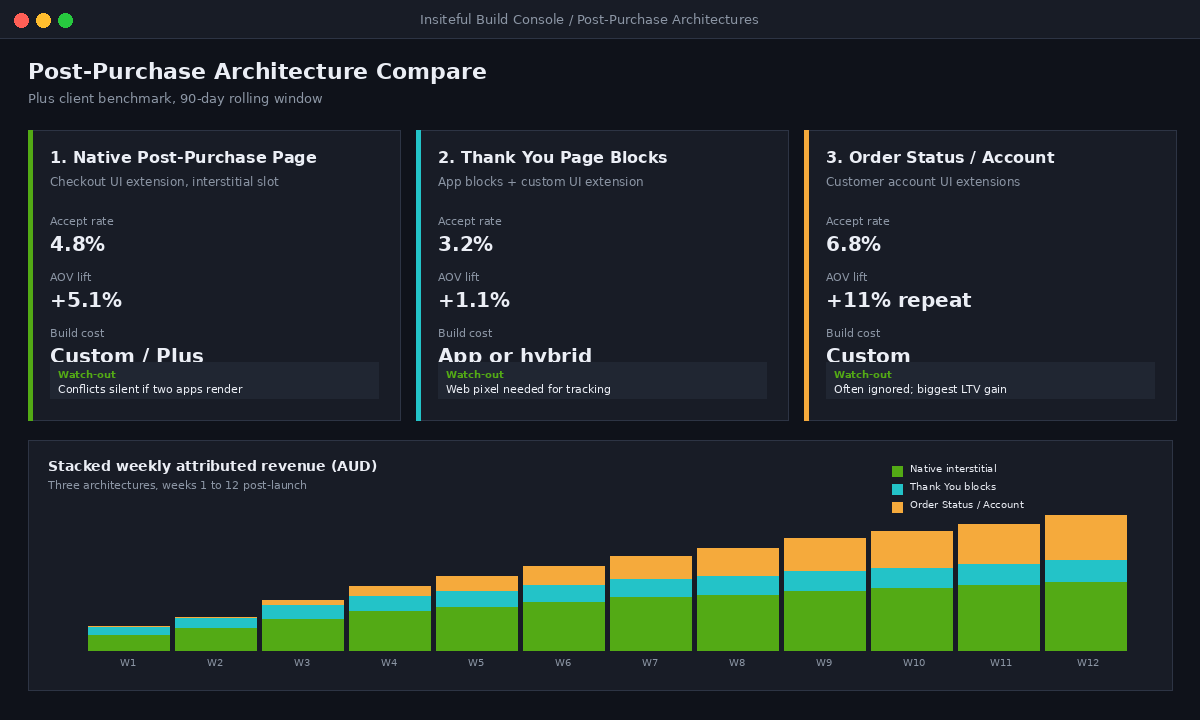
This is the highest-converting placement on the entire site. The post-purchase page is an interstitial that Shopify inserts between checkout completion and the Thank You page. The customer has paid. Their card is vaulted. Accepting an offer is a single tap, no card re-entry, no second checkout. Shopify counts the second charge against the original order, so you see a single order with multiple line items in your admin.
Accept rates in this slot are the highest of any upsell placement. Industry data puts post-purchase acceptance at 3 to 8% on cold offers and well above that on tightly relevant ones. The variance is almost entirely driven by offer relevance, which we will get to.
How it actually works under the hood
A post-purchase extension is a checkout UI extension with the target purchase.post.render. It runs after the customer has confirmed the original order but before Shopify renders the Thank You page. Your extension calls useApplyChange to add the offered product as a new line, and Shopify amends the original order with the new line and re-charges the vaulted payment method.
The limits Shopify enforces are strict and worth knowing before you scope:
- Maximum two offers per checkout. Shopify will not render a third even if your extension tries to inject one.
- Only one extension can render. If you have two apps installed that both target
purchase.post.render, only the first one Shopify loads runs. Conflicts are silent. We see this on roughly 1 in 5 client audits. - Payment must be vaulted. Shop Pay, supported direct credit card processors, and PayPal Express (only when approved for Reference Transactions) work. Anything that redirects the customer offsite during checkout, including most local AU options like Afterpay variants, will not vault and the post-purchase page will simply not render for those orders.
- Subscription products are excluded. If the original order contains a Selling Plan line, the post-purchase offer flow is skipped.
- Discount Functions running after the offer can re-trigger. If you have a discount Function that depends on cart contents, accepting a post-purchase offer can change the discount on the parent order. Test this. We have seen 15% promo codes silently re-apply to the post-purchase line on launch day.
The build artefact we ship
For Plus clients with custom offer logic (think bundle attach rates by collection, dynamic AOV-based pricing, or category-aware swaps), we build a private checkout UI extension. The skeleton looks like this:
// extensions/post-purchase-offer/src/PostPurchase.jsx
import {
  extend,
  render,
  BlockStack,
  Button,
  CalloutBanner,
  useExtensionApi,
  useApplyChange,
} from "@shopify/post-purchase-ui-extensions-react";

render("Checkout::PostPurchase::Render", () => <App />);

function App() {
  const { inputData } = useExtensionApi();
  const applyChange = useApplyChange();
  const offer = chooseOffer(inputData.initialPurchase);

  if (!offer) return null;

  const accept = async () => {
    await applyChange({
      type: "addVariant",
      variantId: offer.variantId,
      quantity: 1,
      discount: { value: offer.discountPercent, valueType: "percentage", title: "Order add-on" },
    });
  };

  return (
    <BlockStack>
      <CalloutBanner title={`Add ${offer.title} for ${offer.priceDisplay}`}>
        One-time offer, no extra shipping.
      </CalloutBanner>
      <Button onPress={accept}>Add to my order</Button>
    </BlockStack>
  );
}
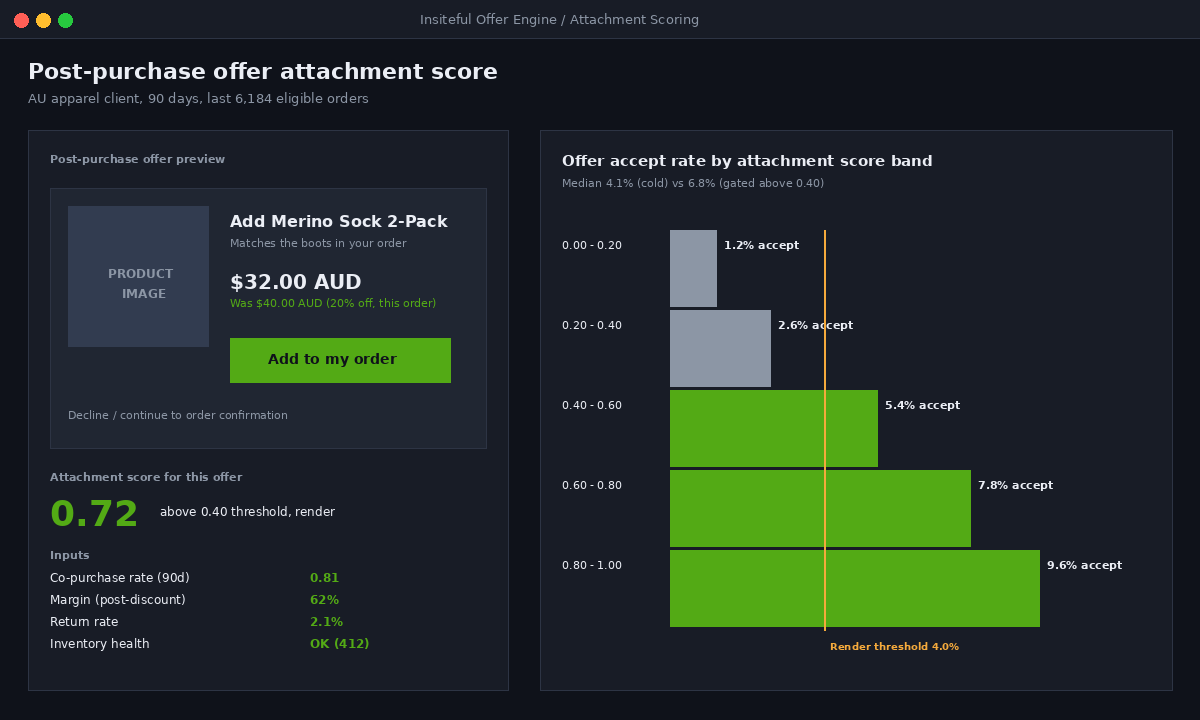
The chooseOffer function is where the agency thinking lives. It reads the original cart, looks at the highest-margin attachment for the dominant collection, applies an AOV-based discount ladder (5% under $80, 10% from $80 to $200, 15% above $200), and returns null if no attachment scores high enough. Returning null is critical. A bad offer kills the post-purchase slot for that order. Better to render nothing than to train customers to dismiss the page.
Approach 2: Thank You page blocks (post-payment, pre-account)
The new Thank You page (which replaced the old Order Status page upsell zone in August 2025) accepts UI extensions and app blocks rendered through the checkout and accounts editor. The customer has already seen the post-purchase interstitial (if you have one) by the time they land here. They are scrolling the order summary, looking at the shipping ETA, maybe sharing the confirmation with a partner.
Conversion is lower here than the interstitial because the customer has psychologically closed the buying loop. Industry benchmarks put Thank You page upsells at 2 to 5% accept on a relevant offer. But the construction is far simpler, the limits are looser, and it stacks on top of the post-purchase page. The two are additive, not competitive.
What you can render here
- App blocks from any Checkout Extensibility-native app. AfterSell, Rebuy, and Selleasy all ship Thank You page blocks. You drag, drop, and configure inside the checkout editor.
- Custom UI extensions with target
purchase.thank-you.block.render. For agency-built logic where you need data from your own backend, your own loyalty system, or a custom recommendations engine. - Web pixels for tracking. The new Order Status and Thank You pages render in a sandboxed iframe. Any GA4, Meta CAPI, or Klaviyo tracking must be wired through a web pixel app extension. Script tags simply do not fire. We still find broken Meta pixels on Thank You pages roughly once a month on new client audits.
The agency move: pair the Thank You block with a customer account CTA
The mistake most stores make on this page is treating it as a second upsell shot. The customer has already paid, already maybe accepted a post-purchase, and is fatigued. A second hard offer accept rate drops to 1 to 2%.
The better move on the Thank You page is to bank the relationship for the next purchase. We typically build a two-block layout:
- Block one: account creation incentive. “Save your order, track shipping, and get a $10 AUD voucher off your next order.” Drives new-customer accounts and gives Klaviyo a verified email plus a reason to open the welcome flow.
- Block two: low-friction add-on. Not a hero upsell. A consumable, a small accessory, or a “while we are packing your order” replenishment offer. Lower price point, lower friction, higher accept rate (typically 4 to 7%).
On a recent Plus client doing approximately $2M AUD a year on a single product line, this two-block setup added $42 AUD in lifetime contribution per new customer over the following 90 days, almost entirely through the account-creation pathway that triggered repurchase flows. The “second upsell” block by itself converted at 3.2%, which was a quiet win compared to nothing.
Approach 3: Order tracking and customer account offers (the LTV play)
Most agencies stop after Thank You. We do not, because the order-tracking page and the new customer account view are where the second purchase actually gets won.
Between the moment a customer hits Thank You and the moment their parcel arrives, they will visit the order-tracking link an average of 2.3 times. That is two and a third high-intent return sessions per order, with a customer who has already trusted you with their card details, address, and email. If the only thing they see on that page is a courier widget, you are wasting it.
What to build here in 2026
- A “complete your set” block that uses the original order’s product taxonomy to surface the second-most-likely buy, with a time-limited discount that expires when the parcel is marked as delivered.
- A loyalty status callout that shows the customer how close they are to a tier benefit (free shipping on next order, free gift at threshold). Loyalty-aware merchants see repeat-purchase rates 25 to 40% higher than non-loyalty stores in our portfolio.
- A subscription convert offer for consumables. If the customer just bought 30 days of something, a “subscribe and save 10%, next delivery on day 28” offer converts at 6 to 12% in the first three days after delivery.
The implementation is now native. Shopify’s new customer accounts and order status pages both accept UI extensions targeting customer-account.order-status.block.render and customer-account.order.action.menu-item.render. The old approach of throwing tracking widgets into a script tag and hoping is dead. Build it as a block, version it, and the offer becomes editable from the checkout editor without a redeploy.
App or custom build: the decision tree we use
For most non-Plus stores under $1M AUD a year, the right answer is a Checkout Extensibility-native upsell app. AfterSell and ReConvert lead the category for a reason: they handle the extension lifecycle, the A/B test framework, the offer editor, and the analytics out of the box. You install, configure, ship a sensible default offer, and iterate.
The trade-off is everyone else gets the same default behaviour. You cannot reach into the offer engine to add proprietary attachment scoring, you cannot integrate with your ERP or PIM for live margin-aware pricing, and you cannot stack a custom Function on top to manage discount interactions cleanly. For brands doing under approximately $5M AUD a year, those trade-offs do not matter. Above that, they start to.
One commercial flag worth raising: in early 2026 the upsell app category had a serious incident where one popular app was discovered injecting third-party display ads (including Capital One offers) into client checkout and Thank You pages without consent, and the developer confirmed it was an intentional default behaviour. This is the risk of running someone else’s UI inside your funnel. Even with the disclosure now made, we now do a default scan on every new client audit for unexpected third-party content rendered through installed apps. We have flagged it once since.
When custom is the right call
- You are on Shopify Plus and doing >$5M AUD a year. The post-purchase slot is worth more than the app subscription, and custom logic gives you a 30 to 60% lift over a generic upsell engine.
- Your catalogue has strong attachment patterns. If “people who buy X also buy Y” is a real signal in your data, custom scoring beats a static rule every time.
- You have a margin-sensitive offer ladder. Custom Functions can read live margin, current promo stack, and inventory position and refuse to render an offer that would tank contribution.
- You need offer logic that touches systems outside Shopify. Loyalty tiers from a separate engine, ERP-driven inventory, or PIM-managed bundles. Apps cannot reach there; a private extension can.
The four mistakes we fix on every audit
Across 12 to 15 post-purchase audits we run a quarter, the same four mistakes show up. Bank these.
Mistake 1: One offer for everyone. A single fixed product as the post-purchase offer caps your accept rate at the relevance ceiling of that one product. We have seen stores running a $39 AUD accessory as the universal offer when their order mix ranges from $40 single-item to $400 bundle. The accessory is wildly relevant on the $40 order and a yawn on the $400 order. Segment by cart value, by collection, by SKU type.
Mistake 2: Stacking discounts you did not test. If you run a 10% sitewide promo and a post-purchase 15% offer, customers can end up with effective 24% off on the post-purchase line. We have seen merchants accidentally erase margin on what they thought was a profit lever. Run the math, and where possible, exclude post-purchase line items from sitewide discount Functions.
Mistake 3: Treating Thank You as a second hard sell. If the customer just dismissed your post-purchase interstitial, a second hard offer on Thank You converts at 1 to 2% and trains them to ignore upsells permanently. Use the Thank You slot for relationship work: account creation, loyalty, low-friction add-ons.
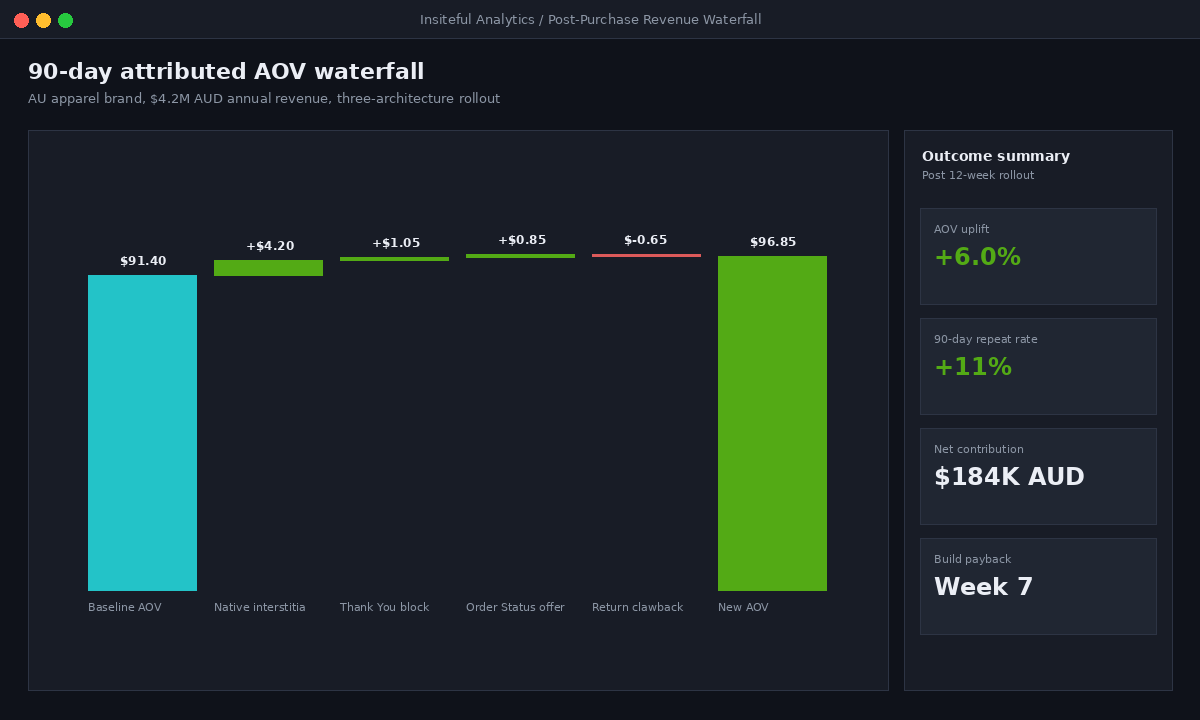
Mistake 4: Forgetting that returns affect attribution. A post-purchase offer that has a 12% return rate is not the same as one with a 3% return rate. The post-purchase analytics in most apps show gross revenue, not net contribution. We audit returns by post-purchase SKU monthly and pull SKUs with high return rates out of the offer engine. The math changes fast.
How we do it at Insiteful
When we scope post-purchase for a new build or an audit, our process is consistent. We start with the data, not the app store. Pull the last 90 days of orders, run an attachment-rate analysis by collection and by AOV band, and identify the three highest-conviction offers. That tells us whether the store has a real attachment pattern worth building custom for, or whether a configured app will get them most of the way there.
For Plus clients, we typically deploy a hybrid: a custom post-purchase UI extension with our own attachment-score engine handling the interstitial offer, a configured app block handling the Thank You page (because the editor lets the client iterate without dev work), and a custom block on the order status page driving the second-purchase window. We instrument the whole flow with web pixels into our analytics layer so we can attribute revenue cleanly per architecture, per offer, per SKU.
On a recent migration project for an Australian apparel brand doing approximately $4.2M AUD a year, this three-architecture stack added 6.4% to AOV and 11% to 90-day repeat purchase rate within the first quarter. The interstitial alone drove a 4.8% accept rate at an average $58 AUD attach. The Thank You block drove 28% of new-customer account creations, which in turn lifted the welcome flow’s revenue per recipient by 19% in Klaviyo. None of that came from buying a more expensive app. It came from building each slot for what it actually does best.
Two final notes on the build. First, Scripts (the Ruby-based price-manipulation framework that has been around since 2016) will be permanently shut down on June 30, 2026. If your post-purchase or upsell logic still runs through a Script, you have weeks, not months, to migrate. Second, Cart Transform Functions for custom apps require Shopify Plus. If you are planning custom bundle logic on a non-Plus plan, your options are a public app or a planned Plus upgrade. Scope this honestly before you start.
If post-purchase is on your roadmap
Post-purchase is one of the few places on a Shopify store where a six-week build pays back inside the same quarter. The customers are paying. The cards are vaulted. The platform supports the slot natively. The only question is whether you build it as a configured default that anyone with your apps would have, or as a custom system that uses your data, your margin map, and your brand voice.
If you are weighing up where post-purchase sits on your Shopify roadmap, that is exactly the kind of scoping call we do for founders every week. Talk to the Insiteful team.