
If you run a Shopify Plus store doing $2M AUD or more a year, there is a near certainty you are paying for three apps you no longer need. A volume-discount app at $39 a month, a payment-method-hider at $19, a delivery-customisation tool at $29. That is roughly $1,000 AUD a year leaving the bank account for functionality that Shopify shipped natively into the platform and called Shopify Functions. The brands we audit in 2026 keep the apps installed because nobody ever showed them the swap.
That is the surface saving. The bigger story is what Functions let a Plus store build that the old app stack never could. Server-side discount logic that runs in under 5 milliseconds. Cart bundles that expand at checkout without a third-party bundling app. Payment-method rules tied to cart contents, customer tag, or shipping country. And, sitting underneath all of it, a deadline that turns the conversation from “should we” to “we have to”: Shopify Scripts switches off entirely on 30 June 2026.
This is the agency view of Shopify Functions from the team that ships them on real Aussie Plus stores. What they are, which of the 11 function types pay for themselves immediately, the build artefacts we use to keep clients inside the 5ms execution gate, and the migration mistakes we keep cleaning up for brands who let a generalist developer touch checkout logic. No coaching, no theory. Just the agency view of where Functions earn their keep and where the no-code apps still beat a custom build.
What Shopify Functions actually are (under the marketing copy)
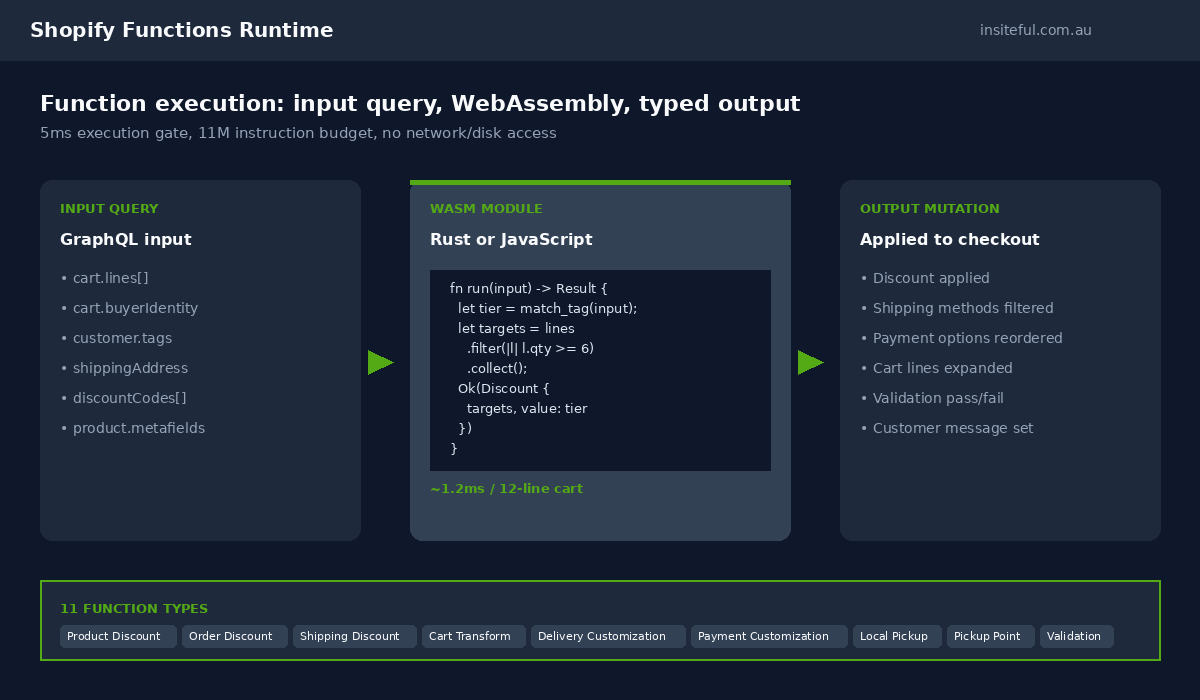
A Shopify Function is a small WebAssembly module that runs inside Shopify’s own infrastructure. You write it in Rust or JavaScript, compile it to Wasm, deploy it through a Shopify app, and Shopify calls it at the relevant point in the cart or checkout pipeline. The function receives a typed input query, returns a typed output, and the platform applies the result to the order. There is no public HTTPS endpoint, no server you manage, and no failure mode where a slow third-party server holds up a checkout.
That architecture is the entire reason Functions exist. The old Scripts runtime ran Ruby in a sandbox owned by Shopify and was the structural blocker for almost every checkout improvement Shopify has shipped in the last three years. Scripts could not talk to Flow, could not access the GraphQL Admin API at runtime, and could not survive the checkout rewrite. Functions can. They run in milliseconds, return a stable contract, and integrate with Flow, Checkout UI Extensions, and the rest of the modern Shopify surface.
The runtime has hard limits and they matter. A Function must return in under 5 milliseconds. It has an 11 million instruction budget, measured by Wasm operations, not wall-clock time. It runs without network access, without disk access, and without persistent state. Everything it needs has to arrive in the input query or come from metafields you have already loaded. Those constraints are the reason a Function never holds up checkout. They are also the reason the engineering discipline matters: a sloppy Function will silently fall back to default behaviour on a busy cart, and the merchant will not see the issue until a customer raises a support ticket.
Two languages are supported. Rust compiles directly to Wasm and is roughly three times faster than JavaScript for the same business logic. JavaScript runs through Javy, a Wasm port of the QuickJS engine, which is plenty fast for most cases but uses about seven times more instruction count for an equivalent function output. We default to Rust for any function that touches cart lines at scale (B2B catalogues, multi-pack pricing, complex bundle expansion) and JavaScript for the simpler customisation jobs where developer velocity matters more than nano-optimisation.
The 30 June 2026 deadline that forces every Plus store’s hand
Shopify Scripts stops executing on 30 June 2026. Full stop. Any Plus store still running discount, shipping, or payment logic through the Scripts editor on that date sees those rules silently disappear from checkout. Customers will see full price where there was a tiered discount, every shipping method where there was a curated list, and every payment option where there was a sensible filter. The merchant will not get a warning email at the moment of the cut.
The interim deadline is sharper. From 15 April 2026, the Scripts editor was locked for new and edited scripts. A Plus store running a Black Friday discount script in November still gets it executed, but cannot ship a fix if something breaks. The functional posture is “frozen and decaying”: the old logic still runs, but the merchant cannot adapt it as the catalogue, the offers, or the customer segments change.
What we tell every Plus client in our 2026 audit calls is that the deadline is not the priority. The priority is the lead time. A clean Scripts-to-Functions migration on a $5M AUD a year Plus store typically takes four to six weeks of engineering, depending on how many bespoke discount rules are in play. Stores that delay until May or June 2026 are stacking up against agency capacity at exactly the moment every Plus shop is trying to ship the same migration. We started telling clients in Q4 2025 to either book the work or accept that they will be writing their Functions in a rush in late Q2 2026.
The other thing worth knowing: Shopify Scripts and Shopify Functions can run side-by-side in the same store today. The migration is not a hard cutover. Most of the clean projects we ship migrate one rule at a time, prove parity in a draft order, then deactivate the matching Script. That keeps the risk surface tiny and lets QA happen in production conditions without ever putting live revenue at risk.
The 11 Function types Shopify ships (and which three pay for themselves)
Shopify currently ships 11 Function APIs across cart, checkout, fulfilment, and admin surfaces. Not all of them are equally useful for a typical Aussie Plus store. Five do most of the work, three of those replace recurring app subscriptions outright, and the rest are situational.
- Product Discount. Per-line discount logic. Tiered pricing, BOGO, member-only pricing, conditional discounts on a single SKU.
- Order Discount. Whole-cart discount logic. Spend $200, get $30 off. First-order welcome discounts that ignore sale items. Stacking rules.
- Shipping Discount. Discounts that target shipping rates. Free shipping over $150 expressed as a discount rather than a flat shipping rule.
- Cart Transform. The genuinely new capability. Expand a parent SKU into its components at checkout, or merge a set of line items into a grouped parent. The basis for proper bundles, builder kits, and configurable products without a paid bundling app.
- Delivery Customization. Hide, rename, or reorder shipping methods at checkout. Hide Express Post when the cart contains a hazardous item. Rename “Standard” to “Free, dispatched today from Sydney” when the order qualifies.
- Payment Customization. Hide, rename, or reorder payment methods. Hide cash-on-delivery for international orders. Show Afterpay only above a threshold. Demote PayPal on high-fraud SKUs.
- Local Pickup Customization. Filter pickup locations based on inventory, customer location, or cart contents.
- Pickup Point Customization. Filter parcel-locker pickup points by carrier or distance.
- Validation. Block a checkout based on cart conditions. Prevent purchase if minimum quantity is not met, or if a customer is in a banned country.
- Fulfilment Constraints. Influence how Shopify Fulfilment Network splits an order across warehouses.
- Order Routing. Choose which location an order should be fulfilled from based on inventory, distance, or cost.
The three that pay for themselves on almost every Plus store we audit are Product Discount, Delivery Customization, and Payment Customization. They directly replace three of the most common paid apps in the App Store: a volume-discount engine, a delivery-method-hider, and a payment-rules tool. We have walked into stores paying $87 AUD a month for that exact trio and switched the lot off the same fortnight we deployed the Functions.
Cart Transform is the fourth that earns its keep almost every time, but only if the store has bundle logic to begin with. For a single-product brand it is moot. For a multi-pack supplement brand or a configurable-furniture brand, it is the cheapest way out of a recurring $79 to $149 AUD a month bundle-app subscription, and the only way to get a bundle that survives reporting in Shopify analytics rather than fighting it.
The three apps Functions kills (and the maths on what you save)
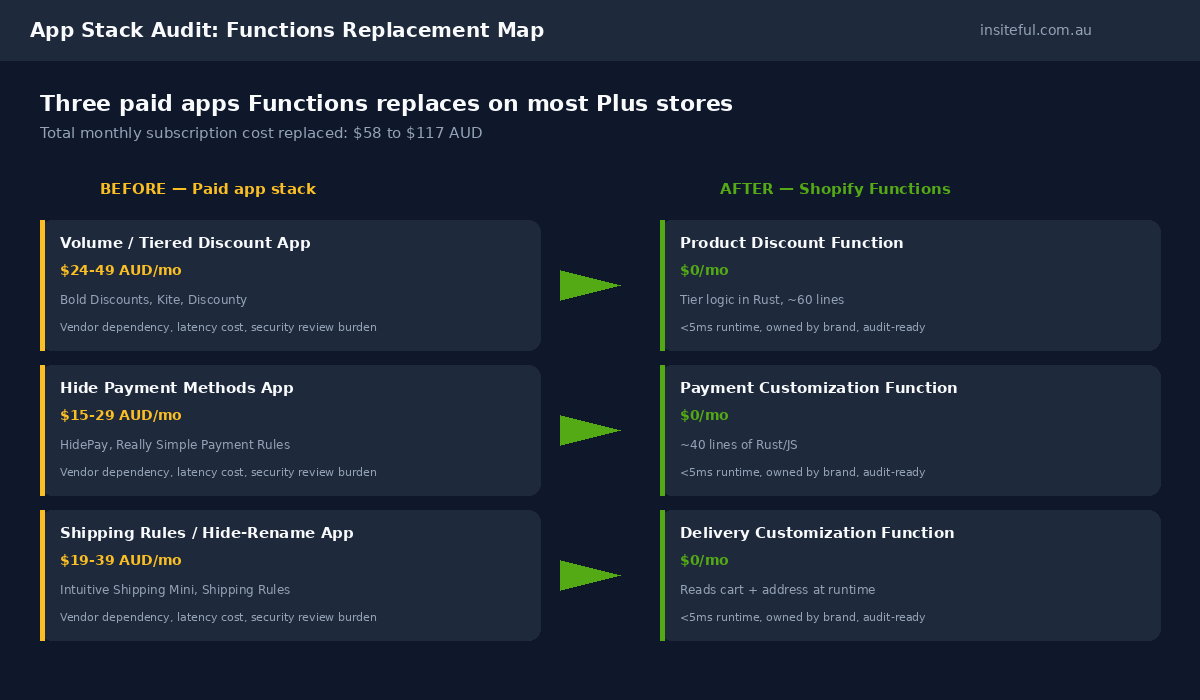
Let’s get specific. Below is the typical app stack we see on a $2M to $5M AUD Plus store before we touch it, and the Function that replaces each one.
- Volume / tiered discount app. Typical pricing: $24 to $49 AUD a month (Bold Discounts, Discounty, Kite, Smart Bundles). Replaced by: a Product Discount Function with the merchant’s actual price ladder hard-coded or stored in product metafields.
- Hide payment methods app. Typical pricing: $15 to $29 AUD a month (HidePay, Really Simple Payment Rules). Replaced by: a Payment Customization Function with rules expressed in 40 lines of Rust or JS.
- Shipping method rules / hide-rename app. Typical pricing: $19 to $39 AUD a month (Intuitive Shipping Mini, Shipping Rules). Replaced by: a Delivery Customization Function reading cart contents and shipping address.
That is $58 to $117 AUD a month in app subscription cost on the low end. On a single store, that is $700 to $1,400 AUD a year. On a multi-store Plus organisation running four storefronts, that is $2,800 to $5,600 AUD a year that pays for the migration build outright in the first twelve months. The bigger number, though, is the indirect saving: every paid app on a Shopify Plus checkout adds latency, requires permissioning, and creates one more vendor in the security review. We have decommissioned 14 apps from a single Plus client over a six-month engagement, freed up roughly $380 AUD a month in subscription cost, and recovered 320ms of checkout step-load time as a bonus.
The math case rarely lands when we present it as “save $80 a month”. It lands when we present it as a one-day Functions sprint that pays back inside three months and removes a category of operational risk for good.
Why Plus stores get the full toolkit and Standard stores get the basics
Shopify positioned Functions as plan-agnostic, and on the surface that is true. A merchant on the standard Shopify plan can deploy a Product Discount Function. The deeper story is that the most powerful Function operations are gated to Plus.
The clearest example is Cart Transform’s lineUpdate operation, which lets a Function override the price, title, or image of an existing cart line. lineUpdate is only available on development stores and Plus. Standard-plan merchants can use lineExpand (bundle expansion) and linesMerge (bundle merging) but cannot adjust the displayed price of an existing line through Cart Transform. For a wholesale or B2B brand that wants to show a customer-tagged price at the cart line, that limitation is the difference between a clean native build and a third-party app holding the experience together.
The other Plus-only edge is checkout extensibility surface area. Full Checkout UI Extensions, deeper Web Pixels capability, and the ability to layer Functions with Plus-only customisation surfaces like B2B catalogues, Markets Pro, and Shopify Audiences. Functions are the engine, but Plus is the chassis that holds the rest of the modern checkout together. The $2,300 USD a month Plus plan is a tax on the toolkit; the Functions are how you start to claw it back.
Build artefact: a Product Discount Function for tiered B2B pricing
This is a stripped-down version of a Product Discount Function we shipped for a wholesale homeware client in February. The brand sells the same SKU to retail customers, to retail-account customers, and to two B2B tiers. Each tier has a different price ladder by quantity. Before the migration, this lived in a $89 AUD a month volume-discount app and broke twice a year when the catalogue updated. After the migration, it is 60 lines of Rust running inside the 5ms gate.
// src/main.rs (Rust target for Shopify Functions)
use shopify_function::prelude::*;
use shopify_function::Result;

#[shopify_function_target(query_path = "src/run.graphql", schema_path = "schema.graphql")]
fn run(input: input::ResponseData) -> Result<output::FunctionRunResult> {
    let no_discount = output::FunctionRunResult {
        discounts: vec![],
        discount_application_strategy: output::DiscountApplicationStrategy::FIRST,
    };

    let tier = input
        .cart
        .buyer_identity
        .as_ref()
        .and_then(|b| b.customer.as_ref())
        .and_then(|c| c.has_tags.iter().find_map(|t| match t.tag.as_str() {
            "wholesale-tier-1" => Some(0.15),
            "wholesale-tier-2" => Some(0.25),
            "retail-account"   => Some(0.05),
            _                  => None,
        }));

    let Some(rate) = tier else { return Ok(no_discount) };

    let targets: Vec<_> = input.cart.lines.iter().filter_map(|line| {
        let qty = line.quantity;
        if qty >= 6 {
            Some(output::Target::ProductVariant(output::ProductVariantTarget {
                id: line.merchandise.id.clone(),
                quantity: Some(qty),
            }))
        } else { None }
    }).collect();

    if targets.is_empty() { return Ok(no_discount); }

    Ok(output::FunctionRunResult {
        discounts: vec![output::Discount {
            message: Some(format!("Wholesale tier {:.0}% off (6+ units)", rate * 100.0)),
            targets,
            value: output::Value::Percentage(output::Percentage { value: rate * 100.0 }),
        }],
        discount_application_strategy: output::DiscountApplicationStrategy::FIRST,
    })
}
Three things to call out. First, the discount logic is pure: same input, same output, every time. That is a property the Functions runtime enforces and a property that makes the rule auditable. Second, the only data the function uses is on the cart input. There is no database call, no Shopify Admin API hit, no third-party lookup. The price ladder is hard-coded; for a larger catalogue, the rate would come from product metafields loaded into the input query. Third, the function returns the discount with a clear message string, which Shopify surfaces in the customer’s order confirmation as a discount line. The customer always knows why their price moved.
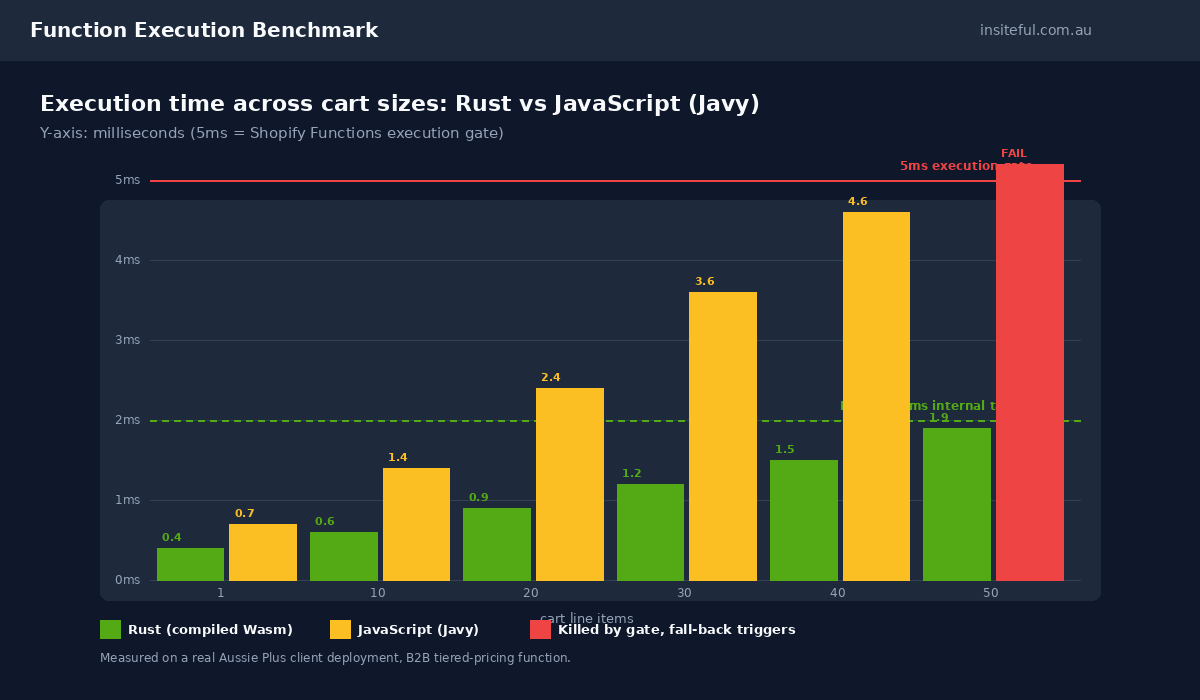
The build artefact above runs in about 1.2ms on a typical 12-line cart on Aussie Plus stores we have measured. That leaves 3.8ms of headroom on the 5ms gate, which is plenty for the more complex tier logic the same brand bolted on three months later for promotional combos. The Functions discipline is to keep the function small, deterministic, and observable. The opposite discipline is to push every business rule into a single Function until it tips over.
The 5ms execution gate is a feature, not a constraint
Almost every Function we audit on a struggling client store has the same anti-pattern: too much logic, too many branches, and no instrumentation. The Function runs fine on a five-item cart in QA, then quietly times out on a 30-item B2B cart on Black Friday, and Shopify falls back to default behaviour. The customer gets no discount, the merchant gets no error notification, and the agency that built it gets no signal that anything is wrong until the support ticket lands.
The 5ms gate is what stops a slow Function from breaking checkout for everyone. A Shopify Scripts equivalent that ran 200ms on a busy cart used to be the difference between checkout loading and checkout hanging. Functions cannot do that. They either return in 5ms or they are killed, and Shopify proceeds as if they did not exist. That is a feature: the customer always gets a checkout, even when the merchant’s discount logic is broken. It is also a constraint: the engineering bar is real, and it punishes laziness.
What we do on every build is set an internal target of 2ms median execution time on the largest realistic cart the brand actually sees. Not the average cart. The worst-case one. For a homeware client that is a 40-line builder cart. For a supplement brand it is a six-pack subscription. We benchmark with Shopify’s CLI tooling, log the instruction count, and write a Cypress smoke test that fires a representative cart through draft-order checkout once a day. If the Function ever brushes the upper half of the gate, it gets refactored before the metric trips.
The other operational discipline is to never let a Function hold business logic that should live elsewhere. Customer-tag rules live in the customer record. Price ladders live in product metafields. Promotional windows live in Flow workflows that toggle the Function on and off. A Function that hard-codes a marketing campaign date is a Function that you have to redeploy every quarter. A Function that reads “is the campaign live” from a metafield is one Flow toggle away from reuse.
The five Functions mistakes we audit out of client stores
Of the Plus stores we have audited that already have Functions in production (typically built by a previous agency or an in-house developer), four out of five have at least one of these patterns. None of them are obvious until you go looking.
1. One God Function for every discount rule
The pattern: a single Product Discount Function with 15 nested conditions, every campaign, every customer tag, every SKU exception in one file. It runs fine for a quarter, then a Black Friday rule pushes it over the instruction budget. The fix is to split into one Function per rule type, deploy independently, and let Shopify combine them via the discount application strategy. Functions are cheap. Long, sprawling Functions are the problem.
2. No instrumentation
The pattern: nobody is watching execution time, instruction count, or fall-back rate. The Function fails silently on busy carts. We bolt a lightweight metric pipeline into every Function we ship: Shopify Function Invocation logs into a webhook, into a Datadog or Mixpanel dashboard, with an alert when the fall-back rate breaches 0.5% over a six-hour window. That is how you catch a degrading Function before a customer does.
3. Hard-coded business rules
The pattern: campaign dates, product IDs, customer-tag lists baked into the Function code. Every change ships a new app version through Shopify Partners. The fix is to read configuration from metafields, app settings, or the GraphQL Admin API at deploy time and bake it into the input query. Once that is in place, the merchant’s marketing team can change rules through the admin UI without touching code.
4. JavaScript where Rust is required
The pattern: a JavaScript Function written for developer velocity, deployed onto a Function type that handles large carts, instruction count tipping over on real-world traffic. JavaScript is fine for small, simple, predictable Functions. For Cart Transform on a bundle-heavy store, or a Product Discount Function on a 50-line wholesale cart, Rust is the answer. The team at B2 Agency published a migration case study showing a 7x reduction in instruction count from a TypeScript-to-Rust port on a B2B pricing function. Their numbers match ours.
5. No fall-back plan
The pattern: the Function is the only logic path. When it fails, the customer gets no discount, the cart looks wrong, and the merchant’s support inbox lights up. The fix is to design the fall-back as a deliberate behaviour, not an accident. For a Product Discount Function, that means having a manual discount code as a safety net for the brand’s biggest VIPs. For a Payment Customization Function, that means a clear admin alert when the fall-back triggers. The Function is the engine; the fall-back is the seatbelt.
When the no-code app is still the right call
Not every Plus store needs a custom Function. Some merchants are better off with a Functions-based no-code app like Kite, PowerX, or Nexus, which wraps the same Shopify Function infrastructure in a configurator the merchant can drive without an agency.
The line we draw is roughly this. If the rule is a single discount type with no exceptions, no integration with customer tags, and no audit requirement, the no-code app is fine. We have shipped Kite-configured BOGO offers on $1M AUD a year stores and never looked back. If the rule involves cart-level logic, customer-segment branching, integration with B2B catalogues, or audit history that the brand actually needs to defend in a finance review, we build a custom Function. The cost of a custom build pays back in audit-readiness alone for a brand doing $2M AUD or more.
The other reason we go custom is portability. A no-code app subscription is a recurring cost and a vendor dependency. A custom Function we deploy through the brand’s own Partner organisation is owned by the brand. If we part ways with a client, the Function stays with them, in their account, under their control. That ownership is part of the value of a real agency build.
How we do it at Insiteful
Our standard Functions engagement is a four-week sprint on a single store, or six weeks across a multi-store Plus organisation. Week one is the audit: every Script, every paid app touching checkout, every discount rule, every payment and shipping customisation, listed and ranked by replacement priority. We hand the audit to the client as a Notion page with a column for “kill”, “replace”, “keep”, and a one-line rationale on each row. Most clients are surprised by how much of the stack falls into “kill”.
Week two is the build. We scaffold a single Shopify app for the brand (or extend their existing private app) and ship the first Functions: a Product Discount for tiered pricing, a Payment Customization for the obvious fraud and BNPL rules, a Delivery Customization for the obvious shipping cases. Each one ships with a draft-order test plan and a metric dashboard. By the end of week two, the brand can see the new Functions running side-by-side with the old Scripts, with no live impact yet.
Week three is the cutover. We deactivate the matching Scripts and apps one rule at a time, monitor for 48 hours per cutover, and roll forward to the next. The discipline is to never deactivate more than one rule in a single business day. By the end of week three, the old stack is off, the Functions are running, and the app subscriptions are cancelled.
Week four is the hardening. We add Cart Transform where bundles need it, write the alerting that catches a degrading Function before customers do, document the rules for the brand’s internal team, and hand over a runbook. The client owns the Functions, the app, and the dashboards. We are available for the next six months under a support contract, but the goal is for the brand’s internal team to be able to ship a new rule without us inside the first quarter post-launch.
The deliverable at the end is a Plus store with no Scripts, three to four fewer paid apps, a Functions stack the internal team understands, and a checkout that runs measurably faster and cleaner than it did before. We have shipped this engagement on stores from $1.8M to $14M AUD a year in revenue. The pattern holds.
The bottom line on Functions for Aussie Plus stores in 2026
Shopify Functions are not a marketing feature. They are the runtime that replaces the runtime your business logic has been running on for a decade, and the runtime that makes the modern Plus checkout possible. The 30 June 2026 deadline turns the migration from a discretionary upgrade into a non-negotiable, and the indirect savings (a smaller app stack, a faster checkout, a cleaner audit trail) are the real prize sitting underneath the headline cost reduction.
The Plus stores we work with in 2026 fall into two buckets. The ones who have already migrated and are using the headroom to build genuinely better experiences. The ones who have not, and who will be writing checks for emergency agency work in May and June 2026 trying to beat the cutover. Neither bucket is wrong, but the first one is winning.
Ready to map your Functions plan?
If you are running Shopify Plus and you have not yet mapped your Scripts-to-Functions migration, the next move is a one-call audit of what you currently have and what it costs to replace. We do this as a paid scoping engagement: one of our engineers walks your store, lists every Script and every paid checkout app, and gives you a written migration plan with effort estimates and a sequence. The audit lands the same week.
Book a build assessment with Insiteful if you want the agency view of your checkout stack before the 30 June 2026 deadline. We will give you the audit, the sequence, and a fixed-fee build estimate. You can take that plan to any agency. We just think we are the right one to ship it.