
Scroll through ten Shopify stores in your niche. Count how many share the same full-width hero banner, the same sticky announcement bar, the same stacked product grid. If you’re honest, the answer is probably seven or eight out of ten. This isn’t a coincidence. It’s the natural outcome of a market where the three most-installed themes power a third of all Shopify storefronts.
The problem isn’t that those themes are bad. Dawn is clean and fast. Trademark converts. Horizon is a solid base. The problem is that a theme built to work for every category — skincare, homewares, fashion, supplements, pet accessories — is designed around compromise. Every section is cautious. Every layout is safe. The result is a visual language that whispers “ecommerce store” rather than speaking in your brand’s actual voice.
We see this constantly at Insiteful. Founders come to us after spending months tweaking their Dawn or Impulse install, convinced they just need a few more settings adjusted. What they’ve actually built is a highly customised version of a generic store. The bones are still generic. The customer still lands, sees something familiar, and doesn’t feel a reason to stay. Conversion rates on these stores rarely break 2.8%, while the brands they’re competing with that invested in differentiated design consistently sit above 3.5%.
The Numbers Behind the Sameness Problem
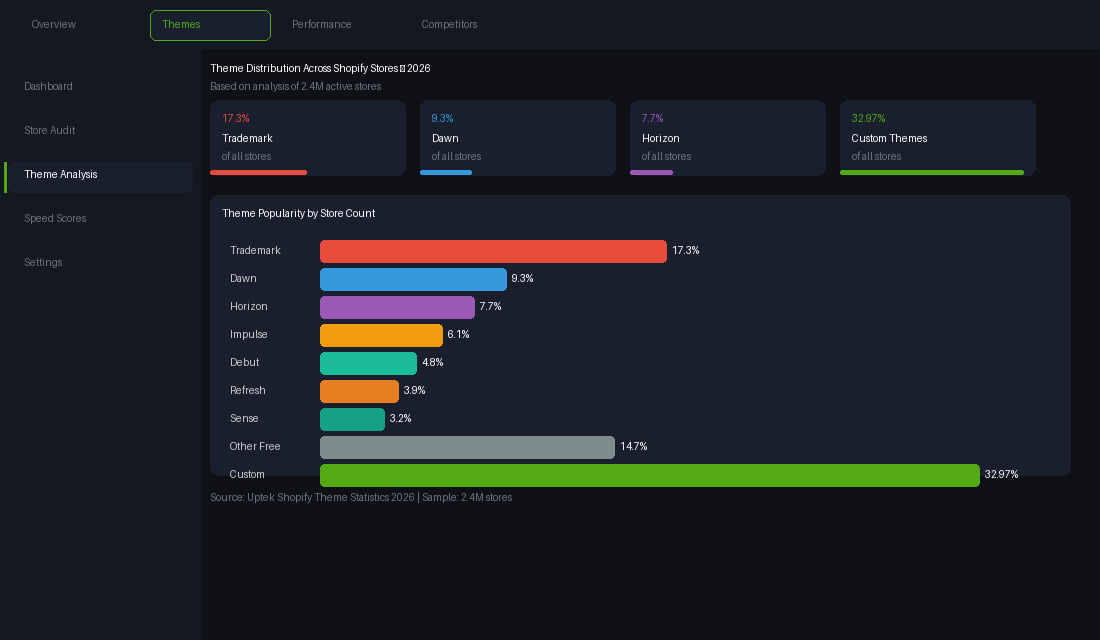
The concentration of Shopify theme usage is more extreme than most people realise. Trademark is installed on 17.3% of all Shopify stores. Dawn — Shopify’s own default — sits at 9.3%. Horizon, the newer framework, is already at 7.7%. Add a few more popular paid themes and you’re looking at roughly a third of all Shopify stores using one of five or six themes.
That’s hundreds of thousands of storefronts sharing the same section architecture, the same layout logic, and often the same default typography pairings. Merchants customise the colours, swap the fonts, upload their own imagery. But the underlying design decisions — where the trust signals sit, how the product grid breathes, what happens to the page rhythm on mobile — those are fixed by the theme developer, not the brand.
32.97% of Shopify stores use a custom theme. These are the stores that tend to rank higher in customer recall, perform better on branded search, and convert at the upper end of their category benchmarks. That’s not coincidence. When a store looks and feels like a brand rather than a template, customers make a faster trust decision — and a faster trust decision means a shorter path to purchase.
Why Off-the-Shelf Themes Are Designed for Everyone (and Therefore Nobody)
A theme developer building for the Shopify Theme Store faces a specific commercial challenge: their product needs to work for as many store categories as possible to justify the price point and drive enough installs for visibility. That constraint shapes every design decision.
The hero section needs to be generic enough for skincare and for furniture. The product card layout needs to work for a $12 supplement and a $1,800 rug. The typography scale needs to feel appropriate for a streetwear brand and a baby goods store. None of these requirements conflict with building a functional store. They do conflict with building a distinctive one.
When we audit a store built on a premium off-the-shelf theme, we almost always find the same set of design compromises:
- Section padding that’s too conservative. Default spacing values are chosen so nothing looks broken across any product photography style. The result is layouts that feel crowded on stores with bold imagery and sparse on stores with white-space-led photography.
- Typography pairings chosen to offend no one. Neutral sans-serifs paired with neutral serifs. Nothing that communicates a genuine brand personality. Founders swap in their own fonts but the underlying type scale, which controls hierarchy and reading rhythm, stays the default.
- Product pages built for the average cart value. Most premium themes are designed around a $40–120 average order value. Luxury or considered-purchase brands ($200+) need a completely different information hierarchy, social proof placement, and trust architecture to convert at the right rate.
- Mobile layouts that are an afterthought. On desktop, most premium themes look fine. On mobile — where 67% of Shopify traffic now lands — the sections stack predictably but rarely in the order that serves the brand’s conversion priority.
None of this means you can’t build a high-performing store on an off-the-shelf theme. You can. But you’ll be fighting the theme’s design assumptions at every step, and you’ll eventually hit a ceiling that no amount of settings-panel tweaking can break through.
The Page Builder Trap: How Drag-and-Drop Makes Differentiation Harder
When founders hit that ceiling, many reach for a page builder: PageFly, Shogun, GemPages. The appeal is obvious — total layout control without code, a visual editor that shows you exactly what you’re building. The reality is messier.
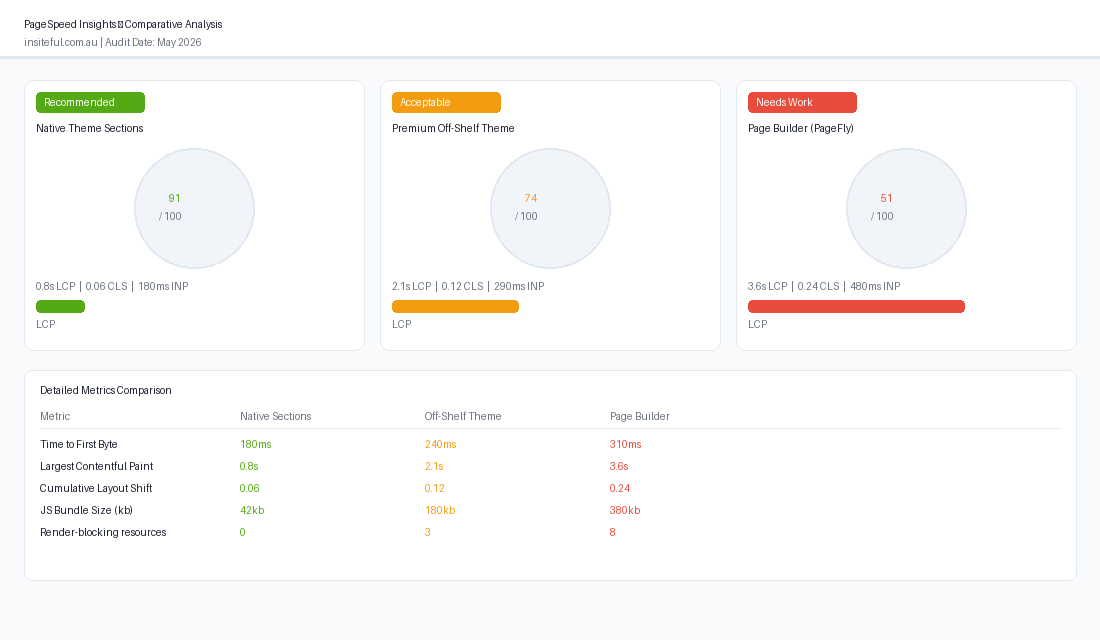
Page builders add between 300 and 600ms of render time to every page they power. On a store where your base theme already scores 70–85 on PageSpeed, adding a page builder can push your largest contentful paint past the 2.5-second threshold that Google uses as its Core Web Vitals benchmark. That’s not a hypothetical. Analysis across thousands of Shopify stores consistently shows page-builder-powered pages underperforming native theme sections on LCP by a full second or more.
The second problem is lock-in. When we take on a store that’s been running PageFly or Shogun across 30 or more pages, rebuilding those pages in native theme sections typically takes four to six weeks. One client we worked with recently had 38 PageFly pages that needed to be rebuilt as part of a broader theme refresh. The rebuild took longer than building an original custom theme from scratch would have.
Page builders solve a real problem — getting complex layouts live without a developer — but they solve it in a way that creates technical debt. Every page you build in a drag-and-drop tool is a page you’ll eventually need to migrate. For brands that are serious about long-term performance and site speed, native Liquid sections and proper Online Store 2.0 architecture is always the better foundation.
What Genuinely Differentiated Shopify Stores Actually Do
The stores that stand out — the ones where customers screenshot pages and send them to friends, where branded search volumes grow over time, where press coverage tends to mention the “beautiful site” — share five structural characteristics. None of them require headless.
1. They design the product page from the customer decision point, not the theme default. The layout of a product page should be driven by one question: what does this specific customer need to see, in what order, to feel confident enough to add to cart? That answer is different for a $30 candle versus a $900 sofa. Brands that get this right start with a conversion brief — what’s the objection, what’s the proof, what’s the risk-reducer — and then design the page layout around that brief. Brands that use a theme default start with sections and try to fit their story into them.
2. They have a type system, not just a font choice. Typography in most Shopify stores is two decisions: which heading font, which body font. Genuinely differentiated brands make eight or nine decisions: heading scale, body size, line height, letter spacing, paragraph width, mobile size adjustments, accent type for callouts and badges, caption style for images, and price display formatting. This level of typographic intention creates a reading experience that feels considered rather than default.
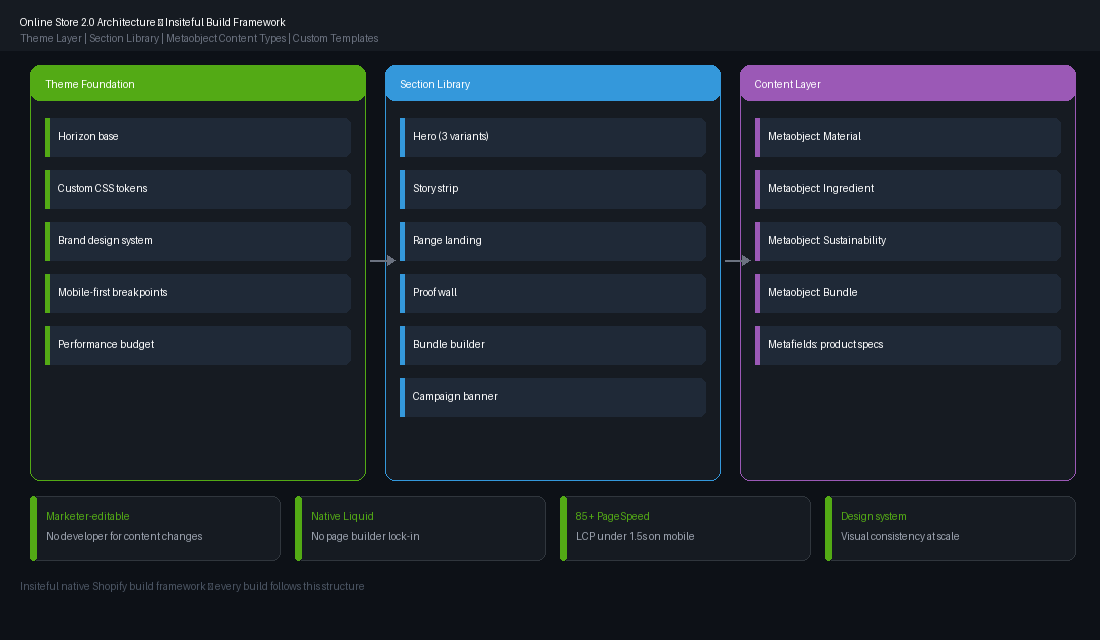
3. Their sections are built around their content, not the other way around. Online Store 2.0 and sections everywhere gave Shopify merchants something genuinely powerful: the ability to create page templates with brand-specific section types. A well-built custom theme might include a “story strip” section designed specifically for the brand’s storytelling format, a “range landing” section architected for their product category structure, and a “proof wall” section that matches their specific customer review data. These aren’t generic sections you’d find in any theme. They’re built for one store.
4. They treat mobile as the primary canvas, not a responsive afterthought. 67% of Shopify traffic lands on mobile. The brands that convert well on mobile designed their layouts mobile-first — starting with the constraints of a 390px wide screen and then expanding to desktop, rather than designing desktop and then collapsing it down. Mobile-first product pages often have larger product imagery, less descriptive copy above the fold, and a more prominent add-to-cart button that follows the user as they scroll.
5. They invest in a design system, not just a design. A design system means your colour palette has tokens (not just hex values), your spacing follows a consistent scale, your component library is documented, and anyone adding a new page or section can do it without breaking the visual language. Brands with design systems update their stores faster, with less rework, and maintain more visual consistency across campaigns. The upfront investment in systematising the design pays back over the following 12 to 24 months in reduced change request costs.
What Online Store 2.0 and Horizon Actually Unlock
Shopify’s architecture has shifted significantly in the past two years. Online Store 2.0 — and the newer Horizon theme framework — gives custom build teams a more modular foundation than the Liquid-and-global-settings model that dominated Shopify theming until 2021.
The key change is that sections can now appear on any page template, not just the homepage. That means a custom product page can have brand-specific sections — a “meet the maker” callout, an ingredient breakdown accordion, a size guide specific to that product category — all built as reusable, marketer-editable components. No developer needed to update the content once the section exists.
Metaobjects take this further. Rather than hardcoding content into Liquid or hiding it in metafields, metaobjects let you create structured content types — a “material” type, a “sustainability claim” type, a “bundle component” type — and reference them across any product or page. For brands with complex product stories, this changes what’s possible on a native Shopify build.
The Horizon framework specifically introduced better performance architecture at the theme level: improved render patterns, smarter lazy loading, and a CSS variable system that makes maintaining a consistent design token layer much cleaner. For the builds we’re working on now, Horizon is the starting point — not as a theme you install and customise in the settings panel, but as a foundation you extend with custom sections, templates, and a brand-specific design system layered on top.
This is what “standing out without going headless” looks like in 2026. Not a different tech stack. A better-built version of the native stack you’re already on.
The Visual Mistakes That Make Every Store Look the Same
Beyond architecture, there are specific visual patterns that flatten Shopify stores into sameness. We audit these on every new build.
The 16px body copy problem. Almost every Shopify theme defaults to 16px body text. On mobile, that’s too small for comfortable reading at arm’s length. On desktop, 18–19px body copy reads as more premium and authoritative. It’s a one-line CSS change that makes an immediate and measurable difference to how the brand is perceived.
The full-width hero by default. Full-width heroes look bold in the theme preview. In production, on a 27-inch monitor, they can feel overwhelming. Brands that choose to constrain their hero width — 1100px with breathing room on either side — often feel more premium than those going edge-to-edge. Width constraint is a design decision, not a technical limitation.
The generic announcement bar. Every theme has one. Most stores use it for a percentage-off code or a free shipping threshold. The brands that stand out use the announcement bar as a tone-setter — a piece of brand copy that communicates something specific about who they are and what they believe. “Free shipping over $150. Always made in Australia.” versus “Use code SAVE15.” One is a brand statement. The other is a price signal.
The same three trust badges. Padlock, credit cards, 30-day return. These have become so ubiquitous they’ve lost their converting power. The brands doing it well replace generic trust icons with specific, credible claims — “Shipped from our Melbourne warehouse in 24 hours”, “Formulated by a registered dermatologist” — that are brand-specific rather than category-generic.
Review widgets styled exactly like the app default. Okendo, Yotpo, Judge.me — every review app has a default display style, and most stores install and use it without any design work. Custom-styled review sections that match the store’s typography and spacing feel like a deliberate editorial choice. Default-styled ones feel like an afterthought.
How We Do It at Insiteful
Every Insiteful build starts with a brand and conversion brief before we write a single line of Liquid. We work through three questions before the design phase opens: who is the customer, what decision are they making, and what does this brand need to communicate to win that decision?
From there, we build a design system in Figma that covers typography scale, colour tokens, spacing units, and component states — before any theme work starts. This system becomes the source of truth for the build, and it’s handed to the client at project end so their team can extend it without breaking the visual language.
The theme build itself is done on a custom Liquid foundation, typically starting from Horizon’s architecture but replacing every section with brand-specific components built to the conversion brief. The product page template is custom to the product type — a fragrance brand gets a different product page architecture to a furniture brand, because the customer decision is different, the proof requirements are different, and the mobile scrolling pattern is different.
We don’t use page builders on production stores. Every section is native Liquid, accessible through the Shopify theme editor, and documented so the client’s marketing team can operate it independently. When the marketing team wants to run a landing page for a campaign, they use the existing section library — they’re not reaching for a third-party page builder that creates technical debt and speed drag.
The result is a store that looks and functions like a brand rather than a category. Customers land and feel something different — not because the technology is different, but because every design decision has been made with intent rather than defaulted from a settings panel.
This is what standing out on Shopify looks like in 2026. Not headless. Not a bigger app budget. A custom native build with a design system behind it and a conversion brief in front of it.
If you’re looking at your current Shopify store and recognising the patterns above, that’s exactly the kind of audit we help brands work through. Talk to the Insiteful team about what a brand-led native Shopify build could look like for your store.