
For years, Shopify Plus merchants customised their checkout by editing checkout.liquid. It was messy, fragile, and completely outside Shopify’s upgrade path. It worked. Now that file is gone.
Shopify deprecated checkout.liquid for Plus stores in August 2024. If your store was still running on it, you’ve either already migrated or you’re operating on a ticking clock. The new platform is called Checkout Extensibility, and it works fundamentally differently from anything that came before it.
The good news: what’s now possible goes well beyond what checkout.liquid ever allowed. The bad news: a lot of the “customisations” that agencies used to hack into place via liquid no longer work the same way. Some need to be rebuilt from scratch. Others simply can’t exist in the new model. Understanding which is which. Before you brief a developer, that is the difference between a smooth migration and a costly rebuild.
This is a technical breakdown of what Checkout Extensibility actually is, what each component does, and how we approach these builds at Insiteful for Australian Shopify Plus brands.
Checkout.liquid Is Dead: Here’s What Replaced It
The old model was simple in concept: Shopify exposed a liquid template file for the checkout, and developers could edit it directly. Add a trust badge here, insert an upsell widget there, inject custom JavaScript wherever you needed it. It was the same mental model as editing any other template on a Shopify theme.
The problem was that this approach broke constantly. Every time Shopify updated the checkout (and they update it frequently), those custom edits were at risk. Merchants on checkout.liquid also couldn’t use Shop Pay’s accelerated checkout, couldn’t access Shopify’s newer native checkout features, and were excluded from the checkout performance improvements Shopify ships each quarter. That exclusion had real cost: Shopify’s own data shows that Shop Pay converts at up to 36% higher rates than guest checkout.
Checkout Extensibility replaces that one-file-fits-all approach with a structured platform built around four distinct tools:
- Checkout UI Extensions: React-based components that render inside the checkout at specific extension points
- Shopify Functions: server-side logic that runs inside Shopify’s infrastructure to customise discounts, delivery, and payment options
- Branding API: a configuration layer for visual customisation of the checkout (Plus only)
- Post-purchase and Thank You page extensions: UI Extensions that run after the order is placed
These four tools replace the single liquid file. Each handles a different concern. Together, they cover most of what checkout.liquid was being used for, and several things it couldn’t do at all.
UI Extensions Explained (With a Real Example)
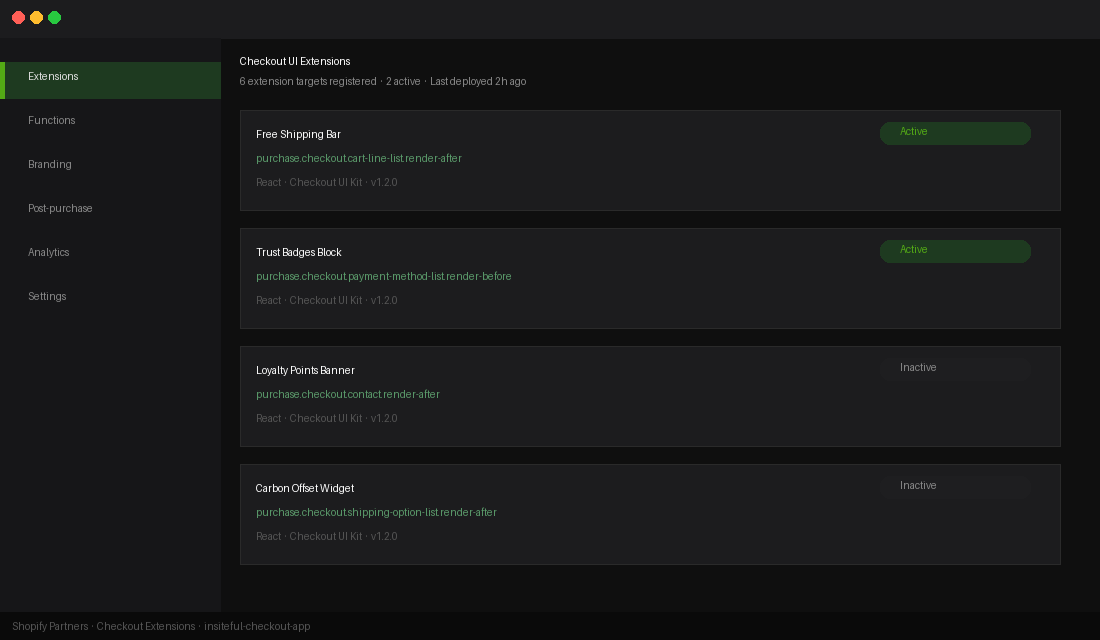
Checkout UI Extensions are React components that render at predefined locations inside the checkout. Shopify calls these “extension targets”: slots where your code injects UI. There are over 40 extension targets available across the checkout flow, covering the cart summary, contact information, shipping, payment, and order summary sections.
You’re not writing arbitrary HTML. You’re building components using Shopify’s own component library (Checkout UI Kit), which Shopify renders natively. This is what makes extensions upgrade-safe: because Shopify controls the rendering, it can update the checkout design without breaking your extension.
The tradeoff is that you can’t place a component anywhere you want. You’re constrained to the defined extension targets. For most use cases (trust badges, custom fields, upsell widgets, loyalty points display) those targets are more than sufficient. For highly bespoke checkout layouts, you’ll hit limits faster.
Here’s a real-world example. A Plus merchant wants to show a “You’re $X away from free shipping” bar inside the checkout. In the checkout.liquid era, this was a custom JavaScript injection with a fragile DOM query to find the right insertion point. With UI Extensions, it’s a typed component placed at the purchase.checkout.cart-line-list.render-after target:
import {
  Banner,
  Text,
  useCartLines,
  reactExtension,
} from "@shopify/ui-extensions-react/checkout";

export default reactExtension(
  "purchase.checkout.cart-line-list.render-after",
  () => <FreeShippingBar />
);

function FreeShippingBar() {
  const cartLines = useCartLines();
  const threshold = 150; // AUD threshold
  const subtotal = cartLines.reduce(
    (sum, line) => sum + parseFloat(line.cost.totalAmount.amount),
    0
  );
  const remaining = threshold - subtotal;

  if (remaining <= 0) {
    return (
      <Banner status="success">
        <Text>You've unlocked free shipping!</Text>
      </Banner>
    );
  }

  return (
    <Banner>
      <Text>Add ${remaining.toFixed(2)} more to get free shipping</Text>
    </Banner>
  );
}
This component renders natively inside the checkout. It respects Shopify’s theme settings, works with Shop Pay, and won’t break when Shopify ships checkout updates. That’s the core value proposition of the new model.
Functions: What You Can and Can’t Customise
Shopify Functions are a completely different class of customisation. Where UI Extensions handle what the customer sees, Functions handle what Shopify computes. They run server-side inside Shopify’s own infrastructure. They run outside your theme and any third-party app server, which means they execute in under 5 milliseconds per request, with no external latency risk.
There are five types of Functions available for checkout customisation:
- Discount Functions: custom discount logic beyond what Shopify’s native discount engine supports natively
- Delivery Customisation Functions: hide, rename, or reorder shipping options based on cart contents
- Payment Customisation Functions: hide or reorder payment methods based on conditions you define
- Cart Transform Functions: modify line items before checkout calculations run (useful for bundle logic)
- Order Routing Functions: for Plus stores using Shopify’s Fulfillment Network
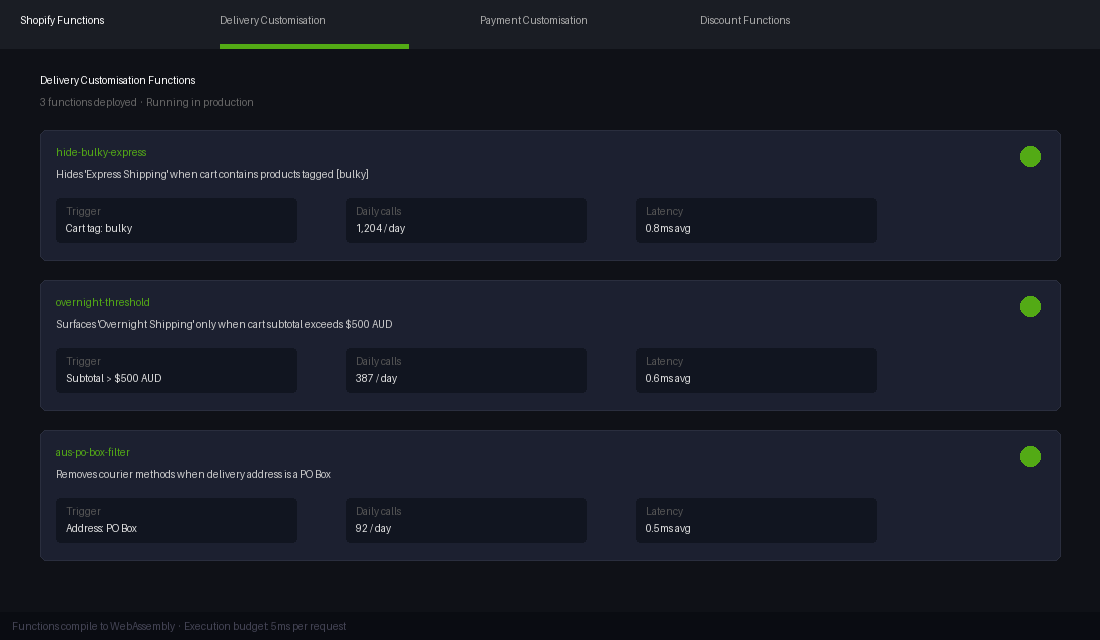
A common use case we see for Australian brands is delivery customisation. A merchant might want to hide “Express Shipping” if the cart contains a bulky item, or surface an “Overnight” option only when the subtotal exceeds $500 AUD. Both are straightforward delivery customisation functions.
Functions are written in Rust or JavaScript and compiled to WebAssembly. The Function receives a GraphQL input payload describing the cart and returns a mutation that Shopify applies. Here’s what a delivery customisation Function’s input query looks like:
query Input {
  cart {
    lines {
      quantity
      merchandise {
        ... on ProductVariant {
          product {
            tags
            hasAnyTag(tags: ["bulky", "oversized"])
          }
        }
      }
      cost {
        totalAmount {
          amount
          currencyCode
        }
      }
    }
    deliveryGroups {
      deliveryOptions {
        handle
        title
        cost {
          amount
          currencyCode
        }
      }
    }
  }
}
What you cannot do with Functions is worth knowing clearly. Functions can’t make external API calls during execution. They run within a tight compute budget and WebAssembly sandbox. They can’t access order history or customer data beyond what’s passed in the input query. And they can’t perform asynchronous operations. If your customisation logic requires a live API call to a loyalty platform, a custom pricing engine, or an ERP, that’s outside what a Function can handle natively. The workaround is to populate metafields before checkout (via a storefront script or app backend) and have the Function read those metafields as its data source.
Branding API for Plus: Visual Customisation Without Fragility
The Branding API is a Plus-only configuration layer that controls the visual appearance of the checkout. Think of it as a strongly typed design token system for checkout styling. You’re not writing CSS directly. You’re setting values for a defined schema of customisable properties (around 40 in the current version of the API).
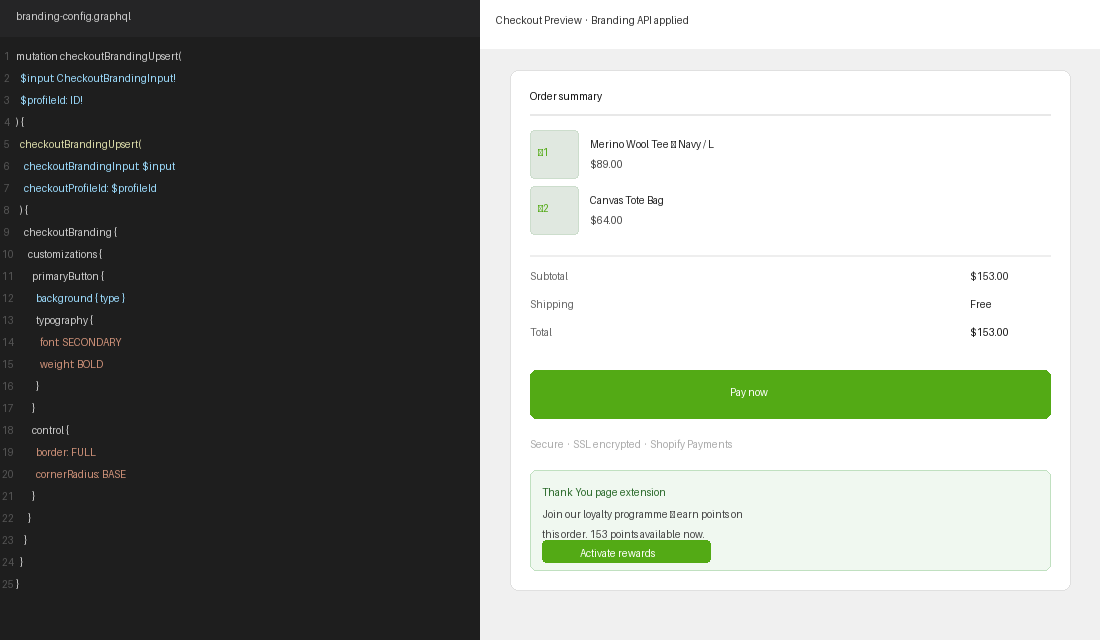
The properties you can configure include colour tokens (primary button colour, background, error states), typography (font family, size scales, weight), form field styling, border radius, and logo placement. The Branding API is set via the GraphQL Admin API, not through a dashboard UI. Here’s a representative configuration for an Australian fashion brand:
mutation checkoutBrandingUpsert(
  $checkoutBrandingInput: CheckoutBrandingInput!
  $checkoutProfileId: ID!
) {
  checkoutBrandingUpsert(
    checkoutBrandingInput: $checkoutBrandingInput
    checkoutProfileId: $checkoutProfileId
  ) {
    checkoutBranding {
      customizations {
        control {
          border: FULL
          cornerRadius: BASE
          color: TRANSPARENT
        }
        primaryButton {
          background { type: SOLID }
          typography {
            font: SECONDARY
            weight: BOLD
          }
        }
        orderSummary {
          background { type: SUBDUED }
        }
      }
    }
    userErrors { field message }
  }
}
The Branding API covers most visual customisation needs for brands that want their checkout to feel cohesive with their store design. It does not allow arbitrary CSS injection. If a design calls for a layout change that the API schema doesn’t support (say, a split-pane checkout layout or a completely custom step order). that’s outside what’s currently possible. For the majority of Plus brands, the Branding API combined with UI Extensions covers the visual requirements comfortably. In our experience across hundreds of Aussie Shopify builds, we’ve only encountered a handful of cases where the API’s constraints were genuinely limiting rather than just different from the old approach.
Post-Purchase Pages and Thank You Page Extensions
One of the most underused parts of Checkout Extensibility is what happens after the order is placed.
Shopify introduced the Thank You page as a customisable surface in 2024, and it has quickly become one of the highest-ROI places to deploy checkout extensions. The order is confirmed. The customer is in a positive emotional state. Conversion intent is still warm. This is prime real estate for a post-purchase upsell, a loyalty programme enrolment prompt, or a referral offer. Studies consistently show post-purchase upsell offers converting at 15 to 25%. That is significantly higher than standard on-site product recommendations.
Thank You page extensions work exactly like checkout UI extensions: React components deployed to defined extension targets on the order confirmation screen. The targets include positions above and below the order summary, inside the fulfilment block, and in the contact section. The component has access to order data, customer data, and metafields, which means you can personalise the experience based on what was just purchased.
Post-purchase pages (the interstitial page shown before the Thank You page) are a separate surface. These require a paid app subscription to activate and are primarily used for one-click post-purchase upsells. Shopify’s native Post Purchase API is available to all Plus stores, but most brands use an app like ReConvert or AfterSell to manage the content and logic without custom development.
The Thank You page is the more flexible, fully custom-buildable option. We typically build Thank You page extensions as part of a checkout extensibility project rather than treating them as a separate initiative, because the deployment infrastructure. The app, the extension point registration, and the access scopes are already in place once the checkout build is done.
Old Approach vs New: A Practical Comparison
The biggest confusion we see from brands migrating off checkout.liquid is not understanding which old customisations map cleanly to the new platform and which need a fundamentally different approach. Here’s a direct comparison of five common checkout customisations:
| Customisation | Old checkout.liquid approach | New extensibility approach |
|---|---|---|
| Trust badges in checkout | Direct HTML injection into liquid template | UI Extension at purchase.checkout.payment-method-list.render-before |
| Hide a shipping method for specific products | JavaScript DOM manipulation (fragile, often breaks) | Delivery Customisation Function (server-side, reliable) |
| Custom checkout button colour and font | CSS override in checkout.liquid style block | Branding API mutation (strongly typed, upgrade-safe) |
| Free shipping progress bar | Custom JS + DOM injection | UI Extension using useCartLines() hook |
| Post-purchase upsell offer | Not reliably possible in checkout.liquid | Post-purchase page extension or Thank You page UI extension |
The pattern is consistent: what was previously done with fragile JavaScript DOM manipulation or CSS injection is now done with typed APIs and structured component targets. The new approach is more constrained in where you can place UI, but far more stable, upgrade-proof, and compatible with Shop Pay and accelerated checkout flows.
How We Approach Checkout Extensibility Builds at Insiteful
When we take on a checkout extensibility project, the first thing we do is an audit of the existing checkout customisations. For brands migrating off checkout.liquid, that means cataloguing every modification in the file: custom fields, injected scripts, third-party snippets, CSS overrides, and any liquid logic that’s filtering or transforming checkout data.
That audit consistently surfaces three categories of customisation:
- Direct equivalents: things that map cleanly to a UI Extension or Function, typically within a day or two of development effort
- Architectural rewrites: customisations that worked via DOM manipulation or script injection and now need to be rebuilt properly as typed components, usually requiring a few days of focused work
- App replacements: scripts that are actually third-party app embeds (loyalty widgets, review tools, upsell popups) which now need to be replaced with app extensions that have been updated for the extensibility platform
The third category is where brands often get surprised. A number of popular Shopify checkout apps spent 2023 and early 2024 rebuilding their checkout integrations to use the new extension model. Not all of them are fully migrated. Before committing to a checkout extensibility build, it’s worth auditing every app currently touching your checkout and confirming its extension support status.
The build sequence we use at Insiteful for a full checkout extensibility implementation: first, deploy the app scaffold and register the extension point access in the Partner Dashboard. Second, build and test UI Extensions in a development store against Shopify’s checkout sandbox. Third, implement any required Functions and test them against edge cases (empty cart, international addresses, specific product tags). Fourth, apply Branding API configuration and QA against the design. Finally, deploy to production and run a complete checkout flow test across mobile and desktop, including Shop Pay, Afterpay, and any buy-now-pay-later methods the brand offers.
A full Plus implementation with multiple Functions, UI extensions across three or four targets, and a custom Thank You page typically takes four to six weeks end-to-end. Simpler implementations. Simpler implementations (primarily visual changes via the Branding API and one or two UI extensions) come in at two to three weeks. Either way, the result is a checkout that Shopify can upgrade without touching your customisations, which is something checkout.liquid never offered.
One thing worth stating clearly: the migration deadline has passed, but the optimisation opportunity has not. We regularly see Plus brands that have technically migrated (their checkout is no longer on checkout.liquid) but haven’t built out the full extensibility toolkit. They’ve moved to the new platform but haven’t taken advantage of delivery customisation functions, Thank You page extensions, or the Branding API’s full capability. That’s the build we’re most commonly doing for established Insiteful clients right now.
If you’re weighing up a checkout extensibility build or audit for your Shopify Plus store, that is exactly the kind of project we work on. Talk to the Insiteful team and we’ll work through what your checkout actually needs.