
Most Magento migration projects take twice as long and cost 40% more than the original quote. We have seen it happen to brands who came to us after another agency underscoped the project, ran out of runway, and handed over a half-built store six months past the agreed go-live date.
The problem is not the platforms. The problem is that agencies quote for the migration they hope will happen, not the one that actually happens. Magento is complex. Its attribute system, URL structure, customer authentication model, and integration layer are all built differently from Shopify. When those differences are not mapped out before the build starts, they become expensive surprises mid-project.
We have run Magento-to-Shopify migrations for mid-market and enterprise brands across Australia. This is what we have learned about the real timeline (8 to 16 weeks for a mid-market store, not the 4 to 6 weeks some agencies quote), the cost in AUD, and the specific things that always break.
Why Brands Are Leaving Magento in 2026
Magento 2 remains technically supported, but the economics have shifted dramatically against it. Adobe’s continued push toward its Commerce Cloud tier means the open-source version is receiving less investment in new features. Security patches still come through, but the velocity of innovation has stalled compared to Shopify’s release cadence.
The cost comparison is stark. Managed Magento hosting for a mid-market brand typically runs $2,500 to $6,000 AUD per month, before developer fees. Factor in a Magento developer at $150 to $250 per hour (compared to $80 to $150 for Shopify developers), and ongoing maintenance quickly becomes a significant fixed cost that compounds year over year.
Then there is the feature gap. Shopify’s native B2B, Markets for international expansion, Checkout Extensibility, and native POS integration are all capabilities Magento brands have to bolt on through expensive custom development or third-party modules. Shopify ships these as platform features. The compounding effect, over two or three years, makes Shopify considerably cheaper to operate at the same capability level.
Three catalysts we see most often in brands who reach out to us:
- A security breach or near-miss caused by an unpatched Magento vulnerability. Magento stores running outdated versions are a known target.
- A platform upgrade quote from their current Magento agency that exceeds what it would cost to replatform entirely.
- A new head of ecommerce who has worked on Shopify before and brings a mandate to move. This person usually already knows what good looks like on Shopify and will not go back.
The Real Timeline, Week by Week
The 8-week Magento migration quote is a fantasy for any store with more than a few hundred SKUs, customised checkout logic, or third-party integrations. Here is what an honest timeline looks like for a mid-market brand with roughly 500 to 5,000 SKUs and one or two integrations.
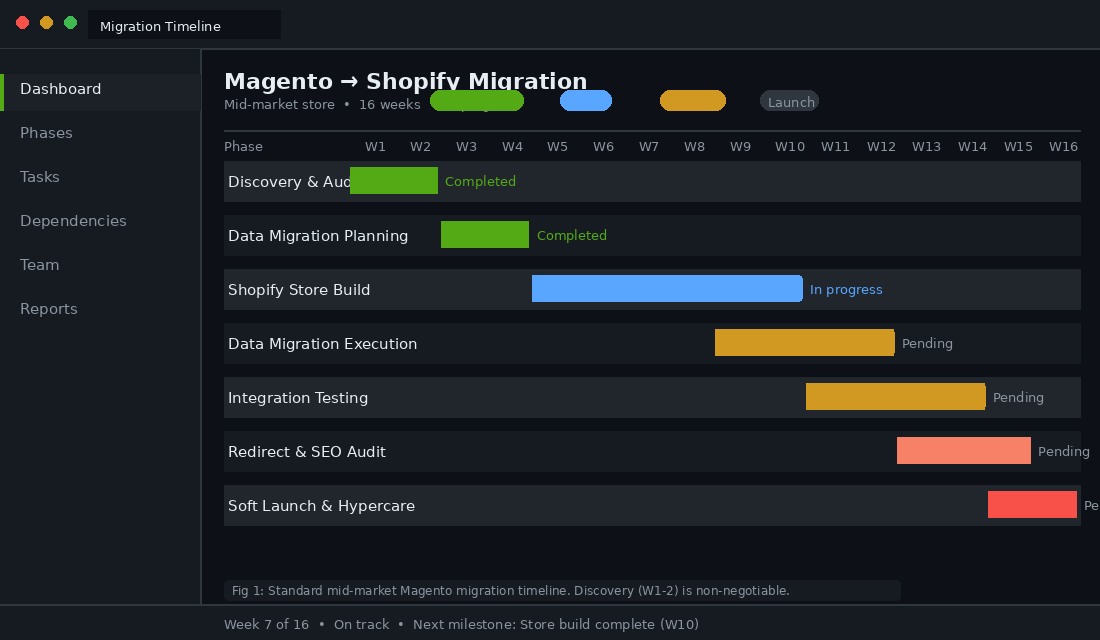
| Phase | Weeks | What Happens |
|---|---|---|
| Discovery and Audit | 1-2 | Full Magento audit: attribute inventory, integration mapping, URL export, data quality assessment, custom code surface area review |
| Data Migration Planning | 3-4 | Migration spec document, redirect map first draft, metafield schema design, customer data export and validation |
| Shopify Store Build | 5-10 | Theme development, app stack configuration, checkout customisation, integration builds in parallel |
| Data Migration Execution | 9-12 | Products, customers, order history, and blog posts migrated to staging environment with checksum validation |
| Integration Testing | 11-14 | ERP sync testing, payment gateway, 3PL, email platform connections tested against staging |
| Redirect Implementation and SEO Audit | 13-15 | Full redirect map uploaded to Shopify, GSC sitemap submitted, 404 monitoring configured |
| Soft Launch and Hypercare | 15-16 | DNS cutover, live monitoring, same-day issue resolution for 30 days post-launch |
The weeks overlap because well-run migration projects use parallel workstreams. The build does not wait for data migration to finish. But notice that 16 weeks is the realistic minimum for a well-scoped project. Complex stores with multi-store setups, custom pricing rules, or international requirements regularly push to 20 to 24 weeks.
The discovery phase is the one most agencies skip or compress. We spend two full weeks here, every time. That investment consistently saves three to four weeks of rework later in the project.
What Breaks (And Why Nobody Warns You)
URL Structure
Magento’s URL patterns look nothing like Shopify’s. Magento commonly uses paths like /catalog/category/mens-shoes.html or /product-name-123.html. Shopify uses /collections/mens-shoes and /products/product-handle. Every single URL on your Magento store will change.
If you have 3,000 products and 400 collection pages, that is 3,400 URLs that need 301 redirects. Miss any of them and you lose the link equity those pages have built up over years. A Majestic or Ahrefs export of your backlink profile should form part of your pre-migration audit, so the highest-value pages get redirects built first.
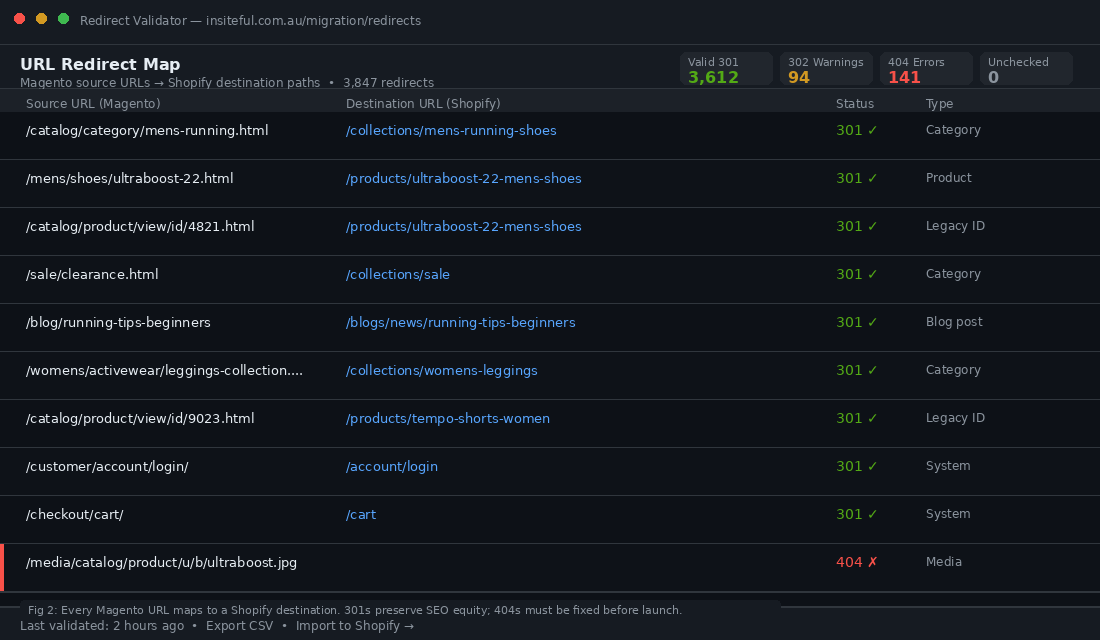
Here is what the redirect format looks like moving from Magento’s .htaccess rules to Shopify’s URL Redirects CSV import:
# Magento .htaccess patterns (what you are leaving behind)
RewriteRule ^mens/shoes/running-shoes\.html$ /products/mens-running-shoes [R=301,L]
RewriteRule ^catalog/category/mens-shoes\.html$ /collections/mens-shoes [R=301,L]
RewriteRule ^catalog/product/view/id/(\d+)\.html$ /products/$1 [R=301,L]

# Shopify URL Redirects CSV format (two columns: old path, new path)
/mens/shoes/running-shoes.html,/products/mens-running-shoes
/catalog/category/mens-shoes.html,/collections/mens-shoes
/catalog/product/view/id/4821.html,/products/ultraboost-22-mens-shoes
/catalog/product/view/id/9023.html,/products/tempo-shorts-women

# Note: Shopify URL Redirects does not support wildcard patterns.
# Legacy /catalog/product/view/id/ URLs need individual entries.
# For high volumes, use the Shopify API bulk redirect endpoint.
Shopify’s URL Redirects accepts a CSV with two columns: the old path and the new path. You can import up to 10,000 redirects via the admin. For larger volumes, use the Shopify API or a bulk redirect app. We validate every redirect with a crawl tool after import to catch anything resolving to a 404 before launch.
Customer Password Reset Flow
This one surprises clients every time. Magento stores passwords using a different hashing algorithm than Shopify. The passwords cannot be migrated. Full stop.
Every customer who tries to log in after launch will get an error if they use their Magento credentials. The correct approach is to trigger a one-time password reset email to your full customer list on launch day. The email should acknowledge the platform change and make the reset process as frictionless as possible.
If your Klaviyo account is connected to your new Shopify store before launch, you can segment this flow and track completion rates. Typical reset completion within 30 days runs at 35 to 55% of active customers. The rest either use guest checkout going forward or find the reset email when they next attempt to log in.
Product Attributes to Shopify Metafields
Magento’s EAV (Entity-Attribute-Value) data model is one of its most powerful and most painful features. Brands routinely have 50 to 200 product attributes stored in Magento, covering everything from material composition to care instructions to regulatory compliance fields.
In Shopify, these become metafields. But the mapping is not automatic and requires deliberate schema design before migration begins. Here is an example mapping for a fashion brand:
| Magento Attribute | Attribute Type | Shopify Metafield Key | Namespace | Content Type |
|---|---|---|---|---|
| material | Dropdown | material | product | Single line text |
| care_instructions | Textarea | care_instructions | product | Multi-line text |
| country_of_origin | Dropdown | country_of_origin | product | Single line text |
| is_sustainable | Yes/No | sustainable | product | True/False |
| fit_type | Dropdown | fit_type | product | Single line text |
| wash_temp_celsius | Integer | wash_temp | product | Number (integer) |
| fabric_composition | Textarea | fabric_composition | product | Multi-line text |
| warranty_years | Integer | warranty_years | product | Number (integer) |
The mapping must be completed before migration, not after. Attributes that power your collection page filters in Magento need to be set up as Shopify metafields with correct content types, then referenced in your theme’s Liquid code. If a developer skips this step, you will launch with product pages missing key specifications and collection filters that do not work.
Third-Party Integrations
Every integration your Magento store has will need to be rebuilt. The Magento REST and SOAP APIs that power your current integrations are being replaced by Shopify’s APIs, and the authentication model, endpoint structure, and data schema are entirely different.
- ERP systems (MYOB, SAP, NetSuite): These typically connect via scheduled sync jobs. The Shopify API format differs from Magento’s, so either your ERP vendor needs to build a Shopify connector or you need middleware such as Celigo, Boomi, or a custom integration layer.
- 3PL and warehouse management: If your 3PL has a native Shopify app, you are in luck. If they only have Magento connectors, budget for a bespoke integration build as part of the migration scope.
- Accounting (Xero, MYOB): Both have native Shopify apps. This is usually the easiest integration to resolve and can often be handled within a few days.
- Site search: Magento’s Elasticsearch-based search does not transfer. Shopify’s native search has improved significantly, but brands with complex faceted search requirements typically implement Searchanise, Boost Commerce, or Searchpie post-migration.
Cost in AUD: Rough Ranges
Magento-to-Shopify migration costs vary widely depending on store complexity, integration count, and data volume. The ranges below reflect what these projects actually cost in the Australian market in 2026.
Small store (fewer than 500 SKUs, no custom integrations, straightforward data): $15,000 to $30,000 AUD. This typically covers a standard theme with minor customisation, a basic redirect map, and manual data migration.
Mid-market (500 to 5,000 SKUs, one or two integrations, moderate attribute complexity): $40,000 to $90,000 AUD. This range reflects custom theme development, integration rebuilds, and a structured data migration process with full validation.
Enterprise (5,000+ SKUs, multi-store, complex ERP, international): $100,000 to $200,000+ AUD. Projects at this tier typically involve Shopify Plus, custom checkout extensions via Checkout Extensibility, Markets configuration, and extensive parallel testing before cutover.
Beyond the migration cost, factor in the ongoing savings. A brand moving from managed Magento (at $4,000 per month hosting plus $3,000 per month in ongoing developer fees) to Shopify Plus ($2,500 USD per month, very low ongoing maintenance) typically sees positive ROI on the migration cost within 12 to 18 months. The total cost of ownership calculation often makes the migration decision obvious.
SEO Preservation Playbook (The Part Nobody Talks About)
The migration project team is usually focused on getting the store live and functional. The SEO consequences of a poorly executed relaunch can take 6 to 12 months to recover from. We treat SEO preservation as a separate workstream within every migration project, not a box to tick the day before launch.
Before launch: Export your full Magento URL list via sitemap and a Screaming Frog crawl. Cross-reference against your Google Search Console coverage report to identify which URLs currently receive impressions. Build your redirect map prioritising high-impression URLs first, then work through long-tail. Check your top 50 backlinks via Ahrefs or Semrush and confirm every destination URL has a redirect in place.
At launch: Go live on a Tuesday, Wednesday, or Thursday. Never a Friday. If something breaks, you want a full team available to fix it within hours, not Monday morning. Push DNS changes and verify 301s are working within the first hour. Submit the new sitemap to Google Search Console immediately after DNS propagation.
After launch: Monitor GSC for 404 errors daily for the first 30 days. Every new 404 represents a missed redirect that needs to be added. Watch Core Web Vitals weekly. Track your top 20 keyword rankings for 90 days post-launch. Minor ranking fluctuations in the first 2 to 3 weeks are normal as Google reindexes the new URLs. Sustained drops beyond 4 weeks warrant investigation.
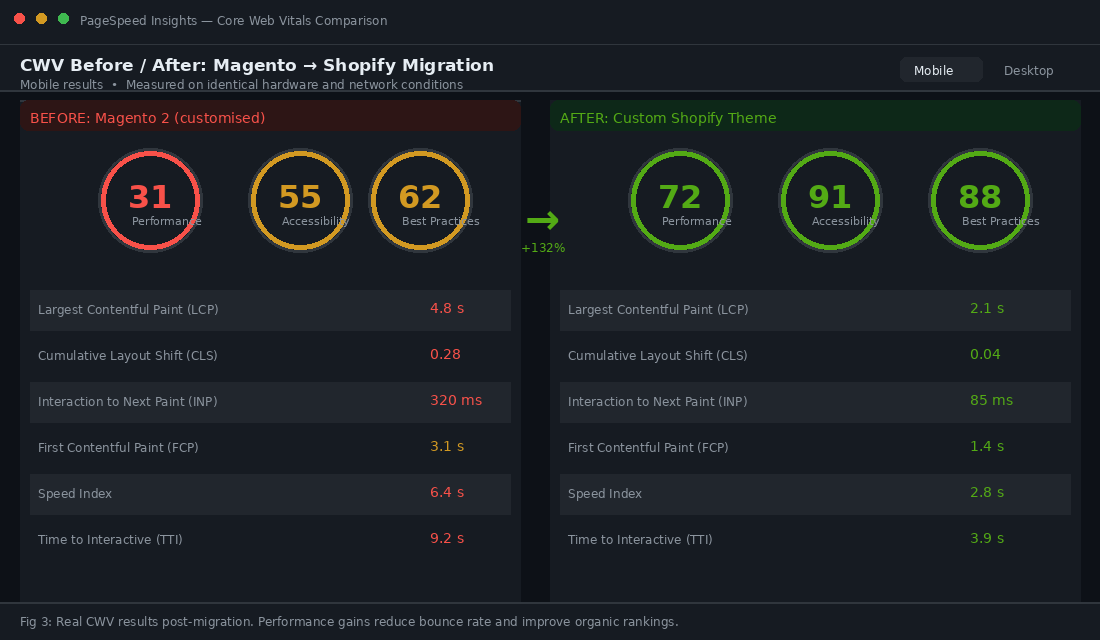
Here is a representative before/after CWV comparison from our migration projects:
| Metric | Magento (before) | Shopify (after) | Change |
|---|---|---|---|
| LCP (Largest Contentful Paint) | 4.8s | 2.1s | -56% |
| CLS (Cumulative Layout Shift) | 0.28 | 0.04 | -86% |
| INP (Interaction to Next Paint) | 320ms | 85ms | -73% |
| FCP (First Contentful Paint) | 3.1s | 1.4s | -55% |
| Mobile PageSpeed Score | 31 | 72 | +132% |
| Desktop PageSpeed Score | 58 | 89 | +53% |
These numbers are not guaranteed for every migration, but they are representative of what happens when a custom Shopify theme replaces a heavily extended Magento 2 installation. Google’s own research shows a one-second improvement in LCP correlates with approximately a 7% improvement in conversion rate. The performance gains from migration alone often contribute meaningfully to post-launch revenue uplift.
How We De-Risk Magento Migrations at Insiteful
Most migration failures we inherit from other agencies come down to three things: inadequate discovery, skipped testing environments, and no data validation. Our process is built specifically to eliminate all three.
Discovery audit, always. Before we quote a dollar or commit to a timeline, we run a full technical audit of the Magento store. We document the attribute count, integration list, URL volume, order history depth, and custom code surface area. This audit is what allows us to scope accurately rather than optimistically. Brands that skip discovery almost always face scope creep.
Parallel environments. We build the Shopify store in a development environment that mirrors the existing Magento store’s data. Products, customers, and order history are migrated to staging first. We validate data completeness with row-count checksums at each stage before we get near a live cutover. If the numbers do not match, we find out why before launch day.
Redirect validation before cutover. We crawl the completed redirect map before launch using Screaming Frog combined with a custom validation script that checks each source URL returns a true 301 (not a 302, not a 200, and definitely not a 404). Every failed redirect gets fixed before the domain switches. This is non-negotiable.
Phased launch with a rollback plan. For larger migrations, we run the new Shopify store live on a staging subdomain in parallel with the existing Magento store. This validates real-world performance before DNS cutover. We keep the Magento store accessible for 72 hours post-launch as a fallback, so there is a rollback option if something critical breaks at scale.
30-day hypercare. We stay on the project for a full 30 days post-launch. The first 72 hours are the most active. Beyond that, it is typically minor issues like app conflicts, edge-case display bugs, or missed redirects surfaced through GSC data.
If you are evaluating a Magento migration and comparing agency quotes, two questions will reveal whether an agency has actually done this before: “Can you walk me through your discovery audit process?” and “How do you validate data completeness before cutover?” Agencies that cannot answer both in specific, technical terms are quoting from a template rather than from experience.
If you are scoping a Magento-to-Shopify migration and want a realistic view of what it involves for your specific store, that is exactly the kind of conversation we have with brands before they commit to anything. Talk to the Insiteful team.