
The campaign was ready. The creative was signed off. The marketing manager had the banner copy, the promotional pricing, and a tight launch window. What she didn’t have was the ability to publish it herself.
Her Shopify theme had a hero section, but it was hardcoded. To change the headline or swap the image, she needed a developer. The developer was booked out for three weeks. The sale window was four days. She missed it.
This is one of the most common problems we see when we audit a Shopify store for the first time. The theme looks beautiful. The design is solid. But it was built for a snapshot in time, not for a marketing team that needs to move fast. Shopify’s Online Store 2.0 architecture was built specifically to fix this problem, but only if the theme is implemented properly. Most aren’t.
What Online Store 2.0 Actually Changed
Shopify launched Online Store 2.0 (OS 2.0) in mid-2021, and it fundamentally rewrote how themes are structured. Before OS 2.0, sections were limited to the homepage. Every other page (product pages, collection pages, landing pages) used Liquid template files that required code changes to modify. Marketers had to go through developers for almost everything visual.
OS 2.0 introduced sections everywhere. Now every page template can carry sections and blocks. Product pages, blog posts, collection pages, custom landing pages, the cart page: all of them can have flexible, drag-and-drop content areas that merchants and marketers can control directly in the theme editor.
The second major shift was the move to JSON templates. Instead of a single Liquid file rendering a page, each template became a JSON file that defines which sections appear on that page and in what order. This unlocked something powerful: the ability to create multiple unique templates for the same page type. You can have a product template for your hero products with a full-bleed hero, a comparison table, and a FAQ block, then a different product template for your accessories range with a simpler layout and a cross-sell section.
Shopify’s own data shows that stores running OS 2.0 themes with full sections-everywhere architecture reduce their dependence on developer changes for marketing updates by around 70%. For any store running more than two campaigns per month, that is a significant operational shift.
The JSON Template Structure: What’s Actually in the File
When we build an OS 2.0 theme at Insiteful, we start by mapping the full JSON template structure before writing a line of Liquid. Understanding this architecture is the foundation of everything that makes the theme flexible.
A JSON template file lives in the templates/ directory of the theme and follows a strict schema. Here is what a product template looks like at its core:
{
  "sections": {
    "main": {
      "type": "main-product",
      "blocks": {
        "vendor": {
          "type": "text",
          "settings": {
            "text": "{{ product.vendor }}"
          }
        },
        "title": {
          "type": "title",
          "settings": {}
        },
        "price": {
          "type": "price",
          "settings": {}
        },
        "buy_buttons": {
          "type": "buy-buttons",
          "settings": {
            "show_dynamic_checkout": true
          }
        }
      },
      "block_order": ["vendor", "title", "price", "buy_buttons"],
      "settings": {
        "enable_sticky_info": true
      }
    },
    "product-recommendations": {
      "type": "product-recommendations",
      "settings": {
        "heading": "You might also like",
        "products_to_show": 4
      }
    }
  },
  "order": ["main", "product-recommendations"]
}
That order array at the bottom is the control panel. It defines exactly which sections appear on this template and in what sequence. Every key in sections corresponds to a section file in the sections/ directory. The merchant can reorder them in the theme editor without touching any code.
The power of this structure is that it is per-template, not global. You can have templates/product.json for your standard product page and templates/product.hero-launch.json for your campaign launches. Each gets its own section order, its own block configuration, its own settings. The theme editor shows both options in the Templates dropdown, and a marketer can assign specific products to either template without developer involvement.
One constraint worth knowing: each JSON template supports a maximum of 25 sections, and each section supports up to 50 blocks. For almost every retail use case, that ceiling is never reached. But it is worth being aware of when architecting templates for complex landing pages.
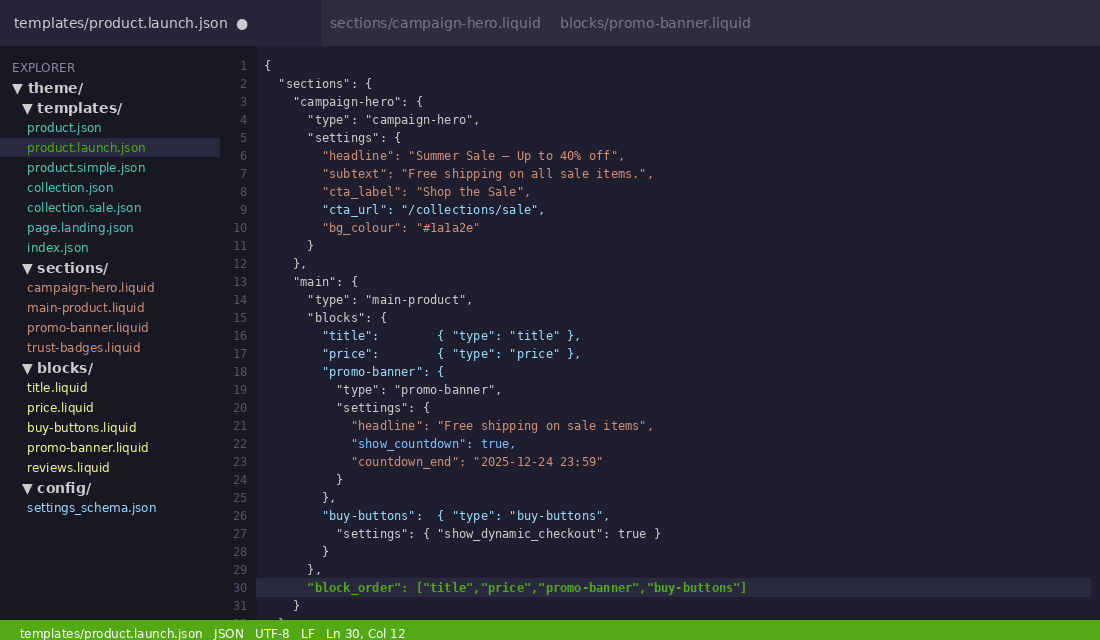
product.launch.json template in VS Code. The block_order array on line 30 defines exactly how blocks render on the product page, with the Promo Banner inserted between price and buy buttons.Block Schemas Marketers Love
The block schema is where the real magic lives for marketing teams. A well-written block schema turns a developer’s code into a marketer’s control panel. A poorly written one turns every campaign change into a support ticket.
Here is an example of a block schema that gives a marketer full control over a promotional banner block, without them needing to know any Liquid or HTML:
{% schema %}
{
"name": "Promo Banner",
"tag": "div",
"class": "promo-banner-block",
"settings": [
{
"type": "text",
"id": "headline",
"label": "Headline",
"default": "Limited Time Offer"
},
{
"type": "richtext",
"id": "subtext",
"label": "Supporting text",
"default": "Free shipping on all orders over $80 AUD.
"
},
{
"type": "url",
"id": "cta_url",
"label": "Button URL"
},
{
"type": "text",
"id": "cta_label",
"label": "Button text",
"default": "Shop now"
},
{
"type": "color",
"id": "bg_colour",
"label": "Background colour",
"default": "#1a1a2e"
},
{
"type": "image_picker",
"id": "background_image",
"label": "Background image (overrides colour)"
},
{
"type": "select",
"id": "text_align",
"label": "Text alignment",
"options": [
{ "value": "left", "label": "Left" },
{ "value": "center", "label": "Centre" },
{ "value": "right", "label": "Right" }
],
"default": "center"
},
{
"type": "checkbox",
"id": "show_countdown",
"label": "Show countdown timer",
"default": false
},
{
"type": "text",
"id": "countdown_end",
"label": "Countdown end date (YYYY-MM-DD HH:MM)",
"info": "Leave blank to hide the timer"
}
],
"presets": [
{
"name": "Promo Banner"
}
]
}
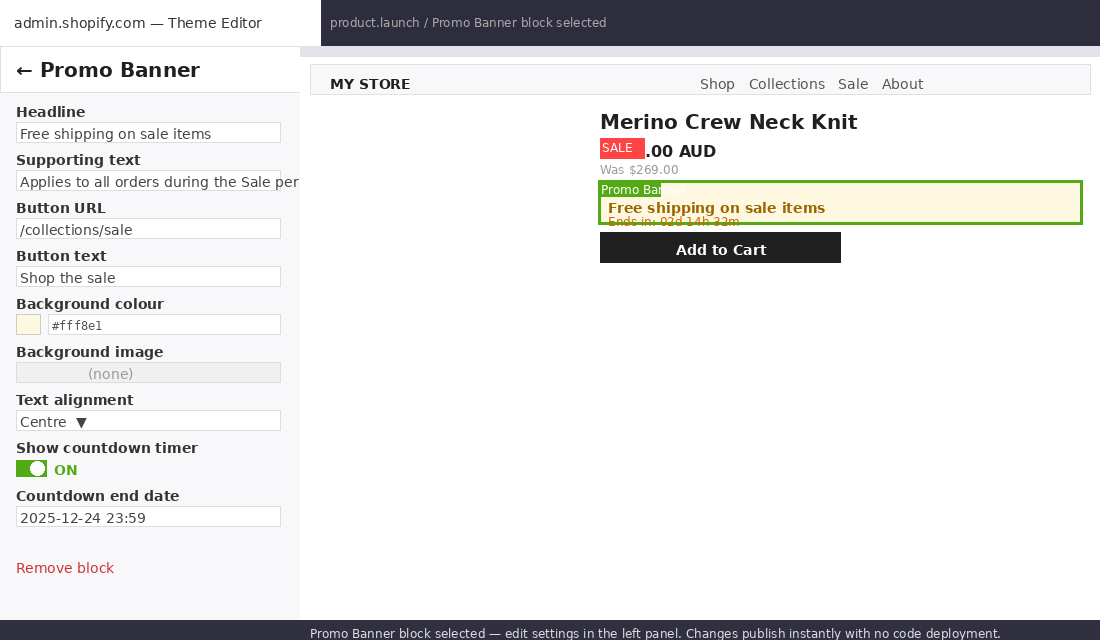
{% endschema %}Notice what this gives a marketer in the Shopify editor: a headline field, rich text for supporting copy, a URL picker, a CTA label, a colour picker, an image picker that overrides the colour, alignment control, and a countdown toggle with a date field. That is a complete campaign banner they can configure end-to-end without a developer.
The presets array at the bottom is critical. Without a preset defined, the block cannot be added from the theme editor. It will only exist if hardcoded into a JSON template. Every block we build at Insiteful ships with at least one preset so the marketing team can add it to any compatible section.
Common settings types that marketers find most useful include: image_picker (no image hosting or URL juggling), richtext (styled text without HTML knowledge), url (link to any page, product, or collection from a dropdown), product (reference a specific product by name), and collection (link a collection by name). These input types abstract away the underlying data and give marketers a purpose-built interface.
The Hidden Problem: Hardcoded Sections in “Modern” Themes
Here is something most Shopify merchants don’t realise: buying a theme from the Shopify Theme Store does not guarantee that theme is properly built for OS 2.0 flexibility. Many themes that list themselves as “Online Store 2.0 ready” still hardcode significant portions of their product and collection templates.
We see this constantly when we audit themes before a migration or rebuild. The homepage sections are fully flexible. The product page is a monolithic main-product.liquid section with the title, price, description, and buy button all locked together in one block. The marketer can’t reorder them. They can’t add a trust badge between the price and the button. They can’t insert a shipping calculator below the product form without a developer editing the Liquid.
The technical reason for this is that splitting a product page into granular blocks (title, price, description, media gallery, buy button each as their own block) requires more upfront architecture than keeping it as a single section. It’s faster to build once but slower to maintain. Developers who are optimising for speed of initial delivery often skip this step. The merchant pays for it later in developer fees every time they need a layout change.
The same issue appears on collection pages. A properly built OS 2.0 collection template should let a marketer add a promotional banner between the filter bar and the product grid, swap out the hero image and headline without touching code, and add a “featured products” block above the main grid for sale launches. Most themes from the store don’t support any of this natively.
File Tree: How We Structure an OS 2.0 Theme
The file structure of a well-built OS 2.0 theme makes the flexibility immediately visible. Here is a representative structure from an Insiteful build, showing how templates, sections, and blocks map to each other:
theme/
├── templates/
│   ├── product.json                    # Standard product layout
│   ├── product.launch.json             # Campaign launch layout
│   ├── product.simple.json             # Minimal layout for accessories
│   ├── collection.json                 # Standard collection
│   ├── collection.sale.json            # Sale collection with promo header
│   ├── page.landing.json               # Blank landing page template
│   └── index.json                      # Homepage
│
├── sections/
│   ├── main-product.liquid             # Core product section (blocks-based)
│   ├── main-collection.liquid          # Collection grid section
│   ├── campaign-hero.liquid            # Full-width hero for launches
│   ├── product-recommendations.liquid  # AI-powered upsell section
│   ├── trust-badges.liquid             # Trust signal section
│   └── promo-banner.liquid             # Promotional banner section
│
├── blocks/
│   ├── title.liquid                    # Product title block
│   ├── price.liquid                    # Price + sale badge block
│   ├── buy-buttons.liquid              # ATC + dynamic checkout block
│   ├── description.liquid              # Collapsible description block
│   ├── reviews.liquid                  # Reviews widget block (Okendo/Judge.me)
│   ├── promo-banner.liquid             # Reusable promo banner block
│   └── shipping-estimator.liquid       # Postcode-based shipping block
│
└── layout/
    └── theme.liquid                    # Global layout shell
The key pattern here is the separation of blocks from sections. Each block is an independent .liquid file in the blocks/ directory with its own schema. Sections then declare which blocks they accept. This means a block like promo-banner.liquid can appear inside a campaign hero section, a product page, and a collection page without duplicating any code.
Multiple JSON templates for the same page type (product, collection, page) are one of the most underused features of OS 2.0. A store doing 5 or more campaigns per year should have at minimum a standard template and a campaign template for both products and collections. We typically build 3 to 5 product templates and 2 to 3 collection templates for any mid-market Shopify store.
How the Theme Editor Actually Works with Sections Everywhere
From a marketer’s perspective, the sections-everywhere model changes the theme editor from a homepage tool into a full site builder. Here is what that looks like in practice.
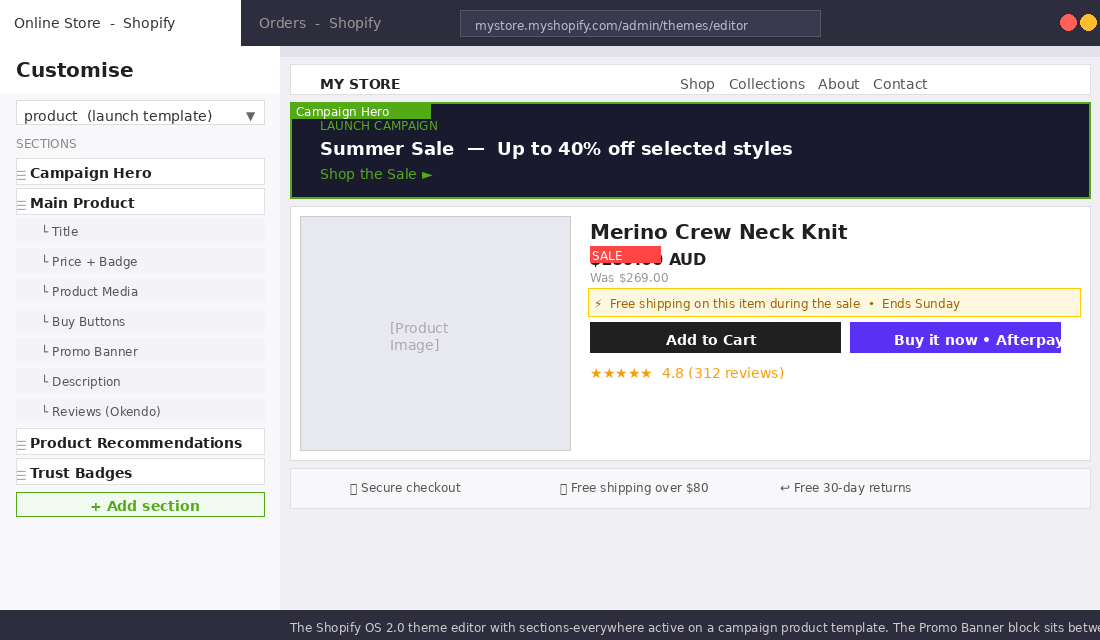
When a marketer opens any page in the Shopify theme editor, they see the same left-hand sidebar they’ve always seen on the homepage: a list of sections with add, remove, and reorder controls. Click on a section and its block list expands. Click on a block and its settings panel opens. Change a value and it updates live in the preview pane.
The difference with a properly built OS 2.0 theme is that this works everywhere. Open a product page in the editor and you can drag the reviews block above the buy button. Add a promo banner between the product title and the price for a sale period. Toggle on the countdown timer block, set the end date, and it starts counting down live. No code, no tickets, no waiting.
For stores that run monthly promotional cycles, this capability is transformative. A marketing manager who previously needed 3 to 5 developer hours per campaign can now execute the same changes in 20 to 30 minutes. At typical Shopify developer rates in Australia (AUD $120 to $200 per hour), that is $360 to $1,000 per campaign saved. For a store running 10 campaigns per year, that is $3,600 to $10,000 back in the budget.
How We Build OS 2.0 Themes at Insiteful
When we take on a Shopify theme build, sections-everywhere architecture is not a premium add-on. It is the default. Every theme we ship is built to give the marketing team genuine independence.
Our process starts with a content audit before we design anything. We sit down with the merchant’s marketing team (or the founder, if they’re hands-on) and map out every type of change they currently need a developer for. That list becomes our block and section checklist. If they need to swap hero images for seasonal campaigns, we build a campaign hero section. If they need to reorder trust signals around a sale, trust badges become independent blocks with drag-and-drop ordering.
We also build what we call a “template library” for each store. Rather than shipping one product template and leaving it at that, we pre-build 3 to 5 product templates for different use cases: standard, hero launch, minimal, subscription product, and bundle product. Each is a JSON file configured with the right sections and block presets for that use case. Before a campaign goes live, the marketer assigns products to the campaign template, customises the banner copy, and the page is ready. No developer involvement.
On the technical side, we enforce a strict separation between global settings (defined in config/settings_schema.json) and per-section settings. Colours, typography, and spacing that should be consistent site-wide live in global settings. Section-specific layout options, block configurations, and one-off settings live in section and block schemas. This prevents the bloat that makes older themes brittle and hard to maintain.
We also audit every third-party app block integration before launch. Klaviyo email capture, Okendo reviews, Rebuy recommendations, Upcart cart upsells: all of these offer OS 2.0 app blocks that can slot into any section. A poorly integrated app block will conflict with the theme’s block order, break the editor preview, or cause layout bugs on mobile. We test every integration across the three most common device sizes (375px, 768px, 1280px) before signing off on a build.
The result is a theme that works as a marketing tool, not just a storefront. The stores we’ve built on this architecture average 40% fewer developer touch points in the 12 months after launch compared to their previous theme, based on support requests from our ongoing clients.
The Dynamic Sections Pattern in theme.liquid
One pattern we use consistently is a clean layout wrapper in theme.liquid that renders the JSON template’s sections in a predictable way. Here is the relevant snippet from our base theme layout:
<!DOCTYPE html>
<html lang="{{ request.locale.iso_code }}">
  <head>
    <!-- head content -->
  </head>
  <body class="template-{{ template.name }}{%- if template.suffix -%} template-{{ template.name }}-{{ template.suffix }}{%- endif -%}">

    {%- sections 'header-group' -%}

    <main id="MainContent" class="content-for-layout focus-none" role="main" tabindex="-1">
      {{ content_for_layout }}
    </main>

    {%- sections 'footer-group' -%}

    {%- sections 'overlay-group' -%}

  </body>
</html>
The content_for_layout tag is where the JSON template’s sections are rendered. Each section in the JSON file gets output here, in order, with no markup between them. This clean wrapper means the sections control their own spacing and layout without the theme’s global layout interfering.
The template.name and template.suffix classes on the body tag let us target specific templates with CSS without JavaScript. When a product is assigned to product.launch.json, the body carries template-product template-product-launch. Campaign-specific styles can be scoped to that class without touching the global stylesheet.
What Marketers Should Expect from a Modern Shopify Theme
If your current Shopify theme is older than 2022 or was built before OS 2.0, there is a reasonable chance it is limiting your marketing team’s ability to move fast. The signs are usually obvious: you have a small list of developer tasks that recur with every campaign (update the hero, add a promo bar, change the featured collection), and those tasks eat hours every month.
A modern OS 2.0 theme built properly should give your team control over: the layout and order of any page, promotional banners on product and collection pages, multiple landing page templates for different campaign types, app block placement (reviews, upsells, email capture) without developer involvement, and countdown timers, sale badges, and urgency elements that can be toggled on and off.
The baseline question to ask about any theme is this: can a non-developer on my team add a promotional banner to a product page in under 10 minutes? If the answer is no, the theme is working against your marketing operation.
Building an OS 2.0 theme correctly takes more upfront architecture than throwing together a page builder layout. But the compounding payoff across every campaign, every season, and every product launch makes it one of the highest-leverage investments a growing Shopify brand can make.
If you are evaluating a theme rebuild or a migration and want a team that builds this way by default, talk to the Insiteful team. We can audit your current theme and show you exactly where it is costing your marketing team time.